
#3使用html+css+js制作网页 番外篇 使用python flask 框架 (II)
#3使用html+css+js制作网页 番外篇 使用python flask 框架 II第二部
0. 本系列教程
#1使用html+css+js制作网站教程 准备
#2使用html+css+js制作网站教程 测试
#3使用html+css+js制作网页 制作登录网页
#3使用html+css+js制作网页 番外篇 制作接收php
#3使用html+css+js制作网页 番外篇 使用python flask 框架(I)
#3使用html+css+js制作网页 番外篇 使用python flask 框架 (II)
1. 登录功能准备
a.python中操控mysql
要想做一个登录系统,数据库是必不可少的,本文用了mysql做数据库,相关教程可以自行百度
 db = MySQLdb.connect("地址(一般是localhost)", "用户名(一般是root)", "密码","数据库名")#连接数据库
 print("数据库连接")
    # 使用cursor()方法获取操作游标
    cursor = db.cursor()
    # SQL 插入语句
    sql = "mysql语句"
    print("取注册位数")
    # 执行sql语句
    cursor.execute(sql)
    # 提交到数据库执行
    db.commit()
    results = cursor.fetchall()#结果
b. 安装数据库
c.安装mysqlclient python库
从下载地址下载对应python版本的mysqlclient库,然后打开cmd命令提示符,cd到下载目录下,执行
pip install xxx.whl
安装库
d.mysql语句教程
e.mysql 创建数据表
1.登录mysql
mysql -u root -p
然后输入密码,其中root为用户名
2.进入web库
use web;
3.创建数据表
 CREATE TABLE IF NOT EXISTS `users`(
        `uid` INT UNSIGNED AUTO_INCREMENT,
         `name` VARCHAR(100) NOT NULL,
         `udate` DATE NOT NULL,
         PRIMARY KEY ( `uid` )
      )ENGINE=InnoDB DEFAULT CHARSET=utf8;
       ALTER TABLE users ADD unique(`name`)
其中
- 第2行
uid是用户排行,为int类型,即整数,AUTO_INCREMENT为自增 - 第3行
name是用户名,为varchar(100),即100字符内的字符串,不为空 - 第4行
udate是注册日期吧,不为空 - 第5行设置
uid为键值 - 第6行设置utf8编码
- 第7行设置用户名为唯一,不可重复
2.前端登录页面
b.目录
|flask-demo
|-templates
|–index.html
|–login.html
|–head.html
|-run.py
a.代码
login.html
{% extends "head.html" %}
{% block body %}
<h1>sign up</h1>
<input id="i" type="text" />
<buttom onclick="sign_up()">确定</buttom>
<h1>sign in</h1>
<input id="u" type="text" />
<buttom onclick="sign_in()">确定</buttom>
<script>
    function sign_up() {
        var x = $("#i").val();
        if (x != "" && x != " ") {
            $.ajax({
                type: "GET",//{{ url_for('login_in') }}取login_in页面的url地址
                url: "{{ url_for('login_in') }}",
                data: {
                    sign_up_name: x
                },
                dataType: "html",
                success: function (data) {
                    if (data == "haven") {
                        alert("已经有这个用户名了");
                    } else {
                        window.location.href = "./login";
                    }
                }

            })
        }
    }

    function sign_in() {
        var x = $("#u").val();
        if (x != "" && x != " ") {
            $.ajax({
                type: "GET",
                url: "{{ url_for('login_in') }}",
                data: {
                    sign_in_name: x
                },
                dataType: "html",
                success: function (data) {
                    if (data == 'none') {
                        alert("没有此用户");
                    } else {
                        window.location.href = "./login";
                    }
                }

            })
        }
    }
</script>
{% endblock %}
本段代码为登录和注册页面
head.html
<!doctype html>

<head>
    <title>Hi</title>
    <script src="https://lib.sinaapp.com/js/jquery/2.0.2/jquery-2.0.2.min.js"></script>
</head>

<body>
    {% block body %}
    {% endblock %}
</body>
本段代码主要为引入jq文件
index.html
{% extends "head.html" %}
{% block body %}
{% if user %}

<h1>Hello {{ user }}!</h1>
<h>your are the {{ uid }}th user in our site</h>
<button onclick="logout()">登出</button>
<br />
<table id="t">

</table>

<div id="ti" style="display: none;">{{ users_x }}</div>
<script lang="Javascript">
    $(window).load(function () {
        var t = $("#t");
        for (var key in $("#ti").value) {
            console.debug(key);
            t.append("<tr><td>" + key[1] + "</td><td>" + key[1] + "</td></tr>");
        }
    });

    function logout() {
        $.ajax({
            type: "GET",
            url: "/login?l=1",
            dataType: "html",
            success: function (data) {
                location.reload();
            }

        })
    }
</script>
{% else %}
<button onclick="login()">登入/注册</button>
<h1>please enter your name</h1>
<script lang="Javascript">
    function login() {
        window.location.href = "./login_in";
    }
</script>
{%  endif  %}
{% endblock %}
本段代码为首页
4.后端
run.py
from flask import Flask, url_for, request, render_template, redirect, session
import os
from datetime import timedelta  # 导入过期时间库
import MySQLdb
import time


app = Flask(__name__, static_folder='files', static_url_path="/files")
# app.config['SECRET_KEY'] = os.urandom(24) # 每一次服务器启动后,SECRET_KEY不一样
app.config['SECRET_KEY'] = "sadasfas"
# app.config['PERMANENT_SESSION_LIFETIME'] = timedelta(days=7)  # 配置过期时间


@app.route('/login', methods=['GET'])
def login():
    l = request.args.get('l', 0, type=int)
    if l == 1:
        print("登出")
        session.pop('user')
        return render_template('index.html')

    if 'user' in session:
        print("首页登录成功")
        return render_template('index.html', users_x=get_users(), user=session['user'], uid=num_user(session['user']))
    return render_template('index.html')

@app.route('/login_in', methods=['GET'])
def login_in():
    if 'user' in session:
        print("已登录")
        return render_template('502.html')
    u = request.args.get('sign_up_name', 'none', type=str)
    if u != 'none':
        print("登录成功")
        return new_user(u)
    u = request.args.get('sign_in_name', 'none', type=str)
    if u != 'none':
        return news(u)
    return render_template('login.html')


# 登录
def news(namea):
    if(num_user(namea) == ""):
        print("没有用户")
        return 'none'  # 无用户
    session['user'] = namea
    return ""
# 注册


def new_user(namea):
    # 打开数据库连接
    db = MySQLdb.connect("localhost", "root", "air123456",
                         "web")
    print("数据库连接成功")
    # 使用cursor()方法获取操作游标
    cursor = db.cursor()
    print("插入新用户")
    if(num_user(namea) != ""):
        print("用户名被注册")
        return "haven"  # 有这个用户
    # SQL 插入语句
    sql = """INSERT ignore INTO users(name,udate)VALUES ('%s','%s')""" % (
        namea, time.strftime(r"%Y-%m-%d", time.localtime()))
    try:
        # 执行sql语句
        cursor.execute(sql)
        # 提交到数据库执行
        db.commit()
    except:
        # 发生错误时回滚
        db.rollback()
    db.close()
    print("ok")
    session['user'] = namea
    return ""


def get_users():
    db = MySQLdb.connect("localhost", "root", "air123456",
                         "web")
    print("数据库连接")
    # 使用cursor()方法获取操作游标
    cursor = db.cursor()
    print("取用户列表")
    # SQL 插入语句
    sql = "SELECT * FROM users"
    # 执行sql语句
    cursor.execute(sql)
    # 提交到数据库执行
    db.commit()
    results = cursor.fetchall()
    print("ok")
    db.close()
    return results


def num_user(namea):
    # 打开数据库连接
    db = MySQLdb.connect("localhost", "root", "air123456",
                         "web")
    print("数据库连接")
    # 使用cursor()方法获取操作游标
    cursor = db.cursor()

    # SQL 插入语句
    sql = "SELECT * FROM users WHERE name = '%s'" % (namea)
    print("取注册位数")
    # 执行sql语句
    cursor.execute(sql)
    # 提交到数据库执行
    db.commit()
    results = cursor.fetchall()
    ida = ""
    for row in results:
        # 打印结果
        ida = row[0]
    db.close()
    print("ok")
    return ida


if __name__ == '__main__':
    app.run(host='0.0.0.0', port=5000,  debug=True)
# 关闭数据库连接
# db.close()

# ###
# CREATE TABLE IF NOT EXISTS `users`(
#         `uid` INT UNSIGNED AUTO_INCREMENT,
#         `name` VARCHAR(100) NOT NULL,
#     `udate` DATE NOT NULL,
#         PRIMARY KEY ( `uid` )
#      )ENGINE=InnoDB DEFAULT CHARSET=utf8;
#       ALTER TABLE users ADD unique(`name`)

# ###
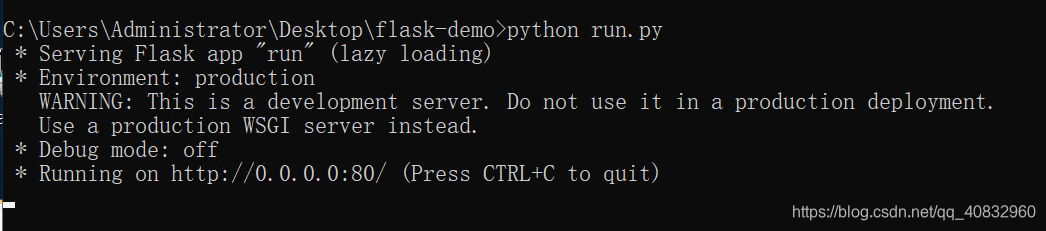
5.运行
在当前目录下,输入
python run.py
本文版权归作者和博客园共有,欢迎转载,但必须给出原文链接,并保留此段声明,否则保留追究法律责任的权利。

 浙公网安备 33010602011771号