
[GenAI] MCP
前置知识
stdio
这是 MCP 中的通信方式。
进程:执行一个应用程序,就会启动一个进程,操作系统会为其分配内存空间、系统资源。
应用程序执行完毕后,系统分配给进程的资源就会被回收。
进程之间是可以通信的。那这里有一个最基本的要求:进程不能结束。如何让进程不结束?
想想微信、QQ启动后为啥不结束?
因为要监听。

这里也同样,只要进程处于监听状态,就不会结束。
// 监听输入
process.stdin.on("data", () => {});
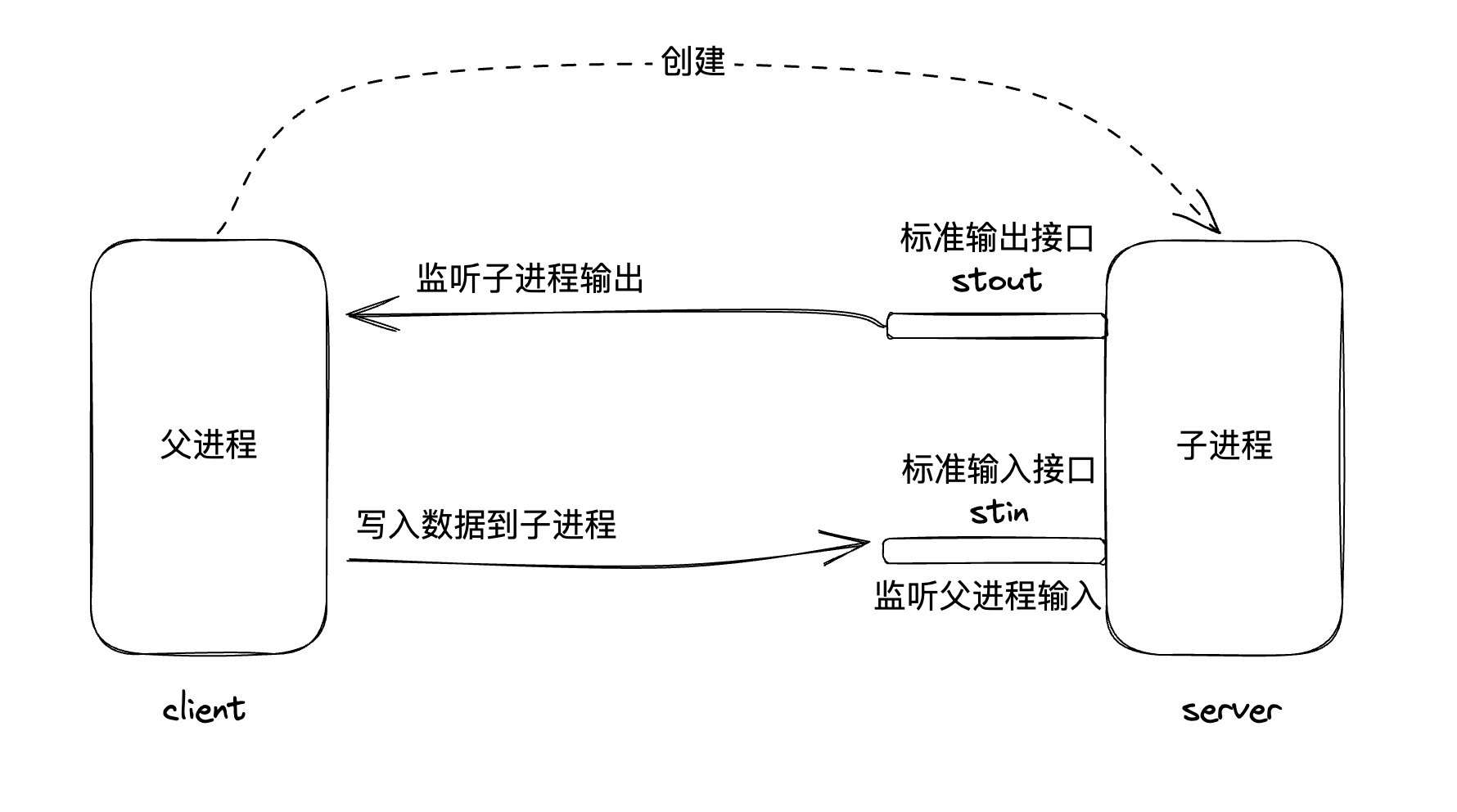
除此之外,一个进程还可以启动另一个进程,这在操作系统中是非常常见和常用的行为,被称之为父子进程模型。
控制台其实也是一个应用程序,启动后也会有进程。因此下面的代码:
node index.js
控制台就是父进程,node程序就是子进程。

🙋 让终端和 node 程序进行通信,该如何进行通信?
stdio: standard input and output 标准输入输出
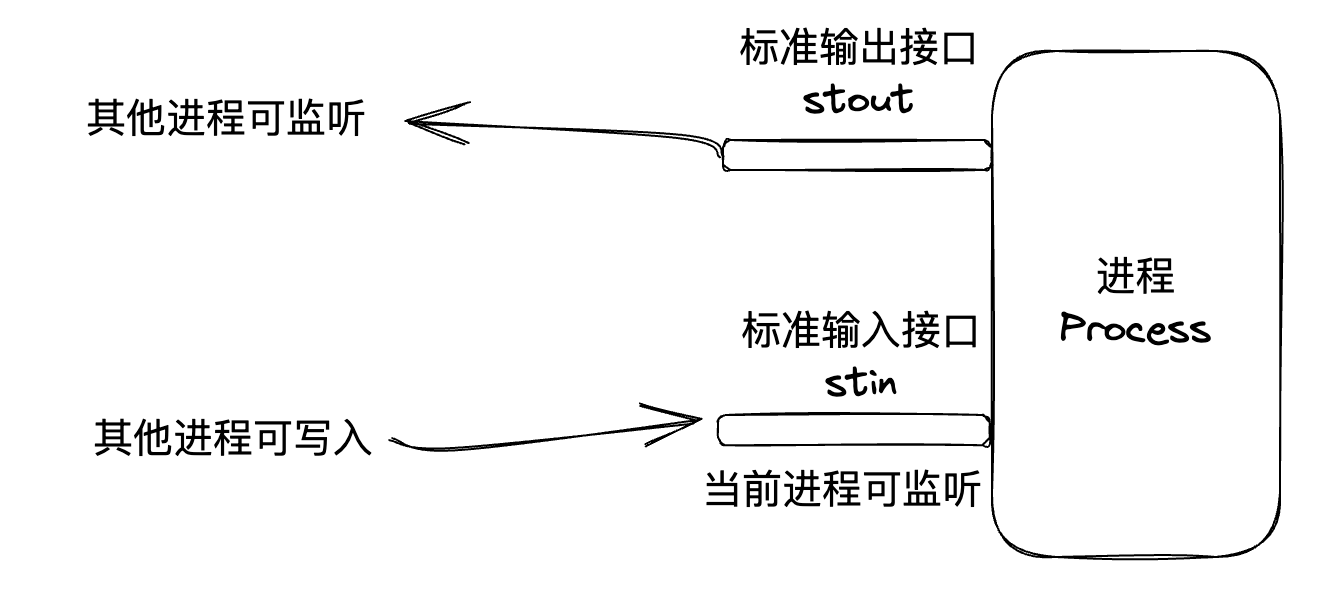
每一个进程启动后,都会留出两个对外通信的接口:
- 标准输入接口:standard in
- 标准输出接口:standard output
上面进程监听输入和对外输出的图,就可以变成这样:
结合前面父子模型的知识:
练习
终端和 node 进程通信
/// client.js
const { spawn } = require("child_process");

// 启动 server.js 子进程
const serverProcess = spawn("node", ["server.js"]);

// 监听服务端的响应
serverProcess.stdout.on("data", (data) => {
    process.stdin.write(data.toString());
});

// 发送几条测试消息
const messages = ["生命有意义吗?", "宇宙有尽头吗?", "再见!"];

messages.forEach((msg, index) => {
  setTimeout(() => {
    console.log(`-->${msg}`);
    serverProcess.stdin.write(msg);
  }, index * 1000); // 每秒发一条
});
///server.js
process.stdin.setEncoding("utf8"); // 设置字符编码
// 处于监听状态,监听其它进程给我的消息
process.stdin.on("data", (data) => {
  const response = `AI: ${data
    .replace(/[??吗]/g, "")
    .replace(/我/g, "你")
    .replace(/你/g, "我")}\n`;
  process.stdout.write(response); // 向父进程输出信息
});
如下图:

- 一个进程可以启动另外一个进程
- 进程之间可以通信
stdio通信高效、简洁,但仅适用于本地进程间通信
stdio:通信方式
通信格式
通信涉及到数据传输,数据传输的格式有多种:
- xml
- json
- 字符串
JSON-RPC2.0
英语全称为 JSON Remote Procedure Call,JSON 远程函数调用。
通过一个 JSON 远程的调用不在本地的函数。
request:
{
  "jsonrpc": "2.0",
  "method": "sum", // 我要调用的函数
  "params": { // 函数的参数
    "a": 5,
    "b": 6
  },
  "id": 1 // 请求的id,回头该请求对应的响应的id会和这个id相同
}
response:
{
  "jsonrpc": "2.0",
  "result": 11, // 函数的调用结果
  "id": 1
}
练习
实现基于 JSON-RPC 的通信
///server.js
const utils = require("./utils.js"); // { sum:f, createFile: f}
process.stdin.on("data", (data) => {
  const req = JSON.parse(data);
  const funcName = req.method; // sum
  const params = req.params; // { "a": 11, "b": 22 }
  const result = utils[funcName](params); // 调用对应的方法
  // 封装成一个 JSON-RPC2.0 格式的响应
  const res = {
    jsonrpc: "2.0",
    result,
    id: req.id,
  };
  process.stdout.write(JSON.stringify(res) + "\n"); // 给父进程发送消息
});
/// utils.js
const fs = require("fs");
module.exports = {
  // 第一个工具
  sum({ a, b }) {
    return a + b;
  },
  // 写入文件
  createFile({ filename, content }) {
    try {
      fs.writeFileSync(filename, content);
      return true;
    } catch (error) {
      console.log(error);
      return false;
    }
  },
};
test:
{ "jsonrpc": "2.0", "method": "sum", "params": { "a": 11, "b": 22 }, "id": 1 }

{ "jsonrpc": "2.0", "method": "createFile", "params": {  "filename": "/Users/jie/desktop/渡一MCP.txt", "content": "Hello, 渡一MCP!" }, "id": 2 }
初识MCP
MCP是一套 标准协议, 它规定了 应用程序 之间 如何通信
如何通信:
- 通信方式
- stdio: 推荐,高效、简洁、本地
- http: 可远程
- StreamHTTP
- SSE
- 通信格式: 基于JSON-RPC的进一步规范(和上面的例子稍微还有一些不同)
基本规范
1. 初始化 initialize
两个应用程序要开始通信,首先需要初始化
request:
{
  "jsonrpc": "2.0",
  "id": 1,
  "method": "initialize", // 固定为 initialize,不能变,属于 MCP
  "params": {
    "protocolVersion": "2024-11-05", // MCP协议的版本
    "capabilities": { // MCP客户端的能力
      "roots": {
        "listChanged": true
      },
      "sampling": {},
      "elicitation": {}
    },
    "clientInfo": { // 告知服务器客户端的信息
      "name": "ExampleClient",
      "title": "Example Client Display Name",
      "version": "1.0.0"
    }
  }
}
response:
{
  "jsonrpc": "2.0",
  "id": 1,
  "result": {
    "protocolVersion": "2024-11-05", // 协议版本号
    "capabilities": {
      "logging": {},
      "prompts": {
        "listChanged": true
      },
      "resources": {
        "subscribe": true,
        "listChanged": true
      },
      "tools": {
        "listChanged": true
      }
    },
    "serverInfo": { // 服务端信息
      "name": "ExampleServer",
      "title": "Example Server Display Name",
      "version": "1.0.0"
    },
    "instructions": "Optional instructions for the client"
  }
}
2. 发现工具 tools/list
服务器有哪些工具函数可以供客户端调用
request:
{
  "jsonrpc": "2.0",
  "id": 1,
  "method": "tools/list", // 固定的方法名
}
response:
{
  "jsonrpc": "2.0",
  "id": 1,
  "result": {
    // tools对应的是一个数组,因为你会有多个工具(函数)
    "tools": [
      {
        "name": "get_weather", // 函数名
        "title": "Weather Information Provider",
        "description": "Get current weather information for a location", // 函数的描述
        // 函数接收的参数
        "inputSchema": {
          "type": "object",
          "properties": {
            "location": {
              "type": "string",
              "description": "City name or zip code"
            },
          },
          "required": ["location"]
        }
      }
    ]
  }
}
3. 工具调用 tools/call
request:
{
  "jsonrpc": "2.0",
  "id": 2,
  "method": "tools/call", // 调用工具,也是固定的
  "params": {
    "name": "get_weather", // 工具名,对应工具发现中的name
    "arguments": { // 工具参数,需要和工具发现中的结构一致
      "location": "New York"
    }
  }
}
response:
{
  "jsonrpc": "2.0",
  "id": 2,
  "result": {
    "content": [{ // 函数结果需要放到content字段中,如果有多个,使用数组
      // 函数结果的类型
      // 支持的类型: https://modelcontextprotocol.io/specification/2025-06-18/server/tools#tool-result
      "type": "text",
      "text": "72°F"
    }]
  }
}
工具返回的类型有 多种
基于 JSON-RPC2.0 做了进一步的约定,例如 tools/list、tools/call
练习
实现遵循 MCP 协议的服务器
///server.js
const protocal = require("./protocal.js");
const tools = require("./tools.js");

process.stdin.on("data", (data) => {
  const req = JSON.parse(data);
  let result;
  if (req.method === "tools/call") {
    // 代表调用工具
    result = tools[req.params.name](req.params.arguments);
  } else if (req.method in protocal) {
    result = protocal[req.method](req.params);
  } else {
    return;
  }

  // 将这个结果封装成符合JSON-RPC2.0的格式
  const res = {
    jsonrpc: "2.0",
    result,
    id: req.id,
  };
  process.stdout.write(JSON.stringify(res) + "\n");
});
///porotocal.s
module.exports = {
  initialize() {
    return {
      protocolVersion: "2024-11-05",
      capabilities: {
        logging: {},
        prompts: {
          listChanged: true,
        },
        resources: {
          subscribe: true,
          listChanged: true,
        },
        tools: {
          listChanged: true,
        },
      },
      serverInfo: {
        name: "ExampleServer",
        title: "Example Server Display Name",
        version: "1.0.0",
      },
      instructions: "Optional instructions for the client",
    };
  },
  "tools/list"() {
    return {
      tools: [
        {
          name: "sum",
          title: "两数求和",
          description: "得到两个数的和",
          inputSchema: {
            type: "object",
            properties: {
              a: {
                type: "number",
                description: "第一个数",
              },
              b: {
                type: "number",
                description: "第二个数",
              },
            },
            required: ["a", "b"],
          },
        },
        {
          name: "createFile",
          title: "创建文件",
          description: "在指定目录下创建一个文件",
          inputSchema: {
            type: "object",
            properties: {
              filename: {
                type: "string",
                description: "文件名",
              },
              content: {
                type: "string",
                description: "文件内容",
              },
            },
            required: ["filename", "content"],
          },
        },
      ],
    };
  },
};
///tools.js
const fs = require("fs");
module.exports = {
  sum({ a, b }) {
    // 这里返回结果的时候,结果的格式要符合MCP协议的格式
    return {
      content: [
        {
          type: "text",
          text: `两数求和结果:${a + b}`,
        },
      ],
    };
  },
  createFile({ filename, content }) {
    try {
      fs.writeFileSync(filename, content);
      return {
        content: [
          {
            type: "text",
            text: `文件创建成功!`,
          },
        ],
      };
    } catch (err) {
      return {
        content: [
          {
            type: "text",
            text: err.message || "文件创建失败!",
          },
        ],
      };
    }
  },
};
test:
{"jsonrpc":"2.0","id":1,"method":"initialize","params":{"protocolVersion":"2024-11-05","capabilities":{"roots":{"listChanged":true},"sampling":{},"elicitation":{}},"clientInfo":{"name":"ExampleClient","title":"Example Client Display Name","version":"1.0.0"}}}

{"jsonrpc":"2.0","id":1,"method":"tools/list"}

{"jsonrpc":"2.0","id":2,"method":"tools/call","params":{"name":"sum","arguments":{"a":1, "b":2}}}

{ "jsonrpc": "2.0", "id": 2, "method": "tools/call", "params": { "name" :"createFile",  "arguments":{"filename": "/Users/jie/desktop/渡一MCP2.txt", "content": "Hello, 渡一MCP2!"}}}
调试工具
服务器目录下,直接运行
npx @modelcontextprotocol/inspector
官方SDK
非业务代码,一般就会封装出来。
使用@modelcontextprotocol/sdk可以更方便的开发MCP Server
npm install @modelcontextprotocol/sdk
练习
使用官方SDK实现 MCP 服务器
帮我节省很多的事情,让我们的精力专注于业务代码
///package.json
  "scripts": {
    "start": "node ./src/server.js"
  },
  "dependencies": {
    "@modelcontextprotocol/sdk": "^1.15.1",
    "zod": "^3.25.76"
  }
///server.js
import { McpServer } from "@modelcontextprotocol/sdk/server/mcp.js";
import { StdioServerTransport } from "@modelcontextprotocol/sdk/server/stdio.js";
import { z } from "zod";
import fs from "fs";

// 创建一个MCP Server的实例
const server = new McpServer({
  name: "my mcp server",
  version: "0.1.0",
});

// 专注你的业务代码,你这个服务器上面有哪些工具
server.registerTool(
  "sum", // 函数名
  {
    title: "两数求和",
    description: "得到两个数的和",
    inputSchema: {
      a: z.number().describe("第一个数"), // number类型
      b: z.number().describe("第二个数"), // number类型
    },
  },
  ({ a, b }) => ({
    // 正常的函数逻辑 ....
    content: [
      {
        type: "text",
        text: `两数求和结果:${a + b}`,
      },
    ],
  })
);

server.registerTool(
  "createFile",
  {
    title: "创建文件",
    description: "在指定目录下创建一个文件",
    inputSchema: {
      filename: z.string().describe("文件名"),
      content: z.string().describe("文件内容"),
    },
  },
  ({ filename, content }) => {
    try {
      fs.writeFileSync(filename, content);
      return {
        content: [
          {
            type: "text",
            text: `文件创建成功!`,
          },
        ],
      };
    } catch (err) {
      return {
        content: [
          {
            type: "text",
            text: err.message || "文件创建失败!",
          },
        ],
      };
    }
  }
);

const transport = new StdioServerTransport(); // 创建一个 stdio 通信通道
server.connect(transport); // 进行连接
对接AI应用
什么是AI应用程序?
所有能与大模型交互的应用都可以看作是AI应用程序
常见的AI应用程序:
-
ChatGPT:AI应用
- GPT:模型
-
DeepSeek Chat Page
-
Claude Desktop
-
VSCode
-
Cursor
-
...
凡是支持 MCP 协议的 AI 应用,就可以充当客户端,连接 MCP 服务器。
- Claude Desktop
支持MCP协议,可充当MCP客户端
https://claude.ai/download - Cursor
支持MCP协议,可充当MCP客户端
https://cursor.com/cn
整个流程如下图:
用户和 AI 应用进行交互,AI 应用背后调用的是大模型。

但是有些事情,大模型办不到。

此时可以通过 MCP 服务器扩宽大模型的能力边界。
🤔 工具是谁调用,大模型调用么?
不是大模型调用,大模型只接收 输入 和 输出。
所以大模型会回复:我需要调用 XXX 工具。

然后 AI 应用调用工具,将工具调用结果返回给大模型。

With cursor
{
  "mcpServers": {
    "my mcp server": {
      "command": "/usr/local/bin/node",
      "args": ["/Users/zhentianwan/Downloads/use-sdk/src/server.js"]
    }
  }
}
-EOF-

 浙公网安备 33010602011771号