
[Unit testing] Mocking the Network with Mock Service Worker
Limitations of Mocking the Store
In the last lesson, we successfully mounted our EventList component and provided initial state to our Vuex store. While this allowed us to validate that our EventCards were rendering, it bypassed the Vuex store’s own logic to call through to axios. In other words, we put off the work to create testing infrastructure necessary to mock network requests.
We had good reason to do this, though. Using a real Vuex store is the easiest way of mounting any component that depends on Vuex or another state management library.
However, our next task is to validate that when the EventList fails to fetch events, it shows an error message.
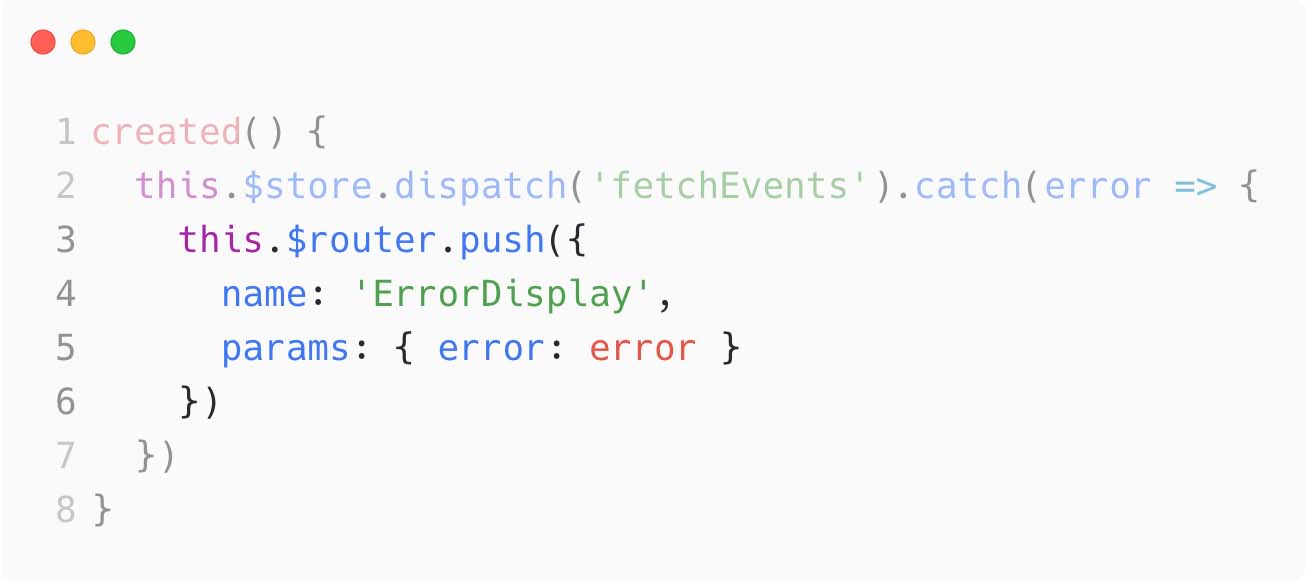
For that, we’ll need to execute the callback within EventList’s created hook, which requires use to make a failing axios request inside of EventService.
Should you mock axios?
If you trace through the call to fetchEvents, you’ll see that it depends on the EventService and uses an axios client to get all of the events.
fetchEvents returns a promise, and if axios fails to respond successfully, the EventList will handle the error. So far, we don’t have a pattern that will allow us to trigger a failure response from axios.
There are two common solutions:
- Use file-based module mocking (mocking axios)
- Use environmental network mocks (mocking API requests)
File-based Module Mocking
File-based module mocking is a technique popularized in Jest. It can be very powerful, but also very brittle because it’s mocking the literal file names and module names in your system. Most other test runners, like Mocha, do not support this style of mocking.
By using file-based module mocking with our EventService or even axios, we would be able to mock out the implementation of axios with custom requests/responses every time axios.get was invoked. This is an extremely common approach to testing code that depends on network requests and we cover it in our Introduction to Unit Testing course.
Environmental network mocks
On the other hand, environmental network mocks are a technique focused on making the runtime environment respond as if there were a live server available for your source code to execute against. Tools like Mock Service Worker and Cypress’s cy.intercept() command allow your code to execute as if a real server were available. The benefit of this strategy is that your code does not behave differently under tests, and your tests are not coupled to a particular library or method of fetching data. Your tests will only be tied to your applications’ API contract.
What is Mock Service Worker?
Let’s start with the basics.
Mock Service Worker is a library that helps you test, develop, and debug the parts of your application that make network requests. It works by intercepting requests on the network level and allows you to reuse the same mock definition for testing, development, and debugging.
Benefits of Mock Service Worker
Because Mock Service Worker operates at the network-level, it’s agnostic to how your client fetches data. This means that if you were to switch from XMLHttpRequest to fetch to axios, your tests wouldn’t have to change.
As an aside, a good sign your tests are well-written is when you’re able to make major refactors to your codebase without needing to touch your tests. For this reason, using high-level mocks, like Mock Service Worker, that operate at an environmental level are preferred to using lower-level mocks that operate at a source code level.
You don’t expect your customers to mock
fetchdo you? So don’t expect your tests either. Target any state of your API while testing your application exactly how your users interact with it. - mswjs.io documentation
Configure Mock Service Worker
- Initial Setup
- Running Mock Service Worker in Jest
1. Initial Setup
First, let’s run npm install msw -D.
Next, create a src/mocks directory where we’ll place all of our mock definitions and handlers.
Within that directory, create a handlers.js file.
We’re using REST in this application, so let’s import that API from the msw package.
src/mocks/handlers.js
import { rest } from 'msw'Next, we’ll define our first handler.
The Mock Service Worker handler API is very similar to the API you’d see when writing an Express-style server. You have access to a request object, a response, and a shared context. We won’t go into those too deeply right now.
All we need to do is respond with a status code (we’ll do that using the context.status method), and then define a response body (we’ll do that with the context.json method). We’ll invoke the response method with those two arguments and return out of the handler.
Don’t worry about how the data looks. After we validate that our testing infrastructure works, we’ll refactor our mock data.
src/mocks/handlers.js
import { rest } from 'msw'

export const handlers = [
  // Handles the GET /events request
  rest.get('/events', (req, res, ctx) => {
    const data = { message: 'Hello from Vue Mastery!' }
    return res(ctx.status(200), ctx.json(data))
  })
]
Great! Now let’s setup our server in Jest so we can test if it correctly handles the API route we’ve mocked.
2. Running Mock Service Worker in Jest
Now, let’s create a server.js file within src/mocks, which will serve as the entry point when we use Mock Service Worker within our tests.
First, we’ll import setupServer from the msw/node entry point.
Next, we’ll import the handlers we created in the step above.
Finally, we’ll spread the handlers into setupServer **and export the result.
src/mocks/server.js
import { setupServer } from 'msw/node'
import { handlers } from './handlers'

// This configures a request mocking server with the given request handlers.
export const server = setupServer(...handlers)
Setup File
Up until now, we haven’t had to do any global setup or teardown for each test, or any one-time setup for our test runs. Most test runners provide a setup file for this. There is no default in Jest and you must explicitly configure it within the jest.config.js file.
jest.config.js
 module.exports = {
  // ...
  setupFilesAfterEnv: ['<rootDir>/tests/unit/setup.js']
}
Next, create the setup.js file within the tests/unit directory. You can leave it empty for now.
Let’s quickly make sure we haven’t broken anything by running npm run test:unit.
Making infrastructure changes safely and sanely
When making testing infrastructure changes, it’s a good idea to test the test infrastructure using simple examples instead of your own source code.
Let’s quickly make a spec called tests/unit/smoke.spec.js and add a smoke test to it.
tests/unit/smoke.spec.js
it('works', () => {
  expect(true).toBeTruthy()
})
Now, run only this spec in watch mode.
#### INTERNAL NOTE: Vue CLI Service isn't properly keeping the jest watch task alive.
#### Need to do this instead of `npm run test:unit smoke --watch`

npx jest smoke --watch # shorthand for smoke.spec.js
Super. Now we know if we break our tests/unit/setup file that it’s because of the Mock Service Worker code and not our own application code.
We’ll keep this watch task up until we’re certain that our mock server is working correctly. If there are any issues in our setup.js, handlers.js, or server.js files, our smoke.spec.js will fail.
Starting the Server
Now open up the tests/unit/setup.js file and import the mock server.
// tests/unit/setup.js
import { server } from '../../src/mocks/server'
This will cause the mocks/server.js file to be invoked and create a server instance; however, the server isn’t listening or receiving any requests yet.
Before each test, we’ll need to call server.listen() with a port to begin receiving API requests. And then reset the handlers after each test with afterEach. Finally, close the server after all the tests are done running with afterAll:
tests/unit/setup.js
import { server } from '../../src/mocks/server'

beforeAll(() => {
  server.listen(3000)
})

afterEach(() => {
	server.resetHandlers()
})

afterAll(() => {
	server.close()
})Now let’s go ahead and test out the handler we wrote earlier by making a network request to /events.
tests/unit/smoke.spec.js
import axios from 'axios'

it('works', async () => {
  const result = await axios.get('/events')

  // "{ message: 'Hello from Vue Mastery!' }"
  console.log(result.data)
  expect(true).toBeTruthy()
})
We should see “Hello from Vue Mastery!” print out in the console of our watched smoke test.
Awesome! Mock Service Worker is working within our spec and our testing infrastructure.

 浙公网安备 33010602011771号