
[CSS] Easy dark or light mode
You only require a few lines of CSS to enable a dark/light mode on your website. You just need to let browsers know that your website can display correctly in system dark/light mode:
html {
    color-scheme: light dark;
}
Note:
color-schemeproperty can be set on any DOM element other thanhtml.
Then set variables that control background color and text color through your website, making it even more bullet proof by checking for browser support:
html {
    --bg-color: #ffffff;
    --txt-color: #000000;
}

@supports (background-color: Canvas) and (color: CanvasText) {
    :root {
        --bg-color: Canvas;
        --txt-color: CanvasText;
    }
}
Note: If you don't set
background-coloron an element, it will inherit the browser-defined system color for the dark/light theme matched. These system colors can be different between different browsers.
Setting background-color explicitly can be useful in combination with prefers-color-scheme to give a different shade of color different from the default that the browser sets.
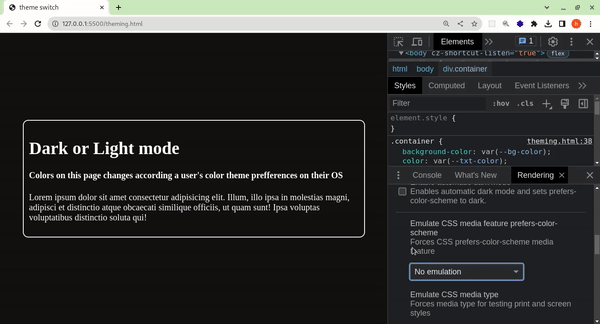
Below is the dark/light mode in action. User's preference is simulated between dark and light mode.
Other approach:
@media (prefers-color-scheme: dark) {
    :root {
        --bg-color: #333;
        --txt-color: #f5f5f5;
    }
}

@media (prefers-color-scheme: light) {
    :root {
        --bg-color: #f5f5f5;
        --txt-color: #333;
    }
}

body {
    background-color: var(--bg-color);
    color: var(--txt-color);
}

 浙公网安备 33010602011771号