
工作中最常用的5种本地缓存
前言
今天和大家聊聊一个几乎所有Java开发者都会用到,但很多人对其理解不够深入的技术——本地缓存。
有些小伙伴在工作中可能遇到过这样的场景:系统性能测试时,发现某个接口响应时间越来越长,一查发现是数据库查询太频繁。
加了Redis分布式缓存后有所改善,但网络IO的开销依然存在,特别是对时效性要求高的数据。
这时候,本地缓存的价值就凸显出来了。
本地缓存是什么?
简单说就是将数据存储在应用进程的内存中,实现数据的快速访问。
它的访问速度通常是纳秒级,而分布式缓存(如Redis)是毫秒级,数据库查询更是毫秒到秒级。
01 为什么需要本地缓存?
在深入具体方案前,我们先搞清楚本地缓存的核心价值。
来看一个没有缓存的场景:
// 没有缓存的用户查询服务
@Service
public class CategoryServiceWithoutCache {

    @Autowired
    private CategoryMapper categoryMapper;

    public Category getCategoryById(Long categoryId) {
        // 每次调用都直接查询数据库
        return categoryMapper.selectById(categoryId);
    }

    // 假设这个接口每秒被调用1000次
    // 数据库就要承受1000QPS的压力
}
这种设计的问题很明显:
- 数据库压力大:每次请求都要查询数据库
- 响应时间长:数据库查询通常需要几毫秒到几十毫秒
- 系统可扩展性差:数据库成为单点瓶颈
引入本地缓存后,情况会大大改善:
// 使用本地缓存的用户查询服务
@Service
public class CategoryServiceWithCache {

    @Autowired
    private CategoryMapper categoryMapper;

    // 使用ConcurrentHashMap作为本地缓存
    private final Map<Long, Category> categoryCache = new ConcurrentHashMap<>();

    public Category getCategoryById(Long categoryId) {
        // 1. 先查缓存
        Category category = categoryCache.get(categoryId);
        if (category != null) {
            return category;  // 缓存命中,直接返回
        }

        // 2. 缓存未命中,查询数据库
        category = categoryMapper.selectById(categoryId);
        if (category != null) {
            // 3. 将数据放入缓存
            categoryCache.put(categoryId, category);
        }

        return category;
    }
}
这样改造后,对于同一个分类的多次查询,只有第一次会访问数据库,后续查询都直接返回缓存数据,性能提升几个数量级。
但是,简单的ConcurrentHashMap只是本地缓存的最基础形态。
在实际生产中,我们需要考虑更多问题:内存管理、过期策略、缓存淘汰、并发控制等。
这就是各种本地缓存框架存在的意义。
02 本地缓存核心要素
在介绍具体方案前,我们先了解一个优秀本地缓存应该具备的特性:

理解了这些核心要素,我们就能更好地评估各种缓存方案。
现在,让我们深入分析5种最常用的本地缓存方案。
03 方案一:ConcurrentHashMap
原理与特点
ConcurrentHashMap是JDK自发的线程安全的哈希表,它通过分段锁技术实现高并发访问。
作为缓存使用时,它是最简单、最轻量级的选择。
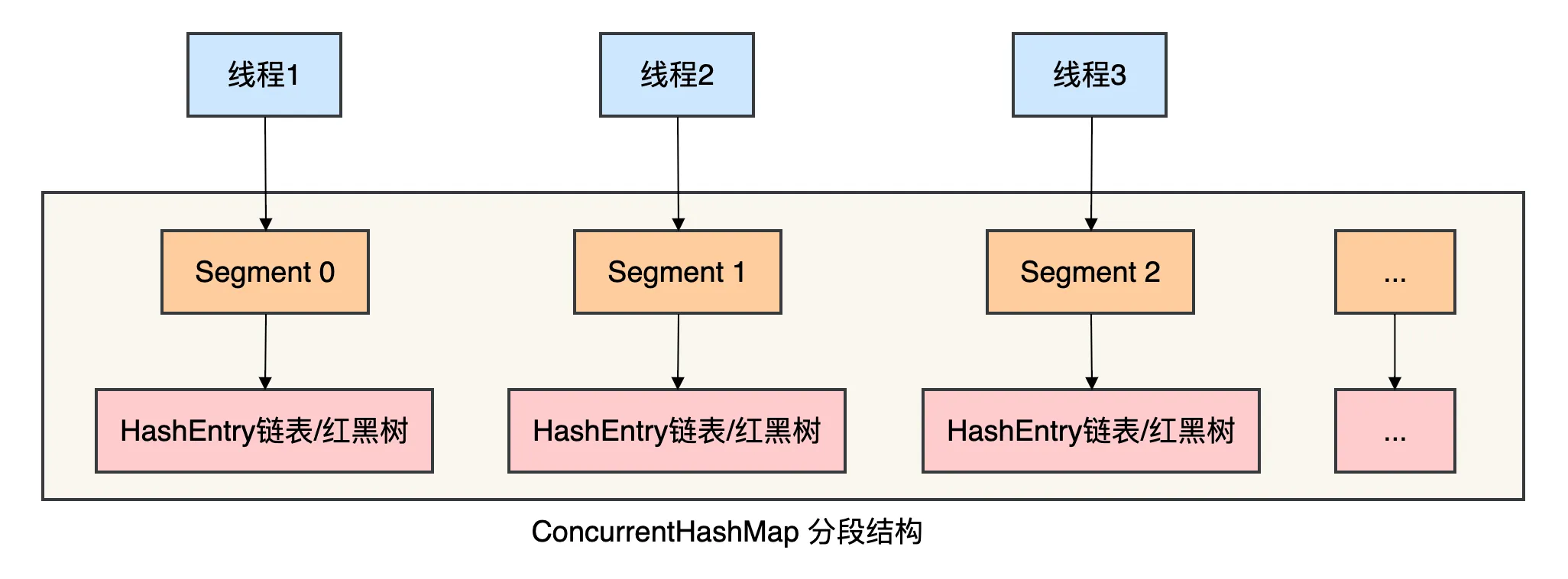
核心机制:
- 分段锁:将整个Map分成多个Segment,每个Segment独立加锁
- 并发度:默认16个Segment,可支持16个线程并发写
- Java 8优化:在Java 8中改为使用
synchronized+CAS+红黑树,性能更好
实战代码示例
import java.util.concurrent.*;

/**
 * 基于ConcurrentHashMap的简易本地缓存
 * 特点:简单、轻量、无过期策略
 */
public class ConcurrentHashMapCache<K, V> {

    // 核心缓存存储
    private final ConcurrentHashMap<K, V> cache;

    // 可选的缓存加载器
    private final CacheLoader<K, V> loader;

    public ConcurrentHashMapCache() {
        this.cache = new ConcurrentHashMap<>();
        this.loader = null;
    }

    public ConcurrentHashMapCache(CacheLoader<K, V> loader) {
        this.cache = new ConcurrentHashMap<>();
        this.loader = loader;
    }

    /**
     * 获取缓存值
     * 如果不存在且配置了loader,则加载数据
     */
    public V get(K key) {
        V value = cache.get(key);

        if (value == null && loader != null) {
            // 双重检查锁,防止并发加载
            synchronized (this) {
                value = cache.get(key);
                if (value == null) {
                    value = loader.load(key);
                    if (value != null) {
                        cache.put(key, value);
                    }
                }
            }
        }

        return value;
    }

    /**
     * 放入缓存
     */
    public void put(K key, V value) {
        cache.put(key, value);
    }

    /**
     * 移除缓存
     */
    public V remove(K key) {
        return cache.remove(key);
    }

    /**
     * 清空缓存
     */
    public void clear() {
        cache.clear();
    }

    /**
     * 获取缓存大小
     */
    public int size() {
        return cache.size();
    }

    /**
     * 判断是否包含key
     */
    public boolean containsKey(K key) {
        return cache.containsKey(key);
    }

    /**
     * 缓存加载器接口
     */
    @FunctionalInterface
    public interface CacheLoader<K, V> {
        V load(K key);
    }
}

/**
 * 使用示例:用户信息缓存
 */
@Service
public class UserServiceWithConcurrentHashMap {

    @Autowired
    private UserMapper userMapper;

    // 使用自定义的ConcurrentHashMap缓存
    private final ConcurrentHashMapCache<Long, User> userCache;

    public UserServiceWithConcurrentHashMap() {
        // 初始化缓存,配置缓存加载器
        userCache = new ConcurrentHashMapCache<>(userId -> {
            // 当缓存不存在时,调用此方法加载数据
            System.out.println("缓存未命中,从数据库加载用户: " + userId);
            return userMapper.selectById(userId);
        });
    }

    /**
     * 获取用户信息(带缓存)
     */
    public User getUserById(Long userId) {
        return userCache.get(userId);
    }

    /**
     * 更新用户信息(同时更新缓存)
     */
    public void updateUser(User user) {
        // 1. 更新数据库
        userMapper.updateById(user);

        // 2. 更新缓存
        userCache.put(user.getId(), user);
    }

    /**
     * 删除用户(同时删除缓存)
     */
    public void deleteUser(Long userId) {
        // 1. 删除数据库记录
        userMapper.deleteById(userId);

        // 2. 删除缓存
        userCache.remove(userId);
    }

    /**
     * 批量获取用户(优化N+1查询)
     */
    public Map<Long, User> getUsersByIds(List<Long> userIds) {
        Map<Long, User> result = new HashMap<>();
        List<Long> missingIds = new ArrayList<>();

        // 1. 先从缓存获取
        for (Long userId : userIds) {
            User user = userCache.get(userId);
            if (user != null) {
                result.put(userId, user);
            } else {
                missingIds.add(userId);
            }
        }

        // 2. 批量查询缺失的数据
        if (!missingIds.isEmpty()) {
            List<User> dbUsers = userMapper.selectBatchIds(missingIds);
            for (User user : dbUsers) {
                result.put(user.getId(), user);
                userCache.put(user.getId(), user);  // 放入缓存
            }
        }

        return result;
    }
}
优缺点分析
优点:
- JDK原生支持:无需引入第三方依赖
- 线程安全:分段锁/CAS保证并发安全
- 性能优秀:读操作完全无锁,写操作锁粒度小
- 简单轻量:代码简单,资源消耗小
缺点:
- 功能有限:缺乏过期、淘汰等高级功能
- 内存无法限制:可能造成内存溢出
- 需要手动管理:缓存策略需要自己实现
适用场景:
- 缓存数据量小且固定
- 不需要自动过期功能
- 作为更复杂缓存的底层实现
- 临时性、简单的缓存需求
有些小伙伴在项目初期喜欢用ConcurrentHashMap做缓存,因为它简单直接。
但随着业务复杂化,往往会遇到内存溢出、缓存清理等问题,这时候就需要更专业的缓存方案了。
04 方案二:LRU缓存
原理与特点
LRU(Least Recently Used,最近最少使用)是一种经典的缓存淘汰算法。
当缓存空间不足时,优先淘汰最久未被访问的数据。
LinkedHashMap是JDK提供的实现了LRU特性的Map实现。
它通过维护一个双向链表来记录访问顺序。
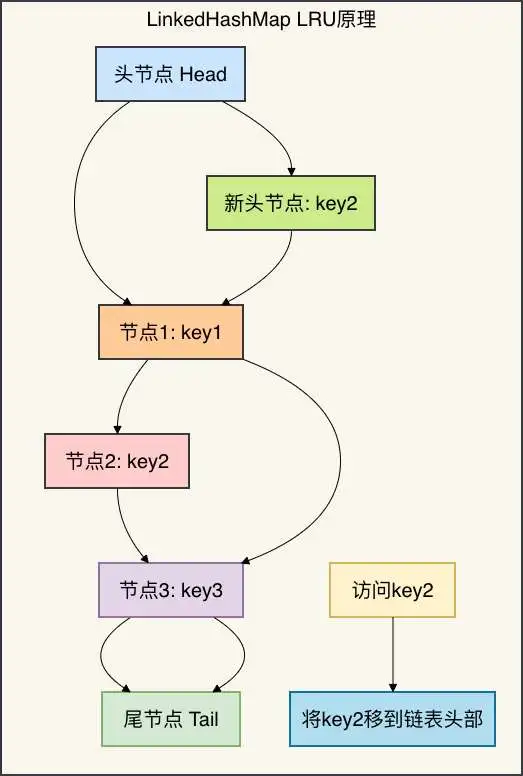
核心机制:
- 访问顺序:
accessOrder=true时,每次访问会将节点移到链表头部 - 淘汰策略:链表尾部的节点是最久未访问的
- 重写removeEldestEntry:控制何时删除最老节点
实战代码示例
import java.util.*;

/**
 * 基于LinkedHashMap的LRU缓存
 * 特点:自动淘汰最久未使用的数据
 */
public class LRUCache<K, V> extends LinkedHashMap<K, V> {

    private final int maxCapacity;

    /**
     * 创建LRU缓存
     * @param maxCapacity 最大容量
     */
    public LRUCache(int maxCapacity) {
        // 第三个参数accessOrder为true表示按访问顺序排序
        super(16, 0.75f, true);
        this.maxCapacity = maxCapacity;
    }

    /**
     * 重写此方法决定何时删除最老的条目
     * @param eldest 最老的条目(最近最少使用)
     * @return true表示应该删除最老的条目
     */
    @Override
    protected boolean removeEldestEntry(Map.Entry<K, V> eldest) {
        // 当大小超过最大容量时,删除最老的条目
        return size() > maxCapacity;
    }

    /**
     * 获取缓存值(会更新访问顺序)
     */
    @Override
    public V get(Object key) {
        synchronized (this) {
            return super.get(key);
        }
    }

    /**
     * 放入缓存值
     */
    @Override
    public V put(K key, V value) {
        synchronized (this) {
            return super.put(key, value);
        }
    }

    /**
     * 获取缓存统计信息
     */
    public CacheStats getStats() {
        return new CacheStats(size(), maxCapacity);
    }

    /**
     * 获取最近访问的N个键
     */
    public List<K> getRecentlyAccessed(int n) {
        List<K> result = new ArrayList<>();
        Iterator<K> iterator = keySet().iterator();

        for (int i = 0; i < n && iterator.hasNext(); i++) {
            result.add(iterator.next());
        }

        return result;
    }

    /**
     * 缓存统计信息
     */
    public static class CacheStats {
        private final int currentSize;
        private final int maxCapacity;
        private final double usageRatio;

        public CacheStats(int currentSize, int maxCapacity) {
            this.currentSize = currentSize;
            this.maxCapacity = maxCapacity;
            this.usageRatio = maxCapacity > 0 ? (double) currentSize / maxCapacity : 0;
        }

        // getters...
    }
}

/**
 * 线程安全的LRU缓存实现
 */
public class ConcurrentLRUCache<K, V> {

    private final LRUCache<K, V> cache;

    public ConcurrentLRUCache(int maxCapacity) {
        this.cache = new LRUCache<>(maxCapacity);
    }

    /**
     * 获取缓存值
     */
    public V get(K key) {
        synchronized (cache) {
            return cache.get(key);
        }
    }

    /**
     * 放入缓存值
     */
    public V put(K key, V value) {
        synchronized (cache) {
            return cache.put(key, value);
        }
    }

    /**
     * 批量放入缓存
     */
    public void putAll(Map<? extends K, ? extends V> map) {
        synchronized (cache) {
            cache.putAll(map);
        }
    }

    /**
     * 移除缓存
     */
    public V remove(K key) {
        synchronized (cache) {
            return cache.remove(key);
        }
    }

    /**
     * 清空缓存
     */
    public void clear() {
        synchronized (cache) {
            cache.clear();
        }
    }

    /**
     * 获取缓存大小
     */
    public int size() {
        synchronized (cache) {
            return cache.size();
        }
    }

    /**
     * 检查缓存是否包含key
     */
    public boolean containsKey(K key) {
        synchronized (cache) {
            return cache.containsKey(key);
        }
    }

    /**
     * 获取缓存统计信息
     */
    public LRUCache.CacheStats getStats() {
        synchronized (cache) {
            return cache.getStats();
        }
    }
}

/**
 * 使用示例:商品信息缓存
 */
@Service
public class ProductServiceWithLRUCache {

    @Autowired
    private ProductMapper productMapper;

    // LRU缓存,最多缓存1000个商品
    private final ConcurrentLRUCache<Long, Product> productCache;

    // 热门商品缓存(更小的LRU缓存)
    private final ConcurrentLRUCache<Long, Product> hotProductCache;

    public ProductServiceWithLRUCache() {
        // 主缓存:1000个商品
        productCache = new ConcurrentLRUCache<>(1000);

        // 热门商品缓存:100个商品
        hotProductCache = new ConcurrentLRUCache<>(100);
    }

    /**
     * 获取商品信息
     */
    public Product getProductById(Long productId) {
        // 1. 先查热门商品缓存
        Product product = hotProductCache.get(productId);
        if (product != null) {
            recordCacheHit("hot");  // 记录命中
            return product;
        }

        // 2. 查主缓存
        product = productCache.get(productId);
        if (product != null) {
            // 如果商品被频繁访问,移到热门缓存
            if (isFrequentlyAccessed(productId)) {
                hotProductCache.put(productId, product);
            }
            recordCacheHit("main");
            return product;
        }

        // 3. 缓存未命中,查询数据库
        product = productMapper.selectById(productId);
        if (product != null) {
            // 放入主缓存
            productCache.put(productId, product);
            recordCacheMiss();
        }

        return product;
    }

    /**
     * 获取热门商品列表
     */
    public List<Product> getHotProducts(int limit) {
        // 直接从热门缓存获取最近访问的商品
        // 注意:这只是简化示例,实际需要更复杂的热门度计算

        List<Product> hotProducts = new ArrayList<>();

        synchronized (hotProductCache) {
            // 这里需要扩展ConcurrentLRUCache以支持获取所有值
            // 实际实现中需要维护额外的数据结构
        }

        return hotProducts;
    }

    /**
     * 更新商品信息(同时更新两个缓存)
     */
    public void updateProduct(Product product) {
        Long productId = product.getId();

        // 1. 更新数据库
        productMapper.updateById(product);

        // 2. 更新缓存
        productCache.put(productId, product);
        hotProductCache.put(productId, product);

        // 3. 记录更新日志
        logProductUpdate(productId);
    }

    /**
     * 批量失效缓存(当商品分类更新时)
     */
    public void invalidateProductsByCategory(Long categoryId) {
        // 在实际应用中,这里需要遍历缓存并删除对应分类的商品
        // 为了性能,可以:
        // 1. 使用分代缓存
        // 2. 使用异步清理
        // 3. 使用更细粒度的缓存键

        System.out.println("商品分类更新,需要清理相关缓存: " + categoryId);
        // 这里简化处理:清空所有缓存(生产环境不推荐)
        // productCache.clear();
        // hotProductCache.clear();
    }

    private boolean isFrequentlyAccessed(Long productId) {
        // 简化实现:总是返回true
        // 实际需要基于访问频率的热度算法
        return true;
    }

    private void recordCacheHit(String cacheType) {
        // 记录缓存命中,用于监控和调优
        System.out.println("缓存命中 [" + cacheType + "]: " + System.currentTimeMillis());
    }

    private void recordCacheMiss() {
        // 记录缓存未命中
        System.out.println("缓存未命中: " + System.currentTimeMillis());
    }

    private void logProductUpdate(Long productId) {
        // 记录商品更新
        System.out.println("商品更新: " + productId + " at " + System.currentTimeMillis());
    }
}
优缺点分析
优点:
- 自动淘汰:无需手动清理,防止内存溢出
- 访问模式优化:自动将热门数据保持在缓存中
- JDK原生:基于LinkedHashMap,无需额外依赖
- 简单有效:对于访问模式有明显热点的场景效果显著
缺点:
- 淘汰策略单一:只基于访问时间,不考虑访问频率
- 可能淘汰热点数据:如果缓存太小,可能误淘汰
- 并发性能:需要额外同步来保证线程安全
- 功能有限:缺乏过期时间等高级功能
适用场景:
- 数据访问有明显热点
- 缓存容量有限,需要自动淘汰
- 数据重要性相对均匀
- 作为缓存系统的一部分
有些小伙伴会发现,LRU缓存能解决内存溢出的问题,但对于“突然被大量访问的冷数据”场景,可能会淘汰掉真正的热点数据。
这时候就需要更智能的淘汰策略了。
05 方案三:Ehcache - 企业级本地缓存
原理与特点
Ehcache是一个成熟的、功能丰富的Java缓存框架,最初作为Hibernate的缓存提供者而闻名。
它支持内存+磁盘的多级缓存,适合缓存大量数据。
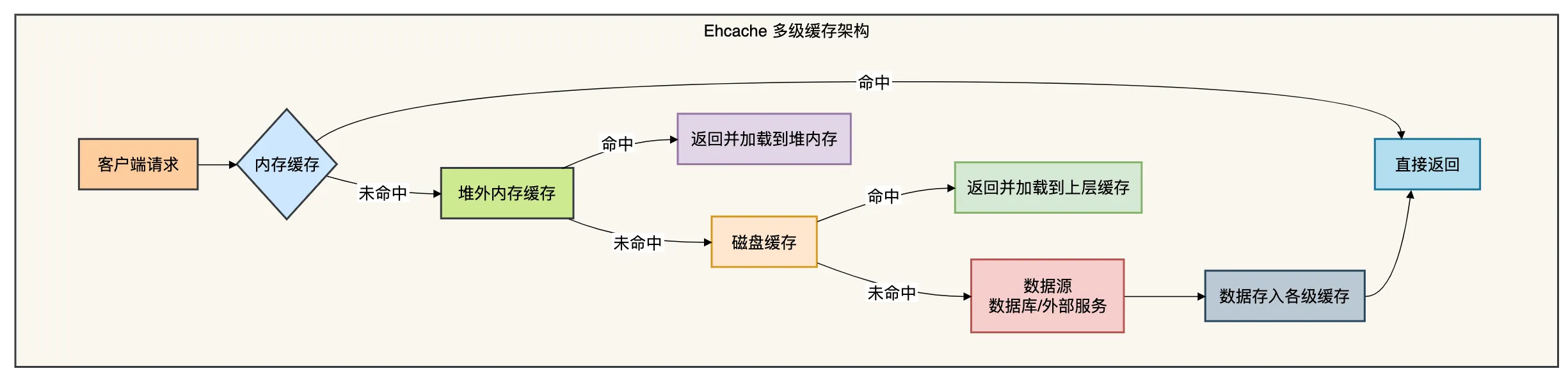
核心特性:
- 多级存储:堆内存 → 堆外内存 → 磁盘
- 丰富的淘汰策略:LRU、LFU、FIFO
- 集群支持:通过Terracotta实现分布式缓存
- 监控管理:JMX支持,完善的监控指标
实战代码示例
由于Ehcache功能丰富,配置相对复杂,这里展示其核心用法:
import net.sf.ehcache.Cache;
import net.sf.ehcache.CacheManager;
import net.sf.ehcache.Element;
import net.sf.ehcache.config.CacheConfiguration;
import net.sf.ehcache.config.PersistenceConfiguration;
import net.sf.ehcache.store.MemoryStoreEvictionPolicy;

import java.io.Serializable;

/**
 * Ehcache缓存工具类
 */
public class EhcacheUtil {

    private static CacheManager cacheManager;

    static {
        // 1. 创建CacheManager(通常从配置文件加载)
        cacheManager = CacheManager.create();

        // 2. 或者以编程方式配置
        createUserCache();
        createProductCache();
    }

    /**
     * 创建用户缓存
     */
    private static void createUserCache() {
        // 缓存配置
        CacheConfiguration cacheConfig = new CacheConfiguration()
            .name("userCache")  // 缓存名称
            .maxEntriesLocalHeap(1000)  // 堆内存最大条目数
            .memoryStoreEvictionPolicy(MemoryStoreEvictionPolicy.LRU)  // 淘汰策略
            .timeToLiveSeconds(3600)  // 存活时间(秒)
            .timeToIdleSeconds(600)  // 空闲时间(秒)
            .diskExpiryThreadIntervalSeconds(120)  // 磁盘过期检查间隔
            .persistence(new PersistenceConfiguration()
                .strategy(PersistenceConfiguration.Strategy.LOCALTEMPSWAP));  // 持久化策略

        // 创建缓存
        Cache cache = new Cache(cacheConfig);

        // 添加到CacheManager
        cacheManager.addCache(cache);
    }

    /**
     * 创建商品缓存(使用堆外内存)
     */
    private static void createProductCache() {
        CacheConfiguration cacheConfig = new CacheConfiguration()
            .name("productCache")
            .maxEntriesLocalHeap(5000)  // 堆内存条目数
            .maxBytesLocalOffHeap(256, MemoryUnit.MEGABYTES)  // 堆外内存256MB
            .maxBytesLocalDisk(2, MemoryUnit.GIGABYTES)  // 磁盘缓存2GB
            .memoryStoreEvictionPolicy(MemoryStoreEvictionPolicy.LFU)  // LFU淘汰策略
            .timeToLiveSeconds(1800)
            .timeToIdleSeconds(300)
            .persistence(new PersistenceConfiguration()
                .strategy(PersistenceConfiguration.Strategy.LOCALTEMPSWAP));

        Cache cache = new Cache(cacheConfig);
        cacheManager.addCache(cache);
    }

    /**
     * 获取缓存实例
     */
    public static Cache getCache(String cacheName) {
        return cacheManager.getCache(cacheName);
    }

    /**
     * 放入缓存
     */
    public static void put(String cacheName, Serializable key, Serializable value) {
        Cache cache = getCache(cacheName);
        if (cache != null) {
            Element element = new Element(key, value);
            cache.put(element);
        }
    }

    /**
     * 获取缓存值
     */
    public static Object get(String cacheName, Serializable key) {
        Cache cache = getCache(cacheName);
        if (cache != null) {
            Element element = cache.get(key);
            return element != null ? element.getObjectValue() : null;
        }
        return null;
    }

    /**
     * 移除缓存
     */
    public static boolean remove(String cacheName, Serializable key) {
        Cache cache = getCache(cacheName);
        if (cache != null) {
            return cache.remove(key);
        }
        return false;
    }

    /**
     * 获取缓存统计信息
     */
    public static String getStats(String cacheName) {
        Cache cache = getCache(cacheName);
        if (cache != null) {
            return String.format(
                "缓存: %s, 大小: %d, 命中数: %d, 未命中数: %d, 命中率: %.2f%%",
                cacheName,
                cache.getSize(),
                cache.getStatistics().cacheHitCount(),
                cache.getStatistics().cacheMissCount(),
                cache.getStatistics().cacheHitRatio() * 100
            );
        }
        return "缓存不存在: " + cacheName;
    }
}

/**
 * 使用示例:订单服务
 */
@Service
public class OrderServiceWithEhcache {

    @Autowired
    private OrderMapper orderMapper;

    /**
     * 获取订单详情(使用Ehcache)
     */
    public OrderDetail getOrderDetail(Long orderId) {
        String cacheName = "orderCache";

        // 1. 先从缓存获取
        OrderDetail detail = (OrderDetail) EhcacheUtil.get(cacheName, orderId);
        if (detail != null) {
            System.out.println("Ehcache缓存命中: " + orderId);
            return detail;
        }

        // 2. 缓存未命中,查询数据库
        System.out.println("Ehcache缓存未命中,查询数据库: " + orderId);
        detail = orderMapper.selectOrderDetail(orderId);

        if (detail != null) {
            // 3. 放入缓存
            EhcacheUtil.put(cacheName, orderId, detail);

            // 4. 异步加载相关数据到缓存
            loadRelatedDataToCache(detail);
        }

        return detail;
    }

    /**
     * 批量获取订单(缓存优化)
     */
    public List<OrderDetail> getOrderDetails(List<Long> orderIds) {
        List<OrderDetail> result = new ArrayList<>();
        List<Long> missingIds = new ArrayList<>();

        // 1. 批量从缓存获取
        for (Long orderId : orderIds) {
            OrderDetail detail = (OrderDetail) EhcacheUtil.get("orderCache", orderId);
            if (detail != null) {
                result.add(detail);
            } else {
                missingIds.add(orderId);
            }
        }

        // 2. 批量查询缺失的数据
        if (!missingIds.isEmpty()) {
            List<OrderDetail> dbDetails = orderMapper.selectOrderDetails(missingIds);
            result.addAll(dbDetails);

            // 3. 批量放入缓存
            for (OrderDetail detail : dbDetails) {
                EhcacheUtil.put("orderCache", detail.getOrderId(), detail);
            }
        }

        return result;
    }

    /**
     * 更新订单状态(同时更新缓存)
     */
    @Transactional
    public void updateOrderStatus(Long orderId, String status) {
        // 1. 更新数据库
        orderMapper.updateOrderStatus(orderId, status);

        // 2. 使缓存失效(或更新缓存)
        EhcacheUtil.remove("orderCache", orderId);

        // 3. 可以选择重新加载到缓存
        OrderDetail detail = orderMapper.selectOrderDetail(orderId);
        if (detail != null) {
            EhcacheUtil.put("orderCache", orderId, detail);
        }
    }

    /**
     * 异步加载相关数据到缓存
     */
    private void loadRelatedDataToCache(OrderDetail orderDetail) {
        // 这里可以异步加载用户信息、商品信息等
        // 减少后续查询的缓存未命中

        CompletableFuture.runAsync(() -> {
            try {
                // 缓存用户信息
                EhcacheUtil.put("userCache", orderDetail.getUserId(), orderDetail.getUserInfo());

                // 缓存商品信息
                for (OrderItem item : orderDetail.getItems()) {
                    EhcacheUtil.put("productCache", item.getProductId(), item.getProductInfo());
                }
            } catch (Exception e) {
                // 异步操作,记录日志但不影响主流程
                System.err.println("异步加载缓存失败: " + e.getMessage());
            }
        });
    }

    /**
     * 获取缓存统计信息
     */
    public void printCacheStats() {
        System.out.println("=== 缓存统计 ===");
        System.out.println(EhcacheUtil.getStats("orderCache"));
        System.out.println(EhcacheUtil.getStats("userCache"));
        System.out.println(EhcacheUtil.getStats("productCache"));
    }
}
优缺点分析
优点:
- 功能全面:支持多级缓存、多种淘汰策略
- 企业级特性:集群支持、持久化、事务支持
- 成熟稳定:经过多年生产验证
- 监控完善:JMX支持,便于监控管理
缺点:
- 配置复杂:功能多导致配置复杂
- 较重:依赖较多,启动较慢
- API较老:部分API设计不够现代
- 社区活跃度下降:相比Caffeine等新框架
适用场景:
- 需要缓存大量数据(内存+磁盘)
- 需要集群缓存支持
- 企业级应用,需要完整解决方案
- 已有Ehcache使用经验的项目
有些小伙伴在企业级项目中接触过Ehcache,它的功能确实强大,但对于简单的缓存需求来说可能过于重量级了。
06 方案四:Caffeine - 高性能现代缓存
原理与特点
Caffeine是一个基于Java 8的高性能缓存库,由Guava Cache的原作者开发。它提供了近乎最优的命中率和卓越的并发性能。

核心优化:
- Window-TinyLFU:结合LFU和LRU优点,提供更好的命中率
- 频率素描:用极小空间统计访问频率
- 异步操作:读不阻塞写,写不阻塞读
- Java 8优化:大量使用
CompletableFuture和StampedLock
实战代码示例
import com.github.benmanes.caffeine.cache.*;
import org.springframework.stereotype.Service;

import java.time.Duration;
import java.util.concurrent.CompletableFuture;
import java.util.concurrent.Executor;
import java.util.concurrent.TimeUnit;

/**
 * Caffeine缓存示例
 */
@Service
public class CaffeineCacheService {

    // 1. 基础缓存示例
    private final Cache<Long, User> userCache = Caffeine.newBuilder()
        .maximumSize(1000)  // 最大容量
        .expireAfterWrite(Duration.ofMinutes(10))  // 写入后10分钟过期
        .expireAfterAccess(Duration.ofMinutes(5))  // 访问后5分钟过期
        .recordStats()  // 开启统计
        .build();

    // 2. 异步加载缓存
    private final AsyncLoadingCache<Long, Product> productCache =
        Caffeine.newBuilder()
            .maximumSize(5000)
            .expireAfterWrite(Duration.ofHours(1))
            .refreshAfterWrite(Duration.ofMinutes(30))  // 写入30分钟后刷新
            .recordStats()
            .buildAsync(new AsyncCacheLoader<Long, Product>() {
                @Override
                public CompletableFuture<Product> asyncLoad(Long productId,
                        Executor executor) {
                    return CompletableFuture.supplyAsync(() ->
                        loadProductFromDB(productId), executor);
                }

                @Override
                public CompletableFuture<Product> asyncReload(Long productId,
                        Product oldValue, Executor executor) {
                    return CompletableFuture.supplyAsync(() ->
                        reloadProductFromDB(productId), executor);
                }
            });

    // 3. 带权重缓存的例子(按对象大小缓存)
    private final Cache<String, byte[]> largeDataCache = Caffeine.newBuilder()
        .maximumWeight(100 * 1024 * 1024)  // 最大100MB
        .weigher((String key, byte[] value) -> value.length)  // 权重计算器
        .expireAfterWrite(Duration.ofHours(2))
        .recordStats()
        .build();

    /**
     * 使用缓存获取用户信息
     */
    public User getUserWithCache(Long userId) {
        // 方式1:手动处理
        User user = userCache.getIfPresent(userId);
        if (user == null) {
            user = loadUserFromDB(userId);
            if (user != null) {
                userCache.put(userId, user);
            }
        }
        return user;
    }

    /**
     * 使用LoadingCache自动加载
     */
    public User getUserAutoLoad(Long userId) {
        LoadingCache<Long, User> loadingCache = Caffeine.newBuilder()
            .maximumSize(1000)
            .expireAfterWrite(Duration.ofMinutes(10))
            .build(this::loadUserFromDB);  // 缓存未命中时调用

        return loadingCache.get(userId);
    }

    /**
     * 使用异步缓存获取商品信息
     */
    public CompletableFuture<Product> getProductAsync(Long productId) {
        return productCache.get(productId);
    }

    /**
     * 批量获取商品
     */
    public CompletableFuture<Iterable<Product>> getProductsAsync(
            Iterable<Long> productIds) {
        return productCache.getAll(productIds);
    }

    /**
     * 获取缓存统计信息
     */
    public String getCacheStats() {
        CacheStats stats = userCache.stats();

        return String.format(
            "命中率: %.2f%%, 命中数: %d, 未命中数: %d, 加载成功: %d, 加载失败: %d, 总加载时间: %dms",
            stats.hitRate() * 100,
            stats.hitCount(),
            stats.missCount(),
            stats.loadSuccessCount(),
            stats.loadFailureCount(),
            stats.totalLoadTime()
        );
    }

    /**
     * 高级用法:事件监听
     */
    public void setupCacheWithListener() {
        Cache<Long, Order> orderCache = Caffeine.newBuilder()
            .maximumSize(1000)
            .expireAfterWrite(Duration.ofMinutes(30))
            .removalListener((Long key, Order order, RemovalCause cause) -> {
                // 缓存条目被移除时的回调
                System.out.printf("缓存移除: key=%s, cause=%s%n", key, cause);

                // 可以根据不同的原因处理
                switch (cause) {
                    case EXPLICIT:  // 显式移除
                        System.out.println("显式移除缓存: " + key);
                        break;
                    case REPLACED:  // 被替换
                        System.out.println("缓存被替换: " + key);
                        break;
                    case COLLECTED:  // 垃圾回收
                        System.out.println("缓存被GC回收: " + key);
                        break;
                    case EXPIRED:  // 过期
                        System.out.println("缓存过期: " + key);
                        break;
                    case SIZE:  // 大小限制
                        System.out.println("因大小限制移除: " + key);
                        break;
                }
            })
            .recordStats()
            .build();

        // 使用缓存
        orderCache.put(1L, new Order(1L, "待支付"));

        // 移除缓存(会触发EXPLICIT事件)
        orderCache.invalidate(1L);
    }

    /**
     * 复杂场景:分层缓存策略
     */
    public void layeredCacheStrategy() {
        // 第一层:小容量,超快访问(使用ConcurrentHashMap)
        Cache<Long, User> L1Cache = Caffeine.newBuilder()
            .maximumSize(100)
            .expireAfterWrite(Duration.ofSeconds(30))
            .build();

        // 第二层:大容量,较慢访问(使用Caffeine)
        Cache<Long, User> L2Cache = Caffeine.newBuilder()
            .maximumSize(10000)
            .expireAfterWrite(Duration.ofMinutes(10))
            .build();

        // 第三层:异步加载,防止缓存穿透
        AsyncLoadingCache<Long, User> L3Cache = Caffeine.newBuilder()
            .maximumSize(50000)
            .expireAfterWrite(Diration.ofHours(1))
            .buildAsync(key -> loadUserFromDB(key));

        // 使用分层缓存的示例
        public User getUserMultiLevel(Long userId) {
            // 1. 查L1缓存
            User user = L1Cache.getIfPresent(userId);
            if (user != null) {
                recordHit("L1");
                return user;
            }

            // 2. 查L2缓存
            user = L2Cache.getIfPresent(userId);
            if (user != null) {
                // 回填L1缓存
                L1Cache.put(userId, user);
                recordHit("L2");
                return user;
            }

            // 3. 查L3缓存(异步加载)
            try {
                user = L3Cache.get(userId).get(2, TimeUnit.SECONDS);

                // 回填L1和L2
                L1Cache.put(userId, user);
                L2Cache.put(userId, user);

                recordHit("L3");
                return user;
            } catch (Exception e) {
                // 缓存加载失败
                recordMiss();
                return loadUserFromDB(userId);  // 降级到直接查DB
            }
        }
    }

    private User loadUserFromDB(Long userId) {
        System.out.println("从数据库加载用户: " + userId);
        // 模拟数据库查询
        return new User(userId, "用户" + userId);
    }

    private Product loadProductFromDB(Long productId) {
        System.out.println("从数据库加载商品: " + productId);
        return new Product(productId, "商品" + productId);
    }

    private Product reloadProductFromDB(Long productId) {
        System.out.println("刷新商品缓存: " + productId);
        return new Product(productId, "刷新后的商品" + productId);
    }

    private void recordHit(String cacheLevel) {
        // 记录命中统计
        System.out.println("缓存命中 [" + cacheLevel + "]");
    }

    private void recordMiss() {
        // 记录未命中
        System.out.println("缓存未命中");
    }
}
优缺点分析
优点:
- 性能卓越:读性能接近
ConcurrentHashMap - 高命中率:Window-TinyLFU算法显著提升命中率
- 现代API:基于Java 8,支持异步、函数式编程
- 内存友好:智能的权重控制和淘汰策略
缺点:
- 较新:生态不如Guava Cache成熟
- 学习曲线:高级功能需要理解其算法原理
- 功能专注:主要关注内存缓存,不像Ehcache支持磁盘
适用场景:
- 对性能要求极高的场景
- 需要高命中率的缓存策略
- 现代Java项目(Java 8+)
- 作为Guava Cache的升级替代
有些小伙伴从Guava Cache迁移到Caffeine后,会发现命中率有明显提升,特别是在数据访问模式复杂多变的场景下。
07 方案五:Guava Cache - 经典的选择
原理与特点
Guava Cache是Google Guava库的一部分,是一个设计优雅、功能完善的本地缓存实现。
它提供了丰富的构建选项和灵活的过期策略。
实战代码示例
import com.google.common.cache.*;
import org.springframework.stereotype.Service;

import java.util.concurrent.ExecutionException;
import java.util.concurrent.TimeUnit;

/**
 * Guava Cache使用示例
 */
@Service
public class GuavaCacheService {

    // 1. 基础缓存示例
    private final Cache<Long, User> userCache = CacheBuilder.newBuilder()
        .maximumSize(1000)  // 最大容量
        .expireAfterWrite(10, TimeUnit.MINUTES)  // 写入后10分钟过期
        .expireAfterAccess(5, TimeUnit.MINUTES)  // 访问后5分钟过期
        .concurrencyLevel(8)  // 并发级别
        .recordStats()  // 开启统计
        .build();

    // 2. 带权重缓存的例子
    private final Cache<String, byte[]> weightedCache = CacheBuilder.newBuilder()
        .maximumWeight(100 * 1024 * 1024)  // 最大100MB
        .weigher(new Weigher<String, byte[]>() {
            @Override
            public int weigh(String key, byte[] value) {
                return value.length;  // 按字节数组长度计算权重
            }
        })
        .expireAfterWrite(2, TimeUnit.HOURS)
        .build();

    // 3. 使用CacheLoader自动加载
    private final LoadingCache<Long, Product> productCache = CacheBuilder.newBuilder()
        .maximumSize(5000)
        .expireAfterWrite(1, TimeUnit.HOURS)
        .refreshAfterWrite(30, TimeUnit.MINUTES)  // 写入30分钟后刷新
        .build(new CacheLoader<Long, Product>() {
            @Override
            public Product load(Long productId) {
                // 缓存未命中时调用
                return loadProductFromDB(productId);
            }

            @Override
            public Product reload(Long productId, Product oldValue) {
                // 刷新时调用(默认实现调用load)
                return reloadProductFromDB(productId);
            }
        });

    /**
     * 基本用法:手动put/get
     */
    public User getUserManual(Long userId) {
        // 尝试获取缓存
        User user = userCache.getIfPresent(userId);

        if (user == null) {
            // 缓存未命中,加载数据
            user = loadUserFromDB(userId);
            if (user != null) {
                userCache.put(userId, user);
            }
        }

        return user;
    }

    /**
     * 使用CacheLoader自动加载
     */
    public Product getProductAutoLoad(Long productId) {
        try {
            // 如果缓存不存在,会自动调用CacheLoader.load()
            return productCache.get(productId);
        } catch (ExecutionException e) {
            // 处理加载异常
            System.err.println("加载产品失败: " + productId);
            return null;
        }
    }

    /**
     * 批量获取
     */
    public Iterable<Product> getProductsAutoLoad(Iterable<Long> productIds) {
        try {
            // 批量获取,自动加载缺失的数据
            return productCache.getAll(productIds).values();
        } catch (ExecutionException e) {
            System.err.println("批量加载产品失败");
            return null;
        }
    }

    /**
     * 缓存刷新示例
     */
    public void refreshProduct(Long productId) {
        // 单个刷新
        productCache.refresh(productId);

        // 或者批量刷新
        // for (Long id : productIds) {
        //     productCache.refresh(id);
        // }
    }

    /**
     * 事件监听器
     */
    public void setupCacheWithListener() {
        RemovalListener<Long, User> removalListener = new RemovalListener<Long, User>() {
            @Override
            public void onRemoval(RemovalNotification<Long, User> notification) {
                RemovalCause cause = notification.getCause();
                Long userId = notification.getKey();
                User user = notification.getValue();

                System.out.printf("缓存移除: userId=%s, cause=%s%n", userId, cause);

                // 根据不同的移除原因处理
                switch (cause) {
                    case EXPLICIT:  // 显式移除
                        System.out.println("主动移除用户缓存: " + userId);
                        break;
                    case REPLACED:  // 被替换
                        System.out.println("用户缓存被替换: " + userId);
                        break;
                    case COLLECTED:  // 垃圾回收
                        System.out.println("用户缓存被GC: " + userId);
                        break;
                    case EXPIRED:  // 过期
                        System.out.println("用户缓存过期: " + userId);
                        // 可以在这里执行一些清理操作
                        cleanupUserResources(user);
                        break;
                    case SIZE:  // 大小限制
                        System.out.println("因容量限制移除用户: " + userId);
                        break;
                }
            }

            private void cleanupUserResources(User user) {
                // 清理用户相关资源
                if (user != null) {
                    System.out.println("清理用户资源: " + user.getId());
                }
            }
        };

        // 创建带监听器的缓存
        Cache<Long, User> cacheWithListener = CacheBuilder.newBuilder()
            .maximumSize(1000)
            .expireAfterWrite(10, TimeUnit.MINUTES)
            .removalListener(removalListener)
            .build();

        // 使用缓存
        cacheWithListener.put(1L, new User(1L, "测试用户"));
        cacheWithListener.invalidate(1L);  // 触发EXPLICIT移除
    }

    /**
     * 统计信息
     */
    public void printCacheStats() {
        CacheStats stats = userCache.stats();

        System.out.println("=== Guava Cache 统计 ===");
        System.out.println("命中率: " + stats.hitRate());
        System.out.println("命中数: " + stats.hitCount());
        System.out.println("未命中数: " + stats.missCount());
        System.out.println("加载成功数: " + stats.loadSuccessCount());
        System.out.println("加载异常数: " + stats.loadExceptionCount());
        System.out.println("总加载时间: " + stats.totalLoadTime() + "ns");
        System.out.println("驱逐数: " + stats.evictionCount());
    }

    /**
     * 复杂场景:多级缓存策略
     */
    public void multiLevelCacheExample() {
        // 第一级:高频小缓存
        LoadingCache<Long, String> L1Cache = CacheBuilder.newBuilder()
            .maximumSize(100)
            .expireAfterWrite(30, TimeUnit.SECONDS)
            .build(new CacheLoader<Long, String>() {
                @Override
                public String load(Long key) {
                    // L1未命中,查L2
                    return L2Cache.get(key);
                }
            });

        // 第二级:低频大缓存
        LoadingCache<Long, String> L2Cache = CacheBuilder.newBuilder()
            .maximumSize(10000)
            .expireAfterWrite(10, TimeUnit.MINUTES)
            .build(new CacheLoader<Long, String>() {
                @Override
                public String load(Long key) {
                    // L2未命中,查数据源
                    return loadFromDataSource(key);
                }
            });

        // 使用多级缓存
        public String getValueMultiLevel(Long key) {
            try {
                return L1Cache.get(key);
            } catch (ExecutionException e) {
                System.err.println("多级缓存获取失败: " + key);
                return loadFromDataSource(key);
            }
        }
    }

    // 辅助方法
    private User loadUserFromDB(Long userId) {
        System.out.println("从数据库加载用户: " + userId);
        return new User(userId, "用户" + userId);
    }

    private Product loadProductFromDB(Long productId) {
        System.out.println("从数据库加载商品: " + productId);
        return new Product(productId, "商品" + productId);
    }

    private Product reloadProductFromDB(Long productId) {
        System.out.println("刷新商品数据: " + productId);
        return new Product(productId, "刷新后的商品" + productId);
    }

    private String loadFromDataSource(Long key) {
        System.out.println("从数据源加载: " + key);
        return "数据" + key;
    }
}
优缺点分析
优点:
- 设计优雅:API设计一致且易于使用
- 功能完善:支持权重、刷新、监听器等高级功能
- Google维护:质量有保障,文档完善
- 生态丰富:Guava库的其他功能可以协同工作
缺点:
- 性能不如Caffeine:在并发极高场景下性能稍差
- 停止演进:新功能开发基本停止
- 内存占用:统计信息等开销较大
- Java 8特性利用不足:基于较老的Java版本设计
适用场景:
- 已经使用Guava库的项目
- 对API设计优雅性要求高的场景
- 不需要极致性能的一般缓存需求
- 作为Caffeine的过渡方案
有些小伙伴的项目因为历史原因一直在用Guava Cache,它的稳定性和功能性确实能满足大多数需求。但如果是新项目,Caffeine可能是更好的选择。
08 综合对比与选型指南
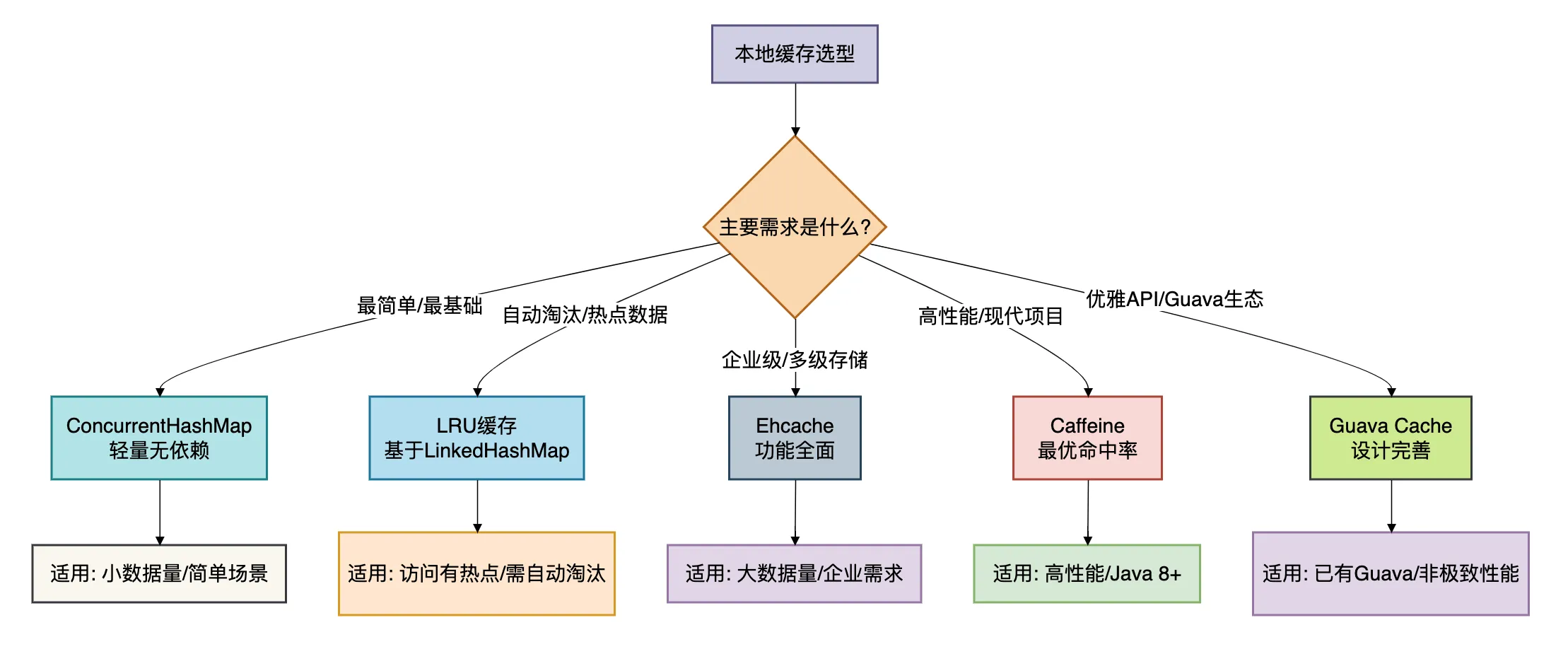
现在我们已经深入了解了5种本地缓存方案,如何在实际项目中选择呢?下面的对比图和选型指南可以帮助你做出决策。
方案对比总览
详细对比表
| 维度 | ConcurrentHashMap | LRU缓存 | Ehcache | Caffeine | Guava Cache |
|---|---|---|---|---|---|
| 易用性 | 极简 ⭐⭐⭐⭐⭐ | 简单 ⭐⭐⭐⭐☆ | 复杂 ⭐⭐☆☆☆ | 中等 ⭐⭐⭐☆☆ | 良好 ⭐⭐⭐⭐☆ |
| 功能完整性 | 基础 ⭐☆☆☆☆ | 基本 ⭐⭐☆☆☆ | 全面 ⭐⭐⭐⭐⭐ | 丰富 ⭐⭐⭐⭐☆ | 完善 ⭐⭐⭐⭐☆ |
| 性能 | 极优 ⭐⭐⭐⭐⭐ | 良好 ⭐⭐⭐☆☆ | 中等 ⭐⭐⭐☆☆ | 卓越 ⭐⭐⭐⭐⭐ | 优秀 ⭐⭐⭐⭐☆ |
| 内存管理 | 无自动管理 ⭐☆☆☆☆ | LRU淘汰 ⭐⭐⭐☆☆ | 多级管理 ⭐⭐⭐⭐⭐ | 智能淘汰 ⭐⭐⭐⭐☆ | 完善管理 ⭐⭐⭐⭐☆ |
| 社区生态 | JDK自带 ⭐⭐⭐⭐⭐ | JDK自带 ⭐⭐⭐⭐⭐ | 成熟但老 ⭐⭐⭐☆☆ | 活跃增长 ⭐⭐⭐⭐☆ | 稳定但停滞 ⭐⭐⭐☆☆ |
| 适用规模 | 小型 ⭐⭐☆☆☆ | 中小型 ⭐⭐⭐☆☆ | 中大型 ⭐⭐⭐⭐☆ | 全规模 ⭐⭐⭐⭐⭐ | 中小型 ⭐⭐⭐☆☆ |
选型决策指南
根据不同的业务场景和技术要求,我给出以下选型建议:
-
初创项目/原型验证 → ConcurrentHashMap 或 LRU缓存
- 理由:快速实现,无需引入外部依赖
- 注意:随着业务增长,需要重构为更专业的方案
-
高性能要求/现代Java项目 → Caffeine
- 理由:最优的性能和命中率
- 注意:需要Java 8+环境
-
企业级复杂需求 → Ehcache
- 理由:功能全面,支持集群和持久化
- 注意:配置较复杂,学习成本高
-
已有Guava生态/API设计优先 → Guava Cache
- 理由:优雅的API,良好的开发者体验
- 注意:性能不是最优,且不再积极开发
-
特定场景需求:
- 访问有明显热点 → LRU缓存
- 需要自定义淘汰策略 → 基于ConcurrentHashMap自实现
- 内存敏感场景 → Caffeine(智能权重控制)
- 需要监控统计 → Ehcache或Caffeine
总结
本地缓存是Java应用中提升性能的利器,选择正确的方案可以让系统性能得到质的提升。
让我们回顾一下核心要点:
-
ConcurrentHashMap是最基础的方案,适合简单场景或作为自定义缓存的基础。
-
LRU缓存基于LinkedHashMap,解决了自动淘汰的问题,适合访问有热点的场景。
-
Ehcache是企业级选择,功能全面但较重,适合复杂的企业应用。
-
Caffeine是现代高性能缓存库,提供了最优的命中率和并发性能,是新项目的首选。
-
Guava Cache设计优雅,API友好,适合已经使用Guava库或对API设计有要求的项目。
**记住,没有最好的缓存方案,只有最适合的缓存方案。
我个人的倾向是:对于新项目,优先考虑Caffeine;对于已有Guava的项目,可以继续使用Guava Cache;对于特别简单的需求,用ConcurrentHashMap或LRU缓存;对于需要企业级特性的场景,选择Ehcache。
缓存虽好,但也要合理使用。过度缓存会增加系统复杂性,缓存不一致会导致业务问题。
最后说一句(求关注,别白嫖我)
如果这篇文章对您有所帮助,或者有所启发的话,帮忙关注一下我的同名公众号:苏三说技术,您的支持是我坚持写作最大的动力。
求一键三连:点赞、转发、在看。
关注公众号:【苏三说技术】,在公众号中回复:进大厂,可以免费获取我最近整理的10万字的面试宝典,好多小伙伴靠这个宝典拿到了多家大厂的offer。
更多项目实战在我的技术网站:http://www.susan.net.cn/project

 浙公网安备 33010602011771号