

SpringAI-ETL-DocumentReader
版本:1.1.2
官网地址:https://docs.spring.io/spring-ai/reference/api/etl-pipeline.html
1、描述
ETL全称:Extract(提取)、Transform(转换)、 Load (加载)
它是构建 RAG 项目中数据处理主要框架,从数据源到结构化向量存储,确保数据以最优格式供 AI 模型检索。
2、API概述
ETL包括三个主要组件:
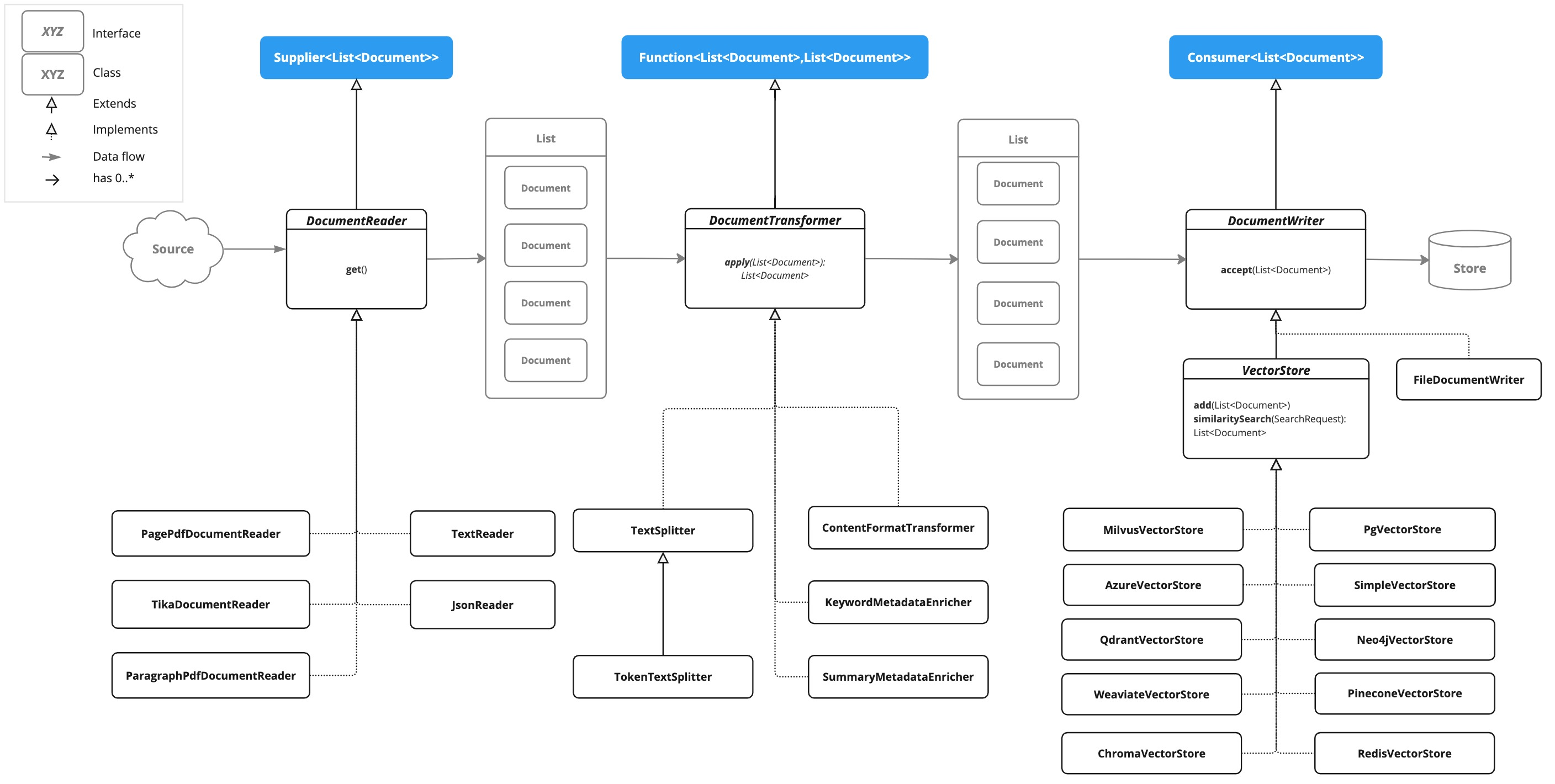
- DocumentReader,实现了 Supplier<List
> - DocumentTransformer,实现了Function<List
, List > - DocumentWriter,实现了 Consumer<List
>
Document是通过 DocumentReader 从 PDF、文本文件和其他文档类型创建的。
要构建一个简单的 ETL 管道,可以将每种类型的一个实例连接起来

3、ETL接口
3.1、DocumentReader
public interface DocumentReader extends Supplier<List<Document>> {
    default List<Document> read() {
        return (List)this.get();
    }
}
实现类:

3.2、DocumentTransformer
public interface DocumentTransformer extends Function<List<Document>, List<Document>> {
    default List<Document> transform(List<Document> transform) {
        return (List)this.apply(transform);
    }
}
实现类:

3.3、DocumentWriter
public interface DocumentWriter extends Consumer<List<Document>> {
    default void write(List<Document> documents) {
        this.accept(documents);
    }
}
实现类:

3.4、ETL类图
由下图可以看出 ETL 处理文件资源的过程
4、DocumentReaders
4.1、JSON
JsonReader用来处理 JSON 文档,将其转换为 Document 对象
a、构造函数:
- JsonReader(Resource resource)
- JsonReader(Resource resource, String… jsonKeysToUse)
- JsonReader(Resource resource, JsonMetadataGenerator jsonMetadataGenerator, String… jsonKeysToUse)
b、参数解释:
- resource:指向JSON文件的 Spring Resource 对象
- jsonKeysToUse:JSON 中的键数组,应将其用作生成 Document 对象中的文本内容
- jsonMetadataGenerator:一个可选的参数,用于为每个 Document 创建元数据
c、代码示例:
json:
[
	{
		"name":"张三",
		"age":18,
		"address":"上海"
	},
	{
		"name":"王五",
		"age":20,
		"address":"北京"

	},
	{
		"name":"赵六",
		"age":30,
		"address":"南京"
	}
]
Java 代码:
    /**
     * 使用JsonReader(Resource resource)构造函数
     * 获取 JSON 文件中所有的数据转为 Document 集合
     */
    @Test
    public void testJsonReader01() {
        FileSystemResource resource = new FileSystemResource("/Users/cmc/Desktop/个人信息.json");
        JsonReader jsonReader = new JsonReader(resource);
        List<Document> documents = jsonReader.get();
        System.out.println(documents);
    }
    // 输出结果
    // [Document{id='f3a008b3-a4bc-487f-9e96-e2aee7e30658', text='{name=张三, age=18, address=上海}', media='null', metadata={}, score=null},
    // Document{id='602aae93-fe4d-4fd9-8594-fb55201fae4a', text='{name=王五, age=20, address=北京}', media='null', metadata={}, score=null},
    // Document{id='928ebb01-d954-493a-950c-f4c42d3b2746', text='{name=赵六, age=30, address=南京}', media='null', metadata={}, score=null}]

    /**
     * 使用 JsonReader(Resource resource, String… jsonKeysToUse)
     * 获取 JSON 中的 name 的 key和对应的 value 转为 Document 集合
     */
    @Test
    public void testJsonReader02() {
        FileSystemResource resource = new FileSystemResource("/Users/cmc/Desktop/个人信息.json");
        JsonReader jsonReader = new JsonReader(resource,"name");
        List<Document> documents = jsonReader.get();
        System.out.println(documents);
    }
    // 输出结果
    // [Document{id='f9805397-1ffa-47b0-b992-cc9890581857', text='name: 张三', media='null', metadata={}, score=null},
    // Document{id='e95ba339-bd76-4a59-84a3-87e4a817a8c5', text='name: 王五', media='null', metadata={}, score=null},
    // Document{id='002c8e53-ba7c-4c8b-ada9-5761617c3f4d', text='name: 赵六', media='null', metadata={}, score=null}]

    /**
     * 使用 JsonReader(Resource resource, JsonMetadataGenerator jsonMetadataGenerator, String… jsonKeysToUse)
     * 获取 JSON 中的 name 的 key和对应的 value 转为 Document 集合,并且把 address 添加到每个 Document 对象的元数据中
     */
    @Test
    public void testJsonReader03() {
        FileSystemResource resource = new FileSystemResource("/Users/cmc/Desktop/个人信息.json");
        JsonReader jsonReader = new JsonReader(resource,m-> Map.of("address", m.get("address")),"name");
        List<Document> documents = jsonReader.get();
        System.out.println(documents);
    }
    // 输出结果
    // [Document{id='5075af45-b2ef-43c8-905b-da4b13cc8dd4', text='name: 张三', media='null', metadata={address=上海}, score=null},
    // Document{id='bc91767c-6a27-47a5-aeed-fa09b218575f', text='name: 王五', media='null', metadata={address=北京}, score=null},
    // Document{id='e166ee29-b44f-4529-8ad7-00e5494b551f', text='name: 赵六', media='null', metadata={address=南京}, score=null}]
4.2、Text
TextReader 处理纯文本文档,它将文本文件全部内容读入单个 Document 对象中,文件的内容即为 Document 内容,元数据会自动添加到 Document 中,可以通过方法 :getCustomMetadata()添加自定义的元数据到 Document 中,有以下两个默认的元数据:
- charset:用于读取文件的字符集(默认:“UTF-8”)
- source:源文本文件的文件名
a、构造函数
- TextReader(String resourceUrl)
- TextReader(Resource resource)
b、参数解释
- resourceUrl:表示要读取的资源 URL 的字符串。
- resource:指向文本文件的 Spring Resource 对象。
c、配置
- setCharset(Charset charset):设置用于读取文本文件的字符集。默认为 UTF-8。
- getCustomMetadata():返回一个可变映射,可以在其中为文档添加自定义元数据。
d、代码示例
    /**
     * 使用TextReader(Resource resource)
     */
    @Test
    public void testTextReader01() {
        FileSystemResource resource = new FileSystemResource("/Users/cmc/Desktop/测试文本.txt");
        TextReader textReader = new TextReader(resource);
        textReader.getCustomMetadata().put("k","v");
        List<Document> documents = textReader.get();
        System.out.println(documents);
    }
    // 输出结果
    // [Document{id='3edf9983-ae08-4f68-b737-e38cd88dab8d', text='测试文本', media='null', metadata={charset=UTF-8, k=v, source=测试文本.txt}, score=null}]

    /**
     * 使用TextReader(String resourceUrl)
     */
    @Test
    public void testTextReader02() {
        TextReader textReader = new TextReader("https://docs.spring.io/spring-ai/reference/api/etl-pipeline.html#_text");
        List<Document> documents = textReader.get();
        System.out.println(documents);
        // 输出结果
        // [Document{id='f704d626-9dac-4653-862e-29681cc16f48', text='<!DOCTYPE html>
        //<html lang="en">
        //  <script src="https://cdn.cookielaw.org/scripttemplates/otSDKStub.js" data-domain-script="018ee325-b3a7-7753-937b-b8b3e643b1a7"></script><script>function OptanonWrapper() {}</script><script>function setGTM(w, d, s, l, i) { w[l] = w[l] || []; w[l].push({ "gtm.start": new Date().getTime(), event: "gtm.js"}); var f = d.getElementsByTagName(s)[0], j = d.createElement(s), dl = l != "dataLayer" ? "&l=" + l : ""; j.async = true; j.src = "https://www.googletagmanager.com/gtm.js?id=" + i + dl; f.parentNode.insertBefore(j, f); } if (document.cookie.indexOf("OptanonConsent") > -1 && document.cookie.indexOf("groups=") > -1) { setGTM(window, document, "script", "dataLayer", "GTM-W8CQ8TL"); } else { waitForOnetrustActiveGroups(); } var timer; function waitForOnetrustActiveGroups() { if (document.cookie.indexOf("OptanonConsent") > -1 && document.cookie.indexOf("groups=") > -1) { clearTimeout(timer); setGTM(window, document, "script", "dataLayer", "GTM-W8CQ8TL"); } else { timer = setTimeout(waitForOnetrustActiveGroups, 250); }}</script>
        //    <meta charset="utf-8">......', media='null', metadata={charset=UTF-8, source=etl-pipeline.html}, score=null}]
    }
4.3、HTML
JsoupDocumentReader 处理 HTML 文档,使用 JSoup 库将其转换为 Document 对象的列表。
JsoupDocumentReaderConfig 允许自定义 JsoupDocumentReader 的行为
- charset:指定 HTML 文档的字符编码(默认为 "UTF-8")。
- selector:一个 JSoup CSS 选择器,用于指定从哪些元素中提取文本(默认为 "body")。
- separator:用于连接来自多个选定元素的文本的字符串(默认为 "\n")。
- allElements:如果为 true,则从 元素中提取所有文本,忽略 selector(默认为 false)。
- groupByElement:如果为 true,则为 selector 匹配的每个元素创建一个单独的 Document(默认为 false)。
- includeLinkUrls:如果为 true,则提取绝对链接 URL 并将其添加到元数据中(默认为 false)。
- metadataTags:要提取内容的 标签名称列表(默认为 ["description", "keywords"])。
- additionalMetadata:允许您向所有创建的 Document 对象添加自定义元数据。
引入依赖:
     <dependency>
            <groupId>org.springframework.ai</groupId>
            <artifactId>spring-ai-jsoup-document-reader</artifactId>
        </dependency>
a、构造函数
- JsoupDocumentReader(String htmlResource)
- JsoupDocumentReader(Resource htmlResource)
- JsoupDocumentReader(String htmlResource, JsoupDocumentReaderConfig config)
- JsoupDocumentReader(Resource htmlResource, JsoupDocumentReaderConfig config)
b、参数解释:
String htmlResource:html 的 类路径
Resource htmlResource:html 的 Spring Resource 对象
JsoupDocumentReaderConfig config:Jsoup 文件读取的配置
c、代码示例
示例文档:my-page.html
<!DOCTYPE html>
<html lang="en">
<head>
<meta charset="UTF-8">
<title>My Web Page</title>
<meta name="description" content="A sample web page for Spring AI">
<meta name="keywords" content="spring, ai, html, example">
<meta name="author" content="John Doe">
<meta name="date" content="2024-01-15">
<link rel="stylesheet" href="style.css">
</head>
<body>
<header>
<h1>Welcome to My Page</h1>
</header>
<nav>
<ul>
<li><a href="/">Home</a></li>
<li><a href="/about">About</a></li>
</ul>
</nav>
<article>
<h2>Main Content</h2>
<p>This is the main content of my web page.</p>
<p>It contains multiple paragraphs.</p>
<a href="https://www.example.com">External Link</a>
</article>
<footer>
<p>© 2024 John Doe</p>
</footer>
</body>
</html>
java 代码
 /**
     * 使用JsoupReader(Resource resource)
     */
    @Test
    public void testJsoupReader01() {
        FileSystemResource resource = new FileSystemResource("/Users/cmc/Desktop/my-page.html");
        JsoupDocumentReader jsoupDocumentReader = new JsoupDocumentReader(resource);
        List<Document> documentList = jsoupDocumentReader.get();
        System.out.println(documentList);
    }
    // 输出结果
    // [Document{id='e2798a0d-d133-48e3-bc34-f9f710dff9b3', text='Welcome to My Page Home About Main Content This is the main content of my web page. It contains multiple paragraphs. External Link © 2024 John Doe', media='null',
    // metadata={description=A sample web page for Spring AI, keywords=spring, ai, html, example, title=My Web Page}, score=null}]

    /**
     * 使用 JsoupDocumentReader(Resource htmlResource, JsoupDocumentReaderConfig config)
     */
    @Test
    public void testJsoupReader02() {
        FileSystemResource resource = new FileSystemResource("/Users/cmc/Desktop/my-page.html");
        JsoupDocumentReaderConfig jsoupDocumentReaderConfig = JsoupDocumentReaderConfig.builder()
                .selector("article p")
                .charset("utf-8")
                .includeLinkUrls(true)
                .metadataTags(List.of("author", "date"))
                .additionalMetadata("source", "my-page.html")
                .build();
        JsoupDocumentReader jsoupDocumentReader = new JsoupDocumentReader(resource,jsoupDocumentReaderConfig);
        List<Document> documentList = jsoupDocumentReader.get();
        System.out.println(documentList);
    }
    // 输出结果
    // [Document{id='a16c410f-74a5-4afb-9b85-0d0bf321c6e4', text='This is the main content of my web page.
    // It contains multiple paragraphs.', media='null', metadata={date=2024-01-15, linkUrls=[, , https://www.example.com],
    // source=my-page.html, title=My Web Page, author=John Doe}, score=null}]
4.4、Markdown、PDF可自行查看官网用法
使用依赖:
<!--        支持处理 markdown 文档-->
        <dependency>
            <groupId>org.springframework.ai</groupId>
            <artifactId>spring-ai-markdown-document-reader</artifactId>
        </dependency>
<!--        支持处理 PDF 文档-->
        <dependency>
            <groupId>org.springframework.ai</groupId>
            <artifactId>spring-ai-pdf-document-reader</artifactId>
        </dependency>
4.5、Tika
TikaDocumentReader 使用 Apache Tika 从各种文档格式(例如 PDF、DOC/DOCX、PPT/PPTX 和 HTML)中提取文本。有关支持格式的完整列表,请参阅 Tika 文档。
依赖:
<dependency>
    <groupId>org.springframework.ai</groupId>
    <artifactId>spring-ai-tika-document-reader</artifactId>
</dependency>
本文来自博客园,作者:0xCAFEBABE_001,转载请注明原文链接:https://www.cnblogs.com/0xcafebabe001/p/19444093

 浙公网安备 33010602011771号