
阿泰的软件实用主义

水晶报表/BOE 第4季 [8月—9月]

博客园 首页 新随笔 联系 订阅 管理
  143 Posts :: 9 Stories :: 1661 Comments :: 17 Trackbacks
前文《在水晶报表中实现任意选择指定字段显示》中有朋友留言说是有无C#版本,最近有时间,重写了一下。
一是使用了VS2005 C#2.0 + Crystal Report 2008,另外就是把模板的实现方式也更改了一下。

在这里就不一步一步讲了,模板的实现方式和xsd文件及mdb文件,请从《在水晶报表中实现任意选择指定字段显示》一文中下载
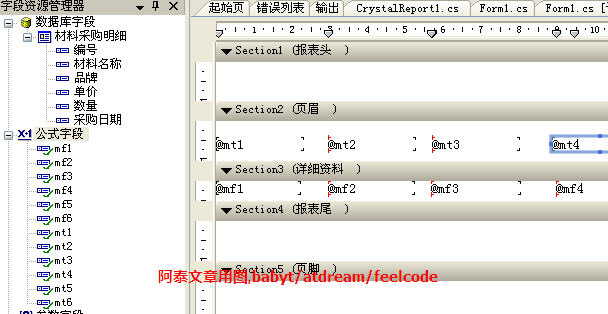
不过模板在这里做一下说明,本文中的模板中的表头部分,未使用参数字段,而是使用了公式字段。
如下图所示


最终效果为
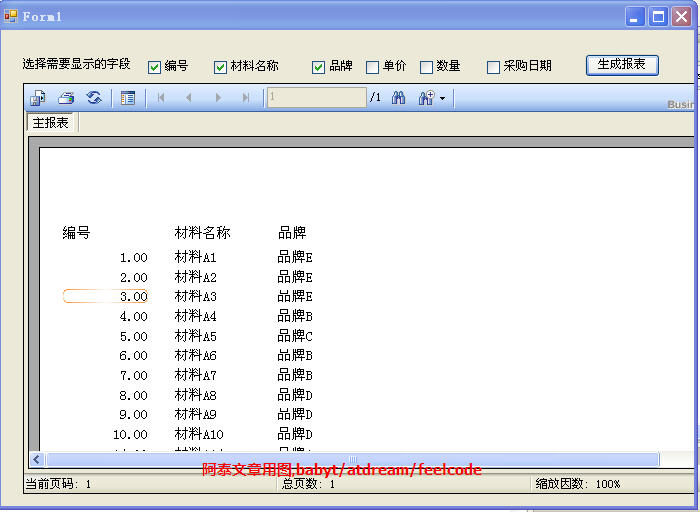

各控件都使用了默认名称,主要的事件为Click

CR2008自动增加如下代码
1using CrystalDecisions.Shared;
2using CrystalDecisions.CrystalReports.Engine;
3using CrystalDecisions.Windows.Forms;

Click事件代码:

 1private void button1_Click(object sender, EventArgs e)
 2        {
 3
 4            
 5            String cnstr = "";
 6            //保持字段的字符串 
 7            String fldstr = "";
 8            //保持字段名称的数组 
 9            String[] fldArr=new string[6] ;
10            int i = 0;
11            int j = 0;
12             
13            
14
15            //--------------------------------------------------------------------- 
16            //获取选取的字段并进行处理 
17            if (checkBox1.Checked == true)
18                fldstr = fldstr + "," + checkBox1.Text;
19            if (checkBox2.Checked == true)
20                fldstr = fldstr + "," + checkBox2.Text;
21            if (checkBox3.Checked == true)
22                fldstr = fldstr + "," + checkBox3.Text;
23            if (checkBox4.Checked == true)
24                fldstr = fldstr + "," + checkBox4.Text;
25            if (checkBox5.Checked == true)
26                fldstr = fldstr + "," + checkBox5.Text;
27            if (checkBox6.Checked == true)
28                fldstr = fldstr + "," + checkBox6.Text;
29
30            if (fldstr == ""{
31                MessageBox.Show("请选择要显示的字段");
32                return;
33            }

34
35            if (fldstr.Substring(01== ","
36                fldstr = fldstr.Substring(1, fldstr.Length - 1);
37
38            fldArr = fldstr.Split(new Char[] {','});
39
40             cnstr= "Provider=Microsoft.Jet.OLEDB.4.0;Data Source=" + Application.StartupPath + "\\BBT_Crystal.mdb" ;
41            OleDbConnection cn=new OleDbConnection(cnstr);
42            cn.Open();
43
44            string sql="";
45            sql=" Select " + fldstr + " From 材料采购明细" ;
46
47            OleDbDataAdapter da1=new OleDbDataAdapter(sql,cn);
48
49            DataSet ds1=new DataSet();
50            da1.Fill(ds1, "材料采购明细");
51 
52
53            CrystalReport1 crReportDocument=new CrystalReport1();
54
55
56            for(i=0;i<fldArr.Length;i++)
57            {
58            
59               // 将公式绑定到具体字段 
60                crReportDocument.DataDefinition.FormulaFields["mf" + (i + 1).ToString()].Text = "{材料采购明细." + fldArr[i] +"}" ;
61                crReportDocument.DataDefinition.FormulaFields["mt" + (i + 1).ToString()].Text = "\"" + fldArr[i] + "\"";
62            }

63
64            for (j =i+ 1; j <= 6; j++)
65            {
66                crReportDocument.DataDefinition.FormulaFields["mt" + (j).ToString()].Text = "";
67            }

68
69            crReportDocument.SetDataSource(ds1);
70            crystalReportViewer1.ReportSource=crReportDocument;          
71
72        }


使用公式构造表头字段节约了不少代码,呵呵。
当然这只是个程序模型~~

-EOF-

posted on 2008-01-03 19:21 阿泰 阅读(1271) 评论(46)  编辑 收藏 所属分类: CR我的原创

Feedback

#1楼  2008-01-03 19:43 破曉之陽      
不错。
  回复  引用  查看    

#2楼  2008-01-04 10:19 力争 [未注册用户]
谢谢啦
  回复  引用    

#3楼  2008-01-04 10:24 力争 [未注册用户]
还有个问题要请教一下 就是用水晶12 + .net(C#) 2.0 做的这个 要是多表联合查询怎么写,比如说两个表的例子,你这个例子是一个表的啊,先谢谢了
  回复  引用    

#4楼  2008-01-04 10:51 力争 [未注册用户]
我按照你给的例子做了两个表联合查询的,用push模式,但老显示加载报表失败,不知道怎么弄了,请阿泰帮帮忙啊 谢谢``
  回复  引用    

#5楼 [楼主] 2008-01-04 16:33 阿泰      
理论上讲这个例子跟用什么数据库,用几个表没有直接关系
当然,多表的时候,需要用点技巧,SQL语句构造时要与xsd进行对应。
  回复  引用  查看    

#6楼  2008-01-07 10:11 力争 [未注册用户]
阿泰,这个是我在你给点例子上改的,结合上次找的多表联合查询Push模式下两个表联合查询的例子,我想想应该这么写,但是不行,两个表内联我也试了还是报错啊,请博主帮帮忙了,不胜感激啊,谢谢...

protected void Button1_Click(object sender, EventArgs e)
{
String cnstr = "";
//保持字段的字符串
String fldstr = "";
//保持字段名称的数组
String[] fldArr=new string[6] ;
int i = 0;
int j = 0;
//离散值
ParameterDiscreteValue DiscreteVal=new ParameterDiscreteValue();

//---------------------------------------------------------------------
//获取选取的字段并进行处理
if (CheckBox1.Checked == true)
fldstr = fldstr + "," + CheckBox1.Text;
if (CheckBox2.Checked == true)
fldstr = fldstr + "," + CheckBox2.Text;
if (CheckBox3.Checked == true)
fldstr = fldstr + "," + CheckBox3.Text;
if (CheckBox4.Checked == true)
fldstr = fldstr + "," + CheckBox4.Text;
if (CheckBox5.Checked == true)
fldstr = fldstr + "," + CheckBox5.Text;
if (CheckBox6.Checked == true)
fldstr = fldstr + "," + CheckBox6.Text;

if (fldstr == "") {
this.Label1.Text="请选择要显示的字段";
return;
}

if (fldstr.Substring(0, 1) == ",")
fldstr = fldstr.Substring(1, fldstr.Length - 1);

fldArr = fldstr.Split(new Char[] {','});

cnstr = "Server=127.0.0.1;DataBase=iwt_TJEPAsyses;UID=sa;PWD=";

SqlConnection cn = new SqlConnection(cnstr);

cn.Open();

string sql="";
//第一个表
sql = " Select " + fldstr + " From Data_List";
//第二个表,需要两个表联合查询的
string sql1 = "Select * from vDevice_List";

SqlDataAdapter da = new SqlDataAdapter(sql, cn);
SqlDataAdapter da1 = new SqlDataAdapter(sql1, cn);

DataSetExample ds1 = new DataSetExample();
//同时填充到数据库中
da.Fill(ds1, "Data_List");
da1.Fill(ds1, "vDevice_List");

ReportDocument crReportDocument = new ReportDocument();

for(i=0;i<fldArr.Length;i++)
{
//// 将公式绑定到具体字段
crReportDocument.DataDefinition.FormulaFields["mf" + (i + 1).ToString()].Text = "{Data_List." + fldArr[i] + "}";
crReportDocument.DataDefinition.FormulaFields["mt" + (i + 1).ToString()].Text = "\"" + fldArr[i] + "\"";

}

for (j =i+ 1; j <= 6; j++)
{
crReportDocument.DataDefinition.FormulaFields["mt" + (j).ToString()].Text = "";

}

//crReportDocument.Load(Server.MapPath("CrystalReport1111.rpt"));
crReportDocument.SetDataSource(ds1);
CrystalReportViewer1.ReportSource = crReportDocument;

}
  回复  引用    

#7楼  2008-01-07 11:25 力争 [未注册用户]
crReportDocument.DataDefinition.FormulaFields["mf" + (i + 1).ToString()].Text = "{Data_List." + fldArr[i] + "}";
这句话老报错,运行时候报错 加载报表失败,原因报表文件路径无效,不知道这个地方怎么改了,单表查询时候也是这个错误,求助啊 ,谢谢
  回复  引用    

#8楼  2008-01-07 15:07 力争 [未注册用户]
// 将公式绑定到具体字段
crReportDocument.DataDefinition.FormulaFields["mf" + (i + 1).ToString()].Text = "{Data_List." + fldArr[i] + "}";
crReportDocument.DataDefinition.FormulaFields["mt" + (i + 1).ToString()].Text = "\"" + fldArr[i] + "\"";

请问一下这里边的mf 和 mt 是 什么意思 在这老报报表文件路径错误 不知道怎么改呀 谢谢啊

  回复  引用    

#9楼  2008-01-07 15:24 力争 [未注册用户]
//离散值
ParameterDiscreteValue DiscreteVal=new ParameterDiscreteValue();

还有这个有用到么??? 问题太多了 不好意思 请阿泰见谅 谢谢啊
学习中................
  回复  引用    

#10楼 [楼主] 2008-01-07 22:20 阿泰      
--引用--------------------------------------------------
力争: //离散值
ParameterDiscreteValue DiscreteVal=new ParameterDiscreteValue();

还有这个有用到么??? 问题太多了 不好意思 请阿泰见谅 谢谢啊
学习中................
--------------------------------------------------------

这个确实没用到,本来是为了容纳字段、标题的来着,我在代码里删除了

  回复  引用  查看    

#11楼 [楼主] 2008-01-07 22:22 阿泰      
--引用--------------------------------------------------
力争: // 将公式绑定到具体字段
crReportDocument.DataDefinition.FormulaFields["mf" + (i + 1).ToString()].Text = "{Data_List." + fldArr[i] + "}";
crReportDocument.DataDefinition.FormulaFields["mt" + (i + 1).ToString()].Text = "\"" + fldArr[i] + "\"";

请问一下这里边的mf 和 mt 是 什么意思 在这老报报表文件路径错误 不知道怎么改呀 谢谢啊

--------------------------------------------------------

mf / mt 是自己定义的字段名称和标题名称,并非是特定用法。
可能是我的例子做得过清楚(?),呵呵

我觉得你要实现的效果和我这个实例是有些差别的,如果可以的话,请仔细描述下要求,并把代码和模板发给我,我再做个例子看看。
babyt@163.com,这几天白天没空了,只有晚上有点时间~~

  回复  引用  查看    

#12楼  2008-01-10 10:56 力争 [未注册用户]
阿泰 你好 呵呵 我又回来了 我又看了下你给的例子 多表联合查询的我用了个视图 差不多功能实现了 还有点小小的问题要问一下......
protected void Button1_Click(object sender, EventArgs e)
{
String cnstr = "";
//保持字段的字符串
String fldstr = "";
//保持字段名称的数组
String[] fldArr = new string[6];
int i = 0;
int j = 0;
//离散值
ParameterDiscreteValue DiscreteVal = new ParameterDiscreteValue();

//获取选取的字段并进行处理
if (CheckBox1.Checked == true)
fldstr = fldstr + "," + CheckBox1.Text;
if (CheckBox2.Checked == true)
fldstr = fldstr + "," + CheckBox2.Text;
if (CheckBox3.Checked == true)
fldstr = fldstr + "," + CheckBox3.Text;
if (CheckBox4.Checked == true)
fldstr = fldstr + "," + CheckBox4.Text;
if (CheckBox5.Checked == true)
fldstr = fldstr + "," + CheckBox5.Text;
if (CheckBox6.Checked == true)
fldstr = fldstr + "," + CheckBox6.Text;

if (fldstr == "")
{
this.Label1.Text = "请选择要显示的字段";
return;
}

if (fldstr.Substring(0, 1) == ",")
fldstr = fldstr.Substring(1, fldstr.Length - 1);
fldArr = fldstr.Split(new Char[] { ',' });
cnstr = "Server=127.0.0.1;DataBase=iwt_TJEPAsyses;UID=sa;PWD=";
SqlConnection cn = new SqlConnection(cnstr);
cn.Open();
string sql = "";
//第一个表
sql = " Select " + fldstr + " From Data_List_vDevice_List";
SqlDataAdapter da = new SqlDataAdapter(sql, cn);
DataSet ds1 = new DataSet();
//DataSetView ds1 = new DataSetView();
//同时填充到数据库中
da.Fill(ds1, "Data_List_vDevice_List");
cn.Close();
CrystalReportView crReportDocument = new CrystalReportView();
for (i = 0; i < fldArr.Length; i++)
{
// 将公式绑定到具体字段
crReportDocument.DataDefinition.FormulaFields["mf" + (i + 1).ToString()].Text = "{Data_List_vDevice_List." + fldArr[i] + "}";
crReportDocument.DataDefinition.FormulaFields["mt" + (i + 1).ToString()].Text = "\"" + fldArr[i] + "\"";
}

for (j = i + 1; j <= 6; j++)
{
crReportDocument.DataDefinition.FormulaFields["mf" + (j).ToString()].Text = "";
crReportDocument.DataDefinition.FormulaFields["mt" + (j).ToString()].Text = "";
}
//设置报表数据源
crReportDocument.SetDataSource(ds1);
CrystalReportViewer1.ReportSource = crReportDocument;
}
  回复  引用    

#13楼  2008-01-10 10:57 力争 [未注册用户]
for (i = 0; i < fldArr.Length; i++)
{
// 将公式绑定到具体字段
crReportDocument.DataDefinition.FormulaFields["mf" + (i + 1).ToString()].Text = "{Data_List_vDevice_List." + fldArr[i] + "}";
crReportDocument.DataDefinition.FormulaFields["mt" + (i + 1).ToString()].Text = "\"" + fldArr[i] + "\"";
}

for (j = i + 1; j <= 6; j++)
{
crReportDocument.DataDefinition.FormulaFields["mf" + (j).ToString()].Text = ""; //这里是我自己按照你给的例子又加了一个,如果不加这段代码我这会报错,找不到相应的数据库字段
crReportDocument.DataDefinition.FormulaFields["mt" + (j).ToString()].Text = "";
}

  回复  引用    

#14楼 [楼主] 2008-01-10 11:12 阿泰      
@力争
呵呵,恭喜啦!
用视图~~ 这就是多表对应关系的核心所在了
当然也可以用纯SQL结合hashtable来实现,不过就要麻烦些,多一层对应关系的转换
  回复  引用  查看    

#15楼  2008-01-11 08:32 njujl [未注册用户]
请问一下阿泰,如果多列之间有线条(也就是出现了表格线),怎么来控制多列的显示呢?你这个方法好像只能控制没有线条的呀?
  回复  引用    

#16楼 [楼主] 2008-01-11 09:17 阿泰      
--引用--------------------------------------------------
njujl: 请问一下阿泰,如果多列之间有线条(也就是出现了表格线),怎么来控制多列的显示呢?你这个方法好像只能控制没有线条的呀?
--------------------------------------------------------

请参考此文:

在水晶报表中实现任意选择指定字段显示(补充)-格线的实现
http://www.cnblogs.com/babyt/archive/2005/04/21/142908.html


  回复  引用  查看    

#17楼  2008-01-15 09:38 njujl [未注册用户]
谢谢阿泰,看了那片文章,实践了一下,发现一个问题
带框对象左右之间的线重合可以通过 控制每个对象的left来控制,但是
在详细节中,我想让多行之间上下线都重合怎么总是不行啊,用了fit section(适应节),显示已经是适应了,但实际效果还是每两行之间有空,我看了节的高度总是比对象(带框)要大一些,改不了,你那个效果怎么出来的呢?谢谢!
  回复  引用    

#18楼  2008-02-22 11:36 wd900      
谢谢阿泰,受益良多.例子也简单明了.谢谢
  回复  引用  查看    

#19楼  2008-03-03 20:27 dennesswu [未注册用户]
阿泰您好:

有个问题请教,在动态显示过程中,比如有10列 我选择显示5列

如果把这5列均匀显示在页面上呢?请问怎么实现?

或者如何单独控制某一列的长度呢,因为每一列的大小并不相同
可能有的是数字,有的是很长的字符串
  回复  引用    

#20楼  2008-04-07 10:43 猫虫虫 [未注册用户]
LZ,你好 我在运行的时候出现了这样的错误

This field name is not known. Error in File C:\DOCUME~1\ADMINI~1\LOCALS~1\Temp\CrystalReport {87350352-CECA-4402-BBD5-32C94BA17B42}.rpt: Error in formula . '{table.num}' This field name is not known.

请问可能是什么原因呢?
  回复  引用    

#21楼 [楼主] 2008-04-07 10:52 阿泰      
你需要确认一下 这个表里的这个字段是不是真实存在


  回复  引用  查看    

#22楼  2008-04-07 14:12 猫虫虫 [未注册用户]
找到原因了 我的DATASET的名称是SEARCH 下面使用了TABLE
谢谢LZ了
另外补充问一下~ 这个绑定以后我使用默认的保存 出现的是个空的数据=-=b
PS 我做的是WEB
  回复  引用    

#23楼  2008-04-22 15:24 kathyowen [未注册用户]
表头可以直接用文本字段,能后在程序中改变他TEXT属性就可以了。何必多添加几个公式字段呢。
  回复  引用    

#24楼  2008-04-23 03:15 三断笛 [未注册用户]
为什么绑定公式时提示"拒绝的权限"呢?
FormulaFields(1).Text = 我的公式
  回复  引用    

#25楼 [楼主] 2008-04-26 09:58 阿泰      
@kathyowen

这里只是种思路,之前的文章中我还用了参数字段,呵呵
  回复  引用  查看    

谢谢
  回复  引用    

#27楼  2008-04-28 02:29 wingor [未注册用户]
阿泰,您好!
我初学者,照你的做了一个,已经快要成功了,只剩下一个问题:
myreport.DataDefinition.FormulaFields["myField" + (k + 1).ToString()].Text = ("{t_tenement_info.tid}");

但是myField1可以和任何类型的字段绑定,其他的myField2,myField3....就不行了,这些公式指定的字段只能是数据库里面为文本型的字段,数字型等就不能绑定,否者会提示
A number is required here. Error in File C:\DOCUME~1\wingor\LOCALS~1\Temp\CrystalReport2 {A2AF62AB-C2F5-44AF-B41A-5CC0C7F9F094}.rpt: Error in formula . 'if {@myField6}="" then ' A number is required here.
上面tid字段是数字型,就提示错误
希望能指教一下,不慎感激!

  回复  引用    

#28楼 [楼主] 2008-04-28 09:56 阿泰      
@wingor

是因为类型不匹配,
如果除了第一个字段外其余的字段都是数值型的话
将myField2,3,4等的初始内容设置为0就可以了
  回复  引用  查看    

#29楼  2008-06-05 10:36 彭贺 [未注册用户]
DiskFileDestinationOptions options = new DiskFileDestinationOptions();
ReportDocument document = new ReportDocument();
ExportOptions options2 = new ExportOptions();
document.Load(iRPath);
options.DiskFileName = iOPath;

ArrayList arr = data[0] as ArrayList;
string[] HeaderData = arr[0].ToString().Split('|');
ArrayList array = new ArrayList();
DataTable iTable = new DataTable();
DataSet ds = new DataSet("tb");
if (arr.Count > 0)
{
for (int i = 0; i < HeaderData.Length; i++)
{
DataColumn dc = new DataColumn(HeaderData[i].ToString(), Type.GetType("System.String"));
iTable.Columns.Add(dc);
}
}
ArrayList ItemData = new ArrayList();
for (int j = 1; j < data.Count; j++)
{
ItemData.Add(data[j]);
}

for (int p = 0; p < ItemData.Count; p++)
{
DataRow dr = iTable.NewRow();
for (int N = 0; N < ((ArrayList)ItemData[p]).Count; N++)
{
dr[HeaderData[N]] = ((ArrayList)ItemData[p])[N].ToString();

}
iTable.Rows.Add(dr);

}
ds.Tables.Add(iTable);


if (arr.Count > 0)
{
for (int i = 0; i < HeaderData.Length; i++)
{
// 将公式绑定到具体字段
document.DataDefinition.FormulaFields["ParaField" + (i + 1).ToString()].Text = "{tb." + HeaderData[i] + "}";
document.DataDefinition.FormulaFields["myParaField" + (i + 1).ToString()].Text = "{tb." + HeaderData[i] + "}";

}
}

//for (int j = 1; j <= 14; j++)
//{
// document.DataDefinition.FormulaFields["myParaField" + (j).ToString()].Text = "";
//}


int Fcount = document.DataDefinition.FormulaFields.Count;

options2.ExportDestinationType = ExportDestinationType.DiskFile;
options2.ExportDestinationOptions = options;
document.SetDataSource(ds);


switch (iExtTP)
{
case ExtType.XLS:
options2.ExportFormatType = ExportFormatType.Excel;
break;

case ExtType.RTF:
options2.ExportFormatType = ExportFormatType.RichText;
break;

case ExtType.DOC:
options2.ExportFormatType = ExportFormatType.WordForWindows;
break;

case ExtType.PDF:
options2.ExportFormatType = ExportFormatType.PortableDocFormat;
break;
}
if (iParam != null)
{
foreach (ParameterField field in document.ParameterFields)
{
if (iParam[field.Name] != null)
{
document.SetParameterValue(field.Name, iParam[field.Name]);
}
}
}

document.Export(options2);
  回复  引用    

#30楼  2008-06-05 10:37 彭贺 [未注册用户]
帮我看看这怎么总提示 文件 C:\WINDOWS\TEMP\ThingGet {BD90F71B-80AE-4106-A022-80D1A8291CB7}.rpt 内出错:
公式 <myParaField1>.
'序号'
剩余文本不是公式的一部分。
DiskFileDestinationOptions options = new DiskFileDestinationOptions();
ReportDocument document = new ReportDocument();
ExportOptions options2 = new ExportOptions();
document.Load(iRPath);
options.DiskFileName = iOPath;

ArrayList arr = data[0] as ArrayList;
string[] HeaderData = arr[0].ToString().Split('|');
ArrayList array = new ArrayList();
DataTable iTable = new DataTable();
DataSet ds = new DataSet("tb");
if (arr.Count > 0)
{
for (int i = 0; i < HeaderData.Length; i++)
{
DataColumn dc = new DataColumn(HeaderData[i].ToString(), Type.GetType("System.String"));
iTable.Columns.Add(dc);
}
}
ArrayList ItemData = new ArrayList();
for (int j = 1; j < data.Count; j++)
{
ItemData.Add(data[j]);
}

for (int p = 0; p < ItemData.Count; p++)
{
DataRow dr = iTable.NewRow();
for (int N = 0; N < ((ArrayList)ItemData[p]).Count; N++)
{
dr[HeaderData[N]] = ((ArrayList)ItemData[p])[N].ToString();

}
iTable.Rows.Add(dr);

}
ds.Tables.Add(iTable);


if (arr.Count > 0)
{
for (int i = 0; i < HeaderData.Length; i++)
{
// 将公式绑定到具体字段
document.DataDefinition.FormulaFields["ParaField" + (i + 1).ToString()].Text = "{tb." + HeaderData[i] + "}";
document.DataDefinition.FormulaFields["myParaField" + (i + 1).ToString()].Text = "{tb." + HeaderData[i] + "}";

}
}

//for (int j = 1; j <= 14; j++)
//{
// document.DataDefinition.FormulaFields["myParaField" + (j).ToString()].Text = "";
//}


int Fcount = document.DataDefinition.FormulaFields.Count;

options2.ExportDestinationType = ExportDestinationType.DiskFile;
options2.ExportDestinationOptions = options;
document.SetDataSource(ds);


switch (iExtTP)
{
case ExtType.XLS:
options2.ExportFormatType = ExportFormatType.Excel;
break;

case ExtType.RTF:
options2.ExportFormatType = ExportFormatType.RichText;
break;

case ExtType.DOC:
options2.ExportFormatType = ExportFormatType.WordForWindows;
break;

case ExtType.PDF:
options2.ExportFormatType = ExportFormatType.PortableDocFormat;
break;
}
if (iParam != null)
{
foreach (ParameterField field in document.ParameterFields)
{
if (iParam[field.Name] != null)
{
document.SetParameterValue(field.Name, iParam[field.Name]);
}
}
}

document.Export(options2);
  回复  引用    

#31楼  2008-06-05 10:38 彭贺 [未注册用户]
CrystalDecisions.CrystalReports.Engine.FormulaException: 该字段名未知。文件 C:\WINDOWS\TEMP\ThingGet {ED516FB0-FB95-4434-B235-E92EE47F9C02}.rpt 内出错:公式 . '{tb.序号}' 该字段名未知。 ---> System.Runtime.InteropServices.COMException (0x80041019): 该字段名未知。文件 C:\WINDOWS\TEMP\ThingGet {ED516FB0-FB95-4434-B235-E92EE47F9C02}.rpt 内出错:公式 . '{tb.序号}' 该字段名未知。
  回复  引用    

#32楼  2008-06-11 17:07 dingjie [未注册用户]
阿泰,我用你的方法实现了动态的任意字段显示,但是现在的字段太多,想在两页里面打印怎么实现呢?
  回复  引用    

#33楼  2008-06-12 08:18 lsharp      
您好!首先谢谢你的文章对我的帮助.有一个问题:就像你的例子中,编号为:1.00 2.00 怎么把.00去掉 只显示整数呢 我公式字段动态绑定的字段是int型的
  回复  引用  查看    

#34楼  2008-06-12 08:25 dingjie [未注册用户]
@lsharp


我来回答你吧 右键弹出菜单,设计-默认设置-字段-数字,选择你想要的格式


  回复  引用    

#35楼  2008-06-12 08:26 dingjie [未注册用户]
不知泰哥什么时候能看看我的贴子
  回复  引用    

#36楼  2008-07-03 08:58 dingjie [未注册用户]
阿泰,我用你的方法实现了动态的任意字段显示,但是现在的字段太多,想在两页里面打印怎么实现呢?
  回复  引用    

阿泰 我用的是VS2005自带的水晶报表 在本机运行一切正常 但把程序上传到服务器后 水晶报表就会报错 : “报表路径错误” 我已经在网上查了好多天了 还是没解决 我用的是:
ReportDocument customerReport = new ReportDocument();
string reportPath = Server.MapPath(Request.ApplicationPath) + "\\CrystalReport.rpt";
customerReport.Load(reportPath);
customerReport.SetDataSource(dataset.Tables["dt"]);
CrystalReportViewer1.ReportSource = customerReport;

string temppath = DateTime.Now.ToString("yyyyMMdd") + ".pdf";

ExportOptions crExportOptions = new ExportOptions();

DiskFileDestinationOptions crDiskFileDestinationOptions = new

DiskFileDestinationOptions();

crExportOptions = customerReport.ExportOptions;

crExportOptions.ExportFormatType = ExportFormatType.PortableDocFormat;

crExportOptions.ExportDestinationType = ExportDestinationType.DiskFile;

string OutputFilePath = Server.MapPath(Request.ApplicationPath) + "\\" + temppath;

crDiskFileDestinationOptions.DiskFileName = OutputFilePath;

crExportOptions.DestinationOptions = crDiskFileDestinationOptions;

customerReport.Export();
Response.Clear();
Response.ClearContent();
Response.ClearHeaders();
Response.ContentType = "application/pdf";
Response.WriteFile(OutputFilePath);
Response.Flush();
Response.Close();
File.Delete(OutputFilePath);

我的水晶报表文件就放在工程文件夹下
请问是路径取得不正确吗? 请指教 万分感谢!
  回复  引用