

WCF后续之旅(6): 通过WCF Extension实现Context信息的传递
 在上一篇文章中,我们讨论了如何通过CallContextInitializer实现Localization的例子,具体的做法是将client端的culture通过SOAP header传到service端,然后通过自定义的CallContextInitializer设置当前方法执行的线程culture。在client端,当前culture信息是通过OperationContext.Current.OutgoingMessageHeaders手工至于SOAP Header中的。实际上,我们可以通过基于WCF的另一个可扩展对象来实现这段逻辑,这个可扩展对象就是MessageInspector。我们今天来讨论MessageInspector应用的另外一个场景:如何通过MessageInspector来传递Context信息。
在上一篇文章中,我们讨论了如何通过CallContextInitializer实现Localization的例子,具体的做法是将client端的culture通过SOAP header传到service端,然后通过自定义的CallContextInitializer设置当前方法执行的线程culture。在client端,当前culture信息是通过OperationContext.Current.OutgoingMessageHeaders手工至于SOAP Header中的。实际上,我们可以通过基于WCF的另一个可扩展对象来实现这段逻辑,这个可扩展对象就是MessageInspector。我们今天来讨论MessageInspector应用的另外一个场景:如何通过MessageInspector来传递Context信息。
一、 Ambient Context
在一个多层结构的应用中,我们需要传递一些上下文的信息在各层之间传递,比如:为了进行Audit,需要传递一些当前当前user profile的一些信息。在一些分布式的环境中也可能遇到context信息从client到server的传递。如何实现这种形式的Context信息的传递呢?我们有两种方案:
- 将Context作为参数传递:将context作为API的一部分,context的提供者在调用context接收者的API的时候显式地设置这些Context信息,context的接收者则直接通过参数将context取出。这虽然能够解决问题,但决不是一个好的解决方案,因为API应该只和具体的业务逻辑有关,而context 一般是与非业务逻辑服务的,比如Audit、Logging等等。此外,将context纳入API作为其一部分,将降低API的稳定性, 比如,今天只需要当前user所在组织的信息,明天可能需求获取当前客户端的IP地址,你的API可以会经常变动,这显然是不允许的。
- 创建Ambient Context来保存这些context信息:Ambient Context可以在不同的层次之间、甚至是分布式环境中每个节点之间共享或者传递。比如在ASP.NET 应用中,我们通过SessionSate来存储当前Session的信息;通过HttpContext来存储当前Http request的信息。在非Web应用中,我们通过CallContext将context信息存储在TLS(Thread Local Storage)中,当前线程下执行的所有代码都可以访问并设置这些context数据。
二、Application Context
介于上面所述,我创建一个名为Application Context的Ambient Context容器,Application Context实际上是一个dictionary对象,通过key-value pair进行context元素的设置,通过key获取相对应的context元素。Application Context通过CallContext实现,定义很简单:
1: namespace Artech.ContextPropagation
2: {
3: [Serializable]
4: public class ApplicationContext : Dictionary<string, object>
5: {
6: private const string CallContextKey = "__ApplicationContext";
7: internal const string ContextHeaderLocalName = "__ApplicationContext";
8: internal const string ContextHeaderNamespace = "urn:artech.com";
9:
10: private void EnsureSerializable(object value)
11: {
12: if (value == null)
13: {
14: throw new ArgumentNullException("value");
15: }
16: if (!value.GetType().IsSerializable)
17: {
18: throw new ArgumentException(string.Format("The argument of the type \"{0}\" is not serializable!", value.GetType().FullName));
19: }
20: }
21:
22: public new object this[string key]
23: {
24: get{return base[key];}
25: set
26: {this.EnsureSerializable(value);base[key] = value;}
27: }
28:
29: public int Counter
30: {
31: get{return (int)this["__Count"];}
32: set{this["__Count"] = value;}
33: }
34:
35: public static ApplicationContext Current
36: {
37: get
38: {
39: if (CallContext.GetData(CallContextKey) == null)
40: {
41: CallContext.SetData(CallContextKey, new ApplicationContext());
42: }
43:
44: return CallContext.GetData(CallContextKey) as ApplicationContext;
45: }
46: set
47: {
48: CallContext.SetData(CallContextKey, value);
49: }
50: }
51: }
52: }
由于此Context将会置于SOAP Header中从client端向service端进行传递,我们需要为此message header指定一个local name和namespace,那么在service端,才能通过此local name和namespace获得此message header。同时,在lcoal domain, client或者service,context是通过CallContext进行存取的,CallContext也是一个类似于disctionary的结构,也需要为此定义一个Key:
private const string CallContextKey = "__ApplicationContext"; internal const string ContextHeaderLocalName = "__ApplicationContext";
internal const string ContextHeaderNamespace = "urn:artech.com";
由于ApplicaitonContext直接继承自Dictionary<string,object>,我们可以通过Index进行元素的设置和提取,考虑到context的跨域传播,需要进行序列化,所以重写了Indexer,并添加了可序列化的验证。为了后面演示方面,我们定义一个context item:Counter。
Static类型的Current属性通过CallContext的SetData和GetData方法对当前的ApplicationContext进行设置和提取:
1: public static ApplicationContext Current
2: {
3: get
4: {
5: if (CallContext.GetData(CallContextKey) == null)
6: {
7: CallContext.SetData(CallContextKey, new ApplicationContext());
8: }
9:
10: return CallContext.GetData(CallContextKey) as ApplicationContext;
11: }
12: set
13: {
14: CallContext.SetData(CallContextKey, value);
15: }
16: }
三、通过MessageInspector将AppContext置于SOAP header中
通过本系列第3部分对Dispatching system的介绍了,我们知道了在client端和service端,可以通过MessageInspector对request message或者reply message (incoming message或者outgoings message)进行检验。MessageInspector可以对MessageHeader进行自由的添加、修改和删除。在service端的MessageInspector被称为DispatchMessageInspector,相对地,client端被称为ClientMessageInspector。我们现在自定义我们自己的ClientMessageInspector。
1: namespace Artech.ContextPropagation
2: {
3: public class ContextAttachingMessageInspector : IClientMessageInspector
4: {
5: public bool IsBidirectional{ get; set; }
6:
7: public ContextAttachingMessageInspector(): this(false){ }
8:
9: public ContextAttachingMessageInspector(bool isBidirectional)
10: {
11: this.IsBidirectional = IsBidirectional;
12: }
13:
14: public void AfterReceiveReply(ref Message reply, object correlationState)
15: {
16: if (IsBidirectional){return;}
17: if (reply.Headers.FindHeader(ApplicationContext.ContextHeaderLocalName, ApplicationContext.ContextHeaderNamespace) < 0){return;}
18: ApplicationContext context = reply.Headers.GetHeader<ApplicationContext>(ApplicationContext.ContextHeaderLocalName, ApplicationContext.ContextHeaderNamespace);
19: if (context == null){return;}
20: ApplicationContext.Current = context;
21: }
22:
23: public object BeforeSendRequest(ref Message request, IClientChannel channel)
24: {
25: MessageHeader<ApplicationContext> contextHeader = new MessageHeader<ApplicationContext>(ApplicationContext.Current);
26: request.Headers.Add(contextHeader.GetUntypedHeader(ApplicationContext.ContextHeaderLocalName, ApplicationContext.ContextHeaderNamespace));
27: return null;
28: }
29:
30: }
31: }
一般地,我们仅仅需要Context的单向传递,也就是从client端向service端传递,而不需要从service端向client端传递。不过回来应付将来潜在的需求,也许可能需要这样的功能:context从client端传向service端,service对其进行修改后需要将其返回到client端。为此,我们家了一个属性:IsBidirectional表明是否支持双向传递。
在BeforeSendRequest,我们将ApplicationContext.Current封装成一个MessageHeader, 并将此MessageHeader添加到request message 的header集合中,local name和namespace采用的是定义在ApplicationContext中常量:
1: public object BeforeSendRequest(ref Message request, IClientChannel channel)
2: {
3: MessageHeader<ApplicationContext> contextHeader = new MessageHeader<ApplicationContext>(ApplicationContext.Current);
4: request.Headers.Add(contextHeader.GetUntypedHeader(ApplicationContext.ContextHeaderLocalName, ApplicationContext.ContextHeaderNamespace));
5: return null;
6: }
如何支持context的双向传递,我们在AfterReceiveReply负责从reply message中接收从service传回的context,并将其设置成当前的context:
1: public void AfterReceiveReply(ref Message reply, object correlationState)
2: {
3: if (IsBidirectional){return;}
4: if (reply.Headers.FindHeader(ApplicationContext.ContextHeaderLocalName, ApplicationContext.ContextHeaderNamespace) < 0){return;}
5: ApplicationContext context = reply.Headers.GetHeader<ApplicationContext>(ApplicationContext.ContextHeaderLocalName, ApplicationContext.ContextHeaderNamespace);
6: if (context == null){return;}
7: ApplicationContext.Current = context;
8: }
四、通过ContextInitializer实现对Context的接收
上面我们介绍了在client端通过ClientMessageInspector将context信息存储到request message header中,照理说我们通过可以通过DispatchMessageInspector实现对context信息的提取,但是考虑到我们设置context是通过CallContext来实现了,我们最好还是使用CallContextInitializer来做比较好一些。CallContextInitializer的定义,我们在上面一章已经作了详细的介绍了,在这里就不用多说什么了。
1: namespace Artech.ContextPropagation
2: {
3: public class ContextReceivalCallContextInitializer : ICallContextInitializer
4: {
5: public bool IsBidirectional{ get; set; }
6: public ContextReceivalCallContextInitializer(): this(false){ }
7: public ContextReceivalCallContextInitializer(bool isBidirectional)
8: {
9: this.IsBidirectional = isBidirectional;
10: }
11: public void AfterInvoke(object correlationState)
12: {
13: if (!this.IsBidirectional)
14: {
15: return;
16: }
17:
18: ApplicationContext context = correlationState as ApplicationContext;
19: if (context == null)
20: {
21: return;
22: }
23: MessageHeader<ApplicationContext> contextHeader = new MessageHeader<ApplicationContext>(context);
24: OperationContext.Current.OutgoingMessageHeaders.Add(contextHeader.GetUntypedHeader(ApplicationContext.ContextHeaderLocalName, ApplicationContext.ContextHeaderNamespace));
25: ApplicationContext.Current = null;
26: }
27:
28: public object BeforeInvoke(InstanceContext instanceContext, IClientChannel channel, Message message)
29: {
30: ApplicationContext context = message.Headers.GetHeader<ApplicationContext>(ApplicationContext.ContextHeaderLocalName, ApplicationContext.ContextHeaderNamespace);
31: if (context == null){return null;}
32:
33: ApplicationContext.Current = context;
34: return ApplicationContext.Current;
35: }
36: }
37: }
代码其实很简单,BeforeInvoke中通过local name和namespace提取context对应的message header,并设置当前的ApplicationContext。如果需要双向传递,则通过AfterInvoke方法将context保存到reply message的header中被送回client端。
五、为MessageInspector和CallContextInitializer创建behavior
1: namespace Artech.ContextPropagation
2: {
3: public class ContextPropagationBehavior : IEndpointBehavior
4: {
5: public bool IsBidirectional{ get; set; }
6: public ContextPropagationBehavior(): this(false){ }
7: public ContextPropagationBehavior(bool isBidirectional)
8: {
9: this.IsBidirectional = isBidirectional;
10: }
11: public void AddBindingParameters(ServiceEndpoint endpoint, BindingParameterCollection bindingParameters){}
12: public void ApplyClientBehavior(ServiceEndpoint endpoint, ClientRuntime clientRuntime)
13: {
14: clientRuntime.MessageInspectors.Add(new ContextAttachingMessageInspector(this.IsBidirectional));
15: }
16: public void ApplyDispatchBehavior(ServiceEndpoint endpoint, EndpointDispatcher endpointDispatcher)
17: {
18: foreach (var operation in endpointDispatcher.DispatchRuntime.Operations)
19: {
20: operation.CallContextInitializers.Add(new ContextReceivalCallContextInitializer(this.IsBidirectional));
21: }
22: }
23: public void Validate(ServiceEndpoint endpoint){}
24: }
25: }
在ApplyClientBehavior中,创建我们的ContextAttachingMessageInspector对象,并将其放置到ClientRuntime 的MessageInspectors集合中;在ApplyDispatchBehavior,将ContextReceivalCallContextInitializer对象放到每个DispatchOperation的CallContextInitializers集合中。
因为我们需要通过配置的方式来使用我们的ContextPropagationBehavior,我们还需要定义对应的BehaviorExtensionElement:
1: namespace Artech.ContextPropagation
2: {
3: public class ContextPropagationBehaviorElement : BehaviorExtensionElement
4: {
5: [ConfigurationProperty("isBidirectional", DefaultValue = false)]
6: public bool IsBidirectional
7: {
8: get{return (bool)this["isBidirectional"];}
9: set{this["isBidirectional"] = value;}
10: }
11: public override Type BehaviorType
12: {
13: get{return typeof(ContextPropagationBehavior);}
14: }
15: protected override object CreateBehavior()
16: {
17: return new ContextPropagationBehavior(this.IsBidirectional);
18: }
19: }
20: }
我们IsBidirectional则可以通过配置的方式来指定。
六、Context Propagation的运用
我们现在将上面创建的对象应用到真正的WCF调用环境中。我们依然创建我们经典的4层结构:

Artech.ContextPropagation.Contract:
1: namespace Artech.ContextPropagation.Contract
2: {
3: [ServiceContract]
4: public interface IContract
5: {
6: [OperationContract]
7: void DoSomething();
8: }
9: }
Artech.ContextPropagation.Services
1: namespace Artech.ContextPropagation.Services
2: {
3: public class Service:IContract
4: {
5: public void DoSomething()
6: {
7: Console.WriteLine("ApplicationContext.Current.Count = {0}", ApplicationContext.Current.Counter);
8: ApplicationContext.Current.Counter++;
9: }
10: }
11: }
打印出ApplicationContext.Current.Count 的值,并加1。
Hosting的配置:
1: <configuration>
2: <system.serviceModel>
3: <behaviors>
4: <endpointBehaviors>
5: <behavior name="contextPropagationBehavior">
6: <contextPropagationElement isBidirectional="true" />
7: </behavior>
8: </endpointBehaviors>
9: </behaviors>
10: <client>
11: <endpoint address="http://127.0.0.1/service" behaviorConfiguration="contextPropagationBehavior"
12: binding="basicHttpBinding" contract="Artech.ContextPropagation.Contract.IContract"
13: name="service" />
14: </client>
15: <extensions>
16: <behaviorExtensions>
17: <add name="contextPropagationElement" type="Artech.ContextPropagation.ContextPropagationBehaviorElement, Artech.ContextPropagation, Version=1.0.0.0, Culture=neutral, PublicKeyToken=null" />
18: </behaviorExtensions>
19: </extensions>
20: </system.serviceModel>
21: </configuration>
Artech.ContextPropagation.Client
1: namespace Artech.ContextPropagation.Client
2: {
3: class Program
4: {
5: static void Main(string[] args)
6: {
7: using (ChannelFactory<IContract> channelFactory = new ChannelFactory<IContract>("service"))
8: {
9: IContract proxy = channelFactory.CreateChannel();
10: ApplicationContext.Current.Counter = 100;
11: Console.WriteLine("Brfore service invocation: ApplicationContext.Current.Count = {0}", ApplicationContext.Current.Counter);
12: proxy.DoSomething();
13: Console.WriteLine("After service invocation: ApplicationContext.Current.Count = {0}", ApplicationContext.Current.Counter);
14: Console.Read();
15: }
16: }
17: }
18: }
以及config:
1: <configuration>
2: <system.serviceModel>
3: <behaviors>
4: <endpointBehaviors>
5: <behavior name="contextPropagationBehavior">
6: <contextPropagationElement isBidirectional="true" />
7: </behavior>
8: </endpointBehaviors>
9: </behaviors>
10: <client>
11: <endpoint address="http://127.0.0.1/service" behaviorConfiguration="contextPropagationBehavior"
12: binding="basicHttpBinding" contract="Artech.ContextPropagation.Contract.IContract"
13: name="service" />
14: </client>
15: <extensions>
16: <behaviorExtensions>
17: <add name="contextPropagationElement" type="Artech.ContextPropagation.ContextPropagationBehaviorElement, Artech.ContextPropagation, Version=1.0.0.0, Culture=neutral, PublicKeyToken=null" />
18: </behaviorExtensions>
19: </extensions>
20: </system.serviceModel>
21: </configuration>
我们运行整个程序,你将会看到如下的输出结果:

可见,Context被成功传播到service端。再看看client端的输出:
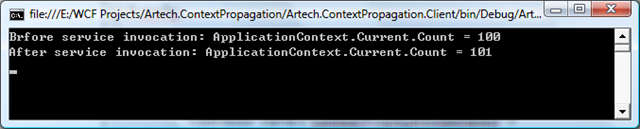
由此可见,在service端设置的context的值也成功返回到client端,真正实现了双向传递。
P.S: SOA主张Stateless的service,也就是说每次调用service都应该是相互独立的。context的传递实际上却是让每次访问有了状态,这实际上是违背了SOA的原则。所以,如何对于真正的SOA的设计与架构,个人觉得这种方式是不值得推荐的。但是,如何你仅仅是将WCF作为传统的分布式手段,那么这可能会给你的应用带了很大的便利。
WCF后续之旅:
WCF后续之旅(1): WCF是如何通过Binding进行通信的
WCF后续之旅(2): 如何对Channel Layer进行扩展——创建自定义Channel
WCF后续之旅(3): WCF Service Mode Layer 的中枢—Dispatcher
WCF后续之旅(4):WCF Extension Point 概览
WCF后续之旅(5): 通过WCF Extension实现Localization
WCF后续之旅(6): 通过WCF Extension实现Context信息的传递
WCF后续之旅(7):通过WCF Extension实现和Enterprise Library Unity Container的集成
WCF后续之旅(8):通过WCF Extension 实现与MS Enterprise Library Policy Injection Application Block 的集成
WCF后续之旅(9):通过WCF的双向通信实现Session管理[Part I]
WCF后续之旅(9): 通过WCF双向通信实现Session管理[Part II]
WCF后续之旅(10): 通过WCF Extension实现以对象池的方式创建Service Instance
WCF后续之旅(11): 关于并发、回调的线程关联性(Thread Affinity)
WCF后续之旅(12): 线程关联性(Thread Affinity)对WCF并发访问的影响
WCF后续之旅(13): 创建一个简单的WCF SOAP Message拦截、转发工具[上篇]
WCF后续之旅(13):创建一个简单的SOAP Message拦截、转发工具[下篇]
WCF后续之旅(14):TCP端口共享
WCF后续之旅(15): 逻辑地址和物理地址
WCF后续之旅(16): 消息是如何分发到Endpoint的--消息筛选(Message Filter)
WCF后续之旅(17):通过tcpTracer进行消息的路由

 浙公网安备 33010602011771号