
6
[NPC²CTF 2025]cccc
ccccapp.exe最先我还运行不了,需要先安装.NET 6.0.0 (x64) ,

运行之后是这样,但是exe在ida里面没有看到这样的明文信息,再查看ccccapp.dll
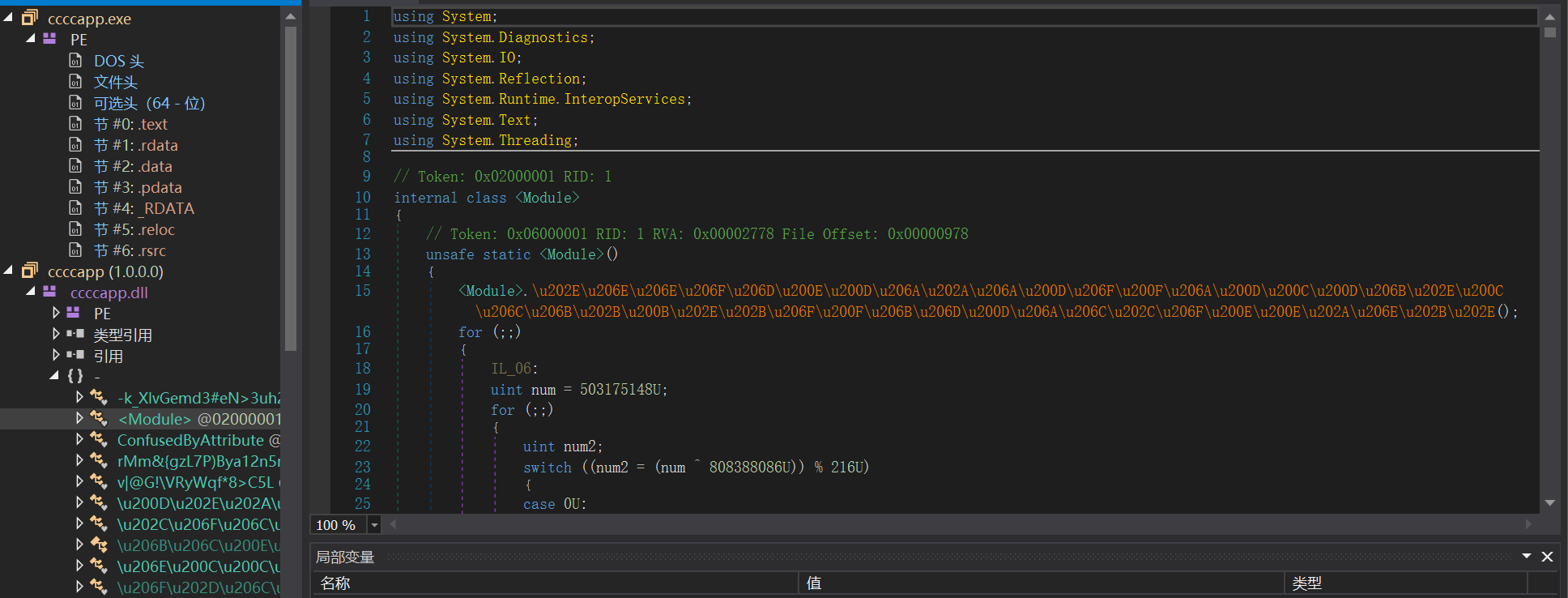
很多乱码
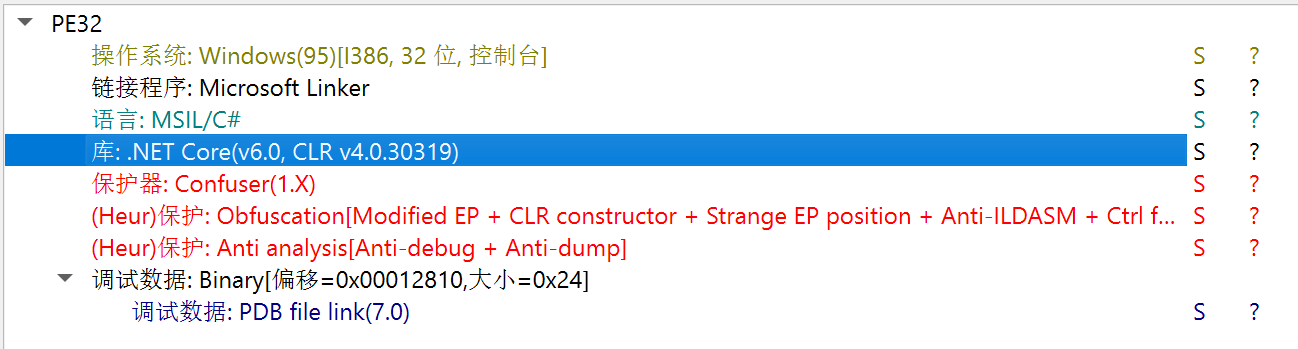
开了很多种保护,用de4dot去一部分

看一下对比,还是很有用的
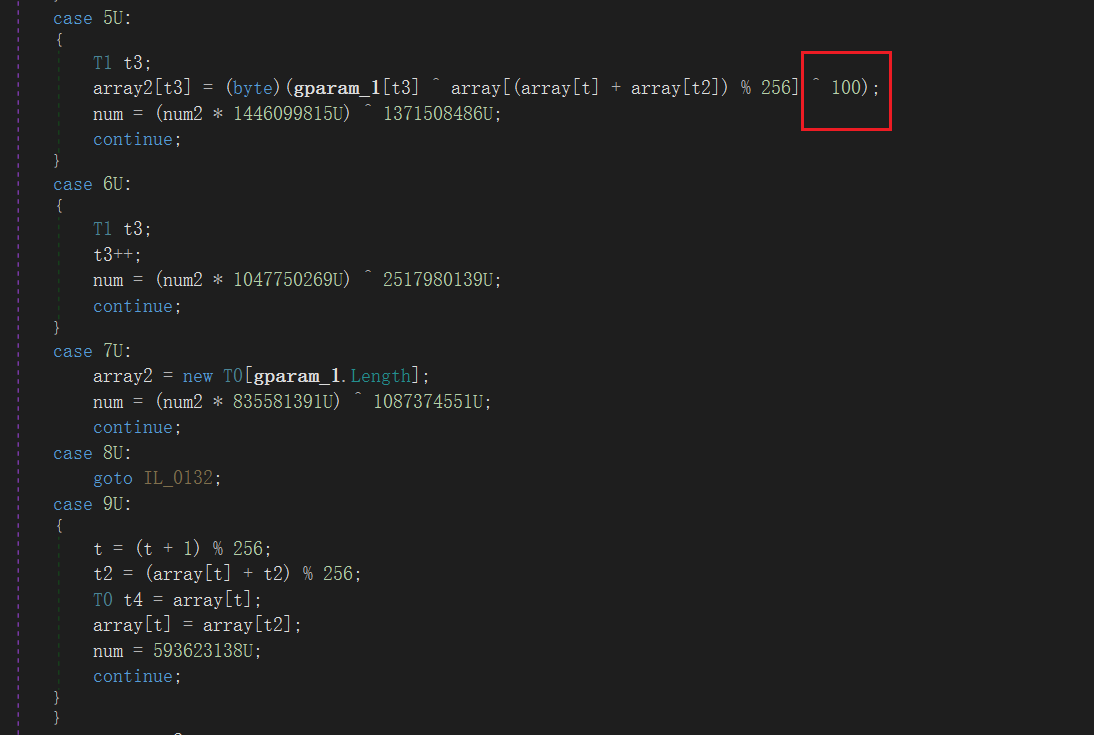
密文和加密

RC4特征,多异或了100

还差key,说是要动调,但是老是出问题,就尝试用CE看,结果还真有,属于运气问题吧

def KSA(key):
    S = list(range(256))
    j = 0
    for i in range(256):
        j = (j + S[i] + key[i % len(key)]) % 256
        S[i], S[j] = S[j], S[i]
    return S


def PRGA(S):
    i, j = 0, 0
    while True:
        i = (i + 1) % 256
        j = (j + S[i]) % 256
        S[i], S[j] = S[j], S[i]
        K = S[(S[i] + S[j]) % 256]
        yield K

def RC4Decrypt(key, text):
    S = KSA(key)
    keystream = PRGA(S)
    res = []
    for char in text:
        res.append(((char ^ next(keystream)) & 0xff) ^ 100)
    return bytes(res)
#示例
key = b'doyouknowcsharp'
plaintext = [0xf8,0xb1,0x1e,0xe8,0x7f,0x99,0xde,0x4e,0x84,0xb4,0x15,0x21,0xb6,0x8e,0xd1,0x2a,0x8b,0x9a,0x4d,0xe7,0x8f,0xda,0x23,0xc0,0xa9,0x62,0x63,0xe7,0x2,0x41,0x90,0x88,0x77,0x75,0xba,0x32,0xc6,0xb0,0x84,0x24,0xa6,0xa8,0x45,0xf6,0xcd,0x9c,0x8a,0x32]
Rc4encrypt = RC4Decrypt(key, plaintext)
print(Rc4encrypt.decode())
//flag{y0u_r34lly_kn0w_m@ny_pr0gr@mm1ng_l@ngu@g3$}
[justctf2023] Rustberry
arm架构的汇编题
通过字符串找到主要逻辑,看到有一张表
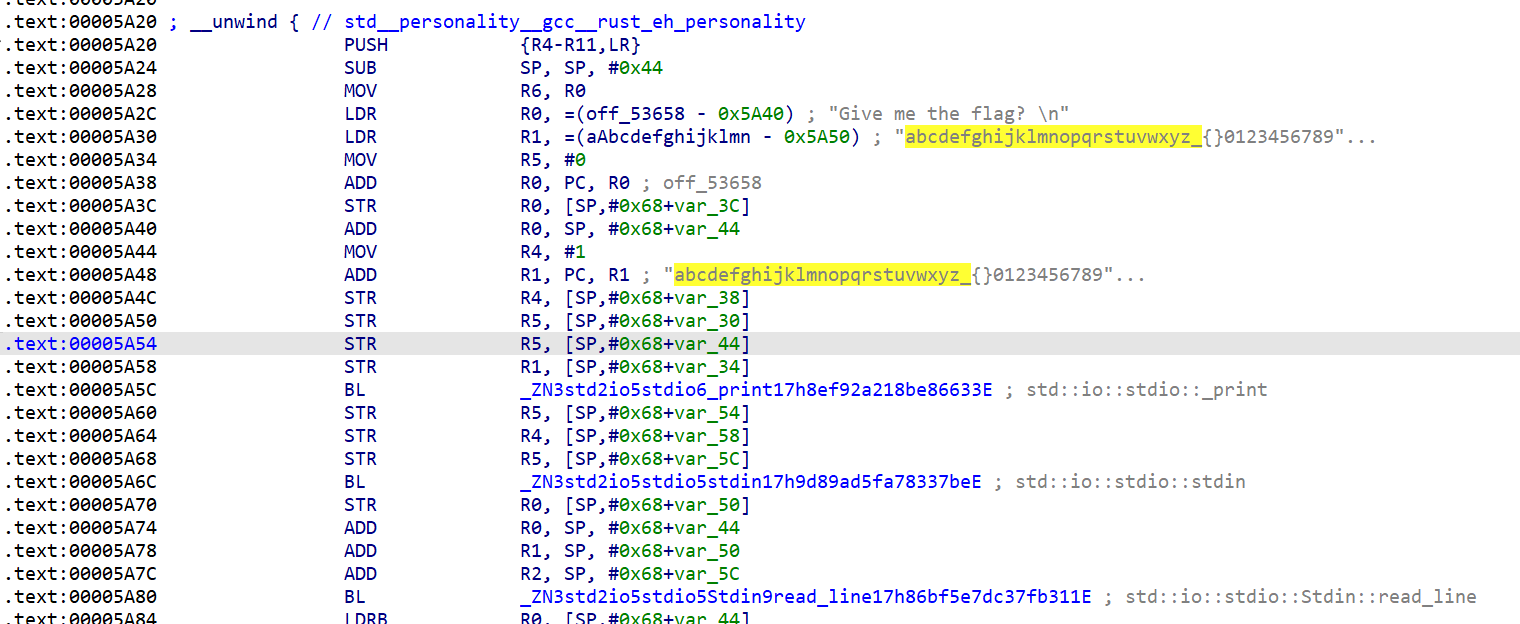
字符集引用

看汇编,进行赋值,赋值大小均小于表的长度

这是一个索引-字符映射验证
r6 = 7
r1= 28
r0 = 0xff
[r7 + 0x94] = 7    -----> v7[37] = 7
r6 = 3
[r7 + 0xa4] = 28   ------> v7[41] = 28
r1 = 17
[r7 + 0xa8] = 0xff ----> v7[42] = 0xff
r0 = 0x1a
r3 = 0x21
[r7 + 0x60] = 3  -----> v7[24] = 3
r6 = 0x64
[r7 + 0x98] = 0x21 ----> v7[38] = 0x21
r3 = 0x13
r8 = 0x14
[r7 + 0x64] = 0x1a , 17 , 0x14 --->v7[25] = 0x1a ,v7[26] = 17, v7[27] = 0x14
r2= 0xb
lr = 0x20
[r7 + 0x80] = 17  ------>v7[32] = 17
r4 =1
[r7 + 0x84] = 17 ------->v7[33] = 17
就是像这样赋值的,每个值占四位,r7对应的数组能够还原,映射还原flag
#include <stdio.h>
#include <string.h>
#include <stdlib.h>
#include <stdint.h>

int main()
{
	int v7[44]={0};
	v7[37] = 7;
	v7[41] = 28;
	v7[42] = 255;
	v7[24] = 3;
	v7[38] = 33;
	v7[25] = 26;
	v7[26] = 17;
	v7[27] = 20;
	v7[32] = 17;
	v7[33] = 17;
	v7[29] = 19;
	v7[30] = 1;
	v7[31] = 32;
	v7[19] = 8;
	v7[40] = 11;
	v7[39] = 11;
	v7[17] = 11;
	v7[23] = 11;
	v7[8] = 21;
	v7[9] = 51;
	v7[34] = 24;
	v7[16] = 15;
	v7[10] = 26;
	v7[11] = 9;
	v7[12] = 20;
	v7[13] = 18;
	v7[3] = 5;
	v7[28] = 34;
	v7[4] = 27;
	v7[5] = 13;
	v7[6] = 29;
	v7[35] = 26;
	v7[21] = 26;
	v7[15] = 26;
	v7[7] = 26;
	v7[36] = 2;
	v7[18] = 0;
	v7[20] = 13;
	v7[22] = 29;
	v7[14] = 19;
	v7[0] = 9;
	v7[1] = 2;
	v7[2] = 19;
	char table[]="abcdefghijklmnopqrstuvwxyz_{}0123456789ABCDEFGHIJKLMNOPQRSTUVWXY";
	for(int i=0;i<44;i++){
		printf("%c",table[v7[i]]);
	}
	return 0;
}
虽然题目名称写了rust,但是反汇编看不到这里的加密过程,反而汇编看起来更容易
[NewStar2024]Lock
只有一个exe和pyd,输入20个0会有1个正确的,且不是第一位,check.pyd里面有一个check.check()函数是主要的检验函数
直接爆破,用ret的值来判断是否正确,但是第一位不好弄,所以我是直接将后面的爆出来再来尝试第一位
import check

charset = "0123456789abcdef"
password = ["d"] * 20  # 初始化,可以用0,这样的第一位是0,但是只有19个对,替换出来第一位是d,所以这里就直接写为d
correct_count = 0
for i in range(20):
    for c in charset:
        attempt = password.copy()
        attempt[i] = c
        ret = check.check("".join(attempt))
        if ret > correct_count:  # 这一位猜对了
            password[i] = c
            correct_count = ret
            # print(f"[+] Found position {i}: {c}  ({correct_count}/20)")
            break

print(f"flag{{{''.join(password)}}}")
cython
将py文件编译为c,会生成库文件pyd供使用
pyx文件就是对应的源码
逆向中需要恢复符号表和还原结构体
[psxd] cookie
有花指令,去花之后就是tea加密
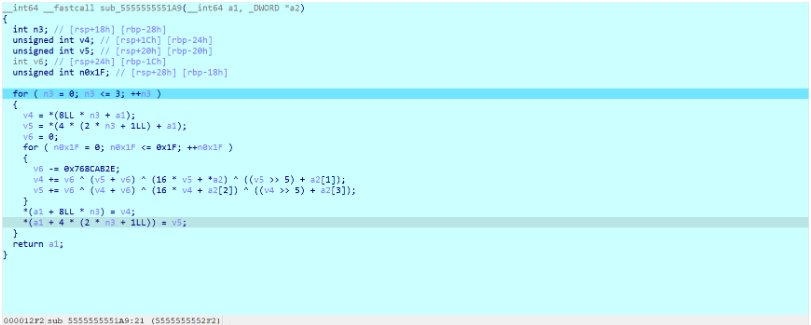
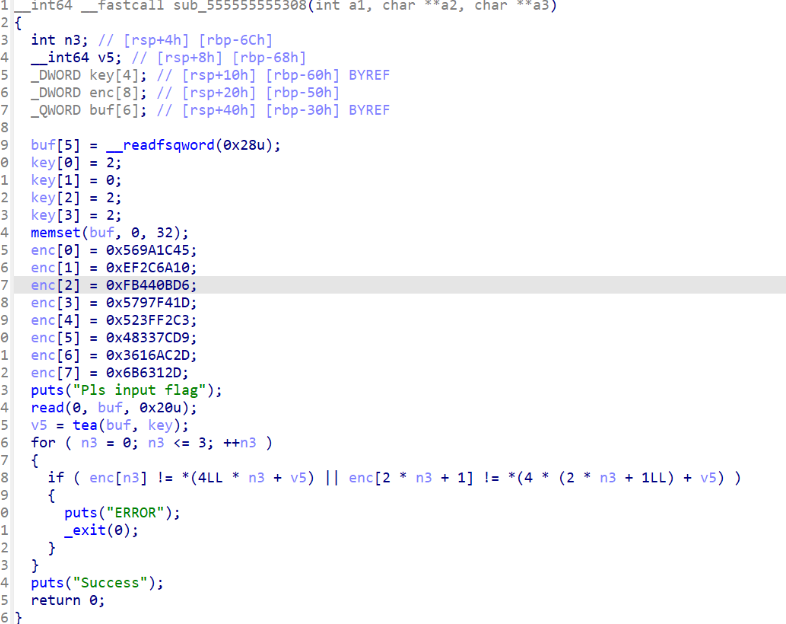
#include <stdio.h>
#include <stdint.h>

void decrypt(uint32_t* v, uint32_t* key){
	uint32_t delta = 0x897354D2;
	uint32_t v0 = v[0], v1 = v[1], sum = delta * 32;
	for (int i = 0; i < 32; i++) {
		v1 -= sum ^ (v0 + sum) ^ ((v0 << 4) + key[2]) ^ ((v0 >> 5) + key[3]);
		v0 -= sum ^ (v1 + sum) ^ ((v1 << 4) + key[0]) ^ ((v1 >> 5) + key[1]);
		sum -= delta;
	}
	v[0] = v0;
	v[1] = v1;
}

int main()
{
	uint32_t key[] = { 2, 0, 2, 2 };
	uint32_t EncFlag[] = {
		0x569A1C45, 0xEF2C6A10,
		0xFB440BD6, 0x5797F41D,
		0x523FF2C3, 0x48337CD9,
		0x3616AC2D, 0x06B6312D
	};

	for (int i = 0; i < 8; i += 2) {
		decrypt(&EncFlag[i], key);
	}

	// 输出结果(32字节,解释为字符)
	char* flag = (char*)EncFlag;
	for (int i = 0; i < 32; i++) {
		putchar(flag[i]);
	}
	putchar('\n');
	return 0;
}
[psxd] EasyRE
开头有反调试,将3条跳转全部nop

魔改rc4

这里是额外的异或处理

ai直接出
# encrypted_data = [
#     0x93, 0xf9, 0x8d, 0x92, 0x52, 0x57, 0xd9, 0x05,
#     0xc6, 0x0a, 0x50, 0xc7, 0xdb, 0x4f, 0xcb, 0xd8,
#     0x5d, 0xa6, 0xb9, 0x40, 0x95, 0x70, 0xe7, 0x9a,
#     0x37, 0x72, 0x4d, 0xef, 0x57
# ]
#
# # 复制数据避免修改原数组
# decrypted = bytearray(encrypted_data)
#
# # 逆向链式异或(从后往前)
# for i in range(len(decrypted)-1, 0, -1):
#     decrypted[i] ^= decrypted[i-1]
#
# # 最后统一异或 0x42
# for i in range(len(decrypted)):
#     decrypted[i] ^= 0x42
#     print(decrypted[i])
# #     print(hex(decrypted[i])[2:],end=' ')
# #
# # print(hex(ord('f')))

def rol(val, r_bits):
    return ((val << r_bits) | (val >> (8 - r_bits))) & 0xFF

def ror(val, r_bits):
    return ((val >> r_bits) | (val << (8 - r_bits))) & 0xFF

def decrypt(data: bytearray):
    n29 = len(data)
    decrypted = bytearray(n29)  # 存储解密结果

    # Step 1: reverse the post-processing (XOR with 0x42 and previous byte)
    for i in range(n29 - 1, -1, -1):
        if i > 0:
            data[i] ^= data[i - 1]
        data[i] ^= 0x42

    # Step 2: RC4 variant reverse (simulate keystream and reverse encrypt)
    S = list(range(256))
    v8 = 0
    for i in range(256):
        v8 = (v8 + S[i] - 7 * (i // 7) + i + 4919) % 256
        S[i], S[v8] = S[v8], S[i]

    v14 = 0
    v15 = 0

    for i in range(n29):
        v14 = (v14 + 1) % 256
        if v14 % 3 == 0:
            v20 = S[(3 * v14) % 256] + v15
        else:
            v20 = S[v14] + v15
        v15 = v20 % 256

        S[v14], S[v15] = S[v15], S[v14]

        tmp = (v14 * v15) % 16
        key_stream = S[(S[v14] + S[v15]) % 256]  # 修正索引计算

        cipher_byte = data[i]
        plain_byte = ror(cipher_byte, 3) - tmp
        plain_byte = (plain_byte ^ key_stream) & 0xFF
        decrypted[i] = plain_byte

    return decrypted

# 加密数据
encrypted_hex = "93 f9 8d 92 52 57 d9 05 c6 0a 50 c7 db 4f cb d8 5d a6 b9 40 95 70 e7 9a 37 72 4d ef 57"
encrypted_bytes = bytearray.fromhex(encrypted_hex)

# 解密
decrypted_data = decrypt(encrypted_bytes)

# 输出结果
print("解密结果(hex):", decrypted_data.hex())
print("解密结果(ASCII):", decrypted_data.decode('latin1', errors='replace'))
[psxd] MFC
CFF看到有明文信息

调试的时候可能有反调试,直接附加就可以直接调试
字符串看到有base64编码表,交叉引用发现rc6加密之后进行base64编码


异或的是iv,WcE4Bbm4kHYQsAcX

看到12位的明文,猜测是key,用4填充至16位
那么密文就是RKCTaz+fty1J2qsz4DI6t9bmMiLBxqFrpI70fU4IMemczIlM+Z1IoVQobIt1MbXF(base64)


 浙公网安备 33010602011771号