
python+selenium+unittest 自动化测试
from pachong.httpUtils.Http import HttPuTils
from selenium import webdriver
import unittest

class Test_login(unittest.TestCase):
    '''
     登录接口测试
    '''
# 创建参数对象
chrome_options = Options()
chrome_options.add_argument('--headless')
chrome_options.add_argument('--enable-print-preview')
    def setUp(self,driver = webdriver.Chrome(executable_path='D:\Program Files\chrom\chromedriver.exe')):
        self.url = url
        self.driver =driver
        print("这是测试开始阶段")

    def tearDown(self):
        print("这是测试结束阶段")

    def testLoginSucc(self):
        self.driver.get(self.url)

    @staticmethod
    def loginTest(url,data):
        josnObj = HttPuTils().requestOpenUrl(url, data)
        print(josnObj)


if __name__ =='__main__':
    unittest.main()
webdriver.Chrome(executable_path='D:\Program Files\chrom\chromedriver.exe') 中
executable_path 是谷歌浏览器安装包位置 通过浏览器 chrome://version/ 找到浏览器版本 通过 http://chromedriver.storage.googleapis.com/index.html 下载

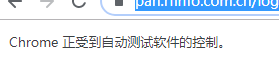
重新运行程序 之后浏览器会出现 受自动测试软件控制的标志
温余生

 浙公网安备 33010602011771号