
实验 3:Mininet 实验——测量路径的损耗率
在实验 2 的基础上进一步熟悉 Mininet 自定义拓扑脚本,以及与损耗率相关的设定;初步了解 Mininet 安装时自带的 POX 控制器脚本编写,测试路径损耗率。
h0 向 h1 发送数据包,由于在 Mininet 脚本中设置了连接损耗率,在传输过程中会丢失一些包,本次实验的目的是展示如何通过控制器计算路径损耗速率(h0-s0-s1-h1)。这里假设控制器预先知道网络拓扑。控制器将向 s0 和 s1 发送flow_stats_request,当控制器接收到来自 s0 的 response 时,将特定流的数据包数保存input_pkts 中,当控制器接收到来自 s1 的 response 时,将接收到特定流的数据包数保存在 output_pkts 中,差值就是丢失的数据包数量。基于上述拓扑,编写 Mininet 脚本,设置特定的交换机间的路径损耗速率,然后编写 POX 控制器脚本,实现对路径的损耗率的测量。
三、实验步骤
1. 实验环境
安装了 Ubuntu 18.04.5 Desktop amd64 的虚拟机
2. 实验过程
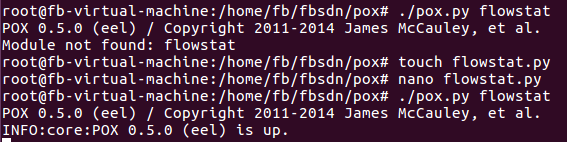
(1)新建并编辑 pox 脚本 flowstat.py: 在 pox 安装目录下(Mininet 完整安装包含了 pox)执行以下命令运行 pox 脚本:$ ./pox.py flowstat
现在一起看下 flowstat.py 的关键代码:
第 7 行开始,让 h0 ping h1,监测 s0 和 s1 之间的链路。
⚫ 如果匹配到以太网类型的包头(0x0800),并且数据包的目的 IP 地址是192.168.123.2(对照后面 Mininet 的脚本发现是 h1),并且连接到控制器的数据平面设备 id 是 s0(h0 ping h1,链路 s0-s1 上数据包是从 s0 流向 s1,s0 为源,s1 为目的地),执行 input_pkts = f.packet_count,把数据包数量存入input_pkts;
⚫ 同理,如果连接到控制器的数据平面设备 id 是 s1,执行 output_pkts =f.packet_count,把数据包数量存入 output_pkts。
⚫ 最后求 input_pkts 和 output_pkts 的差值。一般情况下差值为正,说明链路上数据包有损耗。
flowstat.py的代码如下

  1 # standard includes
  2 from pox.core import core
  3 from pox.lib.util import dpidToStr
  4 import pox.openflow.libopenflow_01 as of
  5 from pox.lib.addresses import IPAddr, EthAddr
  6
  7 # include as part of the betta branch
  8 from pox.openflow.of_json import *
  9 from pox.lib.recoco import Timer
 10 import time
 11
 12 log = core.getLogger()
 13
 14 src_dpid = 0
 15 dst_dpid = 0
 16 input_pkts = 0
 17 output_pkts = 0
 18
 19 def getTheTime():  #fuction to create a timestamp
 20   flock = time.localtime()
 21   then = "[%s-%s-%s" %(str(flock.tm_year),str(flock.tm_mon),str(flock.tm_mday))
 22
 23   if int(flock.tm_hour)<10:
 24     hrs = "0%s" % (str(flock.tm_hour))
 25   else:
 26     hrs = str(flock.tm_hour)
 27   if int(flock.tm_min)<10:
 28     mins = "0%s" % (str(flock.tm_min))
 29   else:
 30     mins = str(flock.tm_min)
 31   if int(flock.tm_sec)<10:
 32     secs = "0%s" % (str(flock.tm_sec))
 33   else:
 34     secs = str(flock.tm_sec)
 35   then +="]%s.%s.%s" % (hrs,mins,secs)
 36   return then
 37
 38 # handler for timer function that sends the requests to all the
 39 # switches connected to the controller.
 40 def _timer_func ():
 41   for connection in core.openflow._connections.values():
 42     connection.send(of.ofp_stats_request(body=of.ofp_flow_stats_request()))
 43     connection.send(of.ofp_stats_request(body=of.ofp_port_stats_request()))
 44   log.debug("Sent %i flow/port stats request(s)", len(core.openflow._connections))
 45
 46 # handler to display flow statistics received in JSON format
 47 # structure of event.stats is defined by ofp_flow_stats()
 48 def _handle_flowstats_received (event):
 49    #stats = flow_stats_to_list(event.stats)
 50    #log.debug("FlowStatsReceived from %s: %s", dpidToStr(event.connection.dpid), stats)
 51    global src_dpid, dst_dpid, input_pkts, output_pkts
 52    #print "src_dpid=", dpidToStr(src_dpid), "dst_dpid=", dpidToStr(dst_dpid)
 53    for f in event.stats:
 54      if f.match.dl_type==0x0800 and f.match.nw_dst==IPAddr("192.168.123.2") and f.match.nw_tos==0x64 and event.connection.dpid==src_dpid:
 55        #print "input: ", f.byte_count, f.packet_count
 56        input_pkts = f.packet_count
 57      if f.match.dl_type==0x0800 and f.match.nw_dst==IPAddr("192.168.123.2") and f.match.nw_tos==0x64 and event.connection.dpid==dst_dpid:
 58        #print "output: ", f.byte_count, f.packet_count
 59        output_pkts = f.packet_count
 60        if input_pkts !=0:
 61          print getTheTime(), "Path Loss Rate =", (input_pkts-output_pkts)*1.0/input_pkts*100, "%"
 62
 63 # handler to display port statistics received in JSON format
 64 def _handle_portstats_received (event):
 65    #print "\n<<<STATS-REPLY: Return PORT stats for Switch", event.connection.dpid,"at ",getTheTime()
 66    #for f in event.stats:
 67       #if int(f.port_no)<65534:
 68         #print "   PortNo:", f.port_no, " Fwd's Pkts:", f.tx_packets, " Fwd's Bytes:", f.tx_bytes, " Rc'd Pkts:", f.rx_packets, " Rc's Bytes:", f.rx_bytes
 69         #print "   PortNo:", f.port_no,  " TxDrop:", f.tx_dropped, " RxDrop:", f.rx_dropped, " TxErr:", f.tx_errors, " RxErr:", f.rx_errors, " CRC:", f.rx_crc_err, " Coll:", f.collisions
 70   stats = flow_stats_to_list(event.stats)
 71   log.debug("PortStatsReceived from %s: %s", dpidToStr(event.connection.dpid), stats)
 72
 73 def _handle_ConnectionUp (event):
 74   global src_dpid, dst_dpid
 75   print "ConnectionUp: ", dpidToStr(event.connection.dpid)
 76   for m in event.connection.features.ports:
 77     if m.name == "s0-eth0":
 78       src_dpid = event.connection.dpid
 79     elif m.name == "s1-eth0":
 80       dst_dpid = event.connection.dpid
 81
 82   msg = of.ofp_flow_mod()
 83   msg.priority =1
 84   msg.idle_timeout = 0
 85   msg.match.in_port =1
 86   msg.actions.append(of.ofp_action_output(port = of.OFPP_ALL))
 87   event.connection.send(msg)
 88
 89   msg = of.ofp_flow_mod()
 90   msg.priority =1
 91   msg.idle_timeout = 0
 92   msg.match.in_port =2
 93   msg.actions.append(of.ofp_action_output(port = of.OFPP_ALL))
 94   event.connection.send(msg)
 95
 96   msg = of.ofp_flow_mod()
 97   msg.priority =10
 98   msg.idle_timeout = 0
 99   msg.hard_timeout = 0
100   msg.match.dl_type = 0x0800
101   msg.match.nw_tos = 0x64
102   msg.match.in_port=1
103   msg.match.nw_dst = "192.168.123.2"
104   msg.actions.append(of.ofp_action_output(port = 2))
105   event.connection.send(msg)
106
107   msg = of.ofp_flow_mod()
108   msg.priority =10
109   msg.idle_timeout = 0
110   msg.hard_timeout = 0
111   msg.match.dl_type = 0x0800
112   msg.match.nw_tos = 0x64
113   msg.match.nw_dst = "192.168.123.1"
114   msg.actions.append(of.ofp_action_output(port = 1))
115   event.connection.send(msg)
116
117 # main functiont to launch the module
118 def launch ():
119   # attach handsers to listners
120   core.openflow.addListenerByName("FlowStatsReceived",
121     _handle_flowstats_received)
122   core.openflow.addListenerByName("PortStatsReceived",
123     _handle_portstats_received)
124   core.openflow.addListenerByName("ConnectionUp", _handle_ConnectionUp)
125
126   # timer set to execute every five seconds
127   Timer(1, _timer_func, recurring=True)
(2)编辑 Mininet 脚本 mymininet3.py
新建一个终端
参照拓扑图,新建并编辑 Mininet 脚本 mymininet3.py,控制器因为安装在本机,所以需修改参考资料代码中的控制器地址为 127.0.0.1:6633。
设置 s0 和 s1 之间链路的丢包率为 0
代码如下
|
1
2
3
4
5
6
7
8
9
10
11
12
13
14
15
16
17
18
19
20
21
22
23
24
25
26
27
28
29
30
31
32
33
34
35
36
37
38
39
40
41
42
43
44
45
46
47
48
49
50
51
52
53
54
55
56
57
58
59
60
61
62
63
64
65
66
67
68
69
70
71
72
73
74
75
76
77
|
#!/usr/bin/python from mininet.net import Mininetfrom mininet.node import Nodefrom mininet.link import TCLinkfrom mininet.log import setLogLevel, infofrom threading import Timerfrom mininet.util import quietRunfrom time import sleep def myNet(cname='controller', cargs='-v ptcp:'): "Create network from scratch using Open vSwitch." info( "*** Creating nodes\n" ) controller = Node( 'c0', inNamespace=False ) switch = Node( 's0', inNamespace=False ) switch1 = Node( 's1', inNamespace=False ) h0 = Node( 'h0' ) h1 = Node( 'h1' ) info( "*** Creating links\n" ) linkopts0=dict(bw=100, delay='1ms', loss=0) linkopts1=dict(bw=100, delay='1ms', loss=0) link0=TCLink( h0, switch, **linkopts0) link1 = TCLink( switch, switch1, **linkopts1) link2 = TCLink( h1, switch1, **linkopts0) #print link0.intf1, link0.intf2 link0.intf2.setMAC("0:0:0:0:0:1") link1.intf1.setMAC("0:0:0:0:0:2") link1.intf2.setMAC("0:1:0:0:0:1") link2.intf2.setMAC("0:1:0:0:0:2") info( "*** Configuring hosts\n" ) h0.setIP( '192.168.123.1/24' ) h1.setIP( '192.168.123.2/24' ) info( "*** Starting network using Open vSwitch\n" ) switch.cmd( 'ovs-vsctl del-br dp0' ) switch.cmd( 'ovs-vsctl add-br dp0' ) switch1.cmd( 'ovs-vsctl del-br dp1' ) switch1.cmd( 'ovs-vsctl add-br dp1' ) controller.cmd( cname + ' ' + cargs + '&' ) for intf in switch.intfs.values(): print intf print switch.cmd( 'ovs-vsctl add-port dp0 %s' % intf ) for intf in switch1.intfs.values(): print intf print switch1.cmd( 'ovs-vsctl add-port dp1 %s' % intf ) # Note: controller and switch are in root namespace, and we # can connect via loopback interface switch.cmd( 'ovs-vsctl set-controller dp0 tcp:127.0.0.1:6633' ) switch1.cmd( 'ovs-vsctl set-controller dp1 tcp:127.0.0.1:6633' ) info( '*** Waiting for switch to connect to controller' ) while 'is_connected' not in quietRun( 'ovs-vsctl show' ): sleep( 1 ) info( '.' ) info( '\n' ) #info( "*** Running test\n" ) h0.cmdPrint( 'ping -Q 0x64 -c 20 ' + h1.IP() ) sleep( 1 ) info( "*** Stopping network\n" ) controller.cmd( 'kill %' + cname ) switch.cmd( 'ovs-vsctl del-br dp0' ) switch.deleteIntfs() switch1.cmd( 'ovs-vsctl del-br dp1' ) switch1.deleteIntfs() info( '\n' ) if __name__ == '__main__': setLogLevel( 'info' ) info( '*** Scratch network demo (kernel datapath)\n' ) Mininet.init() myNet() |
再执行命令运行 Mininet 脚本 mymininet.py
$ sudo python mymininet3.py
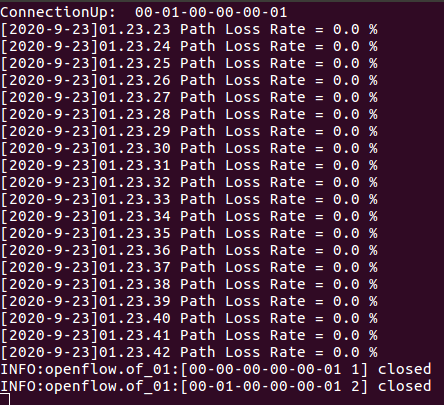
Ping 默认是每 1 秒钟测一次,ping 的结果会显示一个丢包率,这里的丢包率是根据 ping 不通的次数占总次数的百分比计算得到的。上图中由于一共 ping 了 20次,每次都能通,所以丢包率是 0。观察 pox 侧的实时状态更新如下图。可知平均丢包率为 0,结果符合 Mininet 脚本中设置的损耗率,也有可能出现负值,可以认为没有丢包。
如果修改代码中 s0 和 s1 之间链路的丢包率为 10。即:
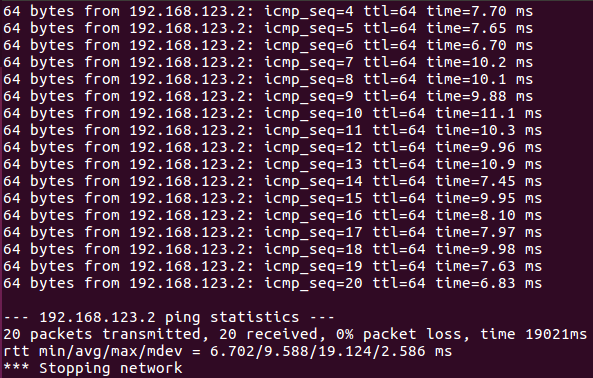
重新运行 Mininet 脚本 mymininet3.py,20 秒时间的 ping 过程中有 icmp_seq 为4/12/14 共 3 次 ping 不通,所以丢包率计算为 15%。
POX 端重新测试,会发现出现丢包现象,但是实际测量出的丢包率会有浮动,链路的性能总体受到了限制。
四、实验经验
1 复制粘贴有可能格式出错 好好讲检查
2 记得sudo mn -c
