

stable-diffusion安装
stable-diffusion
-
安装python
-
安装git
-
安装cude
-
拉去项目
-
报错
安装
因为stable-diffusion是基于python写的,所以需要安装python解释器。
Python解释器
-
版本
因为教程是之前写的,所以教程上是3.6的,推荐下载3.10.6的
如果不会在配置环境变量则记得把自动配置环境变量的这一选项打勾
-
下载
官网
-
鼠标放到Downloads上选择跟自己计算机系统所版本然后点击
-
然后找到自己所想下载的版本以3.6.4为例
-

installer结尾的是exe文件一个执行程序
zip结尾的是下载好一个压缩包
-
-
然后打开
-
-
然后下一步
-
选择路径
-
然后喝杯茶等待。。。。安装完成
-
验证安装是否成功
win + r

回车

执行
pip config set global.index-url https://pypi.tuna.tsinghua.edu.cn/simple
安装git
用来克隆github的项目,比如本作中的stable diffusion webui 前往git官网https://git-scm.com/download/win

一路下一步就行了
-
验证

安装cuda
cuda是NVIDIA显卡用来跑算法的依赖程序所以我们需要它。
打开NVIDIA cuda官网 https://developer.nvidia.com/cuda-toolkit-archive
打不开的可以**上网
你会发现有很多版本,下载那个版本呢?

回到用来验证git和python的界面,输入
nvidia-smi,查看你的cuda版本
我的是11.7的版本,我就下载11.7.0的链接


下载完后安装,这个软件2个G,可以安装在c盘以外的地方。比如D盘。
好了,完成这步,电脑的基础环境设置终于完事了。
下面开始正式折腾stable diffusion了。
安装stable diffusion
-
拉去代码
找到你想把stable diffusion放到的位置
比如我想放到E盘


输入
git clone https://github.com/AUTOMATIC1111/stable-diffusion-webui.git然后显示这个

等待拉去完即可。
如果觉得慢的
可以进入https://github.com/AUTOMATIC1111/stable-diffusion-webui这个页面
如果进不去可以**上网,因为这个国外的网站


把下载好的压缩包解压到自己想放的位置即可

基本上长这个样子

报错的几率很大
报错
installing gfpgan
一直处于这种状态的
那么你就可以把项目这个项目拉下来,手动去安装这些依赖

就是报这个error

E: stable-diffusion-webui-master stable-diffusion-webui-mastervenrScripts python. exe -m pip install --upgrade pip是这一条
网址https://github.com/TencentARC/GFPGAN/
跟下载stable diffusion一样,去这个网址,点code,点ZIP即可
把下载好安装包放到项目的根目录下


把解压好的文件夹放到项目的根目录

然后输入


回车
就进入到了

当你执行过一次 webbui-user的时候会自动创建一个venv文件。我们现在是进入到stable-diffusion给我创建的虚拟环境中
可以执行
pip -V查看当前的pip属于那个python

我要 cd 到

pip 临时换源
清华源: -i https://pypi.tuna.tsinghua.edu.cn/simple some-package
阿里源: -i https://mirrors.aliyun.com/pypi/simple
pip永久换源
升级 pip 到最新的版本 (>=10.0.0) 后进行配置:
pip config set global.index-url https://pypi.tuna.tsinghua.edu.cn/simple
现在我们使用临时的换源
先进入到
GFPGAN-master
然后执行
pip install -r requirements.txt -i https://mirrors.aliyun.com/pypi/simple
在执行
python setup.py develop
能**上网就开启**上网
的执行
webui-user.bat成功率可能会搞一点
Couldn't clone Stable Diffusion

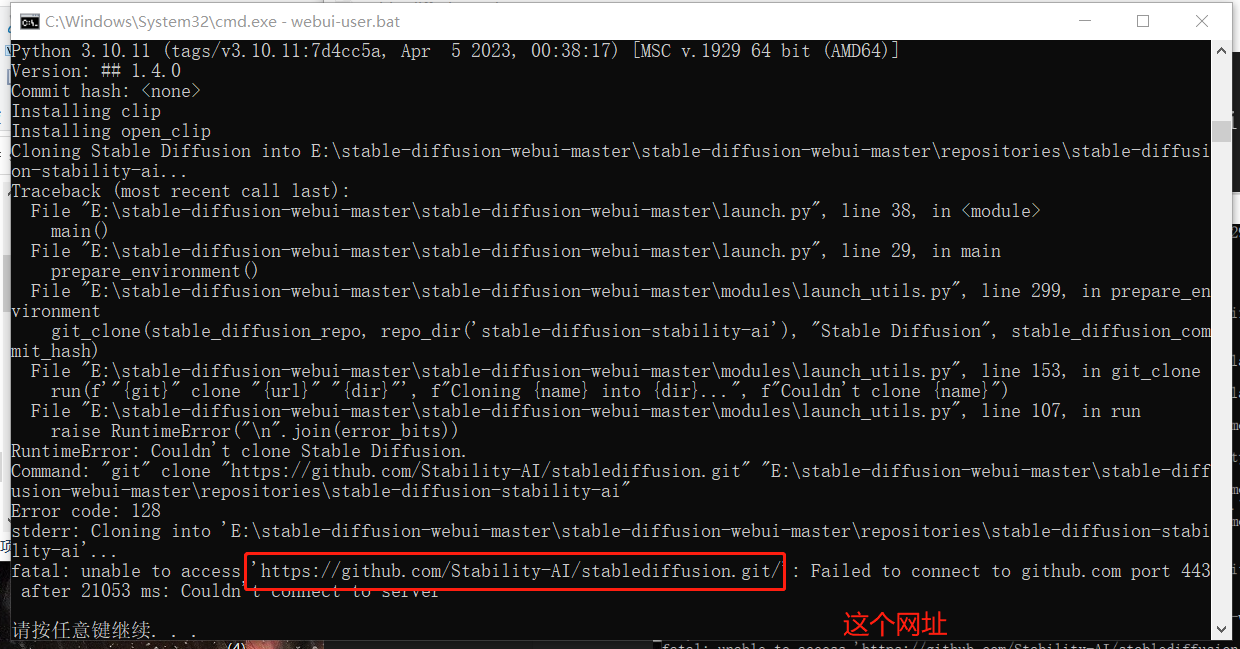
https://github.com/Stability-AI/stablediffusion.git
还是跟gfpgan一样pip 下载的时候记得把**上网关了
这个只需要执行
pip install -r requirements.txt -i https://mirrors.aliyun.com/pypi/simple这个即可

好了结束
sd的一写依赖包(1)输入git clone https://github.com/Stability-AI/stablediffusion.git
(2)输入git clone https://github.com/CompVis/taming-transformers.git
(3)输入git clone https://github.com/crowsonkb/k-diffusion.git
(4)输入git clone https://github.com/sczhou/CodeFormer.git
(5)输入git clone https://github.com/salesforce/BLIP.git
这是一些依赖包
-


 浙公网安备 33010602011771号