
Mysql的源码编译安装
1.下载mysql安装包,下载完成后上传到linux里面(我一般放在/usr/local/src)(下载地址:https://dev.mysql.com/downloads/mysql/)
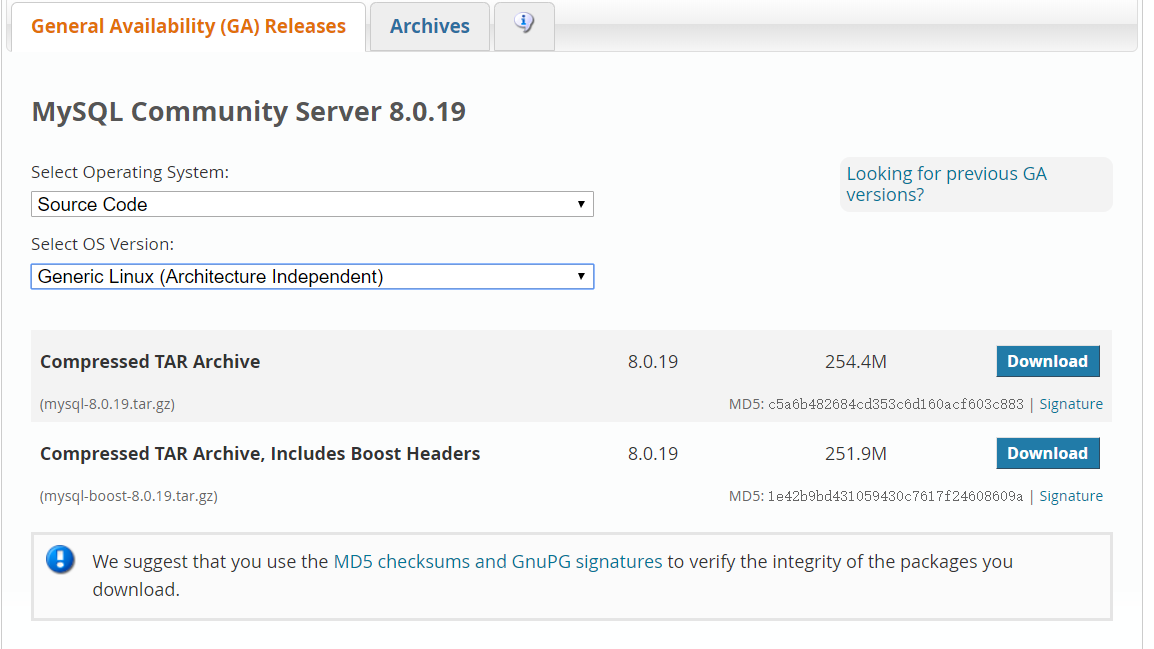
2.安装编译所需的常用组件和依赖包
yum -y install gcc gcc-c++ ncurses ncurses-devel bison libgcrypt perl make cmake
注意:在cmake安装mysql的时候需要安装openssl或者openssl-devel,不然会报错 :yum -y install openssl openssl-devel
3.上传boost1.5.9,个人将其解压在/usr/loacl目录下(后面在cmake编译安装时需要指定boost的路径)
4.创建mysql用户组和用户,用来运行mysql服务器, -g指定用户组, -r创建系统用户
[root@iZ2864f6btwZ src]# groupadd mysql
[root@iZ2864f6btwZ src]# useradd -r -g mysql -s /bin/false mysql
5.解压MySQL,进入 mysql-5.7.19 目录
[root@iZ2864f6btwZ src]# tar zxvf mysql-boost-5.7.19.tar.gz
[root@iZ2864f6btwZ src]# cd mysql-5.7.19/
6.在进入mysql的源码包的路径下后执行以下语句:
cmake . -DWITH_BOOST=/usr/local/boost -DCMAKE_INSTALL_PREFIX=/usr/local/mysql -DWITH_MYISAM_STORAGE_ENGINE=1 -DWITH_INNOBASE_STORAGE_ENGINE=1 -DWITH_FEDERATED_STORAGE_ENGINE=1 -DWITH_BLACKHOLE_STORAGE_ENGINE=1 -DWITH_EXAMPLE_STORAGE_ENGINE=1 -DWITH_PARTITION_STORAGE_ENGINE=1 -DWITH_MEMORY_STORAGE_ENGINE=1 -DWITH_READLINE=1 -DENABLED_LOCAL_INFILE=1 -DDEFAULT_CHARSET=utf8 -DDEFAULT_COLLATION=utf8_general_ci -DEXTRA_CHARSETS=gbk,gb2312,utf8,ascii -DMYSQL_USER=mysql -DWITH_ZLIB=bundled -DWITH_READLINE=1 -DWITH_FAST_MUTEXES=1 -DWITH_EMBEDDED_SERVER=1 -DWITH_DEBUG=0 -DWITH_SSL=system
每个参数的含义解释:百度,哈哈哈哈,实在太多了

7.完成后再次执行:make && make install
8.新建文件夹
mkdir -p /data/{3306,3307}/data
此处注意:本人部署多实例,实际情况按照个人选择
9. 将mysql下的命令加入到系统
vim /etc/profile
export PATH=/usr/local/mysql/bin:$PATH
source /etc/profile
10.初始化数据库
mysqld --defaults-file=/data/3306/my.cnf --initialize-insecure --user=mysql
mysqld --defaults-file=/data/3306/my.cnf --user=mysql &
11.登录修改密码(mysql'修改密码一共有三种方式)
mysql -uroot -S /data/3306/mysql.sock
SET PASSWORD=PASSWORD('123456');
12.Mysql的关闭
注意:一定要用mysqladmin关闭
mysqladmin -u root -p -S /data/3306/mysql.sock shutdown
13.my.cnf里面的内容示例:
[client]
port = 3306
socket = /data/3306/mysql.sock
[mysql]
no-auto-rehash
[mysqld]
user = mysql
port = 3306
socket = /data/3306/mysql.sock
basedir = /usr/local/mysql
datadir = /data/3306/data
open_files_limit = 1024
back_log = 600
max_connections = 800
max_connect_errors = 3000
external-locking = FALSE
max_allowed_packet =8M
sort_buffer_size = 1M
join_buffer_size = 1M
thread_cache_size = 100
query_cache_size = 2M
query_cache_limit = 1M
query_cache_min_res_unit = 2k
#default_table_type = InnoDB
thread_stack = 192K
#transaction_isolation = READ-COMMITTED
tmp_table_size = 2M
max_heap_table_size = 2M
long_query_time = 1
#log_long_format
#log-error = /data/3306/error.log
#log-slow-queries = /data/3306/slow.log
pid-file = /data/3306/mysql.pid
log-bin = /data/3306/mysql-bin
relay-log = /data/3306/relay-bin
relay-log-info-file = /data/3306/relay-log.info
binlog_cache_size = 1M
max_binlog_cache_size = 1M
max_binlog_size = 2M
expire_logs_days = 7
key_buffer_size = 16M
read_buffer_size = 1M
read_rnd_buffer_size = 1M
bulk_insert_buffer_size = 1M
#myisam_sort_buffer_size = 1M
#myisam_max_sort_file_size = 10G
#myisam_max_extra_sort_file_size = 10G
#myisam_repair_threads = 1
#myisam_recover
lower_case_table_names
= 1
skip-name-resolve
slave-skip-errors = 1032,1062
replicate-ignore-db=mysql
server-id = 1
innodb_buffer_pool_size
= 32M
innodb_data_file_path = ibdata1:128M:autoextend
innodb_thread_concurrency = 8
innodb_flush_log_at_trx_commit = 2
innodb_log_buffer_size = 2M
innodb_log_file_size = 4M
innodb_log_files_in_group = 3
innodb_max_dirty_pages_pct = 90
innodb_lock_wait_timeout = 120
innodb_file_per_table = 0
[mysqldump]
quick
max_allowed_packet = 2M
[mysqld_safe]
log-error=/data/3306/mysql_3306.err
pid-file=/data/3306/mysqld.pid
14./data/3306/mysql文件内容:
#!/bin/sh
################################################
#3306实例启动脚本
#
################################################
#init
port=3306
mysql_user="root"
mysql_pwd="123456"
CmdPath="/usr/local/mysql/bin"
mysql_sock="/data/${port}/mysql.sock"
#startup function
function_start_mysql()
{
if [ ! -e "$mysql_sock" ];then
printf "Starting MySQL...\n"
/bin/sh ${CmdPath}/mysqld_safe --defaults-file=/data/${port}/my.cnf 2>&1
> /dev/null &
else
printf "MySQL is running...\n"
exit
fi
}
#stop
function
function_stop_mysql()
{
if [ ! -e "$mysql_sock" ];then
printf "MySQL is stopped...\n"
exit
else
printf "Stoping MySQL...\n"
${CmdPath}/mysqladmin -u ${mysql_user} -p${mysql_pwd} -S
/data/${port}/mysql.sock shutdown
fi
}
#restart
function
function_restart_mysql()
{
printf "Restarting MySQL...\n"
function_stop_mysql
sleep 2
function_start_mysql
}
case
$1 in
start)
function_start_mysql
;;
stop)
function_stop_mysql
;;
restart)
function_restart_mysql
;;
*)
printf "Usage: /data/${port}/mysql {start|stop|restart}\n"
esac

 浙公网安备 33010602011771号