
Kafka存储和压缩机制
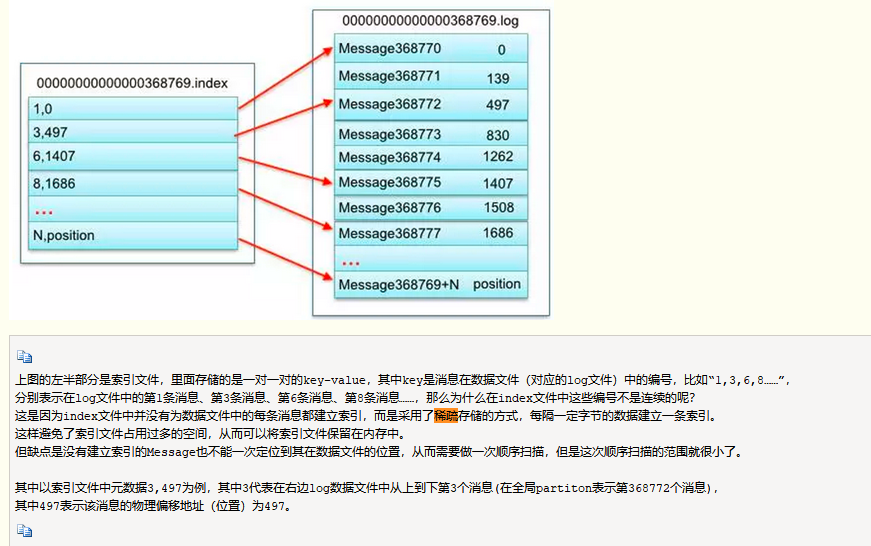
存储算法:稀疏算法:一定字节的建立一条索引,避免索引占用空间,但是数据需要做一次顺序扫描
压缩机制
kafka(本文是以0.8.2.x的版本做基准的)本身可以支持几种类型的压缩,比如gzip和snappy,更高的版本还支持lz4。默认是none,即不采用任何压缩。开启压缩的方式是在客户端调用的时候设置producer的参数。与压缩有关的参数有:
![]()
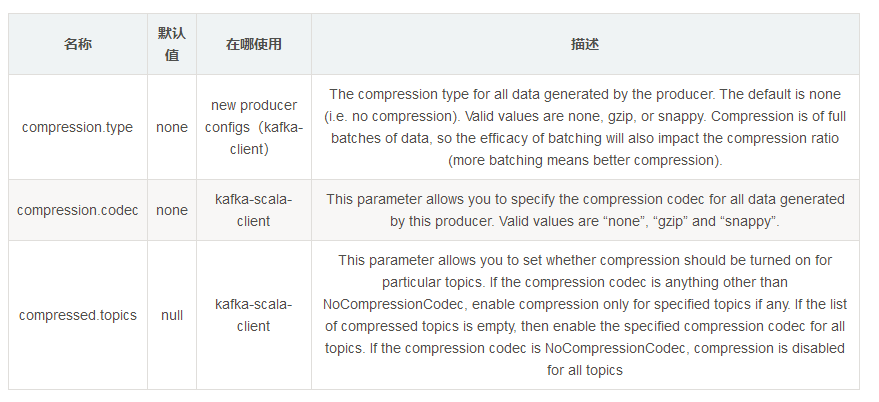
上面表格中提及了kafka-client与kafka-scala-client,这两者之间有什么区别呢?kafka-client是kafka的一个分支,其全部使用java语言来开发kafka的客户端。而kafka-scala-client是使用scala语言开发的客户端,两者之间采用的参数会有所不同,注意区分。
下面演示两个demo来便于区分两者之间的用法。
1.kafka-client的使用demo:
        Properties properties = new Properties();
        properties.put("key.serializer", "org.apache.kafka.common.serialization.StringSerializer");
        properties.put("value.serializer", "org.apache.kafka.common.serialization.ByteArraySerializer");
        properties.put("bootstrap.servers", brokerList);
        properties.put("compression.type", "gzip");

        Producer<String,byte[]> producer = new KafkaProducer<String,byte[]>(properties);

        ProducerRecord<String,byte[]> producerRecord = new ProducerRecord<String,byte[]>(topic, "messages".getBytes());
        Future<RecordMetadata> future =  producer.send(producerRecord, new Callback()
        {
            public void onCompletion(RecordMetadata metadata, Exception exception) {
                System.out.println(metadata.offset());
            }
});- 1
- 2
- 3
- 4
- 5
- 6
- 7
- 8
- 9
- 10
- 11
- 12
- 13
- 14
- 15
2.kafka-scala-client的使用demo:
Properties props = new Properties();
props.put("serializer.class", "com.kafka.compression.kafka.MessageEncoder");
props.put("metadata.broker.list", brokerList);
props.put("producer.type", "async");
props.put("compression.codec", "gzip");

kafka.javaapi.producer.Producer<Integer, byte[]> producer = new kafka.javaapi.producer.Producer<Integer,
        byte[]>(new kafka.producer.ProducerConfig(props));
producer.send(new KeyedMessage<Integer, byte[]>(topic, "messages".getBytes()));- 1
- 2
- 3
- 4
- 5
- 6
- 7
- 8
- 9
下面我们分别采用5个测试样本来进行测试,包括结构化log日志,xls,docx以及随机字符串这4种类型,分别采用Linux gzip工具(gzip -c * > *)、java内置的gzip压缩以及kafka内置的压缩进行测试。(其他的压缩方式可以类推,在此不做赘述。)
查看kafka压缩之后消息的大小,可以通过查看kafka-log文件的大小,没发生一次消息,将前后的文件大小相差即为消息的大小。只需check **.log文件即可。
得到测试接入如下表所示:
| Item | 1.log | 2.log | 3.xls | 4.docx | 随机字符串 |
|---|---|---|---|---|---|
| 原始文件大小 | 35136B | 51354B | 412160B | 322737B | 204800B |
| linux gzip压缩 | 930B | 3557B | 90098B | 302378B | 166474B |
| java gzip压缩 | 924B | 3542B | 90531B | 302687B | 166524B |
| kafka-client 未压缩 | 35162B | 51380B | |||
| kafka-client 压缩 | 980B/981B | 3607B | |||
| kafka-scala-client sync 未压缩 | 35162B | 51380B | |||
| kafka-scala-client sync 压缩 | 980B/981B | 3606B | |||
| kafka-scala-client async 未压缩 | 35162B | 51380B | 412290B | 322841B | 204852B |
| kafka-scala-client async 压缩 | 980B/981B | 3619B | 90660B | 302803B | 166626B |
| 压缩率 | 约3% | 约7% | 约22% | 约94% | 约81% |
压缩率=文件压缩后的大小与压缩前的大小之比。压缩率一般是越小越好,但是也得越小,一般解压时间也越长。
通过查看以上测试结果可以发现,kafka的压缩率和linux gzip或者java gzip的压缩率基本相同。
对于不同的测试样本来说,压缩率会展示出天差地别,不过如果业务方可以先将业务本身的消息采用gzip工具压缩,然后可以估算出开启kafka的压缩率,之后再进行决策。
你或许会注意到上表中的kafka压缩之后的消息大小会比其他的压缩方式压缩之后的消息会大一点点,这是因为kafka的日志存储结构造成的,kafka将消息存盘并不只是存储消息本身,而是包含了以下结构:
| 字段 | 占用空间大小 |
|---|---|
| offset | 8B |
| message size | 4B |
| crc32 | 4B |
| magic | 1B |
| attributes | 1B |
| key length | 4B |
| key | kB |
| payload length | 4B |
| payload | nB |
对于一个没有key的消息来说,其占用的存储空间比消息体本身多占用=8B+4B+4B+1B+1B+4B+0B+4B=26B的大小。
上面的测试都是单条发送整个测试样本的数据的,如果同时发送多条消息,那么会有什么变化呢?我们知道kafka的发送方式有同步和异步之分,异步的发送方式可以批量发送消息,那么会不会批量压缩消息进而使得消息得到更有效的压缩呢?
我们采用前面的样本1.log进行测试,读取样本中的内容,然后拆分成1KB一条消息进行发送。由于kafka-client没有producer.type的设置,我们这里采用kafka-scala-client进行测试,分为同步和异步:
| Item | sync | async |
|---|---|---|
| 未压缩 | 36046B | 36046B |
| 压缩 | 7008B | 1578B |
由上表数据可知:如果采用async的发送方式,那么消息会批量发送,在存储上会比sync的方式更节省磁盘空间
在同步的发送方式中,kafka-logs中消息存储为:
offset:1 position:0
offset:2 position:xxx
…..
一共分成35(25136B/1024B)条消息存储。
而异步的发送方式中,消息的存储为:
offset:34 posiotion:0
一共分成1条消息存储。
所以可以理解为何async的发送方式比sync的发送方式所呈现的压缩效率更好。
查看log日志的内容: bin/kafka-run-class.sh kafka.tools.DumpLogSegments –files /tmp/kafka-logs/[topicName]-0/00000000000000000000.log –print-data-log
附:Java内置的gzip压缩代码:
package com.kafka.compression.gzip;

import java.io.*;
import java.util.zip.GZIPInputStream;
import java.util.zip.GZIPOutputStream;

/**
 * Created by hidden on 2017/6/5.
 */
public class GzipUtil {

    public static void compress(String inFileName, String outFileName) {
        try {
            System.out.println("Createing the Gzip output Stream.");
            GZIPOutputStream out = null;
            try {
                out = new GZIPOutputStream(new FileOutputStream(outFileName));
            } catch (IOException e) {
                System.out.println("Could not create file: " + outFileName);
                e.printStackTrace();
            }

            System.out.println("Opening the input file.");
            FileInputStream in = null;
            try {
                in = new FileInputStream(inFileName);
            } catch (FileNotFoundException e) {
                System.out.println("File not found: "+inFileName);
                e.printStackTrace();
            }

            System.out.println("Transfering bytes from input file to Gzip format");
            byte[] buf = new byte[1024];
            int len;
            while ((len = in.read(buf)) > 0) {
                out.write(buf, 0, len);
            }
            in.close();
            System.out.println("Completing the Gzip file");
            out.finish();
            out.close();
        } catch (IOException e) {
            e.printStackTrace();
        }
    }

    public static void uncompress(String inFileName, String outFileName){
        try {
            System.out.println("Opening the compressed file.");
            GZIPInputStream in = null;
            try {
                in = new GZIPInputStream(new FileInputStream(inFileName));
            } catch (IOException e) {
                e.printStackTrace();
            }

            System.out.println("Open the output file.");
            FileOutputStream out = null;
            try {
                out = new FileOutputStream(outFileName);
            } catch (FileNotFoundException e) {
                e.printStackTrace();
            }


            byte[] buf = new byte[1024];
            int len;
            while ((len = in.read(buf)) > 0) {
                out.write(buf, 0, len);
            }
            out.flush();
            in.close();
            out.close();
        } catch (IOException e) {
            e.printStackTrace();
        }
    }
}
--------------------- 本文来自 朱小厮 的CSDN 博客 ,全文地址请点击:https://blog.csdn.net/u013256816/article/details/73197583?utm_source=copy

 浙公网安备 33010602011771号