
第四课 三元运算符
file1=open("test.txt","r",encoding="utf-8")
file2=open("test1.txt","w",encoding="utf-8")
txt=file1.read()
file2.write(txt)
1 转换a,b的值
a=1
b=2
a,b=b,a
2 if 语句的简单用法
x="m" if sex=1 else "woman"
x="m" if sex =1 else "woman"
3 dict 的简单用法
# status = 0的时候是在用状态,status=1的时候是停用状态
user = {
    "status": 1,
    "name": "xiaowang"
}

# 需要你去输出用户的当前状态 xx: 停用、在用
# xiaowang 当前处于 xx 状态
x= "在用" if user["status"]==0 else "停用"
print(x)

4  列表生成式
l=[1,3,5,7,9,11,13,15]
l1=[i+1 for i in l]
5 冒泡排序
x=[21,3,78,14,11,33,56,12,6,5]
n=len(x)
# for i in range(n):
#     for j in range(n-i-1):
#         if x[j]>x[j+1]:
#             x[j],x[j+1]=x[j+1],x[j]

6 写入字符串
以下实例演示了 writelines() 方法的使用:
#!/usr/bin/python3

# 打开文件
fo = open("test.txt", "w")
print ("文件名为: ", fo.name)
seq = ["菜鸟教程 1\n", "菜鸟教程 2"]
fo.writelines( seq )

# 关闭文件
fo.close()
7 random 使用
import random

print( random.randint(1,10) )        # 产生 1 到 10 的一个整数型随机数
print( random.random() )             # 产生 0 到 1 之间的随机浮点数
print( random.uniform(1.1,5.4) )     # 产生  1.1 到 5.4 之间的随机浮点数,区间可以不是整数
print( random.choice('tomorrow') )   # 从序列中随机选取一个元素
print( random.randrange(1,100,2) )   # 生成从1到100的间隔为2的随机整数

a=[1,3,5,6,7]                # 将序列a中的元素顺序打乱
random.shuffle(a)
print(a)
8 把一个文件的内容写到另一个文件
file1=open("test.txt","r",encoding="utf-8")
file2=open("test1.txt","w",encoding="utf-8")
txt=file1.read()
file2.write(txt)
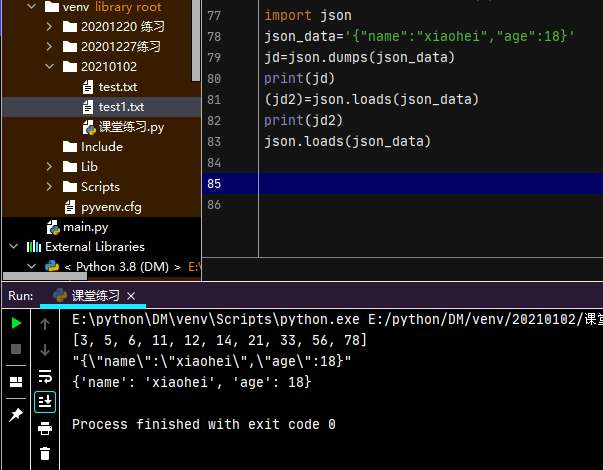
9 json 和字符串和字典的转换

 浙公网安备 33010602011771号