

ASIHttpRequest (Using ASIHTTPRequest in an iOS project)
1) Add the files
Copy the files you need to your project folder, and add them to your Xcode project. An overview of the ASIHTTPRequest source files appears here.
If you aren't sure which files you need, it's best to copy all the following files:
- ASIHTTPRequestConfig.h
- ASIHTTPRequestDelegate.h
- ASIProgressDelegate.h
- ASICacheDelegate.h
- ASIHTTPRequest.h
- ASIHTTPRequest.m
- ASIDataCompressor.h
- ASIDataCompressor.m
- ASIDataDecompressor.h
- ASIDataDecompressor.m
- ASIFormDataRequest.h
- ASIInputStream.h
- ASIInputStream.m
- ASIFormDataRequest.m
- ASINetworkQueue.h
- ASINetworkQueue.m
- ASIDownloadCache.h
- ASIDownloadCache.m
iPhone projects must also include:
- ASIAuthenticationDialog.h
- ASIAuthenticationDialog.m
- Reachability.h (in the External/Reachability folder)
- Reachability.m (in the External/Reachability folder)
2) Link against CFNetwork, SystemConfiguration, MobileCoreServices, CoreGraphics and zlib
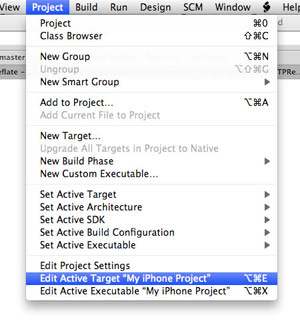
Choose Project -> Edit Active Target from the menu.
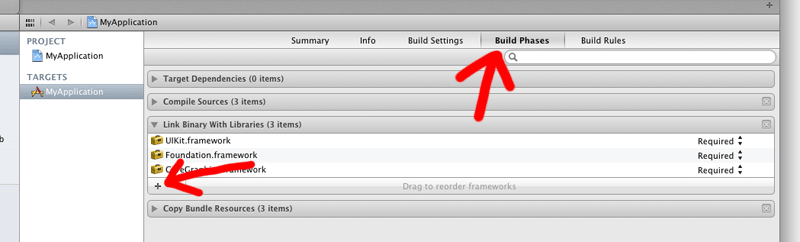
Click the plus button in the bottom left of the window.
Choose CFNetwork.framework from the list, and click Add.
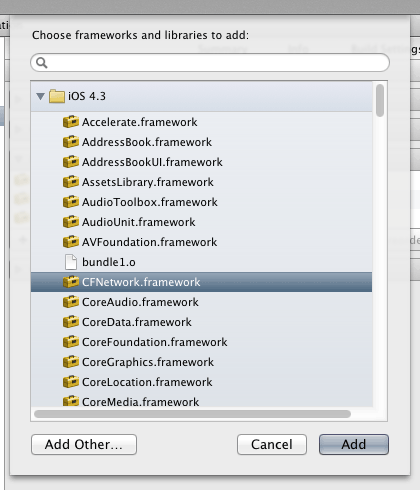
Repeat the last two steps to add the following: SystemConfiguration.framework, MobileCoreServices.framework,CoreGraphics.framework and libz.1.2.3.dylib (this will probably be near the bottom of the list, if you're having trouble finding it).

 浙公网安备 33010602011771号