
.NET6之MiniAPI(十五):跨域CORS(下)
前一篇的跨域请求的方式是松宽的方式,毕竟跨域有安全风险,应尽量少的允许访问必要资源,本篇分别从请求方法,请求头和请求凭据方面了解跨域设置。
请求方法:
api项目,get,post是默认访问,这里只设置了PUT允许访问
-
using Microsoft.AspNetCore.Cors;
-
-
-
var builder = WebApplication.CreateBuilder(args);
-
-
-
builder.Services.AddCors(options =>
-
{
-
options.AddPolicy(name: "Policy2",
-
builder =>
-
{
-
builder
-
.WithOrigins("http://localhost:5280")
-
.WithMethods("PUT");
-
});
-
});
-
var app = builder.Build();
-
//注意,这里是没有策略名称的
-
app.UseCors();
-
app.MapGet("/test2", [EnableCors("Policy2")] () => "get的结果");
-
app.MapPost("/test2", [EnableCors("Policy2")] () => "post的结果");
-
app.MapDelete("/test2", [EnableCors("Policy2")] () => "delete的结果");
-
app.MapPut("/test2", [EnableCors("Policy2")] () => "put的结果");
-
app.Map("/test2", [EnableCors("Policy2")] () => "map全部");
-
app.Run();
页面项目:
-
@page
-
@model IndexModel
-
@{
-
ViewData["Title"] = "Home page";
-
}
-
<div class="text-center">
-
<h1 class="display-4">欢迎学习MiniAPI</h1>
-
<p>本例是跨域知识的分享。</p>
-
</div>
-
<p id="test2-get"></p>
-
<p id="test2-post"></p>
-
<p id="test2-delete"></p>
-
<p id="test2-put"></p>
-
@section Scripts{
-
<script>
-
$(function(){
-
$.ajax({
-
url: 'http://localhost:5001/test2',
-
type: 'GET',
-
}).done(function( data, textStatus, jqXHR ) {
-
$("#test2-get").html("test2 get:"+data)
-
}).fail(function( jqXHR, textStatus, errorThrown) {
-
$("#test2-get").html("test2 get:"+textStatus)
-
});
-
-
-
$.ajax({
-
url: 'http://localhost:5001/test2',
-
type: 'POST',
-
}).done(function( data, textStatus, jqXHR ) {
-
$("#test2-post").html("test2:"+data)
-
}).fail(function( jqXHR, textStatus, errorThrown) {
-
$("#test2-post").html("test2:"+textStatus)
-
});
-
-
-
$.ajax({
-
url: 'http://localhost:5001/test2',
-
type: 'DELETE',
-
}).done(function( data, textStatus, jqXHR ) {
-
$("#test2-delete").html("test2 delete:"+data)
-
}).fail(function( jqXHR, textStatus, errorThrown) {
-
$("#test2-delete").html("test2 detele:"+textStatus)
-
});
-
-
-
$.ajax({
-
url: 'http://localhost:5001/test2',
-
type: 'PUT',
-
}).done(function( data, textStatus, jqXHR ) {
-
$("#test2-put").html("test2 put:"+data)
-
}).fail(function( jqXHR, textStatus, errorThrown) {
-
$("#test2-put").html("test2 put:"+textStatus)
-
});
-
});
-
</script>
-
}
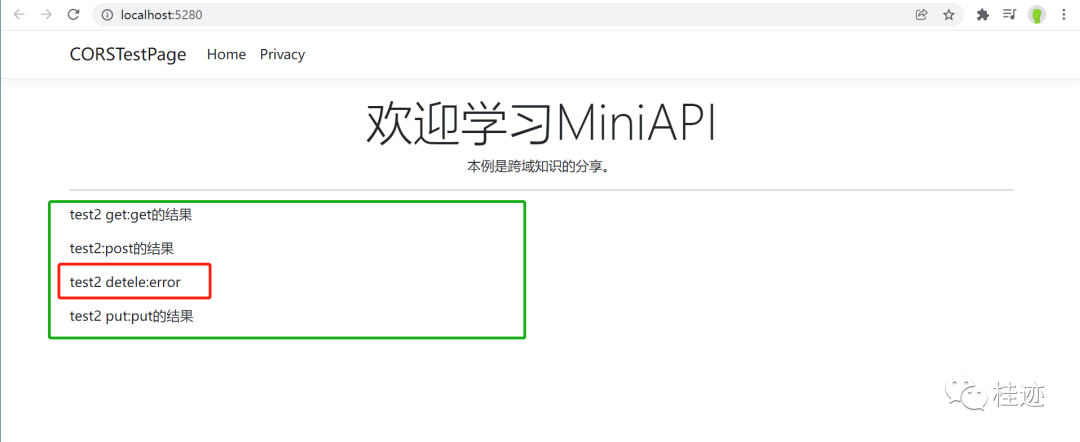
运行结果,delete被拒了
请求Header
api项目,设置是所有请求方法通过
-
using Microsoft.AspNetCore.Cors;
-
-
-
var builder = WebApplication.CreateBuilder(args);
-
builder.Services.AddCors(options =>
-
{
-
options.AddPolicy(name: "Policy3",
-
builder =>
-
{
-
builder.WithOrigins("http://localhost:5280")
-
.WithHeaders("x-cors-header")
-
.AllowAnyMethod();
-
});
-
});
-
-
-
var app = builder.Build();
-
app.UseCors();
-
app.MapGet("/test3", [EnableCors("Policy3")] () => "get的结果");
-
app.MapPost("/test3", [EnableCors("Policy3")] () => "post的结果");
-
app.MapDelete("/test3", [EnableCors("Policy3")] () => "delete的结果");
-
app.MapPut("/test3", [EnableCors("Policy3")] () => "put的结果");
-
app.Map("/test3", [EnableCors("Policy3")] () => "map全部");
-
app.Run();

页面项目
-
@page
-
@model IndexModel
-
@{
-
ViewData["Title"] = "Home page";
-
}
-
<div class="text-center">
-
<h1 class="display-4">欢迎学习MiniAPI</h1>
-
<p>本例是跨域知识的分享。</p>
-
</div>
-
<p id="test3-get"></p>
-
<p id="test3-post"></p>
-
<p id="test3-delete"></p>
-
<p id="test3-put"></p>
-
@section Scripts{
-
<script>
-
$(function(){
-
$.ajax({
-
url: 'http://localhost:5001/test3',
-
type: 'GET',
-
headers: {
-
"x-cors-header":"gsw"
-
}
-
}).done(function( data, textStatus, jqXHR ) {
-
$("#test3-get").html("test3 get:"+data)
-
}).fail(function( jqXHR, textStatus, errorThrown) {
-
$("#test3-get").html("test3 get:"+textStatus)
-
});
-
-
-
$.ajax({
-
url: 'http://localhost:5001/test3',
-
type: 'POST',
-
headers: {
-
"x-cors-header":"gsw"
-
}
-
}).done(function( data, textStatus, jqXHR ) {
-
$("#test3-post").html("test3 post:"+data)
-
}).fail(function( jqXHR, textStatus, errorThrown) {
-
$("#test3-post").html("test3 post:"+textStatus)
-
});
-
-
-
$.ajax({
-
url: 'http://localhost:5001/test3',
-
type: 'PUT',
-
headers: {
-
"x-cors-header":"gsw"
-
}
-
}).done(function( data, textStatus, jqXHR ) {
-
$("#test3-put").html("test3 put:"+data)
-
}).fail(function( jqXHR, textStatus, errorThrown) {
-
$("#test3-put").html("test3 put:"+textStatus)
-
});
-
-
-
$.ajax({
-
url: 'http://localhost:5001/test3',
-
type: 'DELETE',
-
headers: {
-
"x-cors-header":"gsw",
-
"x-key":"gsw",
-
}
-
}).done(function( data, textStatus, jqXHR ) {
-
$("#test3-delete").html("test3 delete:"+data)
-
}).fail(function( jqXHR, textStatus, errorThrown) {
-
$("#test3-delete").html("test3 delete:"+textStatus)
-
});
-
});
-
</script>
-
}
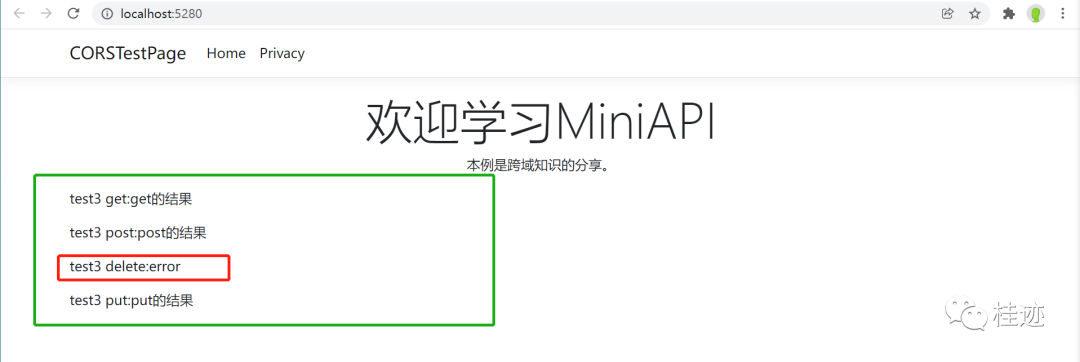
运行结果,delete失败了,因为在delete请求中,夹带了x-key的header,所以没有通过
请求凭据
凭据需要在 CORS 请求中进行特殊处理。 默认情况下,浏览器不会使用跨域请求发送凭据。 凭据包括 cookie s 和 HTTP 身份验证方案。 若要使用跨域请求发送凭据,客户端必须设置 XMLHttpRequest.withCredentials 为 true
api项目
-
using Microsoft.AspNetCore.Cors;
-
-
-
var builder = WebApplication.CreateBuilder(args);
-
builder.Services.AddCors(options =>
-
{
-
options.AddPolicy(name: "Policy4",
-
builder =>
-
{
-
builder.WithOrigins("http://localhost:5280")
-
.AllowCredentials()
-
.AllowAnyMethod();
-
});
-
});
-
var app = builder.Build();
-
app.UseCors();
-
app.MapGet("/test4", [EnableCors("Policy4")] () => "get的结果");
-
app.MapPost("/test4", [EnableCors("Policy4")] () => "post的结果");
-
app.MapDelete("/test4", [EnableCors("Policy4")] () => "delete的结果");
-
app.MapPut("/test4", [EnableCors("Policy4")] () => "put的结果");
-
app.Map("/test4", [EnableCors("Policy4")] () => "map全部");
-
app.Run();
页面项目:
-
@page
-
@model IndexModel
-
@{
-
ViewData["Title"] = "Home page";
-
}
-
<div class="text-center">
-
<h1 class="display-4">欢迎学习MiniAPI</h1>
-
<p>本例是跨域知识的分享。</p>
-
</div>
-
<p id="test4-get"></p>
-
<p id="test4-post"></p>
-
<p id="test4-delete"></p>
-
<p id="test4-put"></p>
-
@section Scripts{
-
<script>
-
$(function(){
-
$.ajax({
-
url: 'http://localhost:5001/test4',
-
type: 'GET',
-
xhrFields: {
-
withCredentials: true
-
}
-
}).done(function( data, textStatus, jqXHR ) {
-
$("#test4-get").html("test4 get:"+data)
-
}).fail(function( jqXHR, textStatus, errorThrown) {
-
$("#test4-get").html("test4 get:"+textStatus)
-
});
-
-
-
$.ajax({
-
url: 'http://localhost:5001/test4',
-
type: 'POST',
-
xhrFields: {
-
withCredentials: true
-
}
-
}).done(function( data, textStatus, jqXHR ) {
-
$("#test4-post").html("test4 post:"+data)
-
}).fail(function( jqXHR, textStatus, errorThrown) {
-
$("#test4-post").html("test4 post:"+textStatus)
-
});
-
-
-
$.ajax({
-
url: 'http://localhost:5001/test4',
-
type: 'PUT',
-
xhrFields: {
-
withCredentials: true
-
}
-
}).done(function( data, textStatus, jqXHR ) {
-
$("#test4-put").html("test4 put:"+data)
-
}).fail(function( jqXHR, textStatus, errorThrown) {
-
$("#test4-put").html("test4 put:"+textStatus)
-
});
-
-
-
$.ajax({
-
url: 'http://localhost:5001/test4',
-
type: 'DELETE',
-
xhrFields: {
-
withCredentials: true
-
}
-
}).done(function( data, textStatus, jqXHR ) {
-
$("#test4-delete").html("test4 delete:"+data)
-
}).fail(function( jqXHR, textStatus, errorThrown) {
-
$("#test4-delete").html("test4 delete:"+textStatus)
-
});
-
});
-
</script>
-
}
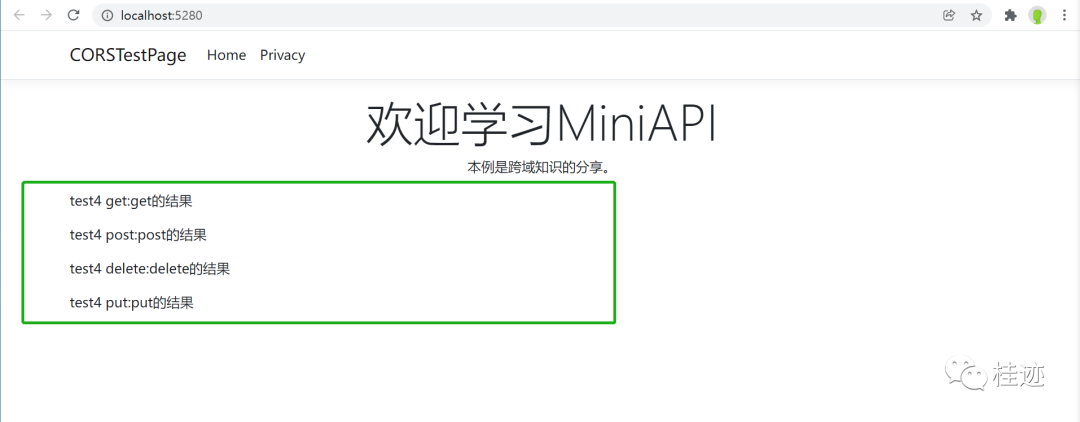
运行结果:
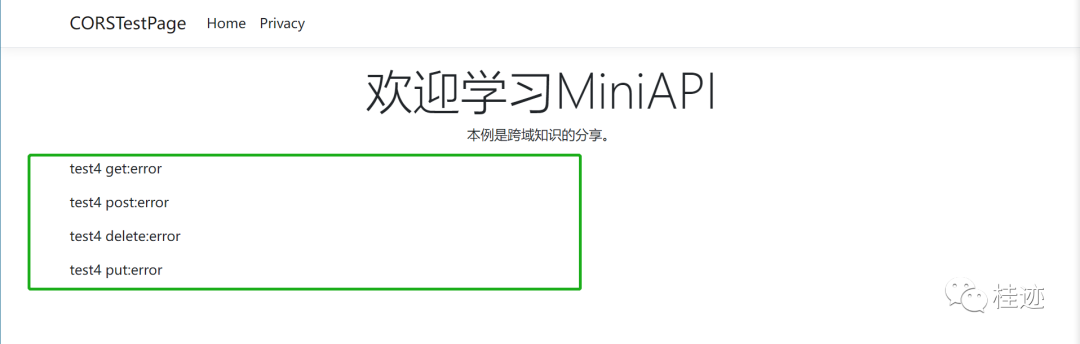
如果除掉api项目中的凭据
-
options.AddPolicy(name: "Policy4",
-
builder =>
-
{
-
builder.WithOrigins("http://localhost:5280")
-
.AllowAnyMethod()
-
;
-
});
运行结果:

 浙公网安备 33010602011771号