
.net core 3.1 Identity Server4 (Swagger UI授权)

.net core 3.1 Identity Server4 (Swagger UI授权)
Identity Server 4的目录:https://www.tnblog.net/hb/article/details/5458
项目地址:https://gitee.com/zuxiazijiahebo/IdentityServer4
前言
Swagger是一个有用的工具,用于使用标准JSON格式即时创建基本的API文档,该文档可以使用对开发人员友好的UI进行呈现。这些UI通常允许您开始通过浏览器发出演示请求。但是,一旦您开始使用OAuth保护此API,该如何保持Swagger文档的功能?
Swagger与OAuth授权服务器的集成已有相对完善的文档,因此在本文中,您将了解使用Swagger将IdentityServer支持添加到ASP.NET Core API的基础,然后了解这种方法的局限性以及也许值得探索。
本文将演示Swashbuckle。
准备API
首先,您需要使用IdentityServer保护的API。这里我们就创建一个ApIDemo2的API。在ConfigureServices中注册身份验证。
services.AddAuthentication("Bearer").AddJwtBearer("Bearer", options =>{options.Authority = "https://localhost:7200"; // 授权服务器地址//确定自己是哪个资源(资源名称)options.Audience = "ApiTwo";options.RequireHttpsMetadata = false; // 是否使用https进行通信//取消验证用户以及验证角色options.TokenValidationParameters = new Microsoft.IdentityModel.Tokens.TokenValidationParameters(){ValidateIssuer = false,ValidateAudience = false};});
tn然后通过更新Configure方法使其类似于以下内容,在HTTP管道中启用它:
app.UseAuthentication();app.UseAuthorization();
然后,您可以通过使用AuthorizeAttribute动作或控制器来触发此操作。现在,您应该从这些受保护的端点获取401未经授权。这里我们在默认的WeatherForecastController下添加一个POST请求方法并添加授权标签Authorize。
[Authorize][HttpPost]public IEnumerable<WeatherForecast> Post(){var rng = new Random();return Enumerable.Range(1, 5).Select(index => new WeatherForecast{Date = DateTime.Now.AddDays(index),TemperatureC = rng.Next(-20, 55),Summary = Summaries[rng.Next(Summaries.Length)]}).ToArray();}
IdentityServer授权服务器配置
在GetApiResources方法中添加ApiScope。通过这种方法,你仅使用一个scope就能表示完全访问这个作用域的权限。
new ApiScope("ApiTwo", "Full access to API #1")
要将Swagger UI配置为IdentityServer实现中的客户端应用程序(Client),您需要在IdentityServer中添加一个类似于以下内容的客户端条目。您正在使用授权码流PKCE和路径为的重定向URI /oauth2-redirect.html,这是Swagger UI的默认路径。如果您的Swagger UI具有基本路径,则还应将其包含在重定向URI中(即,如果Swagger UI处于/swagger,则重定向URI应该为/swagger/oauth2-redirect.html)。
new Client{ClientId = "apidemo2_swagger",ClientName = "Swagger UI for ApIDemo2",ClientSecrets = {new Secret("secret".Sha256())}, // 这个自己整吧AllowedGrantTypes = GrantTypes.Code,// 启动PkceRequirePkce = true,RequireClientSecret = false,RedirectUris = {"http://localhost:9001/swagger/oauth2-redirect.html"},AllowedCorsOrigins = {"http://localhost:9001"},AllowedScopes = { "ApiTwo" }},
Swashbuckle添加OAuth支持
回到我们的ApIDemo2中,让我们引入Swashbuckle:
Install-Package Swashbuckle -Version 5.6.0Install-Package Swashbuckle.AspNetCore.Swagger -Version 5.6.3
我们在ConfigureServices方法中添加以下内容进行注册,使用一些描述性信息配置基本的Swagger文档。
services.AddSwaggerGen(options =>{options.SwaggerDoc("v1", new OpenApiInfo { Title = "Protected API", Version = "v1" });// 我们会在这下面添加更多东西...});
接下来,您想将有关授权服务器的一些信息添加到swagger文档中。由于您的UI将在最终用户的浏览器中运行,并且在该浏览器中运行的JavaScript将需要访问令牌,因此您将使用授权代码流(code的授权方式)(PKCE))。
同时您需要告诉Swashbuckle授权和令牌端点的位置(请检查IdentityServer4文档),以及它将使用的作用域(其中键是作用域本身,而值是显示名称) )。
services.AddSwaggerGen(options =>{options.SwaggerDoc("v1", new OpenApiInfo { Title = "Protected API", Version = "v1" });options.AddSecurityDefinition("oauth2", new OpenApiSecurityScheme{Type = SecuritySchemeType.OAuth2,Flows = new OpenApiOAuthFlows{AuthorizationCode = new OpenApiOAuthFlow{AuthorizationUrl = new Uri("https://localhost:7200/connect/authorize"),TokenUrl = new Uri("https://localhost:7200/connect/token"),Scopes = new Dictionary<string, string>{{"ApiTwo", "Swagger UI for ApIDemo2"}}}}});options.OperationFilter<AuthorizeCheckOperationFilter>();});
现在,您需要告诉您的庞大文档,哪些端点需要访问令牌才能工作,并且它们可以返回401和403响应。您可以使用来执行此操作IOperationFilter,您可以在下面看到(已从EShopOnContainers示例存储库中的过滤器改编而成)。

public class AuthorizeCheckOperationFilter : IOperationFilter{public void Apply(OpenApiOperation operation, OperationFilterContext context){var hasAuthorize = context.MethodInfo.DeclaringType.GetCustomAttributes(true).OfType<AuthorizeAttribute>().Any()|| context.MethodInfo.GetCustomAttributes(true).OfType<AuthorizeAttribute>().Any();if (hasAuthorize){operation.Responses.Add("401", new OpenApiResponse { Description = "Unauthorized" });operation.Responses.Add("403", new OpenApiResponse { Description = "Forbidden" });operation.Security = new List<OpenApiSecurityRequirement>{new OpenApiSecurityRequirement{[new OpenApiSecurityScheme {Reference = new OpenApiReference{Type = ReferenceType.SecurityScheme,Id = "oauth2"}}] = new[] { "ApiTwo" }}};}}}
然后,您可以像这样注册:
options.OperationFilter<AuthorizeCheckOperationFilter>();
现在,您可以通过在Configure方法中添加以下内容,在管道中同时配置Swagger文档端点和Swagger UI :
app.UseSwagger();app.UseSwaggerUI(options =>{options.SwaggerEndpoint("/swagger/v1/swagger.json", "My API V1");options.OAuthClientId("apidemo2_swagger");options.OAuthAppName("Demo API - Swagger");options.OAuthUsePkce();});
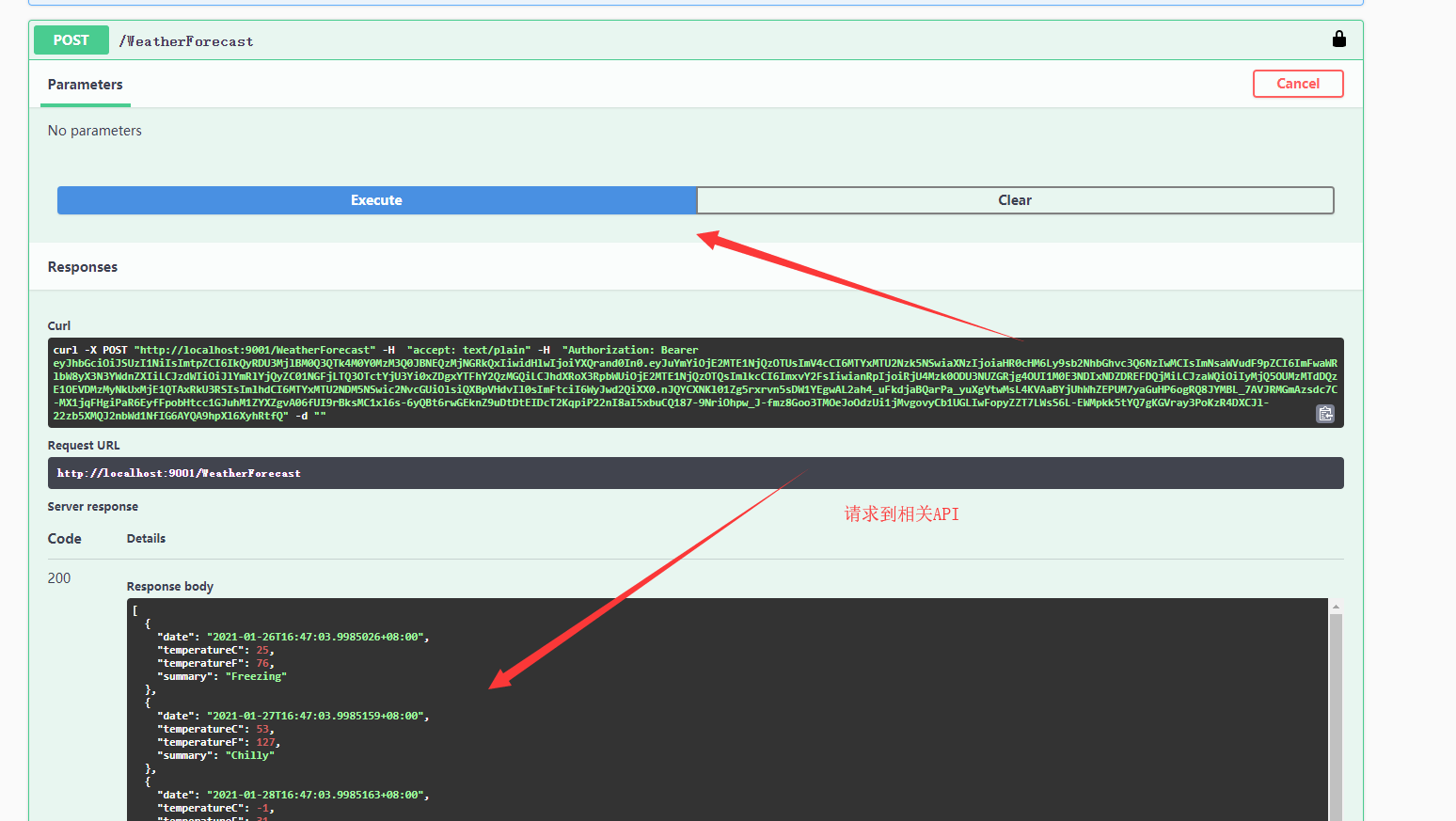
运行测试
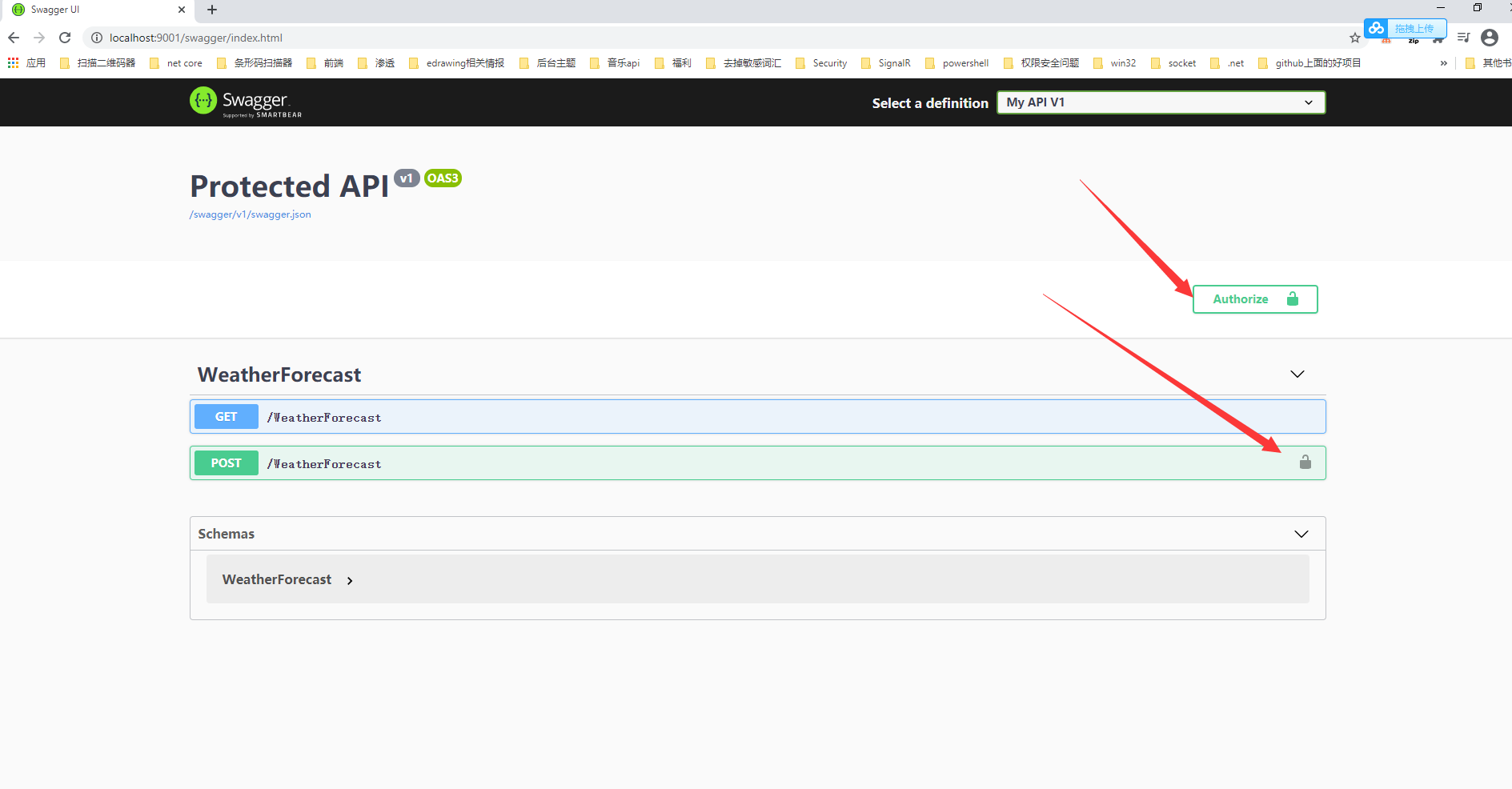
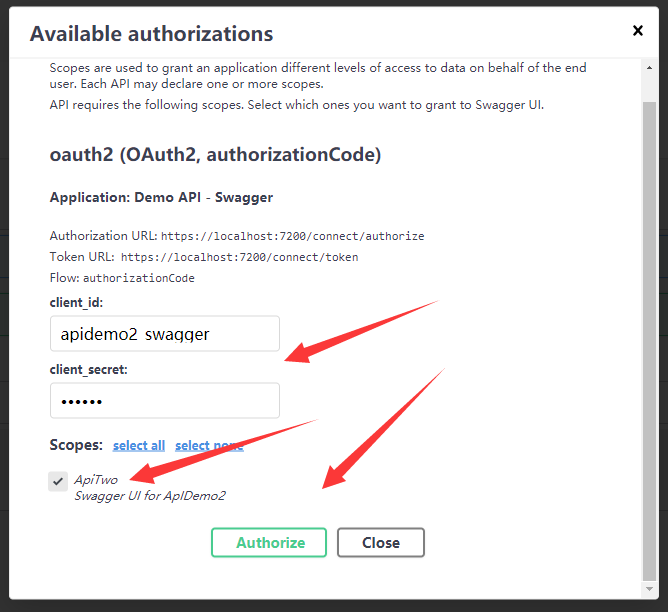
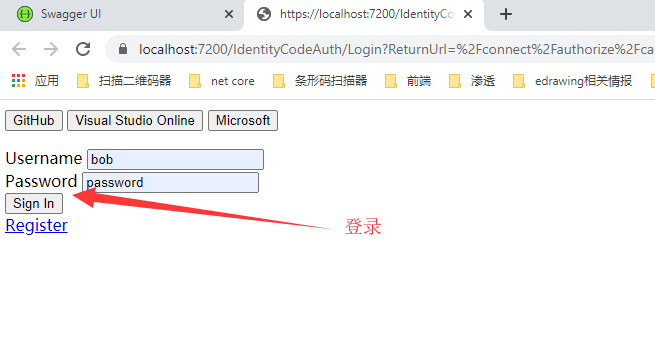
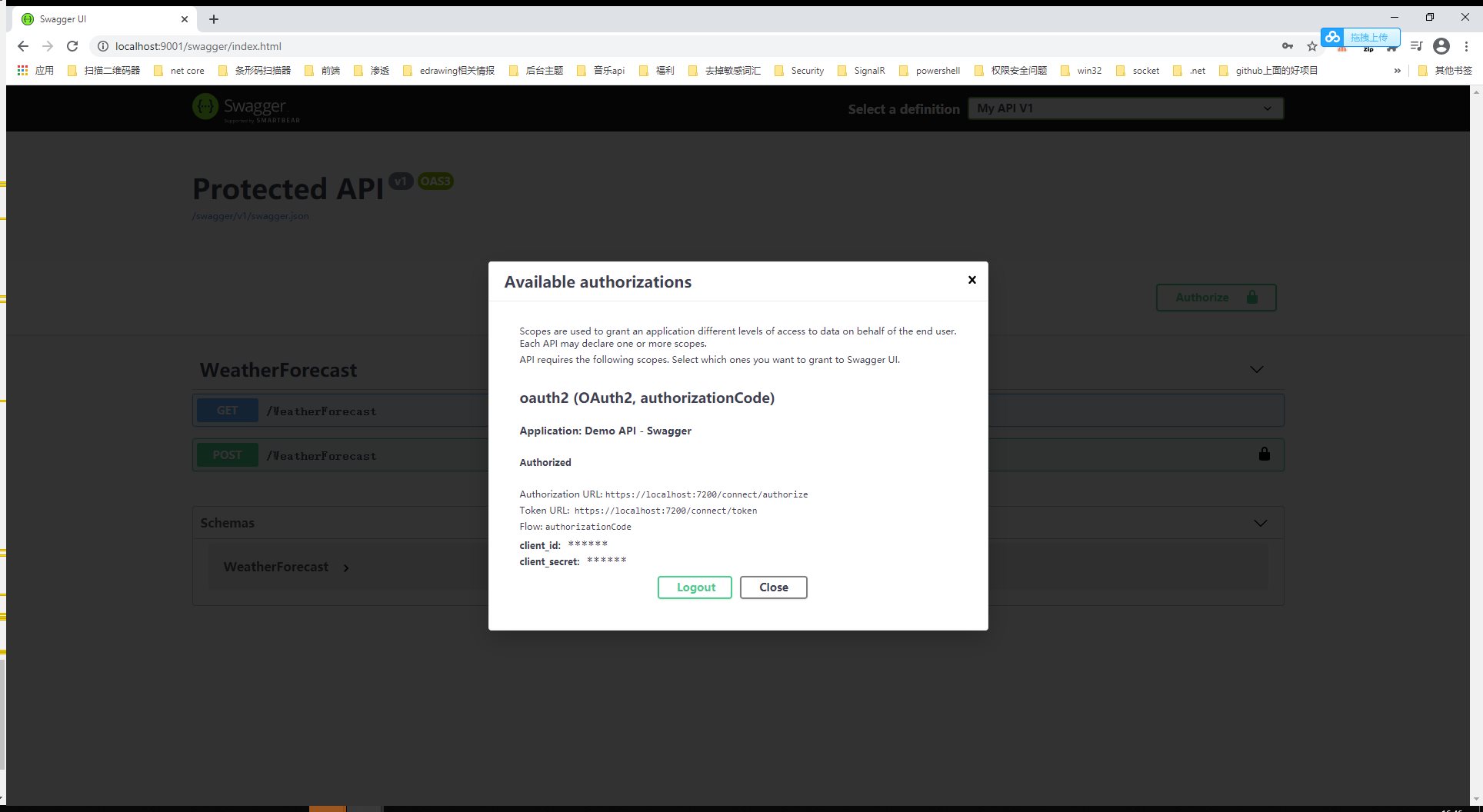

 浙公网安备 33010602011771号