
解决:Gitlab上出现“You won't be able to pull or push project code via SSH until you add an SSH key to you”
第一次使用Gitlab上的issues进行缺陷管理,在使用是出现You won't be able to pull or push project code via SSH until you add an SSH key to your profile (在您的配置文件中添加一个ssh密钥之前,您将无法通过ssh来拖动或推动项目代码):

解决办法:首先确保电脑上安装了git:
详细教程请看我的博客园 :https://www.cnblogs.com/gufengchen/p/10989312.html
当git 安装好后:
1、在git中输入命令:$ cd ~/.ssh 检查是否生成过KEY,

没有生成过key
如果显示有id_rsa.pub或者id_dsa.pub存在,直接进入第4步开始

2、在git中输入命令:$ ssh-keygen -t rsa -C “你公司在GITLAB上的邮箱地址”,按下回车键:这个命令是生成key命令的

3、直接会车,不输入命令
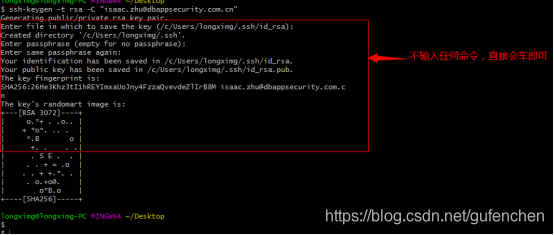
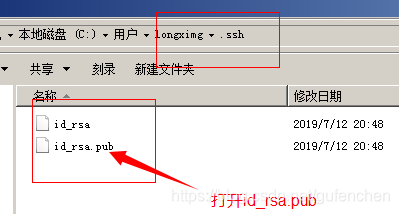
4、找到:生成的key目录
5、在GITlab上添加key:登陆gitlab网站:点击账号--点击Settings--点击SSH KEYS

6、然后把刚才目录文件中的生的id_rsa_pub中的密钥全部粘贴如:keys中--点击add keys搞的
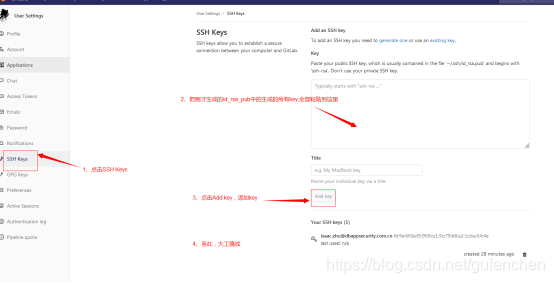
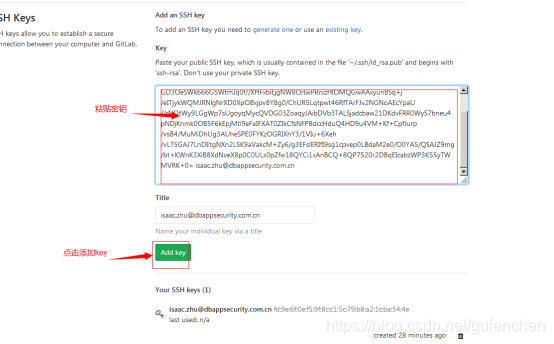
结束:
一下是我的详细步骤及完整图片:
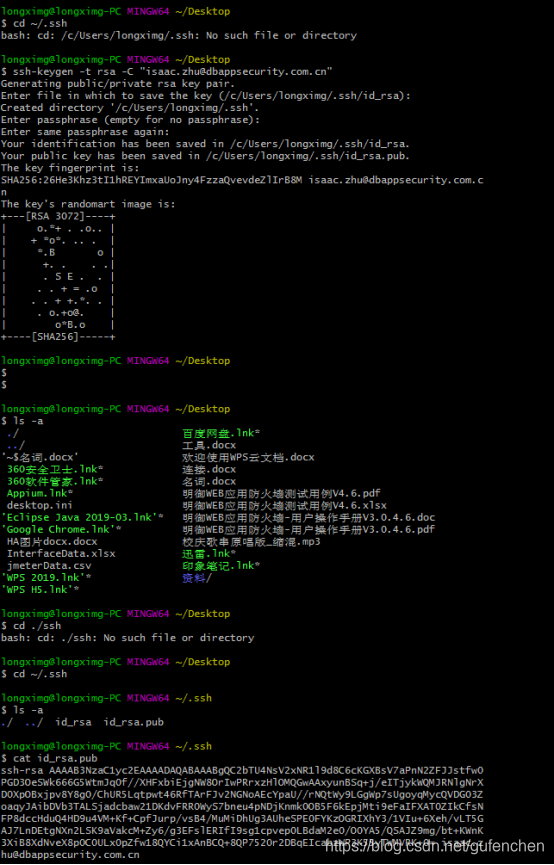
-
-
-
bash: cd: /c/Users/longximg/.ssh: No such file or directory
-
-
-
-
Generating public/private rsa key pair.
-
Enter file in which to save the key (/c/Users/longximg/.ssh/id_rsa): //密钥的目录
-
Created directory '/c/Users/longximg/.ssh'.
-
Enter passphrase (empty for no passphrase): //密码设置为空
-
Enter same passphrase again:
-
Your identification has been saved in /c/Users/longximg/.ssh/id_rsa.
-
Your public key has been saved in /c/Users/longximg/.ssh/id_rsa.pub.
-
The key fingerprint is:
-
SHA256:26He3Khz3tI1hREYImxaUoJny4FzzaQvevdeZlIrB8M isaac.zhu@dbappsecurity.com.cn //公钥
-
The key's randomart image is:
-
-
-
-
-
-
-
-
-
-
-
+----[SHA256]-----+
-
-
-
-
-
-
-
-
-
-
-
-
-
-
-
-
-
-
-
#使用账号duxiaolei 密码:Duia_duxiaolei 登录git.duia.org.cn
-
#将上面生成的ssh 添加进去:
-
-
-
-
(以上是实际操作截图)
-
教程:
-
cd ~/.ssh
-
# 生成rsa密钥,密钥秘钥:123456
-
-
# 将密钥文件复制到剪贴板
-
pbcopy < ~/.ssh/myname_rsakey.pub
-
# 进入github,设置ssh密钥
-
# 1. Edit Profile
-
# 2. SSH Keys
-
# 3. Add SSH Key
-
# 4. 将刚刚复制的Key粘贴,然后提交
-
# 添加rsa密钥
-
-
# 测试github连接
-
ssh -T git@github.com
-
# 关联项目
-
cd 项目文件夹/
-
# 为当前文件夹初始化git
-
git init
-
# 添加远程服务器
-
git remote add origin git@github.com:liufan321/HelloWorldDemo.git
-
# 从服务器拉项目
-
git pull -u origin master
-
# 将项目内容推送到服务器
-
git push -u origin master

 浙公网安备 33010602011771号