
【Vue】基础知识
项目初始化
- 通过脚手架创建项目、配置路由
- 安装
插件Element-UI 在插件中搜索vue-cli-plugin-element - 安装
运行依赖Axios - 代码中css代码需要 less语法的话 需要
开发依赖安装 less & less-loader
v-bind 属性绑定 :属性名 数据对应的是data里中的数据
v-on 事件绑定 @事件名 对应的是methods内的方法
深拷贝 依赖——运行依赖——lodash
运用cloneDeep(对象) 深拷贝一个对象 会返回一个新对象
新对象 = cloneDeep(原来的对象)
- 导入lodash
<script>
import _ from 'lodash'

// 深拷贝
const newForm = _.cloneDeep(this.oldForm)
// 新的Form表单对象和旧的Form表单是两个不同的表单
</script>
Vue中 Watch 方法 观察Vux中数据的变化
 watch: {
    '$store.state.desulfurationNumArr': function () {
      this.leftTopFun()
    },
Vue 实现滚动效果
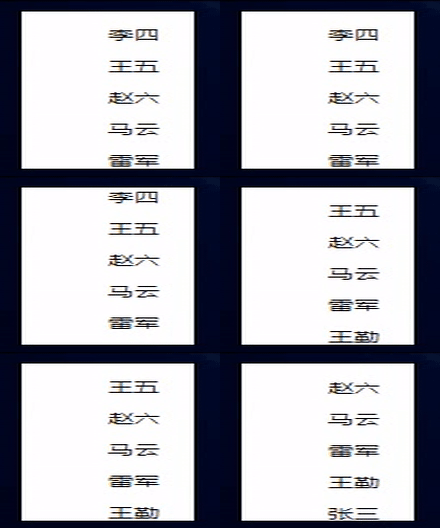
<template>
  <div id="box">
    <ul id="con1"
        ref="con1"
        :class="{anim:animate==true}">
      <li v-for='(item,index) in items'
          :key="index">{{item.name}}</li>
    </ul>
  </div>
</template>

<script>
export default {
  data () {
    return {
      animate: false,
      items: [
        { name: '马云' },
        { name: '雷军' },
        { name: '王勤' },
        { name: '张三' },
        { name: '李四' },
        { name: '王五' },
        { name: '赵六' }
      ]
    }
  },
  created () {
    setInterval(this.scroll, 2000)
  },
  methods: {
    scroll () {
      this.animate = true // 因为在消息向上滚动的时候需要添加css3过渡动画,所以这里需要设置true
      setTimeout(() => { //  这里直接使用了es6的箭头函数,省去了处理this指向偏移问题,代码也比之前简化了很多
        this.items.push(this.items[0]) // 将数组的第一个元素添加到数组的
        this.items.shift() // 删除数组的第一个元素
        this.animate = false // margin-top 为0 的时候取消过渡动画,实现无缝滚动
      }, 500)
    }
  }
}
</script>

<style lang="less" scoped>
#box {
  width: 80px;
  height: 150px;
  line-height: 20px;
  overflow: hidden;
  border: 1px solid black;
  background-color: #fff;
}
.anim {
  transition: all 0.5s;
  margin-top: -17px;
}
#con1 li {
  list-style: none;
  height: 30px;
}
</style>
使用axios定时请求后台数据
使用递归的方式,在成功回调函数中设置定时器,成功了 则再次调用自己 实现axios的定时请求
    // 刷新今日减排数据
    refreshTodayOutData () {
      const self = this
      // 二氧化硫
      self.$http.post('index/so2').then(res => {
        if (res.data !== null) {
          console.log('!!SUCCESS!!刷新so2数据成功')
          console.log(res.data)
          this.$store.state.todayso2 = (res.data * 0.000001).toFixed(5)
          setTimeout(() => {
            self.refreshTodayOutData()
          }, 15000)
        } else {
          console.log('!!ERROR!!刷新so2数据失败')
        }
      })
}
在Vue切换导航栏的时候,在上一个页面如果有定时器(↑ 成功即调用回调函数)的话,需要清除定时器
// 1. 在data中定义一个定时器的名字
export default {
  data () {
    return {
      setTimeoutTimer: null,
  },
    // 刷新今日减排数据
    async refreshTodayOutData () {
      this.num = this.num += 1
      console.log('-------------------今日减排-------------------' + this.num)

      // 二氧化硫
      await this.$http.post('index/so2').then(res => {
        if (res.data !== null) {
          console.log('!!【SUCCESS】!!刷新so2数据成功')
          console.log(res.data)
          this.$store.state.todayso2 = (res.data * 0.000001).toFixed(5)
           // 把定时器赋给data的setTimeoutTimer
          this.setTimeoutTimer = setTimeout(() => {
            this.refreshTodayOutData()
          }, 5000)
        } else {
          console.log('!!【ERROR】!!刷新so2数据失败')
        }
      })
    },
  destroyed () {
    clearTimeout(this.setTimeoutTimer)            // 在destroyed生命周期中,进行切换页面后 可以销毁定时器
    console.log('····清除定时器成功····')
  }
格式化日期
var d = new Date('Thu May 12 2016 08:00:00 GMT+0800 (中国标准时间)');
youWant=d.getFullYear() + '-' + (d.getMonth() + 1) + '-' + d.getDate() + ' ' + d.getHours() + ':' + d.getMinutes() + ':' + d.getSeconds();
//yyyy-MM-dd hh:mm:ss

var m = (d.getMonth()+1).toString().padStart(2,'0');
// 补充0
Vue中Form表单监听回车事件
// @keyup.enter.native跟@keyup.enter区别
// 在 Vue 2.0 中,为自定义组件绑定原生事件必须使用 .native 修饰符,只有Button 组件可以监听 click 事件。

 <el-form @keyup.enter.native="loginbtn">

 浙公网安备 33010602011771号