
实验7:基于REST API的SDN北向应用实践
实验7:基于REST API的SDN北向应用实践
一、实验目的
- 能够编写程序调用OpenDaylight REST API实现特定网络功能;
- 能够编写程序调用Ryu REST API实现特定网络功能。
二、实验环境
- 下载虚拟机软件Oracle VisualBox或VMware;
- 在虚拟机中安装Ubuntu 20.04 Desktop amd64,并完整安装Mininet、OpenDaylight(Carbon版本)、Postman和Ryu;
三、实验要求
(一)基本要求
-
编写Python程序,调用OpenDaylight的北向接口实现以下功能
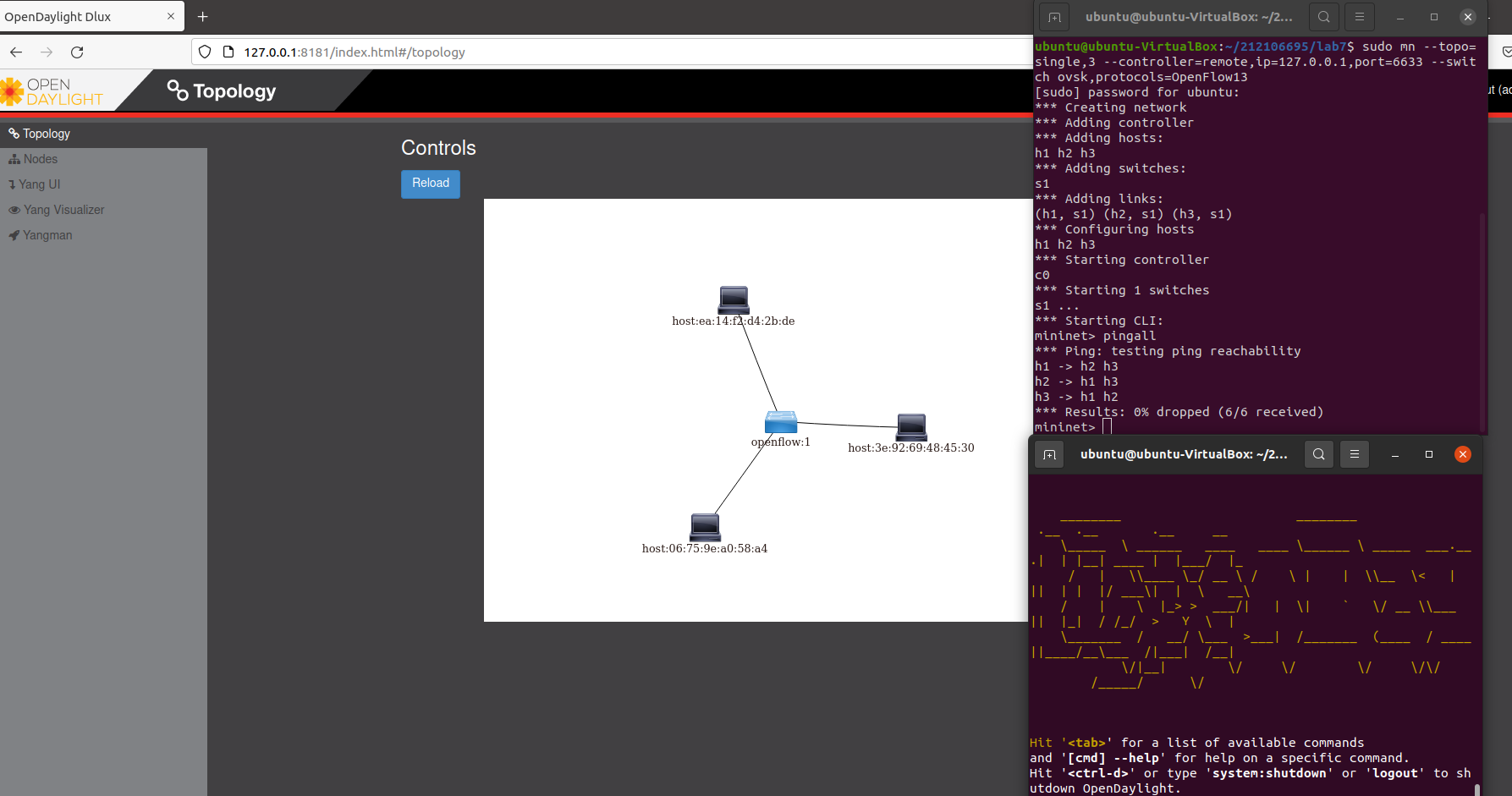
(1) 利用Mininet平台搭建下图所示网络拓扑,并连接OpenDaylight;![]()
- 使用命令
./distribution-karaf-0.6.4-Carbon/bin/karaf打开ODL控制器 - 使用命令
sudo mn --topo=single,3 --controller=remote,ip=127.0.0.1,port=6633 --switch ovsk,protocols=OpenFlow13创建拓扑并连接控制器![]()
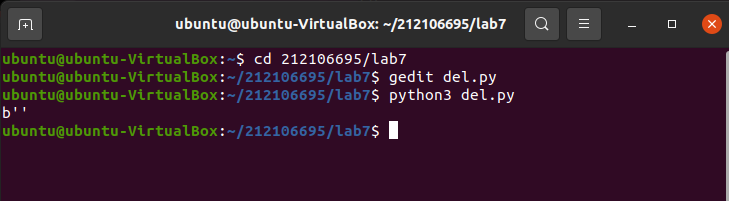
(2) 下发指令删除s1上的流表数据。
#!/usr/bin/python
import requests
from requests.auth import HTTPBasicAuthdef http_delete(url):
url= url
headers = {'Content-Type':'application/json'}
resp = requests.delete(url, headers=headers, auth=HTTPBasicAuth('admin', 'admin'))
return respif __name__ == "__main__":
url = 'http://127.0.0.1:8181/restconf/config/opendaylight-inventory:nodes/node/openflow:1/'
resp = http_delete(url)
print(resp.content)![]()
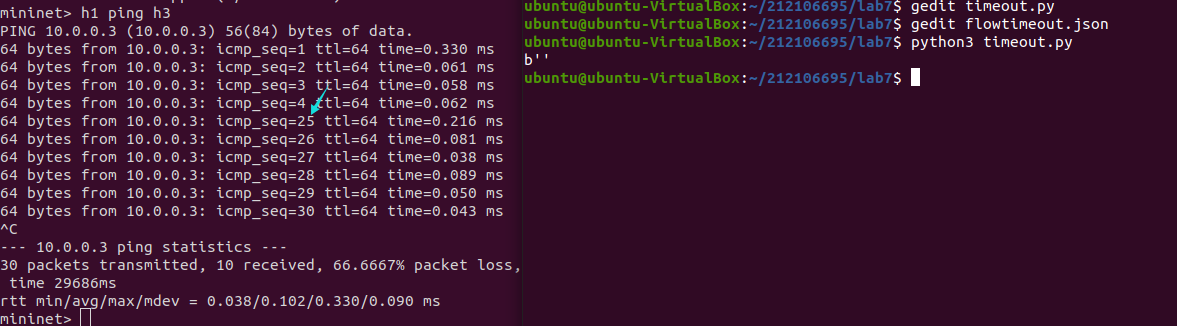
(3) 下发硬超时流表,实现拓扑内主机h1和h3网络中断20s。
#!/usr/bin/python
import requests
from requests.auth import HTTPBasicAuth
if __name__ == "__main__":
    url = 'http://127.0.0.1:8181/restconf/config/opendaylight-inventory:nodes/node/openflow:1/flow-node-inventory:table/0/flow/1'
    with open("./flowtimeout.json") as file:
        str = file.read()
    headers = {'Content-Type': 'application/json'}
    res = requests.put(url, str, headers=headers, auth=HTTPBasicAuth('admin', 'admin'))
    print (res.content)
json文件:
{
  "flow": [
    {
      "id": "1",
      "match": {
        "in-port": "1",
        "ethernet-match": {
          "ethernet-type": {
            "type": "0x0800"
          }
        },
        "ipv4-destination": "10.0.0.3/32"
      },
      "instructions": {
        "instruction": [
          {
            "order": "0",
            "apply-actions": {
              "action": [
                {
                  "order": "0",
                  "drop-action": {}
                }
              ]
            }
          }
        ]
      },
      "flow-name": "flow",
      "priority": "65535",
      "hard-timeout": "20",
      "cookie": "2",
      "table_id": "0"
    }
  ]
}
![]()
(4) 获取s1上活动的流表数。
#!/usr/bin/python
import requests
from requests.auth import HTTPBasicAuth
if __name__ == "__main__":
    url = 'http://127.0.0.1:8181/restconf/operational/opendaylight-inventory:nodes/node/openflow:1/flow-node-inventory:table/0/opendaylight-flow-table-statistics:flow-table-statistics'
    headers = {'Content-Type': 'application/json'}
    res = requests.get(url,headers=headers, auth=HTTPBasicAuth('admin', 'admin'))
    print (res.content)
![]()
- 使用命令
-
编写Python程序,调用Ryu的北向接口实现以下功能
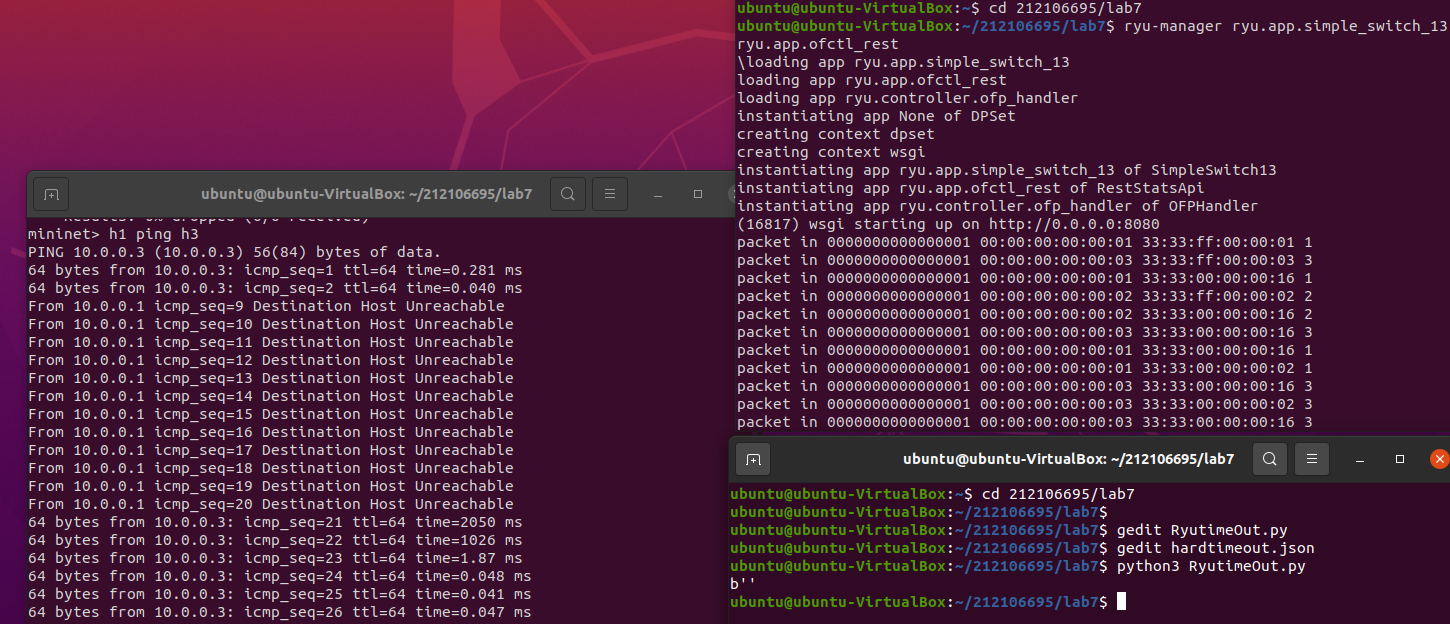
(1) 实现上述OpenDaylight实验拓扑上相同的硬超时流表下发。-
关闭ODL控制器,关闭上次的拓扑并清除拓扑后
-
使用命令
ryu-manager ryu.app.simple_switch_13 ryu.app.ofctl_rest打开Ryu控制器 -
使用命令
sudo mn --topo=single,3 --mac --controller=remote,ip=127.0.0.1,port=6633 --switch ovsk,protocols=OpenFlow13创建拓扑
#!/usr/bin/python
import requests
if __name__ == "__main__":
    url = 'http://127.0.0.1:8080/stats/flowentry/add'
    with open("./hardtimeout.json") as file:
        str = file.read()
    headers = {'Content-Type': 'application/json'}
    res = requests.post(url, str, headers=headers)
    print (res.content)
json文件:
{
    "dpid": 1,
    "cookie": 1,
    "cookie_mask": 1,
    "table_id": 0,
    "hard_timeout": 20,
    "priority": 65535,
    "flags": 1,
    "match":{
        "in_port":1
    },
    "actions":[

    ]
 }
![]()
(2) 参考Ryu REST API的文档,基于VLAN实验的网络拓扑,编程实现相同的VLAN配置。
提示:拓扑生成后需连接Ryu,且Ryu应能够提供REST API服务![]()
-


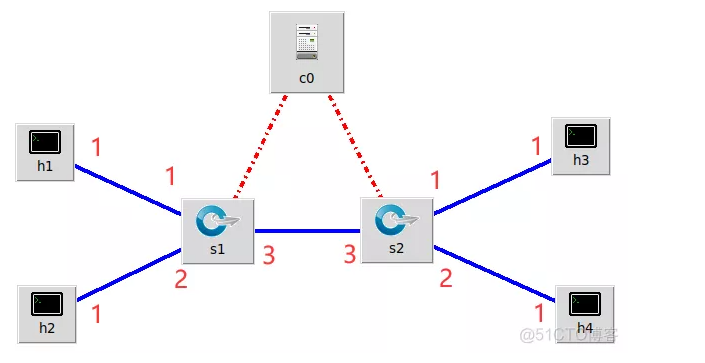
#topo.py
from mininet.topo import Topo

class MyTopo(Topo):
    def __init__(self):
        # initilaize topology
        Topo.__init__(self)

        self.addSwitch("s1")
        self.addSwitch("s2")

        self.addHost("h1")
        self.addHost("h2")
        self.addHost("h3")
        self.addHost("h4")

        self.addLink("s1", "h1")
        self.addLink("s1", "h2")
        self.addLink("s2", "h3")
        self.addLink("s2", "h4")
        self.addLink("s1", "s2")

topos = {'mytopo': (lambda: MyTopo())}
-
关闭控制器,关闭上一次实验的拓扑并清除拓扑
-
使用命令
ryu-manager ryu.app.simple_switch_13 ryu.app.ofctl_rest打开Ryu控制器 -
使用命令
sudo mn --custom topo.py --topo mytopo --mac --controller=remote,ip=127.0.0.1,port=6633 --switch ovsk,protocols=OpenFlow13创建拓扑
| VLAN_ID | Hosts |
|---|---|
| 0 | h1 h3 |
| 1 | h2 h4 |
-
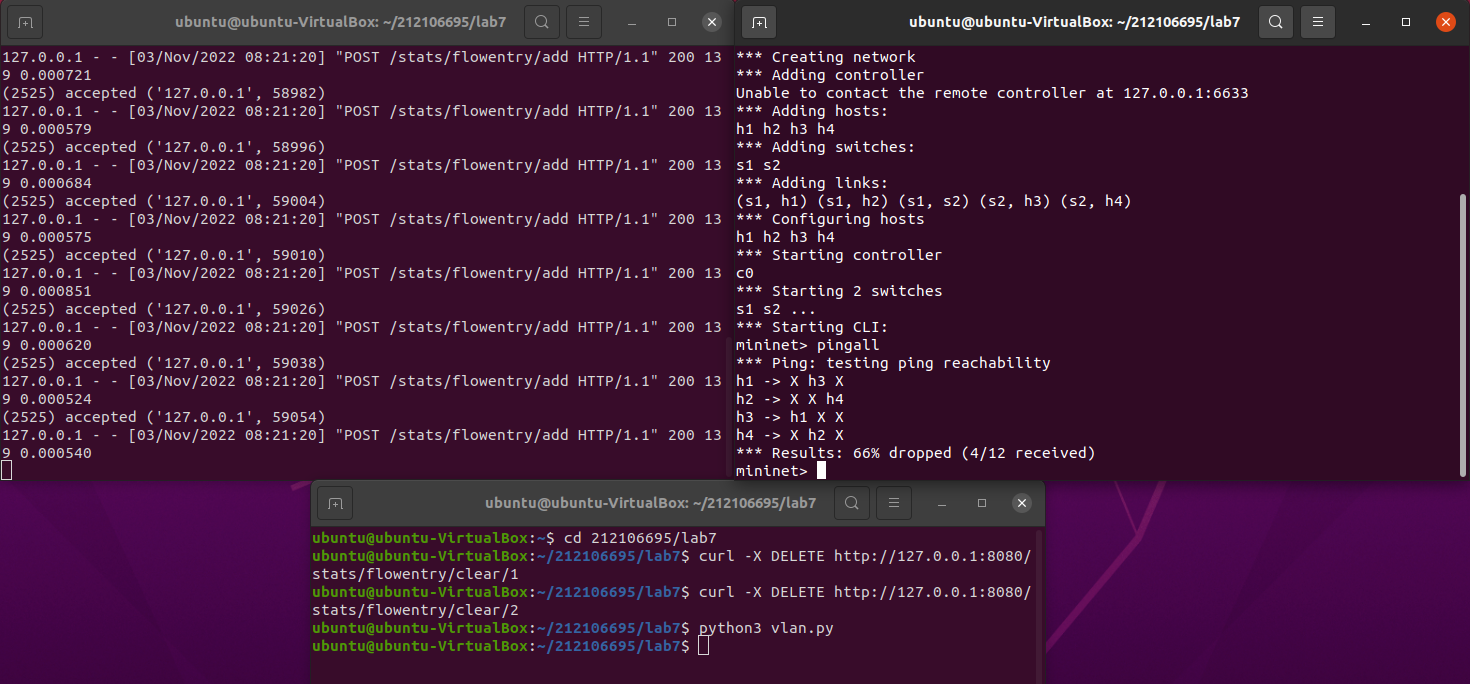
使用命令
-
curl -X DELETE http://127.0.0.1:8080/stats/flowentry/clear/1
-
curl -X DELETE http://127.0.0.1:8080/stats/flowentry/clear/2
-
删除流表
- vlan.py
curl -X POST -d '{
    "dpid": 1,
    "priority": 1,
    "match":{
        "in_port": 1
    },
    "actions":[
        {
            "type": "PUSH_VLAN",     # Push a new VLAN tag if a input frame is non-VLAN-tagged
            "ethertype": 33024       # Ethertype 0x8100(=33024): IEEE 802.1Q VLAN-tagged frame
        },
        {
            "type": "SET_FIELD",
            "field": "vlan_vid",     # Set VLAN ID
            "value": 4096            # Describe sum of vlan_id(e.g. 6) | OFPVID_PRESENT(0x1000=4096)
        },
        {
            "type": "OUTPUT",
            "port": 3
        }
    ]
 }' http://localhost:8080/stats/flowentry/add

 curl -X POST -d '{
    "dpid": 1,
    "priority": 1,
    "match":{
        "in_port": 2
    },
    "actions":[
        {
            "type": "PUSH_VLAN",     # Push a new VLAN tag if a input frame is non-VLAN-tagged
            "ethertype": 33024       # Ethertype 0x8100(=33024): IEEE 802.1Q VLAN-tagged frame
        },
        {
            "type": "SET_FIELD",
            "field": "vlan_vid",     # Set VLAN ID
            "value": 4097            # Describe sum of vlan_id(e.g. 6) | OFPVID_PRESENT(0x1000=4096)
        },
        {
            "type": "OUTPUT",
            "port": 3
        }
    ]
 }' http://localhost:8080/stats/flowentry/add

 curl -X POST -d '{
    "dpid": 1,
    "priority": 1,
    "match":{
        "vlan_vid": 0
    },
    "actions":[
        {
            "type": "POP_VLAN",     # Push a new VLAN tag if a input frame is non-VLAN-tagged
            "ethertype": 33024       # Ethertype 0x8100(=33024): IEEE 802.1Q VLAN-tagged frame
        },
        {
            "type": "OUTPUT",
            "port": 1
        }
    ]
 }' http://localhost:8080/stats/flowentry/add

 curl -X POST -d '{
    "dpid": 1,
    "priority": 1,
    "match":{
        "vlan_vid": 1
    },
    "actions":[
        {
            "type": "POP_VLAN",     # Push a new VLAN tag if a input frame is non-VLAN-tagged
            "ethertype": 33024       # Ethertype 0x8100(=33024): IEEE 802.1Q VLAN-tagged frame
        },
        {
            "type": "OUTPUT",
            "port": 2
        }
    ]
 }' http://localhost:8080/stats/flowentry/add

 curl -X POST -d '{
    "dpid": 2,
    "priority": 1,
    "match":{
        "in_port": 1
    },
    "actions":[
        {
            "type": "PUSH_VLAN",     # Push a new VLAN tag if a input frame is non-VLAN-tagged
            "ethertype": 33024       # Ethertype 0x8100(=33024): IEEE 802.1Q VLAN-tagged frame
        },
        {
            "type": "SET_FIELD",
            "field": "vlan_vid",     # Set VLAN ID
            "value": 4096            # Describe sum of vlan_id(e.g. 6) | OFPVID_PRESENT(0x1000=4096)
        },
        {
            "type": "OUTPUT",
            "port": 3
        }
    ]
 }' http://localhost:8080/stats/flowentry/add

 curl -X POST -d '{
    "dpid": 2,
    "priority": 1,
    "match":{
        "in_port": 2
    },
    "actions":[
        {
            "type": "PUSH_VLAN",     # Push a new VLAN tag if a input frame is non-VLAN-tagged
            "ethertype": 33024       # Ethertype 0x8100(=33024): IEEE 802.1Q VLAN-tagged frame
        },
        {
            "type": "SET_FIELD",
            "field": "vlan_vid",     # Set VLAN ID
            "value": 4097            # Describe sum of vlan_id(e.g. 6) | OFPVID_PRESENT(0x1000=4096)
        },
        {
            "type": "OUTPUT",
            "port": 3
        }
    ]
 }' http://localhost:8080/stats/flowentry/add

 curl -X POST -d '{
    "dpid": 2,
    "priority": 1,
    "match":{
        "vlan_vid": 0
    },
    "actions":[
        {
            "type": "POP_VLAN",     # Push a new VLAN tag if a input frame is non-VLAN-tagged
            "ethertype": 33024       # Ethertype 0x8100(=33024): IEEE 802.1Q VLAN-tagged frame
        },
        {
            "type": "OUTPUT",
            "port": 1
        }
    ]
 }' http://localhost:8080/stats/flowentry/add

 curl -X POST -d '{
    "dpid": 2,
    "priority": 1,
    "match":{
        "vlan_vid": 1
    },
    "actions":[
        {
            "type": "POP_VLAN",     # Push a new VLAN tag if a input frame is non-VLAN-tagged
            "ethertype": 33024       # Ethertype 0x8100(=33024): IEEE 802.1Q VLAN-tagged frame
        },
        {
            "type": "OUTPUT",
            "port": 2
        }
    ]
 }' http://localhost:8080/stats/flowentry/add
(二)进阶要求
OpenDaylight或Ryu任选其一,编程实现查看前序VLAN实验拓扑中所有节点(含交换机、主机)的名称,以及显示每台交换机的所有流表项。
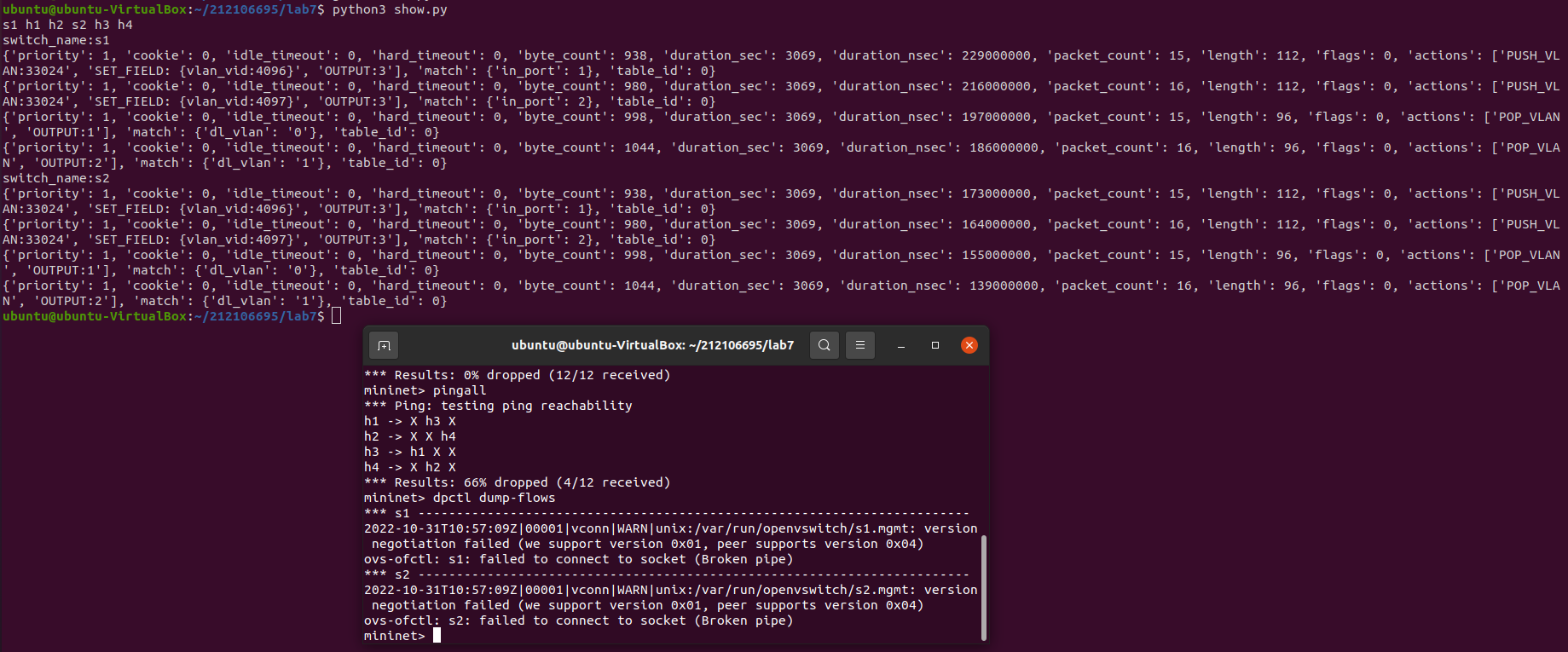
show.py
import requests
import time
import re


class GetNodes:
    def __init__(self, ip):
        self.ip = ip

    def get_switch_id(self):
        url = 'http://' + self.ip + '/stats/switches'
        re_switch_id = requests.get(url=url).json()
        switch_id_hex = []
        for i in re_switch_id:
            switch_id_hex.append(hex(i))

        return switch_id_hex

    def getflow(self):
        url = 'http://' + self.ip + '/stats/flow/%d'
        switch_list = self.get_switch_id()
        ret_flow = []
        for switch in switch_list:
            new_url = format(url % int(switch, 16))
            re_switch_flow = requests.get(url=new_url).json()
            ret_flow.append(re_switch_flow)
        return ret_flow

    def show(self):
        flow_list = self.getflow()
        for flow in flow_list:
            for dpid in flow.keys():
                dp_id = dpid
                switchnum= '{1}'.format(hex(int(dp_id)), int(dp_id))
                print('s'+switchnum,end = " ")
                switchnum = int(switchnum)
            for list_table in flow.values():
                for table in list_table:
                    string1 = str(table)
                    if re.search("'dl_vlan': '(.*?)'", string1) is not None:
                       num = re.search("'dl_vlan': '(.*?)'", string1).group(1);
                       if num == '0' and switchnum == 1:
                          print('h1',end = " ")
                       if num == '1' and switchnum == 1:
                          print('h2',end = " ")
                       if num == '0' and switchnum == 2:
                          print('h3',end = " ")
                       if num == '1' and switchnum == 2:
                          print('h4',end = " ")
        print("")
        flow_list = self.getflow()
        for flow in flow_list:
            for dpid in flow.keys():
                dp_id = dpid
                print('switch_name:s{1}'.format(hex(int(dp_id)), int(dp_id)))
            for list_table in flow.values():
                for table in list_table:
                    print(table)
s1 = GetNodes("127.0.0.1:8080")
s1.show()
个人总结
这次实验难度较大,内容也比较多,花费了不少时间,也遇到了不少问题。
首先,运行python delete.py等命令时报错缺失requests库,后来换成python3才成功运行;
其次,在删除下发流表时一直报错,后来询问同学后才知道是原本没有流表存在,不需要进行删除操作,在下发过硬超命令后才能进行删除操作;
另外,cucl命令无法使用,需要去自行下载,但一直失败。在尝试了多种方法后,最后利用命令sudo apt install curl才成功下载、解决问题。
这次实验可以说是收益匪浅,在本次实验中,我进一步学习了用OpenDaylight和Ryu的rest API来实现特定的要求,还了解了一下python的request库功能,对我来说是一次很大的提升。

 浙公网安备 33010602011771号