一、 安装allure
1.下载Allure安装包:https://github.com/allure-framework/allure2/releases/
2.添加到环境变量
3.pip安装包:pip install allure-pytest
4.配置pytest.ini文件

#https://www.cnblogs.com/DeryKong/p/16201668.html
二、生成allure报告
测试用例代码如下
import pytest
import allure

# 标识整个测试类都是用来进行订单操作
@allure.epic("项目1")
@allure.feature('创建订单')
class Test_Ordering:
    @pytest.mark.hello
    @pytest.mark.login
    @pytest.mark.Fail_retry
    @allure.story('创建订单成功')
    @allure.title("成功得用例")
    def test_c(self):
        print("查询订单")
        raise Exception("失败测试用例重试1")

    @allure.story("创建订单失败")
    def test_a(self):
        print("这是一个测试失败重试10次的测试用例")


@allure.feature('查询订单')
class Test_GetOrdering:
    @pytest.mark.hello
    @pytest.mark.login
    @pytest.mark.Fail_retry
    @allure.story('查询订单失败')
    def test_003(self):
        print("查询订单失败")
        raise Exception("失败测试用例重试1")

    @allure.story('查询订单成功')
    def test_002(self):
        print("这是一个测试失败重试10次的测试用例")

@allure.feature('失败重试')
class Test_Rerunfailure:

    @allure.story('失败重试1')
    def test_001(self):
        print("这是一个测试通过的测试用例")
        with allure.step("重试用例1"):
            raise Exception("失败测试用例重试1")

    @allure.story('失败重试2')
    @pytest.mark.login
    def test_002(self):
        print("这是一个测试失败重试3次的测试用例")
        with allure.step("重试用例2"):
            raise Exception("失败测试用例重试2")
if __name__ == '__main__':
    pytest.main(["-vs"])    # 调用pytest的main函数执行测试
    times = time.strftime("%Y_%m_%d_%H_%M_%S",time.localtime())
    os.system('allure generate ./myAllureReport -o ./report/report_'+times+' --clean')    # cmd 执行 生成 Allure 测试报告文件
    os.system(r'@echo y | del .\myAllureReport\*')  # cmd 删除测试数据文件,并自动输入 y 回车
    os.system(r'allure open -h 127.0.0.1 -p 3333 ./report/report_'+times)     # cmd 执行开启本地 Allure 服务并打开测试报告
控制台terminal执行命令
pytest --alluredir=./myAllureReport
allure generate ./myAllureReport/ -o ./report --clean   ( 使用 myAllureReport 文件下面的数据生成报告放在 report 下 )
allure open -h 127.0.0.1 -p 3333 ./report  (启动本地服务生成链接查看报告)
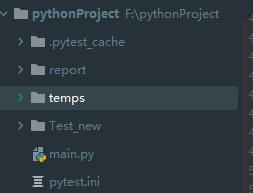
文件夹结果如下-生成的文件夹层级=执行命令的层级
![]()



 浙公网安备 33010602011771号