

[Vue]AntV1.7表格自带筛选确定和重置按钮位置交换
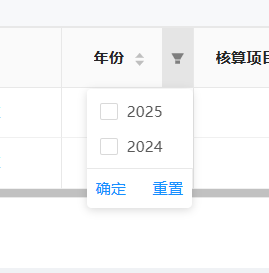
原来:
修改后:
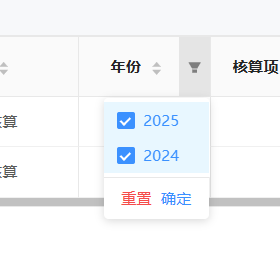
代码如下:
<style scope>
/* 表格筛选器按钮样式 */
:deep(.ant-table-filter-dropdown-btns) {
  display: flex;
  flex-direction: row-reverse;
  justify-content: flex-start;
  padding: 8px;
  border-top: 1px solid #e8e8e8;
}

/* 确定按钮 - 蓝色 */
:deep(.ant-table-filter-dropdown-btns .confirm) {
  color: #1890ff !important;
  order: 2;
}

:deep(.ant-table-filter-dropdown-btns .confirm:hover) {
  color: #40a9ff !important;
}

/* 重置按钮 - 红色 */
:deep(.ant-table-filter-dropdown-btns .clear) {
  color: #ff4d4f !important;
  order: 1;
}

:deep(.ant-table-filter-dropdown-btns .clear:hover) {
  color: #ff7875 !important;
}
</style>

<style>
/* 全局样式 - 表格筛选器按钮 */
.ant-table-filter-dropdown-btns {
  display: flex !important;
  justify-content: space-between !important;
  padding: 8px 16px !important;
}

.ant-table-filter-dropdown-btns .ant-table-filter-dropdown-link.confirm {
  color: #1890ff !important;
  order: 2 !important;
}

.ant-table-filter-dropdown-btns .ant-table-filter-dropdown-link.confirm:hover {
  color: #40a9ff !important;
}

.ant-table-filter-dropdown-btns .ant-table-filter-dropdown-link.clear {
  color: #ff4d4f !important;
  order: 1 !important;
}

.ant-table-filter-dropdown-btns .ant-table-filter-dropdown-link.clear:hover {
  color: #ff7875 !important;
}
</style>
贴上AI的笔记(因为这个问题就是交给AI解决的 —— 感谢Kiro)
自定义 Ant Design Table 筛选器按钮样式
问题描述
需要自定义 Ant Design Vue 表格筛选器下拉框中的按钮样式:
- 将"重置"按钮放在左边,颜色改为红色
- 将"确定"按钮放在右边,颜色改为蓝色
- 两个按钮之间需要有足够的间距
解决方案
1. 使用全局样式
由于筛选器下拉框是通过 Portal 渲染到 body 下的,scoped 样式无法生效,需要添加一个不带 scoped 的 <style> 标签。
<style>
/* 全局样式 - 表格筛选器按钮 */
.ant-table-filter-dropdown-btns {
  display: flex !important;
  justify-content: space-between !important;
  padding: 8px 16px !important;
}

.ant-table-filter-dropdown-btns .ant-table-filter-dropdown-link.confirm {
  color: #1890ff !important;
  order: 2 !important;
}

.ant-table-filter-dropdown-btns .ant-table-filter-dropdown-link.confirm:hover {
  color: #40a9ff !important;
}

.ant-table-filter-dropdown-btns .ant-table-filter-dropdown-link.clear {
  color: #ff4d4f !important;
  order: 1 !important;
}

.ant-table-filter-dropdown-btns .ant-table-filter-dropdown-link.clear:hover {
  color: #ff7875 !important;
}
</style>
2. 关键技术点
2.1 Flexbox 布局控制顺序
- 使用
display: flex启用弹性布局 - 使用
order属性控制元素顺序(order: 1在前,order: 2在后) - 使用
justify-content: space-between让按钮分别靠左右两边
2.2 选择器精确度
使用完整的类名链:
.ant-table-filter-dropdown-btns .ant-table-filter-dropdown-link.confirm
.ant-table-filter-dropdown-btns .ant-table-filter-dropdown-link.clear
2.3 样式优先级
- 使用
!important确保样式覆盖 Ant Design 的默认样式 - 全局样式比 scoped 样式更容易作用到 Portal 渲染的元素
注意事项
1. Scoped 样式的局限性
Vue 的 scoped 样式通过添加 data 属性实现样式隔离,但对于通过 Portal 渲染到 body 下的元素(如下拉框、弹窗等),scoped 样式无法生效。
解决方法:
- 使用不带 scoped 的
<style>标签 - 或使用
:deep()深度选择器(但对 Portal 元素效果有限)
2. 避免使用 flex-direction: row-reverse
虽然 flex-direction: row-reverse 可以反转元素顺序,但会导致:
- 视觉顺序与 DOM 顺序不一致
- 可能影响键盘导航和无障碍访问
- 不如使用
order属性直观
推荐方案: 使用 order 属性明确控制顺序
3. 间距控制
- 使用
justify-content: space-between自动分配空间 - 调整容器的
padding增加整体留白 - 避免使用
margin-right: auto等可能导致布局不稳定的方案
4. 颜色选择
遵循 Ant Design 的色彩规范:
- 主色(蓝色):
#1890ff,hover:#40a9ff - 错误色(红色):
#ff4d4f,hover:#ff7875
5. 全局样式污染
由于使用了全局样式,会影响页面中所有的表格筛选器。如果只想影响特定表格:
/* 只影响特定类名的表格 */
.accounting-table + .ant-table-filter-dropdown .ant-table-filter-dropdown-btns {
  /* 样式 */
}
测试要点
- 检查按钮位置是否正确(重置在左,确定在右)
- 检查按钮颜色是否正确(重置红色,确定蓝色)
- 检查 hover 效果是否正常
- 检查按钮间距是否合适
- 检查其他页面的表格筛选器是否受影响
扩展应用
这个方案同样适用于其他通过 Portal 渲染的 Ant Design 组件:
- Modal 弹窗
- Drawer 抽屉
- Popover 气泡卡片
- Tooltip 文字提示
关键是使用全局样式 + 精确的选择器 + !important 提升优先级。
版 权 声 明
作者:萌狼蓝天
QQ:3447902411(仅限技术交流,添加请说明方向)
转载请注明原文链接:https://www.cnblogs.com/zwj/p/19293099/Vue2AntV1P7_20251201

 浙公网安备 33010602011771号