
1、wxml
<view >
 <scroll-view scroll-x="true" class="tab-h" scroll-left="{{scrollLeft}}">
    <view wx:for="{{tabs}}" wx:for-index="index" wx:key="id"
    class="tab-item {{currentTab==index?'active':''}}" data-current="{{index}}"
    bindtap="swichNav">{{item.name}}</view>
 </scroll-view>
 <swiper class="tab-content" current="{{currentTab}}" duration="300" bindchange="switchTab" style="height:{{winHeight}}rpx">
  <swiper-item wx:for="{{pages}}" wx:for-item="item">
   <scroll-view scroll-y="true" class="scoll-h" >
    {{item}}
   </scroll-view>
  </swiper-item>
 </swiper>
</view>
2、js
// var app = getApp();
Page({
 data:{
  winHeight:"",//窗口高度
  currentTab:0, //预设当前项的值
  scrollLeft:0, //tab标题的滚动条位置
  tabs: [
    {
      id: 0,
      name: '健康'
    },
    {
        id: 1,
        name: '情感'
      },
    {
      id: 2,
      name: '职场'
    }
    ,
    {
      id: 3,
      name: '育儿'
    },
    {
      id: 4,
      name: '纠纷'
    },
    {
      id: 5,
      name: '青葱'
    },
    {
      id: 6,
      name: '全部'
    },
    {
      id: 7,
      name: '其他'
    },
    {
      id: 8,
      name: '女性'
    }
  ],
  pages:[]
 },
 onLoad: function() {
  var that = this;
   var list = []
   this.data.tabs.forEach((item,index)=>{
     list.push(index)
   })
   that.setData({
    pages: list
   })
  console.log(this.data.pages)
  // 高度自适应
  wx.getSystemInfo( {
   success: function( res ) {
    var clientHeight=res.windowHeight,
     clientWidth=res.windowWidth,
     rpxR=750/clientWidth;
    var calc=clientHeight*rpxR-180;
    console.log(calc)
    that.setData( {
     winHeight: calc
    });
   }
  });
 },
 // 滚动切换标签样式
 switchTab:function(e){
   console.log(e)
  this.setData({
   currentTab:e.detail.current
  });
  this.checkCor();
 },
 // 点击标题切换当前页时改变样式
 swichNav:function(e){
   console.log(e)
  var cur=e.target.dataset.current;
  if(this.data.currentTab==cur){
    return false;
  }else{
   this.setData({
    currentTab:cur
   })
  }
 },
 //判断当前滚动超过一屏时,设置tab标题滚动条。
 checkCor:function(){
  if (this.data.currentTab>4){
    this.setData({
    scrollLeft:300
    })
  }else{
    this.setData({
    scrollLeft:0
    })
  }
 },


})
3、wxss
/* pages/tab/index.wxss */
.tab-h{
    height: 80rpx;
    width: 100%;
    box-sizing: border-box;
    overflow: hidden;
    line-height: 80rpx;
    background: #F7F7F7;
    font-size: 16px;
    white-space: nowrap;
    position: fixed;
    top: 0;
    left: 0;
    z-index: 99;
}
.tab-item{
    margin:0 36rpx;
    display: inline-block;
}
.tab-item.active{
    color: #4675F9;
    position: relative;
}
.tab-item.active:after{
    content: "";
    display: block;
    height: 8rpx;
    width: 52rpx;
    background: #4675F9;
    position: absolute;
    bottom: 0;left: 5rpx;
    border-radius: 16rpx;
}
.tab-content{
    margin-top: 80rpx;
}
.scoll-h{
    height: 100%;
}
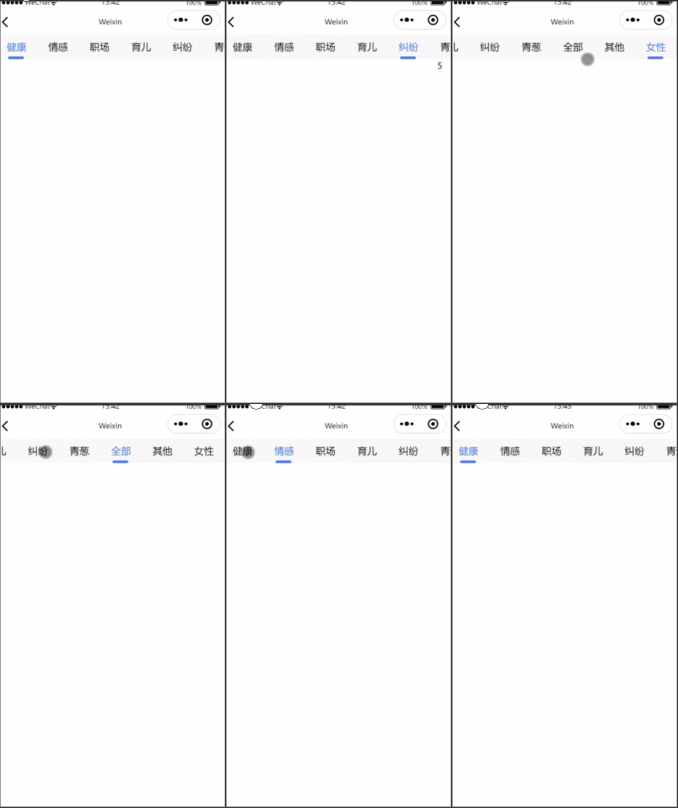
4、效果

 浙公网安备 33010602011771号