
主从架构

从该系统架构中,可以看出:
(1)、数据库从之前的单节点变为多节点提供服务
(2)、主节点数据,同步到从节点数据
(3)、应用程序需要连接到 2个数据库节点,并且在程序内部实现判断读写操作
一、mysql主从复制
1、准备挂载文件
为了将配置文件在宿主机做挂载,先运行测试镜像拷贝配置文件
1)、拉取镜像
docker pull mysql:8.0.26
2)、创建测试容器mysql-demo
docker run -it -p 3300:3306 \
--name mysql-demo \
-e MYSQL_ROOT_PASSWORD=123456 \
-d mysql:8.0.26
运行时改成一排执行:
docker run -it -p 3300:3306 --name mysql-demo -e MYSQL_ROOT_PASSWORD=123456 -d mysql:8.0.26
3)、在root目录下创建mysql-master文件夹,在mysql-master文件夹下创建conf和data文件夹。
mkdir mysql-master
mkdir -p /usr/local/mysql-master/conf /usr/local/mysql-master/data
4)、将mysql-demo容器内的/etc/mysql/my.cnf文件拷贝到~/mysql-master/conf目录下
docker cp mysql-demo:/etc/mysql/my.cnf /usr/local/mysql-master/conf
5)、将mysql-master中的内容全部拷贝到mysql-slave中
cp -r /usr/local/mysql-master /usr/local/mysql-slave
6)、停止并删除测试容器
docker stop mysql-demo
docker rm mysql-demo
2、创建自定义网络
默认的bridge 网桥无法指定固定的ip,会导致mysql服务的ip不固定,最好配置为自定义网络
docker network create --driver bridge --subnet 192.172.0.0/16 --gateway 192.172.0.1 newnet
查看网络
[root@xxx conf]# docker network ls
NETWORK ID     NAME      DRIVER    SCOPE
dfd016599931   bridge    bridge    local
9951733f6b75   host      host      local
8efcdae3efd4   newnet    bridge    local
9eae2373bc1f   none      null      local
3、创建主从容器
创建两个自定义网路的MySQL容器,使用newnet定义IP时,前面两个数字要与newnet的对应,后面两个可以随便指定,但不能超过255
1)、创建主容器

docker run -it -p 3401:3306 \
--name mysql-master2 \
--net newnet --ip 192.172.0.40 \
-v /usr/local/mysql-master/conf/my.cnf:/etc/mysql/my.cnf \
-v /usr/local/mysql-master/data:/var/lib/mysql \
--privileged=true \
--restart=always \
-e MYSQL_ROOT_PASSWORD=123456 \
-e TZ=Asia/Shanghai \
mysql:8.0.26
执行时去掉\改成一排
docker run -it -p 3401:3306 --name mysql-master2 --net newnet --ip 192.172.0.40 -v /usr/local/mysql-master/conf/my.cnf:/etc/mysql/my.cnf -v /usr/local/mysql-master/data:/var/lib/mysql --privileged=true --restart=always -e MYSQL_ROOT_PASSWORD=123456 -e TZ=Asia/Shanghai mysql:8.0.26
控制台打印日志如下:
[root@xxx conf]# docker run -it -p 3301:3306 --name mysql-master --net newnet --ip 192.172.0.30 -v ~/mysql-master/conf/my.cnf:/etc/mysql/my.cnf -v ~/mysql-master/data:/var/lib/mysql --privileged=true --restart=always -e MYSQL_ROOT_PASSWORD=123456 -e TZ=Asia/Shanghai mysql:8.0.26
2022-07-23 09:58:48+08:00 [Note] [Entrypoint]: Entrypoint script for MySQL Server 8.0.26-1debian10 started.
2022-07-23 09:58:48+08:00 [Note] [Entrypoint]: Switching to dedicated user 'mysql'
2022-07-23 09:58:48+08:00 [Note] [Entrypoint]: Entrypoint script for MySQL Server 8.0.26-1debian10 started.
2022-07-23 09:58:48+08:00 [Note] [Entrypoint]: Initializing database files
2022-07-23T01:58:48.354370Z 0 [System] [MY-013169] [Server] /usr/sbin/mysqld (mysqld 8.0.26) initializing of server in progress as process 43
2022-07-23T01:58:48.363794Z 1 [System] [MY-013576] [InnoDB] InnoDB initialization has started.
2022-07-23T01:58:49.105917Z 1 [System] [MY-013577] [InnoDB] InnoDB initialization has ended.
2022-07-23T01:58:50.972408Z 0 [Warning] [MY-013746] [Server] A deprecated TLS version TLSv1 is enabled for channel mysql_main
2022-07-23T01:58:50.972752Z 0 [Warning] [MY-013746] [Server] A deprecated TLS version TLSv1.1 is enabled for channel mysql_main
2022-07-23T01:58:51.081275Z 6 [Warning] [MY-010453] [Server] root@localhost is created with an empty password ! Please consider switching off the --initialize-insecure option.
2022-07-23 09:58:55+08:00 [Note] [Entrypoint]: Database files initialized
2022-07-23 09:58:55+08:00 [Note] [Entrypoint]: Starting temporary server
mysqld will log errors to /var/lib/mysql/f0d909d9adcb.err
mysqld is running as pid 94
2022-07-23 09:58:56+08:00 [Note] [Entrypoint]: Temporary server started.
Warning: Unable to load '/usr/share/zoneinfo/iso3166.tab' as time zone. Skipping it.
Warning: Unable to load '/usr/share/zoneinfo/leap-seconds.list' as time zone. Skipping it.
Warning: Unable to load '/usr/share/zoneinfo/zone.tab' as time zone. Skipping it.
Warning: Unable to load '/usr/share/zoneinfo/zone1970.tab' as time zone. Skipping it.

2022-07-23 09:58:58+08:00 [Note] [Entrypoint]: Stopping temporary server
2022-07-23 09:59:01+08:00 [Note] [Entrypoint]: Temporary server stopped

2022-07-23 09:59:01+08:00 [Note] [Entrypoint]: MySQL init process done. Ready for start up.

2022-07-23T01:59:01.295583Z 0 [System] [MY-010116] [Server] /usr/sbin/mysqld (mysqld 8.0.26) starting as process 1
2022-07-23T01:59:01.306472Z 1 [System] [MY-013576] [InnoDB] InnoDB initialization has started.
2022-07-23T01:59:01.508782Z 1 [System] [MY-013577] [InnoDB] InnoDB initialization has ended.
2022-07-23T01:59:01.729201Z 0 [Warning] [MY-013746] [Server] A deprecated TLS version TLSv1 is enabled for channel mysql_main
2022-07-23T01:59:01.729347Z 0 [Warning] [MY-013746] [Server] A deprecated TLS version TLSv1.1 is enabled for channel mysql_main
2022-07-23T01:59:01.730375Z 0 [Warning] [MY-010068] [Server] CA certificate ca.pem is self signed.
2022-07-23T01:59:01.730543Z 0 [System] [MY-013602] [Server] Channel mysql_main configured to support TLS. Encrypted connections are now supported for this channel.
2022-07-23T01:59:01.734139Z 0 [Warning] [MY-011810] [Server] Insecure configuration for --pid-file: Location '/var/run/mysqld' in the path is accessible to all OS users. Consider choosing a different directory.
2022-07-23T01:59:01.753416Z 0 [System] [MY-011323] [Server] X Plugin ready for connections. Bind-address: '::' port: 33060, socket: /var/run/mysqld/mysqlx.sock
2022-07-23T01:59:01.753477Z 0 [System] [MY-010931] [Server] /usr/sbin/mysqld: ready for connections. Version: '8.0.26'  socket: '/var/run/mysqld/mysqld.sock'  port: 3306  MySQL Community Server - GPL.
2)、创建从容器
docker run -it -p 3402:3306 \
--name mysql-slave2 \
--net newnet --ip 192.172.0.41 \
-v /usr/local/mysql-slave/conf/my.cnf:/etc/mysql/my.cnf \
-v /usr/local/mysql-slave/data:/var/lib/mysql \
--privileged=true \
--restart=always \
-e MYSQL_ROOT_PASSWORD=123456 \
-e TZ=Asia/Shanghai \
mysql:8.0.26
执行时去掉\改为一行执行
docker run -it -p 3402:3306 --name mysql-slave2 --net newnet --ip 192.172.0.41 -v /usr/local/mysql-slave/conf/my.cnf:/etc/mysql/my.cnf -v /usr/local/mysql-slave/data:/var/lib/mysql --privileged=true --restart=always -e MYSQL_ROOT_PASSWORD=123456 -e TZ=Asia/Shanghai mysql:8.0.26
此时已经启动了两个容器mysql-master2和mysql-slave2
CONTAINER ID   IMAGE          COMMAND                  CREATED          STATUS          PORTS                                                  NAMES
8c6de74fbbb9   mysql:8.0.26   "docker-entrypoint.s…"   59 seconds ago   Up 57 seconds   33060/tcp, 0.0.0.0:3402->3306/tcp, :::3402->3306/tcp   mysql-slave2
88af7650cb6f   mysql:8.0.26   "docker-entrypoint.s…"   4 minutes ago    Up 4 minutes    33060/tcp, 0.0.0.0:3401->3306/tcp, :::3401->3306/tcp   mysql-master2
查看newnet网络
命令:
docker network inspect newnet
部分结果如下:
"Containers": {
            "88af7650cb6f0470b968712dfbb9de3bebb71a2031dbb0196a4293f0b730c41c": {
                "Name": "mysql-master2",
                "EndpointID": "0da9ab2cd5fa3c67e24f3f2ba43578551b0da52ef26272c8e869e7477cdb8bf5",
                "MacAddress": "02:42:c0:ac:00:28",
                "IPv4Address": "192.172.0.40/16",
                "IPv6Address": ""
            },
            "8c6de74fbbb92511a487d9537788be8f295b5056ddd420368890d6b9a6ab438f": {
                "Name": "mysql-slave2",
                "EndpointID": "3b6323ea613043d9d8ac55de098561156752824b1d190c3455a2b0b734f90c98",
                "MacAddress": "02:42:c0:ac:00:29",
                "IPv4Address": "192.172.0.41/16",
                "IPv6Address": ""
            }
        },
如果是云服务器,则要在安全组放开3401和3402端口。
本地电脑的navicat访问mysql-master2
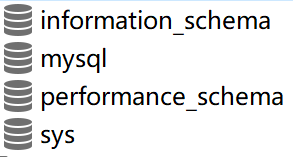
发现该数据库中已经有了msyql自带的四个数据库。
3)、修改主容器的my.conf文件
在宿主机中,配置mysql-master挂载的my.cnf文件
编辑my.cnf文件
vim /usr/local/mysql-master/conf/my.cnf
在my.cnf文件中放入如下内容
server-id=200
log-bin=master-bin #开启主从复制,指定二进制文件
#binlog-do-db=demo    #需要同步的二进制数据库名;
binlog-ignore-db=information_schema    #不同步的二进制数据库名,如果不设置可以将其注释掉;
binlog-ignore-db=mysql
binlog-ignore-db=performance_schema
binlog-ignore-db=sys
#log-slave-update  #这个是把更新的记录写到二进制文件中;
binlog-do-db:指定同步的数据库,如果不指定则同步全部数据库
如下所示:
[mysqld]
pid-file        = /var/run/mysqld/mysqld.pid
socket          = /var/run/mysqld/mysqld.sock
datadir         = /var/lib/mysql
secure-file-priv= NULL

# Custom config should go here
!includedir /etc/mysql/conf.d/

server-id=200
log-bin=master-bin
binlog-ignore-db=information_schema
binlog-ignore-db=mysql
binlog-ignore-db=performance_schema
binlog-ignore-db=sys
server-id: 唯一服务器ID不能和其他服务器的server-id重复;
log-bin文件的命名方式: 名称为hostname-bin.xxxxx (重启mysql一次将会自动生成一个新的binlog)
4)、重启mysql-master使配置生效
配置完成后,需要重启mysql-master容器使其修改的配置文件生效,使用如下命令使mysql进行重启
docker restart mysql-master2
4、配置mysql-slave的my.cnf文件
相同方法配置mysql-slave挂载的my.cnf文件
1)、编辑my.cnf文件
vim /usr/local/mysql-slave/conf/my.cnf
2)、添加如下配置
# 设置server_id,注意要唯一
server-id=101
# 开启二进制日志功能,以备Slave作为其它Slave的Master时使用
log-bin=slave-bin
# relay_log配置中继日志
relay_log=/var/lib/mysql/relay.log
read_only=1  # 设置为只读,该项如果不设置,表示slave可读可写
如下所示:
[mysqld]
pid-file        = /var/run/mysqld/mysqld.pid
socket          = /var/run/mysqld/mysqld.sock
datadir         = /var/lib/mysql
secure-file-priv= NULL

# Custom config should go here
!includedir /etc/mysql/conf.d/

server-id=101
log-bin=slave-bin
relay_log=/var/lib/mysql/relay.log
read_only=1
replicate-do-db=nacos_config
注意:一定要加上replicate-do-db,否则后面会报错:Last_Error: Error 'Unknown database,后面会讲到。
3)、重启mysql-slave容器
docker restart mysql-slave2
5、创建用户并授权
在Master数据库创建数据同步用户,授予用户 slave REPLICATION SLAVE权限和REPLICATION CLIENT权限,用于在主从库之间同步数据。
1)、进入mysql-master容器
docker exec -it mysql-master2 bash
2)、登录mysql-master
mysql -uroot -p123456
注意:mysql8 之前的版本中加密规则是mysql_native_password,而在mysql8之后,加密规则是caching_sha2_password。我们发现root的加密规则为caching_sha2_password,现在修改为mysql_native_password,
ALTER USER 'root'@'%' IDENTIFIED WITH mysql_native_password BY '123456';
3)、创建slave用户
create user 'slave'@'%' IDENTIFIED WITH mysql_native_password BY 'slave';
4)、授予slave用户REPLICATION SLAVE权限和REPLICATION CLIENT权限
GRANT REPLICATION SLAVE, REPLICATION CLIENT ON *.* TO 'slave'@'%';
5)、刷新
flush privileges;
6)、查看权限
SHOW GRANTS FOR 'slave'@'%';
结果
mysql> SHOW GRANTS FOR 'slave'@'%';
+-------------------------------------------------------------------+
| Grants for slave@%                                                |
+-------------------------------------------------------------------+
| GRANT REPLICATION SLAVE, REPLICATION CLIENT ON *.* TO `slave`@`%` |
+-------------------------------------------------------------------+
1 row in set (0.00 sec)
表示授权成功!
7)、进入mysql-slave2容器,以slave账号连接mysql-master2。
[root@xxx ~]# docker exec -it mysql-slave2 bash
root@7f7b489358dc:/# mysql -h192.172.0.40 -uslave -pslave
mysql: [Warning] Using a password on the command line interface can be insecure.
Welcome to the MySQL monitor.  Commands end with ; or \g.
Your MySQL connection id is 35
Server version: 8.0.26 MySQL Community Server - GPL

Copyright (c) 2000, 2021, Oracle and/or its affiliates.

Oracle is a registered trademark of Oracle Corporation and/or its
affiliates. Other names may be trademarks of their respective
owners.

Type 'help;' or '\h' for help. Type '\c' to clear the current input statement.

mysql>
注意:mysql-master2的IP为192.172.0.40
说明从服务器通过账号slave,密码slave可以连接mysql-master容器。
8)、查看Master状态
show master status;
结果如下:
+-------------------+----------+--------------+-------------------------------------------------+-------------------+
| File              | Position | Binlog_Do_DB | Binlog_Ignore_DB                                | Executed_Gtid_Set |
+-------------------+----------+--------------+-------------------------------------------------+-------------------+
| master-bin.000002 |     1130 |              | information_schema,mysql,performance_schema,sys |                   |
+-------------------+----------+--------------+-------------------------------------------------+-------------------+
记住File和Position,后面需要用到。此时一定不要操作Master库,否则将会引起Master状态的变化,File和Position字段也将会进行变化。
6、开启主从复制
进入到mysql-slave2容器的mysql客户端,执行如下命令:
1)、进入mysql-slave2容器
docker exec -it mysql-slave2 bash
2)、登录
mysql -uroot -p123456
3)、执行如下命令
在进行mysql主从复制配置时,change master用于配置和改变slave服务器用于连接master服务器的参数,以便slave服务器读取master服务器的binlog以及slave服务器的relay log,同时更新master.info和relay-log.info信息。
注意:执行该语句之前,从服务器上如果IO线程和SQL线程已经启动,需要先停止,执行stop slave命令。
change master to master_host='192.172.0.40',
 master_user='slave',
 master_password='slave',
 master_port=3306,
 master_log_file='master-bin.000002',
 master_log_pos=1130,
 master_connect_retry=30;
执行时放在一行执行
change master to master_host='192.172.0.40', master_user='slave', master_password='slave', master_port=3306, master_log_file='master-bin.000002', master_log_pos=1130, master_connect_retry=30;
命令说明:
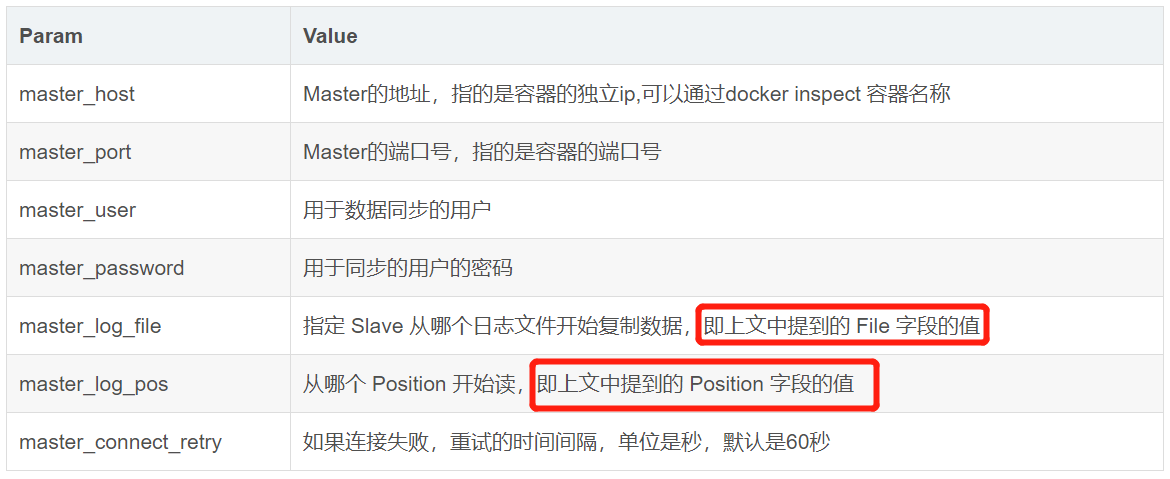
4)、查看主从同步状态
mysql> show slave status \G;
*************************** 1. row ***************************
               Slave_IO_State:
                  Master_Host: 192.172.0.30
                  Master_User: slave
                  Master_Port: 3306
                Connect_Retry: 30
              Master_Log_File: master-bin.000001
          Read_Master_Log_Pos: 681
               Relay_Log_File: relay.000001
                Relay_Log_Pos: 4
        Relay_Master_Log_File: master-bin.000001
             Slave_IO_Running: No
            Slave_SQL_Running: No
              Replicate_Do_DB:
          Replicate_Ignore_DB:
           Replicate_Do_Table:
       Replicate_Ignore_Table:
      Replicate_Wild_Do_Table:
  Replicate_Wild_Ignore_Table:
                   Last_Errno: 0
                   Last_Error:
                 Skip_Counter: 0
          Exec_Master_Log_Pos: 681
              Relay_Log_Space: 156
              Until_Condition: None
               Until_Log_File:
                Until_Log_Pos: 0
           Master_SSL_Allowed: No
           Master_SSL_CA_File:
           Master_SSL_CA_Path:
              Master_SSL_Cert:
            Master_SSL_Cipher:
               Master_SSL_Key:
        Seconds_Behind_Master: NULL
Master_SSL_Verify_Server_Cert: No
                Last_IO_Errno: 0
                Last_IO_Error:
               Last_SQL_Errno: 0
               Last_SQL_Error:
  Replicate_Ignore_Server_Ids:
             Master_Server_Id: 0
                  Master_UUID:
             Master_Info_File: mysql.slave_master_info
                    SQL_Delay: 0
          SQL_Remaining_Delay: NULL
      Slave_SQL_Running_State:
           Master_Retry_Count: 86400
                  Master_Bind:
      Last_IO_Error_Timestamp:
     Last_SQL_Error_Timestamp:
               Master_SSL_Crl:
           Master_SSL_Crlpath:
           Retrieved_Gtid_Set:
            Executed_Gtid_Set:
                Auto_Position: 0
         Replicate_Rewrite_DB:
                 Channel_Name:
           Master_TLS_Version:
       Master_public_key_path:
        Get_master_public_key: 0
            Network_Namespace:
1 row in set, 1 warning (0.00 sec)

ERROR:
No query specified
mysql replication 中slave机器上有两个关键的进程,死一个都不行,一个是slave_sql_running,一个是Slave_IO_Running,一个负责与主机的io通信,一个负责自己的slave mysql进程。Slave_IO_Running: no 表示从主库读取数据的IO不通。
如果Slave_SQL_Running:显示为No,请检查宿主机/usr/local/mysql-master/data/auto.cnf 与/usr/local/mysql-slave/data/auto.cnf 是否相同,若相同,请根据容器中mysql命令select uuid();进行修改。
查看~/mysql-master/data/auto.cnf
[root@xxx ~]# cat /usr/local/mysql-master/data/auto.cnf
[auto]
server-uuid=fdef6cc7-0a2a-11ed-a3d3-0242c0ac001e
查看~/mysql-slave/data/auto.cnf
[root@xxx ~]# cat /usr/local/mysql-slave/data/auto.cnf
[auto]
server-uuid=9eadc9d0-0a2b-11ed-8fc7-0242c0ac001f
发现不同。
如果不同,则执行如下命令
mysql> stop slave;
Query OK, 0 rows affected, 2 warnings (0.00 sec)

mysql> SET GLOBAL SQL_SLAVE_SKIP_COUNTER=1;
Query OK, 0 rows affected, 1 warning (0.00 sec)

mysql> START SLAVE;
Query OK, 0 rows affected, 1 warning (0.01 sec)
start slave表示开启主从复制,
再次查看主从同步状态
mysql> show slave status\G
*************************** 1. row ***************************
               Slave_IO_State: Waiting for source to send event
                  Master_Host: 192.172.0.30
                  Master_User: slave
                  Master_Port: 3306
                Connect_Retry: 30
              Master_Log_File: master-bin.000001
          Read_Master_Log_Pos: 681
               Relay_Log_File: relay.000002
                Relay_Log_Pos: 325
        Relay_Master_Log_File: master-bin.000001
             Slave_IO_Running: Yes
            Slave_SQL_Running: Yes
              Replicate_Do_DB:
          Replicate_Ignore_DB:
           Replicate_Do_Table:
       Replicate_Ignore_Table:
      Replicate_Wild_Do_Table:
  Replicate_Wild_Ignore_Table:
                   Last_Errno: 0
                   Last_Error:
                 Skip_Counter: 1
          Exec_Master_Log_Pos: 681
              Relay_Log_Space: 524
              Until_Condition: None
               Until_Log_File:
                Until_Log_Pos: 0
           Master_SSL_Allowed: No
           Master_SSL_CA_File:
           Master_SSL_CA_Path:
              Master_SSL_Cert:
            Master_SSL_Cipher:
               Master_SSL_Key:
        Seconds_Behind_Master: 0
Master_SSL_Verify_Server_Cert: No
                Last_IO_Errno: 0
                Last_IO_Error:
               Last_SQL_Errno: 0
               Last_SQL_Error:
  Replicate_Ignore_Server_Ids:
             Master_Server_Id: 100
                  Master_UUID: fdef6cc7-0a2a-11ed-a3d3-0242c0ac001e
             Master_Info_File: mysql.slave_master_info
                    SQL_Delay: 0
          SQL_Remaining_Delay: NULL
      Slave_SQL_Running_State: Replica has read all relay log; waiting for more updates
           Master_Retry_Count: 86400
                  Master_Bind:
      Last_IO_Error_Timestamp:
     Last_SQL_Error_Timestamp:
               Master_SSL_Crl:
           Master_SSL_Crlpath:
           Retrieved_Gtid_Set:
            Executed_Gtid_Set:
                Auto_Position: 0
         Replicate_Rewrite_DB:
                 Channel_Name:
           Master_TLS_Version:
       Master_public_key_path:
        Get_master_public_key: 0
            Network_Namespace:
1 row in set, 1 warning (0.00 sec)
此时如果Slave_IO_State: Waiting for source to send event,且Slave_IO_Running和Slave_SQL_Running都为YES,表示主从复制成功.
5、报错:Last_Error: Error 'Unknown database
本地电脑中navicat登录主容器和从容器
主容器:
此时主容器中有四个库
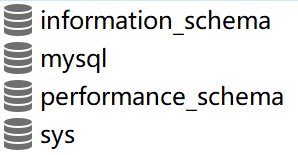
1)、在navicate中执行如下sql语句
CREATE DATABASE nacos_config;
USE nacos_config;

CREATE TABLE `config_info` (
  `id` bigint(20) NOT NULL AUTO_INCREMENT COMMENT 'id',
  `data_id` varchar(255) NOT NULL COMMENT 'data_id',
  `group_id` varchar(255) DEFAULT NULL,
  `content` longtext NOT NULL COMMENT 'content',
  `md5` varchar(32) DEFAULT NULL COMMENT 'md5',
  `gmt_create` datetime NOT NULL DEFAULT CURRENT_TIMESTAMP COMMENT '创建时间',
  `gmt_modified` datetime NOT NULL DEFAULT CURRENT_TIMESTAMP COMMENT '修改时间',
  `src_user` text COMMENT 'source user',
  `src_ip` varchar(50) DEFAULT NULL COMMENT 'source ip',
  `app_name` varchar(128) DEFAULT NULL,
  `tenant_id` varchar(128) DEFAULT '' COMMENT '租户字段',
  `c_desc` varchar(256) DEFAULT NULL,
  `c_use` varchar(64) DEFAULT NULL,
  `effect` varchar(64) DEFAULT NULL,
  `type` varchar(64) DEFAULT NULL,
  `c_schema` text,
  PRIMARY KEY (`id`),
  UNIQUE KEY `uk_configinfo_datagrouptenant` (`data_id`,`group_id`,`tenant_id`)
) ENGINE=InnoDB DEFAULT CHARSET=utf8 COLLATE=utf8_bin COMMENT='config_info';


CREATE TABLE `config_info_aggr` (
  `id` bigint(20) NOT NULL AUTO_INCREMENT COMMENT 'id',
  `data_id` varchar(255) NOT NULL COMMENT 'data_id',
  `group_id` varchar(255) NOT NULL COMMENT 'group_id',
  `datum_id` varchar(255) NOT NULL COMMENT 'datum_id',
  `content` longtext NOT NULL COMMENT '内容',
  `gmt_modified` datetime NOT NULL COMMENT '修改时间',
  `app_name` varchar(128) DEFAULT NULL,
  `tenant_id` varchar(128) DEFAULT '' COMMENT '租户字段',
  PRIMARY KEY (`id`),
  UNIQUE KEY `uk_configinfoaggr_datagrouptenantdatum` (`data_id`,`group_id`,`tenant_id`,`datum_id`)
) ENGINE=InnoDB DEFAULT CHARSET=utf8 COLLATE=utf8_bin COMMENT='增加租户字段';


CREATE TABLE `config_info_beta` (
  `id` bigint(20) NOT NULL AUTO_INCREMENT COMMENT 'id',
  `data_id` varchar(255) NOT NULL COMMENT 'data_id',
  `group_id` varchar(128) NOT NULL COMMENT 'group_id',
  `app_name` varchar(128) DEFAULT NULL COMMENT 'app_name',
  `content` longtext NOT NULL COMMENT 'content',
  `beta_ips` varchar(1024) DEFAULT NULL COMMENT 'betaIps',
  `md5` varchar(32) DEFAULT NULL COMMENT 'md5',
  `gmt_create` datetime NOT NULL DEFAULT CURRENT_TIMESTAMP COMMENT '创建时间',
  `gmt_modified` datetime NOT NULL DEFAULT CURRENT_TIMESTAMP COMMENT '修改时间',
  `src_user` text COMMENT 'source user',
  `src_ip` varchar(50) DEFAULT NULL COMMENT 'source ip',
  `tenant_id` varchar(128) DEFAULT '' COMMENT '租户字段',
  PRIMARY KEY (`id`),
  UNIQUE KEY `uk_configinfobeta_datagrouptenant` (`data_id`,`group_id`,`tenant_id`)
) ENGINE=InnoDB DEFAULT CHARSET=utf8 COLLATE=utf8_bin COMMENT='config_info_beta';


CREATE TABLE `config_info_tag` (
  `id` bigint(20) NOT NULL AUTO_INCREMENT COMMENT 'id',
  `data_id` varchar(255) NOT NULL COMMENT 'data_id',
  `group_id` varchar(128) NOT NULL COMMENT 'group_id',
  `tenant_id` varchar(128) DEFAULT '' COMMENT 'tenant_id',
  `tag_id` varchar(128) NOT NULL COMMENT 'tag_id',
  `app_name` varchar(128) DEFAULT NULL COMMENT 'app_name',
  `content` longtext NOT NULL COMMENT 'content',
  `md5` varchar(32) DEFAULT NULL COMMENT 'md5',
  `gmt_create` datetime NOT NULL DEFAULT CURRENT_TIMESTAMP COMMENT '创建时间',
  `gmt_modified` datetime NOT NULL DEFAULT CURRENT_TIMESTAMP COMMENT '修改时间',
  `src_user` text COMMENT 'source user',
  `src_ip` varchar(50) DEFAULT NULL COMMENT 'source ip',
  PRIMARY KEY (`id`),
  UNIQUE KEY `uk_configinfotag_datagrouptenanttag` (`data_id`,`group_id`,`tenant_id`,`tag_id`)
) ENGINE=InnoDB DEFAULT CHARSET=utf8 COLLATE=utf8_bin COMMENT='config_info_tag';


CREATE TABLE `config_tags_relation` (
  `id` bigint(20) NOT NULL COMMENT 'id',
  `tag_name` varchar(128) NOT NULL COMMENT 'tag_name',
  `tag_type` varchar(64) DEFAULT NULL COMMENT 'tag_type',
  `data_id` varchar(255) NOT NULL COMMENT 'data_id',
  `group_id` varchar(128) NOT NULL COMMENT 'group_id',
  `tenant_id` varchar(128) DEFAULT '' COMMENT 'tenant_id',
  `nid` bigint(20) NOT NULL AUTO_INCREMENT,
  PRIMARY KEY (`nid`),
  UNIQUE KEY `uk_configtagrelation_configidtag` (`id`,`tag_name`,`tag_type`),
  KEY `idx_tenant_id` (`tenant_id`)
) ENGINE=InnoDB DEFAULT CHARSET=utf8 COLLATE=utf8_bin COMMENT='config_tag_relation';


CREATE TABLE `group_capacity` (
  `id` bigint(20) unsigned NOT NULL AUTO_INCREMENT COMMENT '主键ID',
  `group_id` varchar(128) NOT NULL DEFAULT '' COMMENT 'Group ID,空字符表示整个集群',
  `quota` int(10) unsigned NOT NULL DEFAULT '0' COMMENT '配额,0表示使用默认值',
  `usage` int(10) unsigned NOT NULL DEFAULT '0' COMMENT '使用量',
  `max_size` int(10) unsigned NOT NULL DEFAULT '0' COMMENT '单个配置大小上限,单位为字节,0表示使用默认值',
  `max_aggr_count` int(10) unsigned NOT NULL DEFAULT '0' COMMENT '聚合子配置最大个数,,0表示使用默认值',
  `max_aggr_size` int(10) unsigned NOT NULL DEFAULT '0' COMMENT '单个聚合数据的子配置大小上限,单位为字节,0表示使用默认值',
  `max_history_count` int(10) unsigned NOT NULL DEFAULT '0' COMMENT '最大变更历史数量',
  `gmt_create` datetime NOT NULL DEFAULT CURRENT_TIMESTAMP COMMENT '创建时间',
  `gmt_modified` datetime NOT NULL DEFAULT CURRENT_TIMESTAMP COMMENT '修改时间',
  PRIMARY KEY (`id`),
  UNIQUE KEY `uk_group_id` (`group_id`)
) ENGINE=InnoDB DEFAULT CHARSET=utf8 COLLATE=utf8_bin COMMENT='集群、各Group容量信息表';


CREATE TABLE `his_config_info` (
  `id` bigint(64) unsigned NOT NULL,
  `nid` bigint(20) unsigned NOT NULL AUTO_INCREMENT,
  `data_id` varchar(255) NOT NULL,
  `group_id` varchar(128) NOT NULL,
  `app_name` varchar(128) DEFAULT NULL COMMENT 'app_name',
  `content` longtext NOT NULL,
  `md5` varchar(32) DEFAULT NULL,
  `gmt_create` datetime NOT NULL DEFAULT CURRENT_TIMESTAMP,
  `gmt_modified` datetime NOT NULL DEFAULT CURRENT_TIMESTAMP,
  `src_user` text,
  `src_ip` varchar(50) DEFAULT NULL,
  `op_type` char(10) DEFAULT NULL,
  `tenant_id` varchar(128) DEFAULT '' COMMENT '租户字段',
  PRIMARY KEY (`nid`),
  KEY `idx_gmt_create` (`gmt_create`),
  KEY `idx_gmt_modified` (`gmt_modified`),
  KEY `idx_did` (`data_id`)
) ENGINE=InnoDB DEFAULT CHARSET=utf8 COLLATE=utf8_bin COMMENT='多租户改造';


CREATE TABLE `tenant_capacity` (
  `id` bigint(20) unsigned NOT NULL AUTO_INCREMENT COMMENT '主键ID',
  `tenant_id` varchar(128) NOT NULL DEFAULT '' COMMENT 'Tenant ID',
  `quota` int(10) unsigned NOT NULL DEFAULT '0' COMMENT '配额,0表示使用默认值',
  `usage` int(10) unsigned NOT NULL DEFAULT '0' COMMENT '使用量',
  `max_size` int(10) unsigned NOT NULL DEFAULT '0' COMMENT '单个配置大小上限,单位为字节,0表示使用默认值',
  `max_aggr_count` int(10) unsigned NOT NULL DEFAULT '0' COMMENT '聚合子配置最大个数',
  `max_aggr_size` int(10) unsigned NOT NULL DEFAULT '0' COMMENT '单个聚合数据的子配置大小上限,单位为字节,0表示使用默认值',
  `max_history_count` int(10) unsigned NOT NULL DEFAULT '0' COMMENT '最大变更历史数量',
  `gmt_create` datetime NOT NULL DEFAULT CURRENT_TIMESTAMP COMMENT '创建时间',
  `gmt_modified` datetime NOT NULL DEFAULT CURRENT_TIMESTAMP COMMENT '修改时间',
  PRIMARY KEY (`id`),
  UNIQUE KEY `uk_tenant_id` (`tenant_id`)
) ENGINE=InnoDB DEFAULT CHARSET=utf8 COLLATE=utf8_bin COMMENT='租户容量信息表';


CREATE TABLE `tenant_info` (
  `id` bigint(20) NOT NULL AUTO_INCREMENT COMMENT 'id',
  `kp` varchar(128) NOT NULL COMMENT 'kp',
  `tenant_id` varchar(128) default '' COMMENT 'tenant_id',
  `tenant_name` varchar(128) default '' COMMENT 'tenant_name',
  `tenant_desc` varchar(256) DEFAULT NULL COMMENT 'tenant_desc',
  `create_source` varchar(32) DEFAULT NULL COMMENT 'create_source',
  `gmt_create` bigint(20) NOT NULL COMMENT '创建时间',
  `gmt_modified` bigint(20) NOT NULL COMMENT '修改时间',
  PRIMARY KEY (`id`),
  UNIQUE KEY `uk_tenant_info_kptenantid` (`kp`,`tenant_id`),
  KEY `idx_tenant_id` (`tenant_id`)
) ENGINE=InnoDB DEFAULT CHARSET=utf8 COLLATE=utf8_bin COMMENT='tenant_info';

CREATE TABLE `users` (
    `username` varchar(50) NOT NULL PRIMARY KEY,
    `password` varchar(500) NOT NULL,
    `enabled` boolean NOT NULL
);

CREATE TABLE `roles` (
    `username` varchar(50) NOT NULL,
    `role` varchar(50) NOT NULL,
    UNIQUE INDEX `idx_user_role` (`username` ASC, `role` ASC) USING BTREE
);

CREATE TABLE `permissions` (
    `role` varchar(50) NOT NULL,
    `resource` varchar(255) NOT NULL,
    `action` varchar(8) NOT NULL,
    UNIQUE INDEX `uk_role_permission` (`role`,`resource`,`action`) USING BTREE
);

INSERT INTO users (username, password, enabled) VALUES ('nacos', '$2a$10$EuWPZHzz32dJN7jexM34MOeYirDdFAZm2kuWj7VEOJhhZkDrxfvUu', TRUE);

INSERT INTO roles (username, role) VALUES ('nacos', 'ROLE_ADMIN');
主容器的数据库如下:

2)、此时查看从容器的数据库,发现同步没有成功,仍然是四个库

此时进入从容器查看主从同步状态
mysql> show slave status \G;
*************************** 1. row ***************************
               Slave_IO_State: Waiting for source to send event
                  Master_Host: 192.172.0.30
                  Master_User: slave
                  Master_Port: 3306
                Connect_Retry: 30
              Master_Log_File: master-bin.000001
          Read_Master_Log_Pos: 12537
               Relay_Log_File: relay.000002
                Relay_Log_Pos: 534
        Relay_Master_Log_File: master-bin.000001
             Slave_IO_Running: Yes
            Slave_SQL_Running: No
              Replicate_Do_DB: nacos_config
          Replicate_Ignore_DB:
           Replicate_Do_Table:
       Replicate_Ignore_Table:
      Replicate_Wild_Do_Table:
  Replicate_Wild_Ignore_Table:
                   Last_Errno: 1049
                   Last_Error: Error 'Unknown database 'nacos_config'' on query. Default database: 'nacos_config'. Query: 'CREATE TABLE `config_info` (
  `id` bigint(20) NOT NULL AUTO_INCREMENT COMMENT 'id',
  `data_id` varchar(255) NOT NULL COMMENT 'data_id',
  `group_id` varchar(255) DEFAULT NULL,
  `content` longtext NOT NULL COMMENT 'content',
  `md5` varchar(32) DEFAULT NULL COMMENT 'md5',
  `gmt_create` datetime NOT NULL DEFAULT CURRENT_TIMESTAMP COMMENT '创建时间',
  `gmt_modified` datetime NOT NULL DEFAULT CURRENT_TIMESTAMP COMMENT '修改时间',
  `src_user` text COMMENT 'source user',
  `src_ip` varchar(50) DEFAULT NULL COMMENT 'source ip',
  `app_name` varchar(128) DEFAULT NULL,
  `tenant_id` varchar(128) DEFAULT '' COMMENT '租户字段',
  `c_desc` varchar(256) DEFAULT NULL,
  `c_use` varchar(64) DEFAULT NULL,
  `effect` varchar(64) DEFAULT NULL,
  `type` varchar(64) DEFAULT NULL,
  `c_schema` text,
  PRIMARY KEY (`id`),
  UNIQUE KEY `uk_configinfo_datagrouptenant` (`data_id`,`group_id`,`tenant_id`)
)
                 Skip_Counter: 0
          Exec_Master_Log_Pos: 1057
              Relay_Log_Space: 12213
              Until_Condition: None
               Until_Log_File:
                Until_Log_Pos: 0
           Master_SSL_Allowed: No
           Master_SSL_CA_File:
           Master_SSL_CA_Path:
              Master_SSL_Cert:
            Master_SSL_Cipher:
               Master_SSL_Key:
        Seconds_Behind_Master: NULL
Master_SSL_Verify_Server_Cert: No
                Last_IO_Errno: 0
                Last_IO_Error:
               Last_SQL_Errno: 1049
               Last_SQL_Error: Error 'Unknown database 'nacos_config'' on query. Default database: 'nacos_config'. Query: 'CREATE TABLE `config_info` (
  `id` bigint(20) NOT NULL AUTO_INCREMENT COMMENT 'id',
  `data_id` varchar(255) NOT NULL COMMENT 'data_id',
  `group_id` varchar(255) DEFAULT NULL,
  `content` longtext NOT NULL COMMENT 'content',
  `md5` varchar(32) DEFAULT NULL COMMENT 'md5',
  `gmt_create` datetime NOT NULL DEFAULT CURRENT_TIMESTAMP COMMENT '创建时间',
  `gmt_modified` datetime NOT NULL DEFAULT CURRENT_TIMESTAMP COMMENT '修改时间',
  `src_user` text COMMENT 'source user',
  `src_ip` varchar(50) DEFAULT NULL COMMENT 'source ip',
  `app_name` varchar(128) DEFAULT NULL,
  `tenant_id` varchar(128) DEFAULT '' COMMENT '租户字段',
  `c_desc` varchar(256) DEFAULT NULL,
  `c_use` varchar(64) DEFAULT NULL,
  `effect` varchar(64) DEFAULT NULL,
  `type` varchar(64) DEFAULT NULL,
  `c_schema` text,
  PRIMARY KEY (`id`),
  UNIQUE KEY `uk_configinfo_datagrouptenant` (`data_id`,`group_id`,`tenant_id`)
)
  Replicate_Ignore_Server_Ids:
             Master_Server_Id: 100
                  Master_UUID: 88e25bde-c942-11ed-ab5f-0242c0ac001e
             Master_Info_File: mysql.slave_master_info
                    SQL_Delay: 0
          SQL_Remaining_Delay: NULL
      Slave_SQL_Running_State:
           Master_Retry_Count: 86400
                  Master_Bind:
      Last_IO_Error_Timestamp:
     Last_SQL_Error_Timestamp: 230323 14:25:52
               Master_SSL_Crl:
           Master_SSL_Crlpath:
           Retrieved_Gtid_Set:
            Executed_Gtid_Set:
                Auto_Position: 0
         Replicate_Rewrite_DB:
                 Channel_Name:
           Master_TLS_Version:
       Master_public_key_path:
        Get_master_public_key: 0
            Network_Namespace:
1 row in set, 1 warning (0.01 sec)

ERROR:
No query specified
3)、我们先在从容器中创建nacos_config数据库
CREATE DATABASE nacos_config;
如下所示:

此时nacos_config库中没有表。
4)、进入mysql-slave容器,停掉从库的slave
stop slave;
再执行
start slave;
此时发现从数据库中表如下:

修改主容器nacos_config数据库中的users表中的数据:
update users set enabled = 2 where username='nacos';
查看从容器中users表的数据

说明同步成功!
二、mycat分库分表
mycat安装包:

1、在/usr/local目录下新建mycat目录
mkdir mycat
cd mycat
2、上传mycat安装包到mycat目录
3、解压
tar -xvf Mycat-server-1.6.7.4-release-20200105164103-linux.tar.gz
4、重命名为mycat01
mv mycat mycat01
5、修改配置文件server.xml
server.xml是全局的配置项以及用户相关的信息
进入conf目录
cd conf
vim server.xml
修改后的内容如下:
<?xml version="1.0" encoding="UTF-8"?>
<!-- - - Licensed under the Apache License, Version 2.0 (the "License");
    - you may not use this file except in compliance with the License. - You
    may obtain a copy of the License at - - http://www.apache.org/licenses/LICENSE-2.0
    - - Unless required by applicable law or agreed to in writing, software -
    distributed under the License is distributed on an "AS IS" BASIS, - WITHOUT
    WARRANTIES OR CONDITIONS OF ANY KIND, either express or implied. - See the
    License for the specific language governing permissions and - limitations
    under the License. -->
<!DOCTYPE mycat:server SYSTEM "server.dtd">
<mycat:server xmlns:mycat="http://io.mycat/">
    <system>
    <property name="nonePasswordLogin">0</property> <!-- 0为需要密码登陆、1为不需要密码登陆 ,默认为0,设置为1则需要指定默认账户-->
    <property name="ignoreUnknownCommand">0</property><!-- 0遇上没有实现的报文(Unknown command:),就会报错、1为忽略该报文,返回ok报文。
    在某些mysql客户端存在客户端已经登录的时候还会继续发送登录报文,mycat会报错,该设置可以绕过这个错误-->
    <property name="useHandshakeV10">1</property>
    <property name="removeGraveAccent">1</property>
    <property name="useSqlStat">0</property>  <!-- 1为开启实时统计、0为关闭 -->
    <property name="useGlobleTableCheck">0</property>  <!-- 1为开启全加班一致性检测、0为关闭 -->
        <property name="sqlExecuteTimeout">300</property>  <!-- SQL 执行超时 单位:秒-->
        <property name="sequnceHandlerType">1</property>
        <!--<property name="sequnceHandlerPattern">(?:(\s*next\s+value\s+for\s*MYCATSEQ_(\w+))(,|\)|\s)*)+</property>
        INSERT INTO `travelrecord` (`id`,user_id) VALUES ('next value for MYCATSEQ_GLOBAL',"xxx");
        -->
        <!--必须带有MYCATSEQ_或者 mycatseq_进入序列匹配流程 注意MYCATSEQ_有空格的情况-->
        <property name="sequnceHandlerPattern">(?:(\s*next\s+value\s+for\s*MYCATSEQ_(\w+))(,|\)|\s)*)+</property>
    <property name="subqueryRelationshipCheck">false</property> <!-- 子查询中存在关联查询的情况下,检查关联字段中是否有分片字段 .默认 false -->
    <property name="sequenceHanlderClass">io.mycat.route.sequence.handler.HttpIncrSequenceHandler</property>
      <!--  <property name="useCompression">1</property>--> <!--1为开启mysql压缩协议-->
        <!--  <property name="fakeMySQLVersion">5.6.20</property>--> <!--设置模拟的MySQL版本号-->
    <!-- <property name="processorBufferChunk">40960</property> -->
    <!--
    <property name="processors">1</property>
    <property name="processorExecutor">32</property>
     -->
        <!--默认为type 0: DirectByteBufferPool | type 1 ByteBufferArena | type 2 NettyBufferPool -->
        <property name="processorBufferPoolType">0</property>
        <!--默认是65535 64K 用于sql解析时最大文本长度 -->
        <!--<property name="maxStringLiteralLength">65535</property>-->
        <!--<property name="sequnceHandlerType">0</property>-->
        <!--<property name="backSocketNoDelay">1</property>-->
        <!--<property name="frontSocketNoDelay">1</property>-->
        <!--<property name="processorExecutor">16</property>-->
        <!--
            <property name="serverPort">8066</property> <property name="managerPort">9066</property>
            <property name="idleTimeout">300000</property> <property name="bindIp">0.0.0.0</property>
            <property name="dataNodeIdleCheckPeriod">300000</property> 5 * 60 * 1000L; //连接空闲检查
            <property name="frontWriteQueueSize">4096</property> <property name="processors">32</property> -->
        <!--分布式事务开关,0为不过滤分布式事务,1为过滤分布式事务(如果分布式事务内只涉及全局表,则不过滤),2为不过滤分布式事务,但是记录分布式事务日志-->
        <property name="handleDistributedTransactions">0</property>

            <!--
            off heap for merge/order/group/limit      1开启   0关闭
        -->
        <property name="useOffHeapForMerge">0</property>

        <!--
            单位为m
        -->
        <property name="memoryPageSize">64k</property>

        <!--
            单位为k
        -->
        <property name="spillsFileBufferSize">1k</property>

        <property name="useStreamOutput">0</property>

        <!--
            单位为m
        -->
        <property name="systemReserveMemorySize">384m</property>


        <!--是否采用zookeeper协调切换  -->
        <property name="useZKSwitch">false</property>

        <!-- XA Recovery Log日志路径 -->
        <!--<property name="XARecoveryLogBaseDir">./</property>-->

        <!-- XA Recovery Log日志名称 -->
        <!--<property name="XARecoveryLogBaseName">tmlog</property>-->
        <!--如果为 true的话 严格遵守隔离级别,不会在仅仅只有select语句的时候在事务中切换连接-->
        <property name="strictTxIsolation">false</property>

        <property name="useZKSwitch">true</property>
        <!--如果为0的话,涉及多个DataNode的catlet任务不会跨线程执行-->
        <property name="parallExecute">0</property>
    </system>

    <!-- 全局SQL防火墙设置 -->
    <!--白名单可以使用通配符%或着*-->
    <!--例如<host host="127.0.0.*" user="root"/>-->
    <!--例如<host host="127.0.*" user="root"/>-->
    <!--例如<host host="127.*" user="root"/>-->
    <!--例如<host host="1*7.*" user="root"/>-->
    <!--这些配置情况下对于127.0.0.1都能以root账户登录-->
    <!--
    <firewall>
       <whitehost>
          <host host="1*7.0.0.*" user="root"/>
       </whitehost>
       <blacklist check="false">
       </blacklist>
    </firewall>
    -->

    <user name="root" defaultAccount="true">
        <property name="password">123456</property>
        <property name="schemas">nacos_config</property>
        <property name="defaultSchema">nacos_config</property>
        <!--No MyCAT Database selected 错误前会尝试使用该schema作为schema,不设置则为null,报错 -->

        <!-- 表级 DML 权限设置 -->
        <!--
        <privileges check="false">
            <schema name="TESTDB" dml="0110" >
                <table name="tb01" dml="0000"></table>
                <table name="tb02" dml="1111"></table>
            </schema>
        </privileges>
         -->
    </user>

    <user name="user">
        <property name="password">user</property>
        <property name="schemas">nacos_config</property>
        <property name="readOnly">true</property>
        <property name="defaultSchema">nacos_config</property>
    </user>

</mycat:server>
system标签中的是全局的配置项,user标签用于客户端如navicat连接mycat。
6、修改schema.xml
schema.xml用于指定主从的配置
vim schema.xml
修改后的内容如下:
<?xml version="1.0"?>
<!DOCTYPE mycat:schema SYSTEM "schema.dtd">
<mycat:schema xmlns:mycat="http://io.mycat/">

    <schema name="nacos_config" checkSQLschema="true" sqlMaxLimit="100" randomDataNode="dn1">
        <!-- auto sharding by id (long) -->
        <!--splitTableNames 启用<table name 属性使用逗号分割配置多个表,即多个表使用这个配置-->
        <table name="tb_ad" dataNode="dn1" rule="mod-long"/>
    </schema>
    <dataNode name="dn1" dataHost="localhost1" database="nacos_config" />
    <dataHost name="localhost1" maxCon="1000" minCon="10" balance="3"
              writeType="0" dbType="mysql" dbDriver="native" switchType="1"  slaveThreshold="100">
        <heartbeat>select user()</heartbeat>
        <!-- can have multi write hosts -->
        <writeHost host="hostM1" url="localhost:3301" user="root"
                   password="123456">
            <readHost host="W1R1" url="localhost:3302" user="root" password="123456"/>
        </writeHost>
    </dataHost>
</mycat:schema>
注意:当dbDriver值为native时,url只需要填写IP和端口。由于写库和读库与mycat都放在一个云服务器中,故用localhost。
table标签的name属性指定表名,rule用于指定分片规则,mod-long表示根据id取模。由于我们这里只有一个分片,不配置也可以。
dataNode标签的database属性指定数据库名称
heartbeat标签通过select user()查看心跳
由于写库和读库和mycat都在一个云服务器中,故IP用localhost
balance(负载均衡)属性说明:
负载均衡类型,目前的取值有3 种:
1. balance="0", 不开启读写分离机制,所有读操作都发送到当前可用的writeHost 上。
2. balance="1",全部的readHost 与stand by writeHost 参与select 语句的负载均衡,简单的说,当双 主双从模式(M1->S1,M2->S2,并且M1 与M2 互为主备),正常情况下,M2,S1,S2 都参与select 语句的负载均衡。
3. balance="2",所有读操作都随机的在writeHost、readhost 上分发。
4. balance="3",所有读请求随机的分发到wiriterHost 对应的readhost 执行,writerHost 不负担读压 力,
注意balance=3 只在1.4 及其以后版本有,1.3 没有。
checkSQLschema 是用来检查是否通过 dbName.tableName 的方式来访问数据库中的表,默认false,即用户自己检测。
如果该值设置为true时,再执行下面的语句:
select * from dbname.tablename;
MyCat会把语句修改为:
select * from tablename;
也就是会把表示schema的字符去掉,避免发送到后端数据库执行时报以下错误:
ERROR 1146(42S02):Table "dbname.tablename" dosen't exist.
不过这里要注意,即使该值设置为true时,如果语句所带并非schema中指定的数据库名字,那么Mycat也不会将dbname删除。
所以在提供sql语句时,最好不要带这个字段(或设置为false),避免没有定义该库时出现报错。
7、修改rule.xml
vim rule.xml
找到PartitionByMod,局部修改后的内容如下:
<function name="mod-long" class="io.mycat.route.function.PartitionByMod">
                <!-- how many data nodes -->
                <property name="count">1</property>
        </function>
默认值是3,由于我们只有一个节点,修改为1即可。
8、启动
先进入bin目录
cd bin
启动命令
./mycat console
控制台打印如下:
Running Mycat-server...
wrapper  | --> Wrapper Started as Console
wrapper  | Launching a JVM...
jvm 1    | Java HotSpot(TM) 64-Bit Server VM warning: ignoring option MaxPermSize=64M; support was removed in 8.0
jvm 1    | Wrapper (Version 3.2.3) http://wrapper.tanukisoftware.org
jvm 1    |   Copyright 1999-2006 Tanuki Software, Inc.  All Rights Reserved.
jvm 1    |
jvm 1    | MyCAT Server startup successfully. see logs in logs/mycat.log
说明启动成功
再执行脚本
./startup_nowrap.sh
报错如下:./startup_nowrap.sh: /bin/sh^M: bad interpreter: No such file or directory
原因是文件在不同系统的格式不一样造成的。在 window 系统中,文件的格式是 dos 格式
查看方式:在 linux 系统中, 使用命令 vi 文件名打开文件,
vi startup_nowrap.sh
输入英文 “ : ”, 输入命令 set ff 回车,显示 fileformat=doc ,

需要修改文件格式, 命令:
set ff=unix
重新查看文件格式的时候,显示 fileformat=unix 。
再次执行命令:
./startup_nowrap.sh
mycat停止命令
./mycat stop
其他命令:
启动命令:./mycat start;重启命令:./mycat restart;查看状态:./mycat status
9、使用navicat连接mycat
注意:mycat的端口默认是8066,云服务器需要在安全组中放开端口,不然无法连接。

注意:此时驱动版本为mysql-connector-java-5.1.35.jar,并不用升级为mysql8的驱动。mysql数据库中user表的root账户的加密方式也为mysql_native_password。并没有报错:1184 invalid DataSource:0,可能是因为写库和从库都已经有了数据库nacos_config。


发现连接成功,mycat中数据如下:

现在我们来测试:基于mycat进行数据库操作,在TESTDB中创建一张表
-- 创建表
CREATE TABLE `TB_AD` (
`id` bigint(20) NOT NULL AUTO_INCREMENT,
`type` int(10) DEFAULT NULL COMMENT '广告类型',
`title` varchar(100) DEFAULT NULL COMMENT '描述',
`url` varchar(200) DEFAULT NULL COMMENT '图片URL地址',
`created` datetime DEFAULT NULL,
`updated` datetime DEFAULT NULL,
PRIMARY KEY (`id`)
) ENGINE=InnoDB AUTO_INCREMENT=1 DEFAULT CHARSET=utf8 COMMENT='广告表';
结果如下:

此时主库和从库都生成了TB_AD数据库
注意:要想主从同步,需要在从库中设置replicate-do-db=nacos_config。
mycat中插入数据
INSERT INTO `TB_AD` (`id`, `type`, `title`, `url`, `created`, `updated`) VALUES ('1',
'1', 'UniCity万科天空之城', 'http://itcast-haoke.oss-cn-
qingdao.aliyuncs.com/images/2018/11/26/15432029097062227.jpg', '2018-11-26 11:28:49',
'2018-11-26 11:28:51');
此时主库写入了数据,从库也插入了数据。

在mycat中执行如下sql
update users set enabled = 2 where username='nacos';
报错如下:
update users set enabled = 2 where username='nacos'
> 1064 - NullPointerException
> 时间: 0.023s
报错如下:

schema.xml中的dn1节点没有配置users 这个表。
<table name="tb_ad,users" dataNode="dn1" rule="mod-long"/>
再次执行
update users set enabled = 2 where username='nacos';
执行成功。
此时主库和从库的值都变为2了


 浙公网安备 33010602011771号