

Vue 实现可视化自然滚动表格列表
1.可以调整滚动的快慢,2.内容高度不够的时候停止滚动,3.鼠标移入停止滚动,移出继续,4.列宽平分整行且居中对齐 ,5.可动态设置某列状态颜色
实现效果如图:
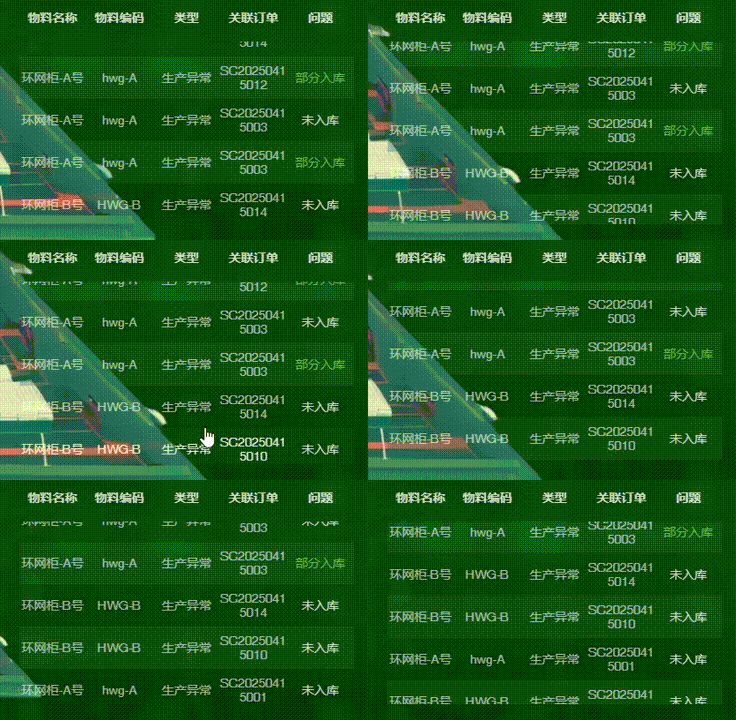
踩了好多坑,vue-seamless-scroll(它不支持数据少的情况下自动停止滚动,需要传入step为0),根据获取el-table内容高度等等方案都不太行,1.
1.新建组件scrollContainerTable.vue
<template>
    <div
        class="scrollContainer"
        :key="currentTime"
        :style="{ height: `${height}px` }"
    >
        <div
            class="scrollHead"
            :style="{
                height: headerHeight + 'px',
            }"
        >
            <div
                v-for="l in columns"
                :key="l.key"

            >
            <!-- :style="{ width: `${l.width}px` }" -->
                {{ l.title }}
            </div>
        </div>
        <ul
            class="scrollBody"
            ref="wrapperDom"
            :style="{ height: `${height - headerHeight}px` }"
        >
            <ul
                ref="childDom1"
                @mouseenter="handleEnter"
                @mouseleave="handleLeave"
            >
                <li
                    v-for="(l, i) in dataSource"
                    :data-key="rowKey ? l[rowKey] : `list${i}`"
                    :key="rowKey ? l[rowKey] : `list${i}`"
                    :style="{ height: `${rowHeight}px` }"
                >
                    <div
                        v-for="(p, c) in columns"
                        :key="`p${c}`"
                        :style="getStyle(p, l,columns.length)"
                        @click="
                            (e) => {
                                e.stopPropagation()
                                onCellClick(l, p)
                                onRowClick?.(l)
                            }
                        "
                    >
                    {{ p?.render?.(i, l, l[p.key]) || l[p.key] }}

                    </div>
                </li>
            </ul>
            <ul ref="childDom2"></ul>
        </ul>
    </div>
</template>
<script setup name="ScrollContainerTable">
import { onMounted, watch, ref, onBeforeUnmount, computed, nextTick } from 'vue';

const { proxy } = getCurrentInstance()
const props = defineProps({
  height: { type: Number, required: true },
  dataSource: { type: Array, required: true },
  columns: { type: Array, required: true },
  headerHeight: { type: Number, default: 30 },
  rowHeight: { type: Number, default: 27.5 },
  onRowClick: { type: Function },
  rowKey: { type: String },
  scroll: { type: Boolean },
})
  const wrapperDom = ref(null);
    const childDom1 = ref(null);
    const childDom2 = ref(null);
    const currentTime = ref(new Date().getTime());
    let count = 0;
    let reqAnimation;

    const { height, columns, rowHeight = 27.5, headerHeight = 30, rowKey } = props;


    const dataSource = computed(() => {
      return props.dataSource;
    });

    watch(
      () => props.dataSource,
      () => {
        currentTime.value = new Date().getTime();
      }
    );
    const getStyle = (p, l, totalColumns) => {
      // 计算每列的宽度百分比
      let columnWidth = (100 / totalColumns).toFixed(2);
      let pStyle = { width: `${columnWidth}%` };
      // 若 p.color 存在,设置对应的颜色
      if (p.color && l.statusColor) {
          pStyle['color'] = l.statusColor;
      } else if (l.lineColor) {
          pStyle['color'] = l.lineColor;
      }
      return pStyle;
    };

    var startTime = null;
    var stepInMs = 100;
    var drawCount = 0;

    const taskStart = (timestamp) => {
      var progress;
      if (startTime === null) {
        startTime = timestamp;
      }
      progress = timestamp - startTime;
      if (progress > stepInMs) {
        startTime = timestamp;
        if (
          childDom1.value?.clientHeight >= wrapperDom.value?.clientHeight &&
          childDom2.value?.clientHeight < 10
        ) {
          childDom2.value.innerHTML = childDom1.value.innerHTML;
        }
        if (wrapperDom.value?.scrollTop >= childDom1.value?.scrollHeight) {
          wrapperDom.value.scrollTop = 0;
          count = 0;
        } else {
          count += 1;
          wrapperDom.value.scrollTop = count;
        }
      }
      if (props.scroll) {
        reqAnimation = window.requestAnimationFrame(taskStart);
      }
    };

    const handleEnter = () => {
      window.cancelAnimationFrame(reqAnimation);
    };

    const handleLeave = () => {
      reqAnimation = window.requestAnimationFrame(taskStart);
    };

    const onCellClick = (l, p) => {
      p?.onClick?.(l);
    };


    onMounted(() => {
      nextTick(() => {
        reqAnimation = window.requestAnimationFrame(taskStart);

      });
    });


    onBeforeUnmount(() => {
      handleEnter();
    });
</script>
<style lang="scss" scoped>
.scrollContainer {
    width: 100%;

    div {
        text-align: center;
        display: inline-block;
        margin: 0;
        font-size: r(14);
        font-weight: normal;
        font-stretch: normal;
        letter-spacing: 0;
        opacity: 0.9;
    }

    .scrollHead {
      width:100%;
        display: flex;
        justify-content: space-around;
        align-items: center;
        div {
          width:100%;
            font-stretch: normal;
            letter-spacing: 0;
            font-family: MicrosoftYaHei, sans-serif;
            font-weight: bold;
            font-size: r(14);
            color: #FFFFFF;
            padding-top: 8px;
        }
    }

    .scrollBody {
        overflow-y: scroll;
        width: 100%;
        padding: 0;
        scrollbar-width: none;
        -ms-overflow-style: none;

        ul {
            height: auto;
            padding: 0;
            margin: 0;
            width: 100%;
        }

        li {
            list-style: none;
            position: relative;
            cursor: pointer;
            display: flex;
            justify-content: space-around;
            width:100%;
            height: 36px;
            color: rgba(255, 255, 255, 0.7);
            align-items: center;
        }
         li {
            height: auto !important; /* 高度自适应 */
            word-wrap: break-word; /* 允许单词内换行 */
            word-break: break-all; /* 强制换行 */
        }
        // li div {
        //     line-height: 36px;
        //     color: #24acef;
        //     white-space: nowrap; /* 文本不换行 */
        //     overflow: hidden; /* 溢出部分隐藏 */
        //     text-overflow: ellipsis; /* 溢出部分用"..."代替 */
        // }
         li div {
          white-space: normal; /* 正常换行 */
          padding-top: 8px;
          padding-bottom: 8px;
        }

        li:hover {
            background: rgba(17, 120, 85, 0.1);
            > div {
                color: #fff;
            }
        }

        &::-webkit-scrollbar {
            display: none;
        }

        li:nth-child(odd) {
            background-color: rgba(17, 120, 85, 0.3);
        }

        li:nth-child(odd):hover {
            background: rgba(17, 120, 85, 0.1);
            color: #fff;
        }
    }

}
</style>
2.父组件调用:
<template>
  <div class="TaskExceptionTable">
    <ScrollTable
        :height="300"
        :dataSource="tableData"
        :columns="columns"
        :scroll="true"
    ></ScrollTable>
  </div>
</template>
<script setup name="TaskExceptionTable">
import { ref, reactive, inject, onMounted, onUnmounted, nextTick } from 'vue'
import ScrollTable from '@/components/common/scrollContainerTable.vue'
import { getStatusColor, getProductStatusByType } from './configset.js'
import { selectTaskException } from '@/api/reportdashboard/storagerelated/statisticallargescreen'

const columns = [
    {
        title: '物料名称',
        dataIndex: 'itemName',
        key: 'itemName',

    },
    {
        title: '物料编码',
        dataIndex: 'itemCode',
        key: 'itemCode',
    },
    {
        title: '类型',
        dataIndex: 'type',
        key: 'type',
    },
    {
        title: '关联订单',
        dataIndex: 'orderCode',
        key: 'orderCode',
    },
    {
        title: '问题',
        dataIndex: 'inventoryStatus',
        key: 'inventoryStatus',
        color:true //字体是否显示颜色,搭配获取的数据不同状态中statusColor字段
    },
]

const tableData = ref([])
async function getStatisticalData() {
  try {
    const response = await selectTaskException()
    const receiveData = response?.data ?? []
    tableData.value = receiveData.map((ele)=>{
      return {
        ...ele,
        inventoryStatus:getProductStatusByType(ele.inventoryStatus), //状态文字
        statusColor:getStatusColor(ele.inventoryStatus) //状态颜色
      }
    })
  } catch (error) {
    // console.error('获取列表数据失败:', error)
  } finally {
  }
}

onMounted(() => {
  getStatisticalData()
})
</script>

<style lang="scss" scoped></style>
3. 完~
// 调接口,列表数据赋值

 浙公网安备 33010602011771号