

vuejs3.0 从入门到精通——watch侦听器
watch侦听器
https://cn.vuejs.org/guide/essentials/watchers.html
虽然计算属性在大多数情况下更适合,但有时也需要一个自定义的侦听器。
这就是为什么 vue 通过 watch 选项提供了一个更通用的方法来响应数据的变化。当需要在数据变化时执行异步或开销较大的操作时,这个方式是最有用的。
在组合式 API 中,我们可以使用watch函数在每次响应式状态发生变化时触发回调函数:
vue:
<script setup>
import { ref, watch } from 'vue'

const question = ref('')
const answer = ref('Questions usually contain a question mark. ;-)')

// 可以直接侦听一个 ref
watch(question, async (newQuestion, oldQuestion) => {
  if (newQuestion.indexOf('?') > -1) {
    answer.value = 'Thinking...'
    try {
      const res = await fetch('https://yesno.wtf/api')
      answer.value = (await res.json()).answer
    } catch (error) {
      answer.value = 'Error! Could not reach the API. ' + error
    }
  }
})
</script>

<template>
  <p>
    Ask a yes/no question:
    <input v-model="question" />
  </p>
  <p>{{ answer }}</p>
</template>
上面的是 vue 官网的例子。我们再举一个 watch 使用的例子,这个更简单些:
vue:
<script lang="ts">
export default {
  data(){
    return {
      message: "hello zuoyang",
    };
  },
  methods:{
  },
  watch:{
    //监听数据的变化
    message:function(newValue,oldValue){
    console.log("newVale: ",newValue)
    console.log("oldVale: ",oldValue)
   }
  },
};
</script>

<template>
  <div>
    <p>{{ message }}</p>
    <button @click="message='你好 zuoyang'">改变 message</button>
  </div>
</template>
<style>
</style>
执行 npm run dev:
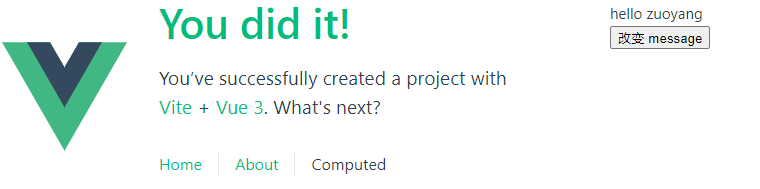
点击 button 按钮,查看 Console:


 浙公网安备 33010602011771号