
提示框的优化之自定义Toast组件之(二)Toast组件的业务逻辑实现
- 在java下org.socrates.mydiary.activity下LoginActivity下自定义一个方法showCustomerToast()
 1 public class LoginActivity extends AppCompatActivity {
 2      private void showCustomerToast(final int icon, final String message){
 3          LayoutInflater inflater=getLayoutInflater();    //通过获取LayoutInflater对象创建一个LayoutInflater接口对象
 4          View layout=inflater.inflate(R.layout.toast_customer, (ViewGroup) findViewById(R.id.toast_layout_root));  //使用Inflater对象中Inflater方法绑定自定义Toast的布局文件,同时指向该布局文件中跟标记节点
 5
 6          ImageView toastIcon=(ImageView)layout.findViewById(R.id.toastIcon);
 7          toastIcon.setBackgroundResource(icon);
 8
 9          TextView toastMessage = (TextView)layout.findViewById(R.id.toastMessage); //获取该布局文件中的TextView组件并为其动态赋值
10          toastMessage.setText(message);
11
12          Toast toast=new Toast(getApplicationContext());  //实例化一个Toast组件对象
13          toast.setDuration(Toast.LENGTH_LONG);
14          toast.setView(layout);  ////将设置好的定制布局与当前的Toast对象进行绑定
15          toast.show();  //显示Toast组件
16      }
17 }
18
业务逻辑流程:
(1)通过获取LayoutInflater对象创建一个LayoutInflater接口对象
(2)使用Inflater对象中Inflater方法绑定自定义Toast的布局文件,同时指向该布局文件中跟标记节点
(3)获取该布局文件中的TextView组件并为其动态赋值
(4)实例化一个Toast组件对象
(5)将设置好的定制布局与当前的Toast对象进行绑定
(6)显示Toast组件
- 在指定位置调用该方法
 1 private  class ViewOcl implements View.OnClickListener{
 2         @Override
 3         public void onClick (View v){
 4             switch (v.getId()){
 5                 case R.id.btnLogin:
 6                     String account=txtAccount.getText().toString().trim();
 7                     String password=txtPassword.getText().toString().trim();
 8                     boolean login_flag =false;
 9
10                     if (login_flag) {
11                         showCustomerToast(android.R.drawable.ic_menu_call,"欢迎登录," + account);  //在指定位置调用该方法
12
13                         break;
14
15                     }
16                     else {
17                         showCustomerToast(android.R.drawable.ic_delete,"账号或密码错误");  //在指定位置调用该方法
18                     }
19                     break;
20              }
21         }
22 }
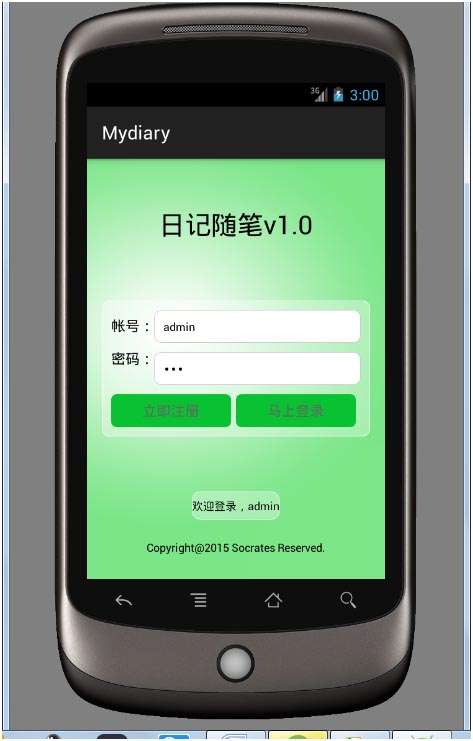
运行:
花朵开放的时候花蕾消逝,人们会说花蕾是花朵否定了的;同样地,当结果的时刻花朵又被解释为植物的一种虚假的存在形式,而果实是作为植物的真实形式而取代花朵的。这些形式不但彼此不同,而且互相排斥,互不相容。但是,他们的流动性却使他们成为有机统一体的环节,他们在有机统一体中不但互相抵触,而且彼此都同样是必要的;而正是这种同样的必要性才构成整体的生命。
