

JAVA解析JSON数据
在使用第三方api的使用,有时候会从网络中获得json数据,所以说我们将如何解析json数据?
下面小编将通过以下几点来进行json的讲解
1.什么是JSON? (http://www.json.org/)
JSON (JavaScript Object Notation) is a lightweight data-interchange format. It is easy for humans to read and write. It is easy for machines to parse and generate. It is based on a subset of the JavaScript Programming Language, Standard ECMA-262 3rd Edition - December 1999. JSON is a text format that is completely language independent but uses conventions that are familiar to programmers of the C-family of languages, including C, C++, C#, Java, JavaScript, Perl, Python, and many others. These properties make JSON an ideal data-interchange language.


2.Json数据类型
2-1.json对象
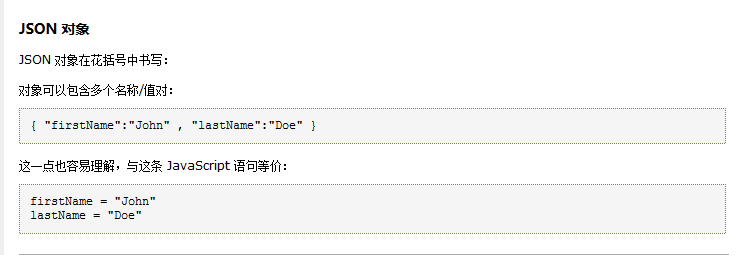
2-2.json数组

ps:JSONObject与JSONArray的区别
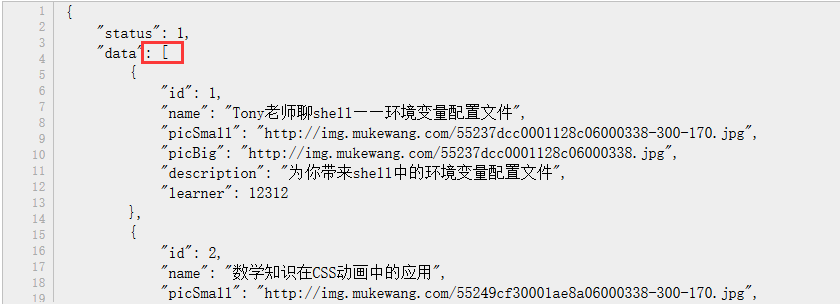 (JSON数组)
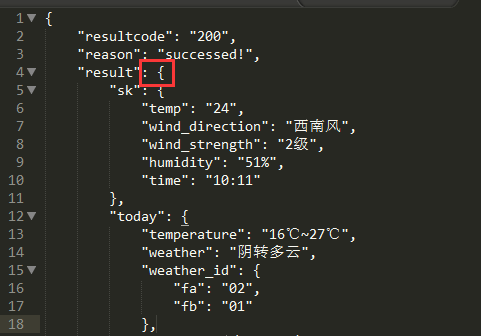 (JSON数组)
3.解析JSON数据(小编使用的GSON进行json数据的解析)
3-1 【JSONObject的解析】
下面是一个json文件:
|
1
2
3
4
5
6
7
8
9
10
11
12
13
14
15
16
17
18
19
20
21
22
23
24
25
26
27
28
29
30
31
32
33
34
35
36
37
38
39
40
41
42
43
44
45
46
47
48
49
50
51
52
53
54
55
56
57
58
59
60
61
62
63
64
65
66
67
68
69
70
71
72
73
74
75
76
77
78
79
80
81
82
83
84
85
86
87
88
89
90
91
92
93
94
95
96
97
98
99
100
101
102
103
104
105
106
107
108
109
110
111
112
113
|
{ "resultcode": "200", "reason": "successed!", "result": { "sk": { "temp": "24", "wind_direction": "西南风", "wind_strength": "2级", "humidity": "51%", "time": "10:11" }, "today": { "temperature": "16℃~27℃", "weather": "阴转多云", "weather_id": { "fa": "02", "fb": "01" }, "wind": "西南风3-4 级", "week": "星期四", "city": "滨州", "date_y": "2015年06月04日", "dressing_index": "舒适", "dressing_advice": "建议着长袖T恤、衬衫加单裤等服装。年老体弱者宜着针织长袖衬衫、马甲和长裤。", "uv_index": "最弱", "comfort_index": "", "wash_index": "较适宜", "travel_index": "", "exercise_index": "较适宜", "drying_index": "" }, "future": [ { "temperature": "16℃~27℃", "weather": "阴转多云", "weather_id": { "fa": "02", "fb": "01" }, "wind": "西南风3-4 级", "week": "星期四", "date": "20150604" }, { "temperature": "20℃~32℃", "weather": "多云转晴", "weather_id": { "fa": "01", "fb": "00" }, "wind": "西风3-4 级", "week": "星期五", "date": "20150605" }, { "temperature": "23℃~35℃", "weather": "多云转阴", "weather_id": { "fa": "01", "fb": "02" }, "wind": "西南风3-4 级", "week": "星期六", "date": "20150606" }, { "temperature": "20℃~33℃", "weather": "多云", "weather_id": { "fa": "01", "fb": "01" }, "wind": "北风微风", "week": "星期日", "date": "20150607" }, { "temperature": "22℃~34℃", "weather": "多云", "weather_id": { "fa": "01", "fb": "01" }, "wind": "西南风3-4 级", "week": "星期一", "date": "20150608" }, { "temperature": "22℃~33℃", "weather": "阴", "weather_id": { "fa": "02", "fb": "02" }, "wind": "西南风3-4 级", "week": "星期二", "date": "20150609" }, { "temperature": "22℃~33℃", "weather": "多云", "weather_id": { "fa": "01", "fb": "01" }, "wind": "南风3-4 级", "week": "星期三", "date": "20150610" } ] }, "error_code": 0} |
我们进行解析(解析一部分):
|
1
2
3
4
5
6
7
8
9
10
11
12
13
14
15
16
17
18
19
20
21
22
23
24
25
26
27
28
29
30
31
32
33
|
package cn.edu.bzu.json;import java.io.FileNotFoundException;import java.io.FileReader;import com.google.gson.JsonArray;import com.google.gson.JsonIOException;import com.google.gson.JsonObject;import com.google.gson.JsonParser;import com.google.gson.JsonSyntaxException;public class Read { public static void main(String args[]){ JsonParser parse =new JsonParser(); //创建json解析器 try { JsonObject json=(JsonObject) parse.parse(new FileReader("weather.json")); //创建jsonObject对象 System.out.println("resultcode:"+json.get("resultcode").getAsInt()); //将json数据转为为int型的数据 System.out.println("reason:"+json.get("reason").getAsString()); //将json数据转为为String型的数据 JsonObject result=json.get("result").getAsJsonObject(); JsonObject today=result.get("today").getAsJsonObject(); System.out.println("temperature:"+today.get("temperature").getAsString()); System.out.println("weather:"+today.get("weather").getAsString()); } catch (JsonIOException e) { e.printStackTrace(); } catch (JsonSyntaxException e) { e.printStackTrace(); } catch (FileNotFoundException e) { e.printStackTrace(); } }} |
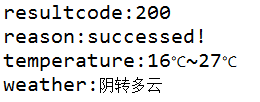
输出结果:
3-2 【JSONArray的解析】
下面是一个json文件

{
    "cat":"it",
    "language":[
        {"id":1,"ide":"eclipse","name":Java},
        {"id":2,"ide":"XCode","name":"Swift"},
        {"id":3,"ide":"Visual Stdio","name":"C#"}
    ],
    "pop":true
}
我们进行解析:
|
1
2
3
4
5
6
7
8
9
10
11
12
13
14
15
16
17
18
19
20
21
22
23
24
25
26
27
28
29
30
31
32
33
34
35
36
37
38
|
package cn.edu.bzu.json;import java.io.FileNotFoundException;import java.io.FileReader;import com.google.gson.JsonArray;import com.google.gson.JsonIOException;import com.google.gson.JsonObject;import com.google.gson.JsonParser;import com.google.gson.JsonSyntaxException;public class ReadJSON { public static void main(String args[]){ try { JsonParser parser=new JsonParser(); //创建JSON解析器 JsonObject object=(JsonObject) parser.parse(new FileReader("test.json")); //创建JsonObject对象 System.out.println("cat="+object.get("cat").getAsString()); //将json数据转为为String型的数据 System.out.println("pop="+object.get("pop").getAsBoolean()); //将json数据转为为boolean型的数据 JsonArray array=object.get("language").getAsJsonArray(); //得到为json的数组 for(int i=0;i<array.size();i++){ System.out.println("---------------"); JsonObject subObject=array.get(i).getAsJsonObject(); System.out.println("id="+subObject.get("id").getAsInt()); System.out.println("name="+subObject.get("name").getAsString()); System.out.println("ide="+subObject.get("ide").getAsString()); } } catch (JsonIOException e) { e.printStackTrace(); } catch (JsonSyntaxException e) { e.printStackTrace(); } catch (FileNotFoundException e) { e.printStackTrace(); } }} |
输出结果:
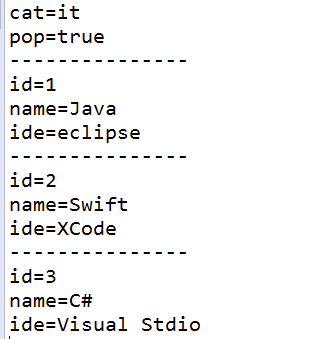
3-3 【分析】
我们通过Gson进行解析,所以在使用前需要导入Gson.jar
解析json数据时,
1.需要进行创建Gson解析器
2.创建JSONObject对象
3.将json数据转为为相应的数据

 浙公网安备 33010602011771号