
python dbutils 简介及准备工作
DBUtils是一套Python数据库连接池包,并允许对非线程安全的数据库接口进行线程安全包装。DBUtils来自Webware for Python。
DBUtils提供两种外部接口:
- PersistentDB :提供线程专用的数据库连接,并自动管理连接。
- PooledDB :提供线程间可共享的数据库连接,并自动管理连接。
需要库
1、DBUtils pip install DBUtils
2、pymysql pip install pymysql/MySQLdb
创建DButils组件
db_config.py 配置文件
- # -*- coding: UTF-8 -*-
- import pymysql
-
- # 数据库信息
- DB_TEST_HOST = "127.0.0.1"
- DB_TEST_PORT = 3306
- DB_TEST_DBNAME = "ball"
- DB_TEST_USER = "root"
- DB_TEST_PASSWORD = "123456"
-
- # 数据库连接编码
- DB_CHARSET = "utf8"
-
- # mincached : 启动时开启的闲置连接数量(缺省值 0 开始时不创建连接)
- DB_MIN_CACHED = 10
-
- # maxcached : 连接池中允许的闲置的最多连接数量(缺省值 0 代表不闲置连接池大小)
- DB_MAX_CACHED = 10
-
- # maxshared : 共享连接数允许的最大数量(缺省值 0 代表所有连接都是专用的)如果达到了最大数量,被请求为共享的连接将会被共享使用
- DB_MAX_SHARED = 20
-
- # maxconnecyions : 创建连接池的最大数量(缺省值 0 代表不限制)
- DB_MAX_CONNECYIONS = 100
-
- # blocking : 设置在连接池达到最大数量时的行为(缺省值 0 或 False 代表返回一个错误<toMany......> 其他代表阻塞直到连接数减少,连接被分配)
- DB_BLOCKING = True
-
- # maxusage : 单个连接的最大允许复用次数(缺省值 0 或 False 代表不限制的复用).当达到最大数时,连接会自动重新连接(关闭和重新打开)
- DB_MAX_USAGE = 0
-
- # setsession : 一个可选的SQL命令列表用于准备每个会话,如["set datestyle to german", ...]
- DB_SET_SESSION = None
-
- # creator : 使用连接数据库的模块
- DB_CREATOR = pymysql
- db_dbutils_init.py 创建数据池初始化
- from DBUtils.PooledDB import PooledDB
- import db_config as config
-
- """
- @功能:创建数据库连接池
- """
-
-
- class MyConnectionPool(object):
- __pool = None
-
- # def __init__(self):
- # self.conn = self.__getConn()
- # self.cursor = self.conn.cursor()
-
- # 创建数据库连接conn和游标cursor
- def __enter__(self):
- self.conn = self.__getconn()
- self.cursor = self.conn.cursor()
-
- # 创建数据库连接池
- def __getconn(self):
- if self.__pool is None:
- self.__pool = PooledDB(
- creator=config.DB_CREATOR,
- mincached=config.DB_MIN_CACHED,
- maxcached=config.DB_MAX_CACHED,
- maxshared=config.DB_MAX_SHARED,
- maxconnections=config.DB_MAX_CONNECYIONS,
- blocking=config.DB_BLOCKING,
- maxusage=config.DB_MAX_USAGE,
- setsession=config.DB_SET_SESSION,
- host=config.DB_TEST_HOST,
- port=config.DB_TEST_PORT,
- user=config.DB_TEST_USER,
- passwd=config.DB_TEST_PASSWORD,
- db=config.DB_TEST_DBNAME,
- use_unicode=False,
- charset=config.DB_CHARSET
- )
- return self.__pool.connection()
-
- # 释放连接池资源
- def __exit__(self, exc_type, exc_val, exc_tb):
- self.cursor.close()
- self.conn.close()
-
- # 关闭连接归还给链接池
- # def close(self):
- # self.cursor.close()
- # self.conn.close()
-
- # 从连接池中取出一个连接
- def getconn(self):
- conn = self.__getconn()
- cursor = conn.cursor()
- return cursor, conn
-
-
- # 获取连接池,实例化
- def get_my_connection():
- return MyConnectionPool()
制作mysqlhelper.py
- from db_dbutils_init import get_my_connection
-
- """执行语句查询有结果返回结果没有返回0;增/删/改返回变更数据条数,没有返回0"""
-
-
- class MySqLHelper(object):
- def __init__(self):
- self.db = get_my_connection() # 从数据池中获取连接
-
- def __new__(cls, *args, **kwargs):
- if not hasattr(cls, 'inst'): # 单例
- cls.inst = super(MySqLHelper, cls).__new__(cls, *args, **kwargs)
- return cls.inst
-
- # 封装执行命令
- def execute(self, sql, param=None, autoclose=False):
- """
- 【主要判断是否有参数和是否执行完就释放连接】
- :param sql: 字符串类型,sql语句
- :param param: sql语句中要替换的参数"select %s from tab where id=%s" 其中的%s就是参数
- :param autoclose: 是否关闭连接
- :return: 返回连接conn和游标cursor
- """
- cursor, conn = self.db.getconn() # 从连接池获取连接
- count = 0
- try:
- # count : 为改变的数据条数
- if param:
- count = cursor.execute(sql, param)
- else:
- count = cursor.execute(sql)
- conn.commit()
- if autoclose:
- self.close(cursor, conn)
- except Exception as e:
- pass
- return cursor, conn, count
-
- # 执行多条命令
- # def executemany(self, lis):
- # """
- # :param lis: 是一个列表,里面放的是每个sql的字典'[{"sql":"xxx","param":"xx"}....]'
- # :return:
- # """
- # cursor, conn = self.db.getconn()
- # try:
- # for order in lis:
- # sql = order['sql']
- # param = order['param']
- # if param:
- # cursor.execute(sql, param)
- # else:
- # cursor.execute(sql)
- # conn.commit()
- # self.close(cursor, conn)
- # return True
- # except Exception as e:
- # print(e)
- # conn.rollback()
- # self.close(cursor, conn)
- # return False
-
- # 释放连接
- def close(self, cursor, conn):
- """释放连接归还给连接池"""
- cursor.close()
- conn.close()
-
- # 查询所有
- def selectall(self, sql, param=None):
- try:
- cursor, conn, count = self.execute(sql, param)
- res = cursor.fetchall()
- return res
- except Exception as e:
- print(e)
- self.close(cursor, conn)
- return count
-
- # 查询单条
- def selectone(self, sql, param=None):
- try:
- cursor, conn, count = self.execute(sql, param)
- res = cursor.fetchone()
- self.close(cursor, conn)
- return res
- except Exception as e:
- print("error_msg:", e.args)
- self.close(cursor, conn)
- return count
-
- # 增加
- def insertone(self, sql, param):
- try:
- cursor, conn, count = self.execute(sql, param)
- # _id = cursor.lastrowid() # 获取当前插入数据的主键id,该id应该为自动生成为好
- conn.commit()
- self.close(cursor, conn)
- return count
- # 防止表中没有id返回0
- # if _id == 0:
- # return True
- # return _id
- except Exception as e:
- print(e)
- conn.rollback()
- self.close(cursor, conn)
- return count
-
- # 增加多行
- def insertmany(self, sql, param):
- """
- :param sql:
- :param param: 必须是元组或列表[(),()]或((),())
- :return:
- """
- cursor, conn, count = self.db.getconn()
- try:
- cursor.executemany(sql, param)
- conn.commit()
- return count
- except Exception as e:
- print(e)
- conn.rollback()
- self.close(cursor, conn)
- return count
-
- # 删除
- def delete(self, sql, param=None):
- try:
- cursor, conn, count = self.execute(sql, param)
- self.close(cursor, conn)
- return count
- except Exception as e:
- print(e)
- conn.rollback()
- self.close(cursor, conn)
- return count
-
- # 更新
- def update(self, sql, param=None):
- try:
- cursor, conn, count = self.execute(sql, param)
- conn.commit()
- self.close(cursor, conn)
- return count
- except Exception as e:
- print(e)
- conn.rollback()
- self.close(cursor, conn)
- return count
-
-
- if __name__ == '__main__':
- db = MySqLHelper()
- # # 查询单条
- # sql1 = 'select * from userinfo where name=%s'
- # args = 'python'
- # ret = db.selectone(sql=sql1, param=args)
- # print(ret) # (None, b'python', b'123456', b'0')
- # 增加单条
- # sql2 = 'insert into userinfo (name,password) VALUES (%s,%s)'
- # ret = db.insertone(sql2, ('old2','22222'))
- # print(ret)
- # 增加多条
- # sql3 = 'insert into userinfo (name,password) VALUES (%s,%s)'
- # li = li = [
- # ('分省', '123'),
- # ('到达','456')
- # ]
- # ret = db.insertmany(sql3,li)
- # print(ret)
- # 删除
- # sql4 = 'delete from userinfo WHERE name=%s'
- # args = 'xxxx'
- # ret = db.delete(sql4, args)
- # print(ret)
- # 更新
- # sql5 = r'update userinfo set password=%s WHERE name LIKE %s'
- # args = ('993333993', '%old%')
- # ret = db.update(sql5, args)
- # print(ret)
python3 实现mysql数据库连接池
首先声明一下,这篇博客进行了通过自己的代码方式,加上这篇博客,最后总结出这段代码。参考博客连接:http://blog.csdn.net/zbc1090549839/article/details/51336458
原理
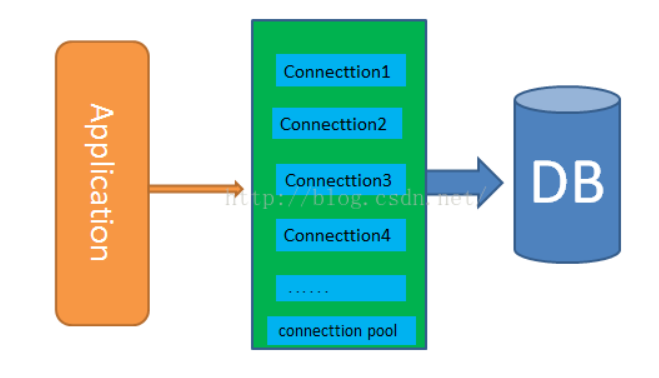
python编程中可以使用MySQLdb进行数据库的连接及诸如查询/插入/更新等操作,但是每次连接mysql数据库请求时,都是独立的去请求访问,相当浪费资源,
而且访问数量达到一定数量时,对mysql的性能会产生较大的影响。
因此,实际使用中,通常会使用数据库的连接池技术,来访问数据库达到资源复用的目的。
安装数据库连接池模块DBUtils
pip3 install DBUtils
DBUtils是一套Python数据库连接池包,并允许对非线程安全的数据库接口进行线程安全包装。DBUtils来自Webware for Python。
DBUtils提供两种外部接口:
- * PersistentDB :提供线程专用的数据库连接,并自动管理连接。
- * PooledDB :提供线程间可共享的数据库连接,并自动管理连接。
下载地址:DBUtils 下载解压后,使用python setup.py install 命令进行安装
下面利用MySQLdb和DBUtils建立自己的mysql数据库连接池工具包
在工程目录下新建package命名为:dbConnecttion,并新建module命名为MySqlConn,下面是MySqlConn.py,该模块创建Mysql的连接池对象,并创建了如查询/插入等通用的操作方法。该部分代码实现如下:
还有很多其他参数可以配置:
- dbapi :数据库接口
- mincached :启动时开启的空连接数量
- maxcached :连接池最大可用连接数量
- maxshared :连接池最大可共享连接数量
- maxconnections :最大允许连接数量
- blocking :达到最大数量时是否阻塞
- maxusage :单个连接最大复用次数
- 根据自己的需要合理配置上述的资源参数,以满足自己的实际需要。
代码:
- #!/usr/bin/env python
- # -*- coding:utf-8 -*-
- import pymysql, os, configparser
- from pymysql.cursors import DictCursor
- from DBUtils.PooledDB import PooledDB
-
-
- class Config(object):
- """
- # Config().get_content("user_information")
- 配置文件里面的参数
- [notdbMysql]
- host = 192.168.1.101
- port = 3306
- user = root
- password = python123
- """
-
- def __init__(self, config_filename="myProjectConfig.cnf"):
- file_path = os.path.join(os.path.dirname(__file__), config_filename)
- self.cf = configparser.ConfigParser()
- self.cf.read(file_path)
-
- def get_sections(self):
- return self.cf.sections()
-
- def get_options(self, section):
- return self.cf.options(section)
-
- def get_content(self, section):
- result = {}
- for option in self.get_options(section):
- value = self.cf.get(section, option)
- result[option] = int(value) if value.isdigit() else value
- return result
-
-
- class BasePymysqlPool(object):
- def __init__(self, host, port, user, password, db_name=None):
- self.db_host = host
- self.db_port = int(port)
- self.user = user
- self.password = str(password)
- self.db = db_name
- self.conn = None
- self.cursor = None
-
-
- class MyPymysqlPool(BasePymysqlPool):
- """
- MYSQL数据库对象,负责产生数据库连接 , 此类中的连接采用连接池实现获取连接对象:conn = Mysql.getConn()
- 释放连接对象;conn.close()或del conn
- """
- # 连接池对象
- __pool = None
-
- def __init__(self, conf_name=None):
- self.conf = Config().get_content(conf_name)
- super(MyPymysqlPool, self).__init__(**self.conf)
- # 数据库构造函数,从连接池中取出连接,并生成操作游标
- self._conn = self.__getConn()
- self._cursor = self._conn.cursor()
-
- def __getConn(self):
- """
- @summary: 静态方法,从连接池中取出连接
- @return MySQLdb.connection
- """
- if MyPymysqlPool.__pool is None:
- __pool = PooledDB(creator=pymysql,
- mincached=1,
- maxcached=20,
- host=self.db_host,
- port=self.db_port,
- user=self.user,
- passwd=self.password,
- db=self.db,
- use_unicode=False,
- charset="utf8",
- cursorclass=DictCursor)
- return __pool.connection()
-
- def getAll(self, sql, param=None):
- """
- @summary: 执行查询,并取出所有结果集
- @param sql:查询SQL,如果有查询条件,请只指定条件列表,并将条件值使用参数[param]传递进来
- @param param: 可选参数,条件列表值(元组/列表)
- @return: result list(字典对象)/boolean 查询到的结果集
- """
- if param is None:
- count = self._cursor.execute(sql)
- else:
- count = self._cursor.execute(sql, param)
- if count > 0:
- result = self._cursor.fetchall()
- else:
- result = False
- return result
-
- def getOne(self, sql, param=None):
- """
- @summary: 执行查询,并取出第一条
- @param sql:查询SQL,如果有查询条件,请只指定条件列表,并将条件值使用参数[param]传递进来
- @param param: 可选参数,条件列表值(元组/列表)
- @return: result list/boolean 查询到的结果集
- """
- if param is None:
- count = self._cursor.execute(sql)
- else:
- count = self._cursor.execute(sql, param)
- if count > 0:
- result = self._cursor.fetchone()
- else:
- result = False
- return result
-
- def getMany(self, sql, num, param=None):
- """
- @summary: 执行查询,并取出num条结果
- @param sql:查询SQL,如果有查询条件,请只指定条件列表,并将条件值使用参数[param]传递进来
- @param num:取得的结果条数
- @param param: 可选参数,条件列表值(元组/列表)
- @return: result list/boolean 查询到的结果集
- """
- if param is None:
- count = self._cursor.execute(sql)
- else:
- count = self._cursor.execute(sql, param)
- if count > 0:
- result = self._cursor.fetchmany(num)
- else:
- result = False
- return result
-
- def insertMany(self, sql, values):
- """
- @summary: 向数据表插入多条记录
- @param sql:要插入的SQL格式
- @param values:要插入的记录数据tuple(tuple)/list[list]
- @return: count 受影响的行数
- """
- count = self._cursor.executemany(sql, values)
- return count
-
- def __query(self, sql, param=None):
- if param is None:
- count = self._cursor.execute(sql)
- else:
- count = self._cursor.execute(sql, param)
- return count
-
- def update(self, sql, param=None):
- """
- @summary: 更新数据表记录
- @param sql: SQL格式及条件,使用(%s,%s)
- @param param: 要更新的 值 tuple/list
- @return: count 受影响的行数
- """
- return self.__query(sql, param)
-
- def insert(self, sql, param=None):
- """
- @summary: 更新数据表记录
- @param sql: SQL格式及条件,使用(%s,%s)
- @param param: 要更新的 值 tuple/list
- @return: count 受影响的行数
- """
- return self.__query(sql, param)
-
- def delete(self, sql, param=None):
- """
- @summary: 删除数据表记录
- @param sql: SQL格式及条件,使用(%s,%s)
- @param param: 要删除的条件 值 tuple/list
- @return: count 受影响的行数
- """
- return self.__query(sql, param)
-
- def begin(self):
- """
- @summary: 开启事务
- """
- self._conn.autocommit(0)
-
- def end(self, option='commit'):
- """
- @summary: 结束事务
- """
- if option == 'commit':
- self._conn.commit()
- else:
- self._conn.rollback()
-
- def dispose(self, isEnd=1):
- """
- @summary: 释放连接池资源
- """
- if isEnd == 1:
- self.end('commit')
- else:
- self.end('rollback')
- self._cursor.close()
- self._conn.close()
-
-
- if __name__ == '__main__':
- mysql = MyPymysqlPool("notdbMysql")
-
- sqlAll = "select * from myTest.aa;"
- result = mysql.getAll(sqlAll)
- print(result)
-
- sqlAll = "select * from myTest.aa;"
- result = mysql.getMany(sqlAll, 2)
- print(result)
-
- result = mysql.getOne(sqlAll)
- print(result)
-
- # mysql.insert("insert into myTest.aa set a=%s", (1))
-
- # 释放资源
- mysql.dispose()

 浙公网安备 33010602011771号