
Spark Streaming学习以及实验6 Spark Streaming 编程初级实践
安装flume
下载地址:https://www.apache.org/dyn/closer.lua/flume/1.7.0/apache-flume-1.7.0-bin.tar.gz
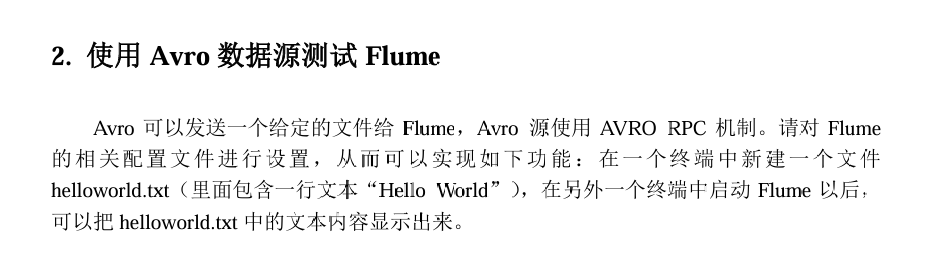
1 创建实验目录
# 创建专用测试目录
mkdir -p /opt/flume_test
cd /opt/flume_test
2 创建正确的配置文件
# 创建avro-test.conf配置文件
cat > avro-test.conf << 'EOF'
# 定义agent组件
agent1.sources = avro-source
agent1.channels = memory-channel
agent1.sinks = logger-sink

# 配置Avro Source
agent1.sources.avro-source.type = avro
agent1.sources.avro-source.bind = localhost
agent1.sources.avro-source.port = 44444

# 配置Memory Channel
agent1.channels.memory-channel.type = memory
agent1.channels.memory-channel.capacity = 1000
agent1.channels.memory-channel.transactionCapacity = 100

# 配置Logger Sink
agent1.sinks.logger-sink.type = logger

# 绑定组件
agent1.sources.avro-source.channels = memory-channel
agent1.sinks.logger-sink.channel = memory-channel
EOF
3 启动Flume Agent在第一个终端
flume-ng agent \
--conf /export/server/apache-flume-1.7.0-bin/conf \
--conf-file avro-test.conf \
--name agent1 \
-Dflume.root.logger=INFO,console
4准备测试数据并发送在第二个终端
4.1 创建测试文件
# 进入测试目录
cd /opt/flume_test

# 创建测试文件
echo "Hello World" > helloworld.txt

# 验证文件内容
cat helloworld.txt
# 输出: Hello World
4.2 使用Avro客户端发送数据
# 发送文件到Flume
flume-ng avro-client \
--conf /export/server/apache-flume-1.7.0-bin/conf \
-H localhost \
-p 44444 \
-F helloworld.txt
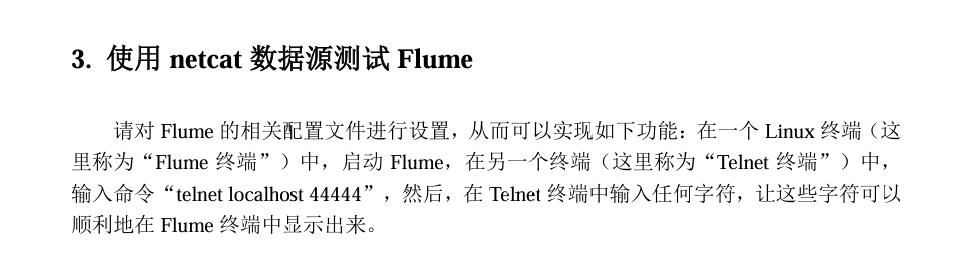
安装Netcat
yum install -y nc
测试nc本身的通信功能
nc -lk 9999
nc localhost 9999
二、创建Flume配置文件
2.1 进入测试目录
# 创建测试目录
mkdir -p /opt/flume_netcat_test
cd /opt/flume_netcat_test
2.2 创建Netcat配置文件
# 创建netcat-test.conf配置文件
cat > netcat-test.conf << 'EOF'
# 定义agent的组件
agent1.sources = netcat-source
agent1.channels = memory-channel
agent1.sinks = logger-sink

# 配置Netcat Source
agent1.sources.netcat-source.type = netcat
agent1.sources.netcat-source.bind = localhost
agent1.sources.netcat-source.port = 44444

# 配置Memory Channel
agent1.channels.memory-channel.type = memory
agent1.channels.memory-channel.capacity = 1000
agent1.channels.memory-channel.transactionCapacity = 100

# 配置Logger Sink
agent1.sinks.logger-sink.type = logger

# 绑定组件
agent1.sources.netcat-source.channels = memory-channel
agent1.sinks.logger-sink.channel = memory-channel
EOF
2.3 验证配置文件
# 查看配置文件
cat netcat-test.conf
三、启动Flume Agent(第一个终端)
3.1 启动Flume
# 启动Flume agent(使用Netcat Source)
flume-ng agent \
--conf /export/server/apache-flume-1.7.0-bin/conf \
--conf-file netcat-test.conf \
--name agent1 \
-Dflume.root.logger=INFO,console
3.2 检查启动成功
等待看到类似以下输出:
INFO - org.apache.flume.source.NetcatSource.start(NetcatSource.java:167)] Created serverSocket:sun.nio.ch.ServerSocketChannelImpl[/127.0.0.1:44444]
INFO - org.apache.flume.source.NetcatSource.start(NetcatSource.java:181)] Netcat source netcat-source started.
四、测试连接和数据发送(第二个终端)
4.1 使用nc连接
# nc也可以连接
nc localhost 44444
4.2 发送测试数据
连接成功后,在telnet/nc窗口中输入:
Hello Flume Netcat Test
This is line 2
Test message 3
注意: 每次输入一行后按回车,Flume就会接收到一行数据。

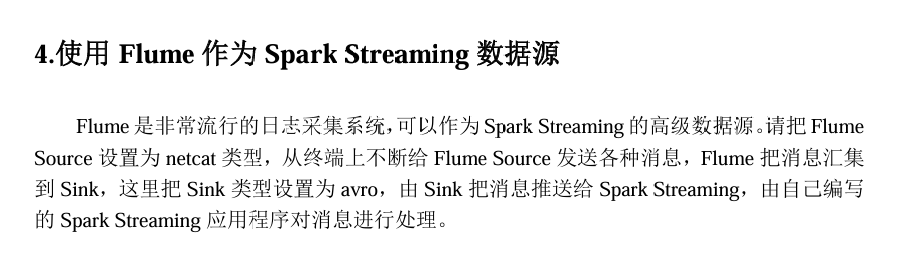
哎呀,查资料发现spark高版本不支持flume了,需要再加一个中间层kafka,由于时间有限,学这么多我脑了要转不过来了,暂且先搁置这个吧,之后有时间或需要学kafka我一定来补上

 浙公网安备 33010602011771号