
2025年秋季 2023 级课堂测试试卷—数据分析测验 日志数据分析 ip地址转换为对应城市
前言
由于各个软件版本不同,本篇文章只做参考。如果你有幸在大数据考试时,看到了这篇文章,可以参考步骤,当然其他实现的技术,思路也是可以的,比如其他路径如python。甚至不用hadoop
实验要求
Result文件数据说明:
Ip:106.39.41.166,(城市)
Date:10/Nov/2016:00:01:02 +0800,(日期)
Day:10,(天数)
Traffic: 54 ,(流量)
Type: video,(类型:视频video或文章article)
Id: 8701(视频或者文章的id)
测试要求:
- 数据清洗:按照进行数据清洗,并将清洗后的数据导入hive数据库中。
两阶段数据清洗:
(1)第一阶段:把需要的信息从原始日志中提取出来
ip: 199.30.25.88
time: 10/Nov/2016:00:01:03 +0800
traffic: 62
文章: article/11325
视频: video/3235
(2)第二阶段:根据提取出来的信息做精细化操作
ip--->城市 city(IP)
date--> time:2016-11-10 00:01:03
day: 10
traffic:62
type:article/video
id:11325
(3)hive数据库表结构:
create table data( ip string, time string , day string, traffic bigint,
type string, id string )
2、数据分析:在HIVE统计下列数据。
(1)统计最受欢迎的视频/文章的Top10访问次数 (video/article)
(2)按照地市统计最受欢迎的Top10课程 (ip)
(3)按照流量统计最受欢迎的Top10课程 (traffic)
3、数据可视化:
将统计结果倒入MySql数据库中,通过图形化展示的方式展现出来。
第一阶段
这里使用到了ip2region模块,需要下载ip2region_v4.xdb。这个模块的使用可以参考我另一篇博客:数据分析中 使用ip2region来进行 ip地址转换为城市 - 雨花阁 - 博客园

导入依赖:
<dependency>
    <groupId>org.lionsoul</groupId>
    <artifactId>ip2region</artifactId>
    <version>2.6.5</version>
</dependency>
MR程序:
DataCleaner
package o;

import org.apache.hadoop.conf.Configuration;
import org.apache.hadoop.fs.Path;
import org.apache.hadoop.io.LongWritable;
import org.apache.hadoop.io.Text;
import org.apache.hadoop.mapreduce.Job;
import org.apache.hadoop.mapreduce.Mapper;
import org.apache.hadoop.mapreduce.Reducer;
import org.apache.hadoop.mapreduce.lib.input.FileInputFormat;
import org.apache.hadoop.mapreduce.lib.output.FileOutputFormat;
import org.lionsoul.ip2region.xdb.Searcher;
import java.io.*;
import java.text.SimpleDateFormat;
import java.util.Date;

public class DataCleaner {

    // 第一阶段:从CSV格式提取基本信息
    public static class FirstStageMapper extends Mapper<LongWritable, Text, Text, Text> {
        private final Text outputKey = new Text();
        private final Text outputValue = new Text();

        @Override
        protected void map(LongWritable key, Text value, Context context)
                throws IOException, InterruptedException {

            String line = value.toString().trim();
            if (line.isEmpty()) return;

            // 解析CSV格式:ip,date,day,traffic,type,id
            // 示例:106.39.41.166,10/Nov/2016:00:01:02 +0800,10,54 ,video,8701
            String[] parts = line.split(",");

            if (parts.length >= 6) {
                try {
                    String ip = parts[0].trim();
                    String dateTime = parts[1].trim();
                    String day = parts[2].trim();
                    String traffic = parts[3].trim();
                    String type = parts[4].trim();
                    String id = parts[5].trim();

                    // 输出格式:ip|dateTime|traffic|type|id
                    String output = ip + "|" + dateTime + "|" + traffic + "|" + type + "|" + id;

                    outputKey.set(ip);
                    outputValue.set(output);

                    context.write(outputKey, outputValue);

                } catch (Exception e) {
                    System.err.println("Error parsing line: " + line);
                    e.printStackTrace();
                }
            } else {
                System.err.println("Invalid line format: " + line + " (expected 6 parts, got " + parts.length + ")");
            }
        }
    }

    // 第二阶段:精细化处理
    public static class SecondStageReducer extends Reducer<Text, Text, Text, Text> {
        private Searcher searcher;
        private final SimpleDateFormat inputFormat = new SimpleDateFormat("dd/MMM/yyyy:HH:mm:ss Z");
        private final SimpleDateFormat outputFormat = new SimpleDateFormat("yyyy-MM-dd HH:mm:ss");

        @Override
        protected void setup(Context context) throws IOException {
            try {
                // 从classpath读取ip2region数据库文件
                System.out.println("DEBUG: Loading ip2region db from classpath");

                InputStream in = getClass().getClassLoader().getResourceAsStream("ip2region_v4.xdb");
                if (in == null) {
                    throw new IOException("ip2region_v4.xdb not found in classpath");
                }

                // 读取文件到内存
                byte[] buffer = new byte[4096];
                java.io.ByteArrayOutputStream baos = new java.io.ByteArrayOutputStream();
                int bytesRead;
                while ((bytesRead = in.read(buffer)) != -1) {
                    baos.write(buffer, 0, bytesRead);
                }
                byte[] dbBinStr = baos.toByteArray();

                in.close();
                baos.close();

                System.out.println("DEBUG: File size: " + dbBinStr.length + " bytes");
                System.out.println("DEBUG: Bytes read: " + dbBinStr.length);

                // 创建搜索器
                searcher = Searcher.newWithBuffer(dbBinStr);
                System.out.println("DEBUG: ip2region searcher initialized successfully");

            } catch (Exception e) {
                System.err.println("Failed to initialize ip2region searcher: " + e.getMessage());
                throw new IOException(e);
            }
        }

        @Override
        protected void reduce(Text key, Iterable<Text> values, Context context)
                throws IOException, InterruptedException {

            for (Text value : values) {
                String[] parts = value.toString().split("\\|");

                if (parts.length == 5) {
                    try {
                        String ip = parts[0];
                        String rawTime = parts[1];
                        String traffic = parts[2];
                        String type = parts[3];
                        String id = parts[4];

                        // 1. IP转换城市
                        String city = getCityFromIP(ip);

                        // 2. 日期格式转换
                        Date date = inputFormat.parse(rawTime);
                        String formattedTime = outputFormat.format(date);

                        // 3. 提取天数(直接从日期中提取,而不是从输入中获取)
                        String day = new SimpleDateFormat("dd").format(date);

                        // 4. 清理流量(去除非数字字符)
                        String cleanTraffic = traffic.replaceAll("[^0-9]", "");
                        if (cleanTraffic.isEmpty()) {
                            cleanTraffic = "0";
                        }

                        // 构建输出字符串
                        String output = String.format("%s,%s,%s,%s,%s,%s",
                                city, formattedTime, day, cleanTraffic, type, id);

                        context.write(null, new Text(output));

                    } catch (Exception e) {
                        System.err.println("Error processing record: " + value.toString());
                        e.printStackTrace();
                    }
                }
            }
        }

        private String getCityFromIP(String ip) {
            try {
                // 使用ip2region查询城市信息
                String region = searcher.search(ip);
                System.out.println("DEBUG: IP=" + ip + ", Region=" + region);

                // 解析返回结果:国家|省份|城市|ISP
                String[] regionParts = region.split("\\|");
                System.out.println("DEBUG: RegionParts length=" + regionParts.length + ", Parts=" + java.util.Arrays.toString(regionParts));

                String location = "未知";
                if (regionParts.length >= 3) {
                    String country = regionParts[0];
                    String province = regionParts[1];
                    String city = regionParts[2];
                    System.out.println("DEBUG: Country=" + country + ", Province=" + province + ", City=" + city);

                    // 返回城市信息,优先使用城市,如果没有则使用省份
                    if (!"0".equals(city) && !"-".equals(city)) {
                        location = city;
                    } else if (!"0".equals(province) && !"-".equals(province)) {
                        location = province;
                    } else if (!"0".equals(country) && !"-".equals(country)) {
                        location = country;
                    }
                }

                // 返回"城市(IP)"格式
                return String.format("%s(%s)", location, ip);

            } catch (Exception e) {
                System.err.println("Failed to search IP " + ip + ": " + e.getMessage());
                // 异常情况下返回"未知(IP)"格式
                return String.format("未知(%s)", ip);
            }
        }

        @Override
        protected void cleanup(Context context) throws IOException {
            if (searcher != null) {
                try {
                    searcher.close();
                } catch (Exception e) {
                    System.err.println("Failed to close searcher: " + e.getMessage());
                }
            }
        }
    }

    // 主函数
    public static void main(String[] args) throws Exception {
        if (args.length < 2) {
            System.err.println("Usage: o.DataCleaner <input> <output>");
            System.exit(1);
        }

        Configuration conf = new Configuration();

        Job job = Job.getInstance(conf, "Data Cleaner Two Stages");
        job.setJarByClass(DataCleaner.class);

        // 设置Mapper和Reducer
        job.setMapperClass(FirstStageMapper.class);
        job.setReducerClass(SecondStageReducer.class);

        // 设置输出类型
        job.setOutputKeyClass(Text.class);
        job.setOutputValueClass(Text.class);

        // 设置输入输出路径
        FileInputFormat.addInputPath(job, new Path(args[0]));
        FileOutputFormat.setOutputPath(job, new Path(args[1]));

        // 设置Reducer数量
        job.setNumReduceTasks(1);

        System.exit(job.waitForCompletion(true) ? 0 : 1);
    }
}
第二阶段
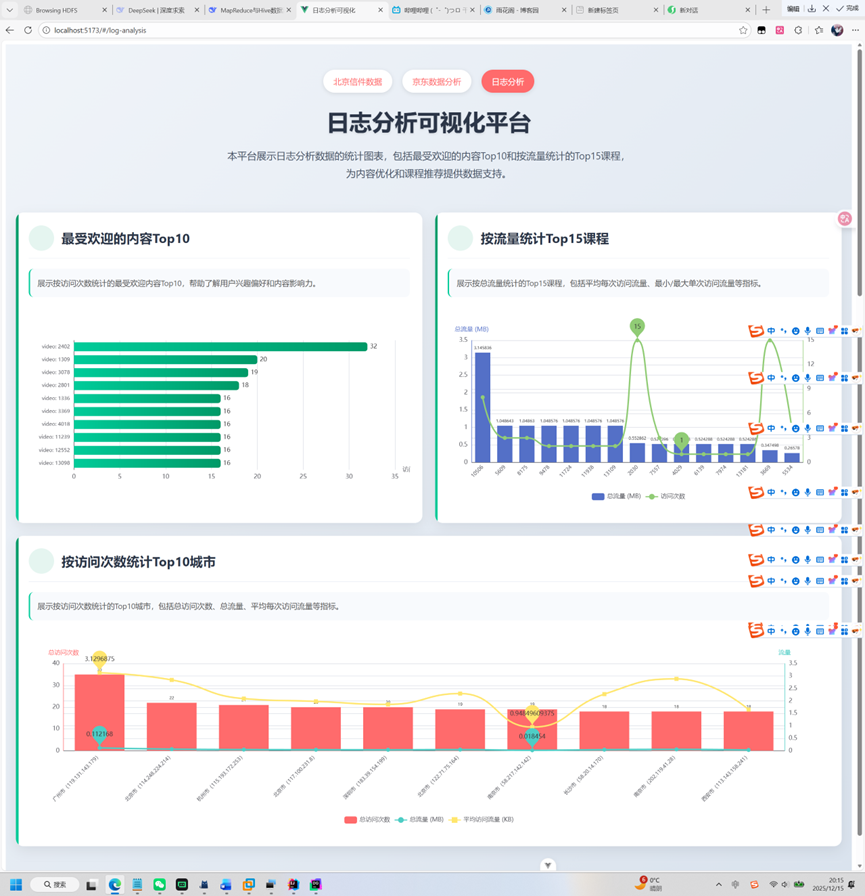
Hivesql语句,注意在最后一个数据分析的sql中是有错误的,并不能将城市区分开,后面看了可视化的就懂了。
-- 创建数据库(如果不存在)
CREATE DATABASE IF NOT EXISTS log_analysis;

-- 使用数据库
USE log_analysis;

DROP TABLE IF EXISTS data;
-- 创建数据表
CREATE TABLE IF NOT EXISTS data (
                                    ip_city STRING COMMENT 'IP归属城市',
                                    `time` STRING COMMENT '访问时间',
                                    day STRING COMMENT '访问天数',
                                    traffic BIGINT COMMENT '流量消耗',
                                    type STRING COMMENT '内容类型',
                                    id STRING COMMENT '内容ID'
)
    ROW FORMAT DELIMITED
        FIELDS TERMINATED BY ','
    STORED AS TEXTFILE
    LOCATION '/user/hadoops/output';

-- 1. 最受欢迎的内容Top10(按访问次数)


CREATE TABLE top10_content_by_visits_detail AS
SELECT
    type AS content_type,
    id AS content_id,
    COUNT(*) AS visit_count,
    ROUND(COUNT(*) * 100.0 / total.total_count, 3) AS percentage_of_total,
    RANK() OVER (ORDER BY COUNT(*) DESC) AS overall_rank,
    DENSE_RANK() OVER (ORDER BY COUNT(*) DESC) AS dense_rank
FROM data
         CROSS JOIN (SELECT COUNT(*) AS total_count FROM data) total
GROUP BY type, id, total.total_count
ORDER BY visit_count DESC
LIMIT 10;
-- 3. 按流量详细统计Top10课程
CREATE TABLE top_courses_by_traffic_detail AS
SELECT
    id AS course_id,
    type AS content_type,
    SUM(traffic) AS total_traffic,
    COUNT(*) AS visit_count,
    ROUND(AVG(traffic), 2) AS avg_traffic_per_visit,
    MIN(traffic) AS min_traffic_per_visit,
    MAX(traffic) AS max_traffic_per_visit,
    ROUND(SUM(traffic) * 100.0 / total.total_traffic, 4) AS traffic_percentage,
    ROUND(COUNT(*) * 100.0 / total.total_visits, 4) AS visit_percentage,
    RANK() OVER (ORDER BY SUM(traffic) DESC) AS traffic_rank,
    DENSE_RANK() OVER (ORDER BY SUM(traffic) DESC) AS dense_traffic_rank
FROM data
         CROSS JOIN (
    SELECT
        SUM(traffic) AS total_traffic,
        COUNT(*) AS total_visits
    FROM data
) total
GROUP BY id, type, total.total_traffic, total.total_visits
ORDER BY total_traffic DESC
LIMIT 15;


-- 按照地市统计最受欢迎的Top10(出现城市最多的前10个)
CREATE TABLE top10_cities_by_visits_detail AS
WITH city_extracted AS (
    SELECT
        -- 提取城市名称,从ip_city字段中提取括号前的内容
        CASE
            WHEN ip_city LIKE '%市%' THEN
                TRIM(SUBSTRING_INDEX(ip_city, '(', 1))
            ELSE ip_city
            END AS city_name,
        type AS content_type,
        id AS content_id,
        traffic,
        1 as visit_count
    FROM data
    WHERE ip_city IS NOT NULL AND ip_city != ''
),
     city_aggregated AS (
         SELECT
             city_name,
             COUNT(*) AS total_visits,
             COUNT(DISTINCT content_id) AS unique_content_count,
             SUM(traffic) AS total_traffic,
             ROUND(COUNT(*) * 100.0 / (SELECT COUNT(*) FROM data), 4) AS visit_percentage,
             ROUND(AVG(traffic), 2) AS avg_traffic_per_visit,
             MIN(traffic) AS min_traffic,
             MAX(traffic) AS max_traffic
         FROM city_extracted
         GROUP BY city_name
     ),
     total_metrics AS (
         SELECT
             SUM(total_visits) AS grand_total_visits,
             SUM(total_traffic) AS grand_total_traffic
         FROM city_aggregated
     )
SELECT
    ca.city_name,
    ca.total_visits,
    ca.unique_content_count,
    ca.total_traffic,
    ca.avg_traffic_per_visit,
    ca.min_traffic,
    ca.max_traffic,
    ca.visit_percentage,
    ROUND(ca.total_traffic * 100.0 / tm.grand_total_traffic, 4) AS traffic_percentage,
    RANK() OVER (ORDER BY ca.total_visits DESC) AS city_rank,
    DENSE_RANK() OVER (ORDER BY ca.total_visits DESC) AS city_dense_rank,
    PERCENT_RANK() OVER (ORDER BY ca.total_visits DESC) AS city_percent_rank,
    CUME_DIST() OVER (ORDER BY ca.total_visits DESC) AS city_cume_dist
FROM city_aggregated ca
         CROSS JOIN total_metrics tm
ORDER BY ca.total_visits DESC
LIMIT 10;
可视化比较简单,采用springboot+vue+mysql实现

 浙公网安备 33010602011771号