
DEV C++创建64位DLL,再用C#调用入门测试(含数组)
1. DEV C++创建64位DLL
DEV C++ 新建--项目--dll--选择C项目---确定
C文件中添加
 1 #include "devdll.h"
 2 #include <windows.h>
 3 /* 在程序中添加两个函数 ,原程序中其他部分可以不变 ,也可以把
 4           DLLIMPORT void HelloWorld() 函数删除
 5 */
 6 DLLIMPORT int add1(int a,int b)
 7 {
 8     return a+b;
 9 }
10
11 DLLIMPORT int add2(int a,int b)
12 {
13     return add1(a,b)+add1(a,b);
14 }
头文件(.h)中添加
 1 #ifndef _DLL_H_
 2 #define _DLL_H_
 3
 4 #if BUILDING_DLL
 5 #define DLLIMPORT __declspec(dllexport)
 6 #else
 7 #define DLLIMPORT __declspec(dllimport)
 8 #endif
 9 DLLIMPORT void HelloWorld();
10 /* 上面的部分为自动生成,不管它 */
11 DLLIMPORT int add1(int a,int b);
12 DLLIMPORT int add2(int a,int b);
13 #endif
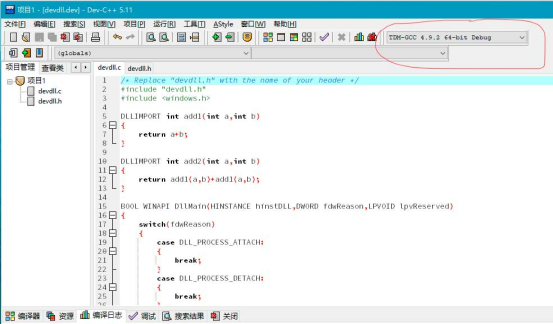
编译时注意,红线圈住的部分 64-bits
2. 在VC#中添加:
using System.Runtime.InteropServices;
 1  [DllImport("devdll.dll", CallingConvention = CallingConvention.Cdecl)]
 2         static extern int add1(int a, int b);
 3         [DllImport("devdll.dll", CallingConvention = CallingConvention.Cdecl)]
 4         static extern int add2(int a, int b);
 5         static void Main(string[] args)
 6         {
 7             int c =  add1(3,5);
 8             int d = add2(3, 5);
 9             Console.WriteLine(c);
10             Console.WriteLine(d);
11             Console.ReadKey();
12         }
编译时注意选择 64位编译
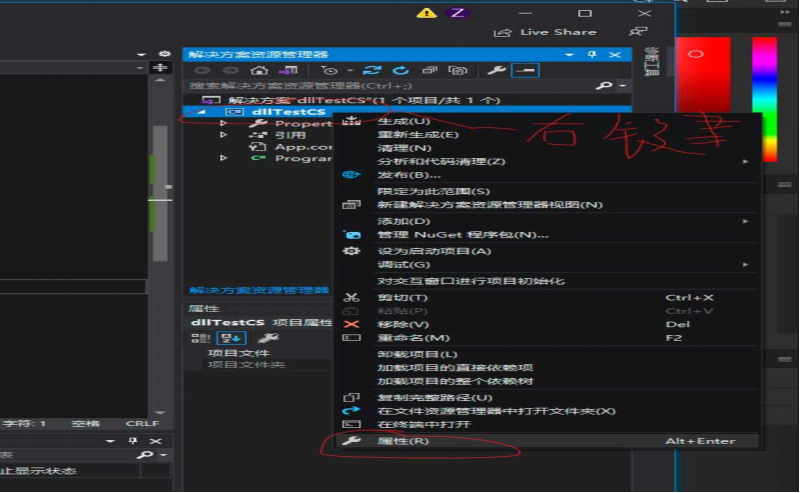
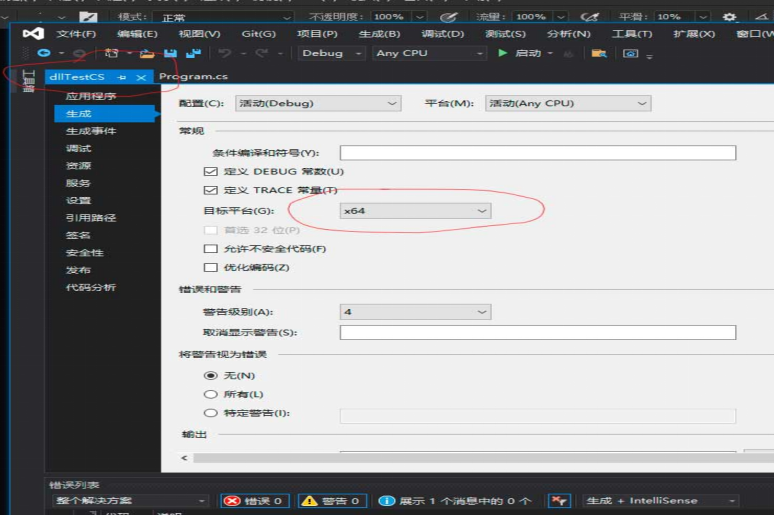
目标平台选择 x64 ,完成。
实际应用的例子:
 1 (wdll.c文件)
 2 #include "wdll.h"
 3 #include <windows.h>
 4 #include <stdio.h>
 5 #include <stdlib.h>
 6 #include <math.h>
 7
 8 double CX[111]= {0.11,0.21,......};
 9 double A=230.0,B=0.006328,CC=0.000001172,R=29.27,TN=288.9;
10
11 DLLIMPORT int ffaa(double c,double m1,double yy1[],double v4[],double kc[])
12 //  return kc[]
13 {
14 ... ...(表示:原代码不用做任何更改)
15 return 0;
16 }
17
18 DLLIMPORT int Calculate (double jing,double zhong,double sp,double i4,double angle,double high,double lout[5][500])
19 {
20 ... ...
21 ffaa(c,m1,yy1,v4,kc); //调用这个函数,在这里利用的数组kc参与了计算,C语言函数参数中数组数据可以带入带出
22 ... ...
23 return na;
24 }
25
26 (wdll.h)文件
27 #ifndef _DLL_H_
28 #define _DLL_H_
29
30 #if BUILDING_DLL
31 #define DLLIMPORT __declspec(dllexport)
32 #else
33 #define DLLIMPORT __declspec(dllimport)
34 #endif
35
36 DLLIMPORT int ffaa(double c,double m1,double yy1[],double v4[],double kc[]);
37 DLLIMPORT int Calculate (double jing,double zhong,double sp,double i4,double angle,double high,double lout[5][500]);
38
39 #endif
40
41
42 C# 调用:
43
44 [DllImport("wdll.dll", CallingConvention = CallingConvention.Cdecl)]
45         public static extern int Calculate(double jing, double zhong, double sp, double i4, double angle, double high, double[,] lout);
46
47         // 输出数据
48         static void PrintData(int na, double[,] lout)
49         {
50            ... ...
51          }
52
53         static void Main(string[] args)
54         {
55             int na,i;
56             double jing, zhong, sp, i4, angle, high;
57             double[,] lout = new double[5, 500]; // 计算结果数组
58             jing = 100.0;
59             zhong = 20.5;
60             sp = 2000.0;
61             i4 = 1.08;
62             angle = 45.0;
63             high = 3.0;
64             // 调用方法,数组也可以直接使用
65             na = Calculate(jing, zhong, sp, i4, angle, high,lout);
66             Console.WriteLine(na);
67             PrintData(na,lout);
68             Console.ReadKey();
69         }
出现过的问题:
1.BadImageFormatException-试图加载格式不正确的程序(0x8007000B),一般往往是64位程序与32位程序之间互相调用发生的。
参考:https://blog.csdn.net/zlbcdn/article/details/114277572
2.在c# 7.3中不可用,请使用8.0或更高的语言版本(在c# 7.3中不可用,请使用9.0或更高的语言版本)
参考:https://blog.csdn.net/liangyely/article/details/106163660
在工程文件 xxx.csproj 里修改,
LangVersion 修改为:preview
<PropertyGroup>
<LangVersion>preview</LangVersion>
</PropertyGroup>
或者改为:9.0 ,我是改为 9.0
<PropertyGroup>
<LangVersion>9.0</LangVersion>
</PropertyGroup>
3.其他的没发现,有问题再补充。

 浙公网安备 33010602011771号