

MVVM的实现原理入门了解4-- Dep发布者与Watcher订阅者之间的关系
前篇讲到compile.js执行进行模板解析 同时new Watcher实例化watcher
由于watcher中在初始化时 使用 this.value = this.get()方法
get: function() {
        Dep.target = this;
        var value = this.getter.call(this.vm, this.vm);
        Dep.target = null;
        return value;
},- get方法的调用使 Dep.target = watcher(也就是data中的属性解析模板时创建的watcher)
- 然后调用var value = this.getter.call(this.vm,this.vm) 进行取值
- 取对应data中属性名的属性值 由于observer对data中的每一个属性都进行了数据劫持添加了get与set方法
- 由于是取值执行get方法
 get: function() {
                if (Dep.target) {  //Dep中的target此时为watcher
                    dep.depend(); //执行此代码
                }
                return val;
            },
depend: function() { Dep.target.addDep(this); },由于此时Dep.target 为watcher 因此 调用watcher.addDep(this) this此时为data属性名对应的dep
-
执行addDep
addDep: function(dep) {
        //判断watcher与dep的关系是否建立 防止同一个data中的属性对应的dep与对应的watcher重复建立关系
        if (!this.depIds.hasOwnProperty(dep.id)) {
            dep.addSub(this);  //调用dep的addSub方法 传入 watcher
            this.depIds[dep.id] = dep; //让depIds容器中的dep.id属性名的属性值为 dep
            // depIds:{ dep.id:dep }  此时也就是将 dep保存到了 watcher中
        }
    },
由于depIds存储的是dep 而dep属性中又有id与subs 两个属性 因此
-
dep.addSub(将当前的watcher传递给dep 并将watcher保存到dep中的subs中)
-
将当前的dep保存到watcher中的depIds中去 以dep.id为属性名 dep为属性值
-
由于解析表达式才创建watcher 因此每次的watcher都是不同的 因此每一次的this.depIds为空
-
-
addSub: function(sub) { //watcher的添加
        this.subs.push(sub);  //将subs数组中 添加对应的watcher
    },
因此这样可以将每次不同的watcher完全的保存到对应的dep.subs中
比如
<p>{{someStr}}</p>
<p v-text="someStr"></p>
那么此时 watcher应为2个(模板中解析指令创建watcher) dep为1个(进行数据劫持时创捷dep) data:{someStr:"hello"} ---> 因此 depIds存入的为 depIds:{ dep.id:dep } --> {dep.id:{dep.id,dep.subs}} --> { 0 : {0,[watcher,watcher] } }
-
初始化完毕返回val 也就是对应属性的属性值
walk: function(data) {
        var me = this;
        Object.keys(data).forEach(function(key) {
            me.convert(key, data[key]);
        });
    },
    convert: function(key, val) {
        this.defineReactive(this.data, key, val);
    },
    defineReactive: function(data, key, val) {
        var dep = new Dep();
        var childObj = observe(val);
        Object.defineProperty(data, key,{
            enumerable: true,
            configurable: false,
            get: function() {
                if (Dep.target) {
                    dep.depend();
                }
                return val;
            }
            set:....
}
当执行更改data中属性名对应的属性值时 进行操作
当数据发生更改时 执行set方法
set: function(newVal) {
                if (newVal === val) {
                    return;
                }
                val = newVal;
                // 新的值是object的话,进行监听
                childObj = observe(newVal);
                // 通知订阅者 也就是通知dep中 subs中存入的watcher
                dep.notify();
            }
- 执行dep.notify()
对变化属性值的对应的subs进行遍历并执行watcher.update方法 因此对应dep的每一个watcher都将进行页面更新notify: function() { this.subs.forEach(function(sub) { sub.update(); }); }
  update: function() {
        this.run();
    },
    run: function() {
        // 让value等于 this.get
        var value = this.get(); //获取最新的值
        var oldVal = this.value;//获取旧值
        if (value !== oldVal) {// 如果新的值与旧的值不相等
            this.value = value; //让value为新的值
            // cb.call 是执行Watcher中的cb形参
            // 调用回调函数
            this.cb.call(this.vm, value, oldVal); //更新界面的回调函数
        }
    },
主要执行为cb方法 执行watcher的回调函数 用于视图更新
new Watcher(vm, exp, function(value, oldValue) {
            // 回调函数 用于更新data中属性名对应的属性值时 节点发生改变
            updaterFn && updaterFn(node, value, oldValue);
        });
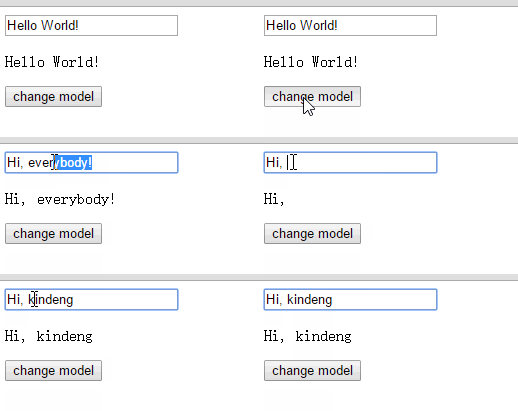
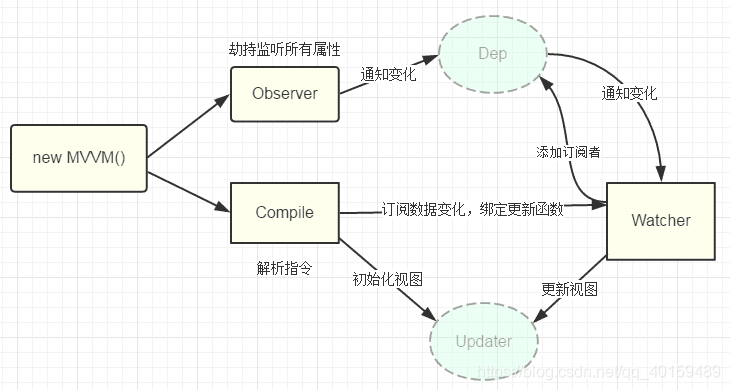
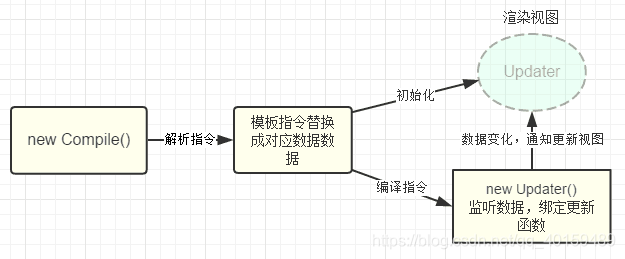
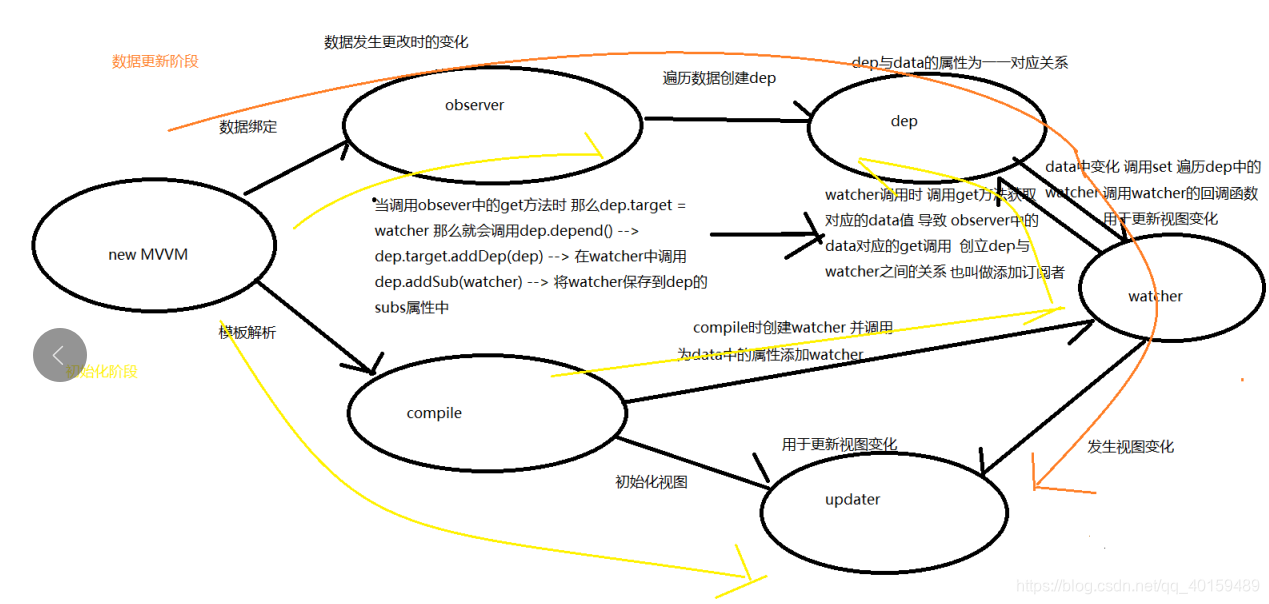
MVVM的原理图 前3张为https://github.com/DMQ/mvvm作者提供
最后一张为个人理解

 浙公网安备 33010602011771号