
① mysql主从代理 环境搭建
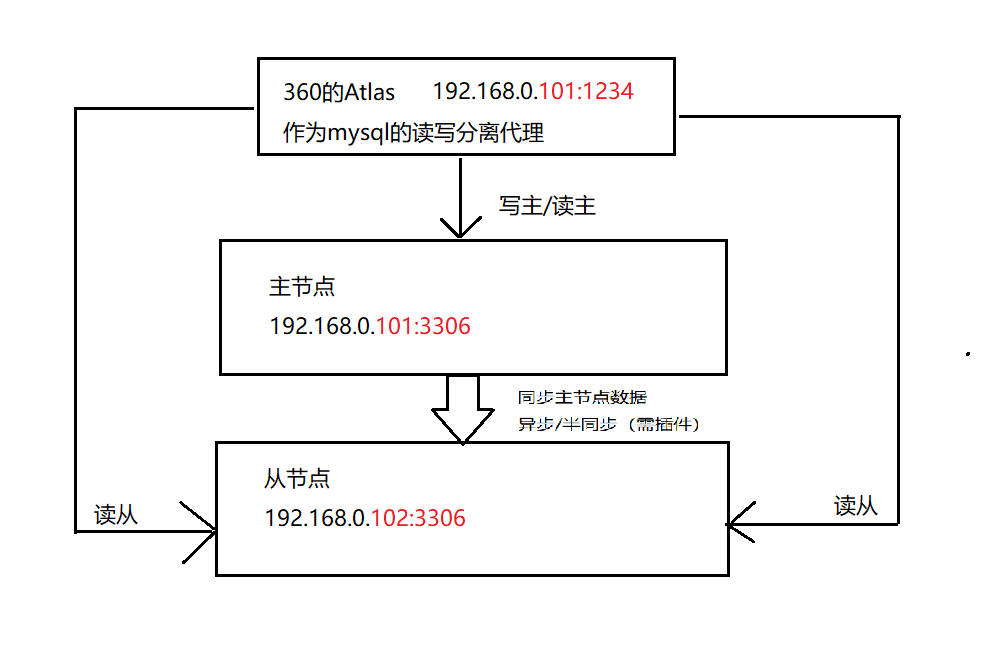
架构图:
Linux搭建环境命令:
yum search libaio
yum install libaio
groupadd mysql
useradd -r -g mysql -s /bin/false mysql
tar -zxvf /path/to/mysql-VERSION-OS.tar.gz
ln -s full-path-to-mysql-VERSION-OS mysql
cd mysql
chown -R mysql ./
chgrp -R mysql ./
mkdir -p /data/mysql
chown -R mysql:mysql /data/mysql
cp ${basedir}/support-files/my-medium.cof /etc/my.cnf
vim /etc/my.cnf
basedir=/home/cbt/svr/mysql
datadir=/data/mysql
character-set-server=utf8
cp support-file/mysql.server /etc/init.d/mysql
./scripts/mysql_install_db --user=mysql --basedir=/home/cbt/svr/mysql --datadir=/data/mysql
vim /etc/profile
PATH=/home/cbt/svr/mysql/bin:$PATH
export PATH
source /etc/profile
chkconfig mysqld on
service mysql start
mysql_secure_installation #回车,全y,设置root密码
user mysql;
select host,user,password from user;
update user set password=password('123456') where user='root';
update user set host='%' where user='root' and host='localhost';
flush privileges;
==================================================================
①主库 my.cnf 配置
binbog-format=ROW
log-bin=mysql-master-bin
log-slave-updates=true
rpl_semi_sync_master_enabled=ON
binlog-do-db=tuling
binlog-ignore-db=information_schema
binlog-ignore-db=mysql
binlog-ignore-db=personalsite
binlog-ignore-db=test
grant replication slave,super,reload on *.* to slave1@192.168.17.201 identified by '123456';
show master status;
show slave hosts;
show binary logs;
show binlog events in 'mysql-bin.000003';
==================================================================
②从库 my.cnf 配置
server-id = 2
log-bin=mysql-slave-bin
binlog-do-db=tuling
binlog-ignore-db=information_schema
binlog-ignore-db=mysql
binlog-ignore-db=personalsite
binlog-ignore-db=test
change master to master_host='192.168.0.101', master_user='slave1', master_password='123456', MASTER_AUTO_POSITION = 2887;
start slave;
stop slave;
show slave status \G;
==================================================================
③主从读写分离 360Atlas
安装目录:/usr/local/mysql-proxy/
rpm -i Atlas-2.2.1.el6.x86_64.rpm
rpm -e Atlas-2.2.1.el6.x86_64.rpm
proxy-backend-addresses=127.0.0.1:3306
proxy-read-only-backend-addresses=127.0.0.1:3305@1
pwds=root:/iZxz+0GRoA=
proxy-address=0.0.0.0:1234
./mysql-proxyd test start
./mysql-proxyd test stop
mysql -h127.0.0.1 -P2345 -uroot -proot

 浙公网安备 33010602011771号