
java导出到excel(poi4.1.1可指定字段导出)
https://www.cnblogs.com/zrsz/p/15792148.html(SpringBoot + easyexcel可导出自己想导出的字段)
一、依赖
pom.xml
<dependency>
    <groupId>org.apache.poi</groupId>
    <artifactId>poi</artifactId>
    <version>4.1.1</version>
</dependency>
<dependency>
    <groupId>org.apache.poi</groupId>
    <artifactId>poi-ooxml</artifactId>
    <version>4.1.1</version>
</dependency>
二、bean
public class User {
    String name;
    int age;
    Date birthday;

    public User(){}

    public User(String name, int age, Date birthday) {
        this.name = name;
        this.age = age;
        this.birthday = birthday;
    }

    public String getName() {
        return name;
    }

    public void setName(String name) {
        this.name = name;
    }

    public int getAge() {
        return age;
    }

    public void setAge(int age) {
        this.age = age;
    }

    public Date getBirthday() {
        return birthday;
    }

    public void setBirthday(Date birthday) {
        this.birthday = birthday;
    }
}
三、Controller(实现)

//下载动态数据
@GetMapping("/test")
@ResponseBody
public void download(HttpServletResponse response) {

        //模拟数据
        List<User> list= new ArrayList<User>();
        list.add(new User("刘华强",22,new Date()));
        list.add(new User("卖瓜老板",33,new Date()));
      //将想要导出的数据封装到newList,全部导出不需要封装
    List<Map<String, Object>> newList = new ArrayList<>();
      for (int i = 0; i < list.size(); i++) {
        Map newMap = new HashMap();
        newMap.put("name", list.get(i).getName());
        newMap.put("age", list.get(i).getAge());
        newList.add(newMap);
    }
        //通过工具类创建writer,默认创建xls格式
        ExcelWriter writer = ExcelUtil.getWriter();
        //自定义标表头名字
        writer.addHeaderAlias("name","姓名");
        writer.addHeaderAlias("age","年龄");


        // 合并单元格后的标题行
         writer.merge(2,"人员信息");

        //一次性写出内容,newList是想要导出数据
        writer.write(newList,true);
        //设置格式为excel
        response.setContentType("application/vnd.ms-excel;charset=utf-8");


         //设置下载文件名
        String name = "oneBack";
        try {
            name = URLEncoder.encode(name, StandardCharsets.UTF_8.toString());
            response.setHeader("Content-Disposition","attachment;filename="+name+".xls");
        } catch (UnsupportedEncodingException e) {
            e.printStackTrace();
        }

        ServletOutputStream out= null;
        try{
            out = response.getOutputStream();
            writer.flush(out,true);

        }catch (IOException e){
            e.printStackTrace();
        }finally {
            //关闭writer,释放内存
            writer.close();
        }
        IoUtil.close(out);

}
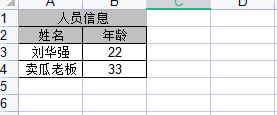
数据结果如下:


 浙公网安备 33010602011771号