
“一键并行搜索”的本地导航页实现
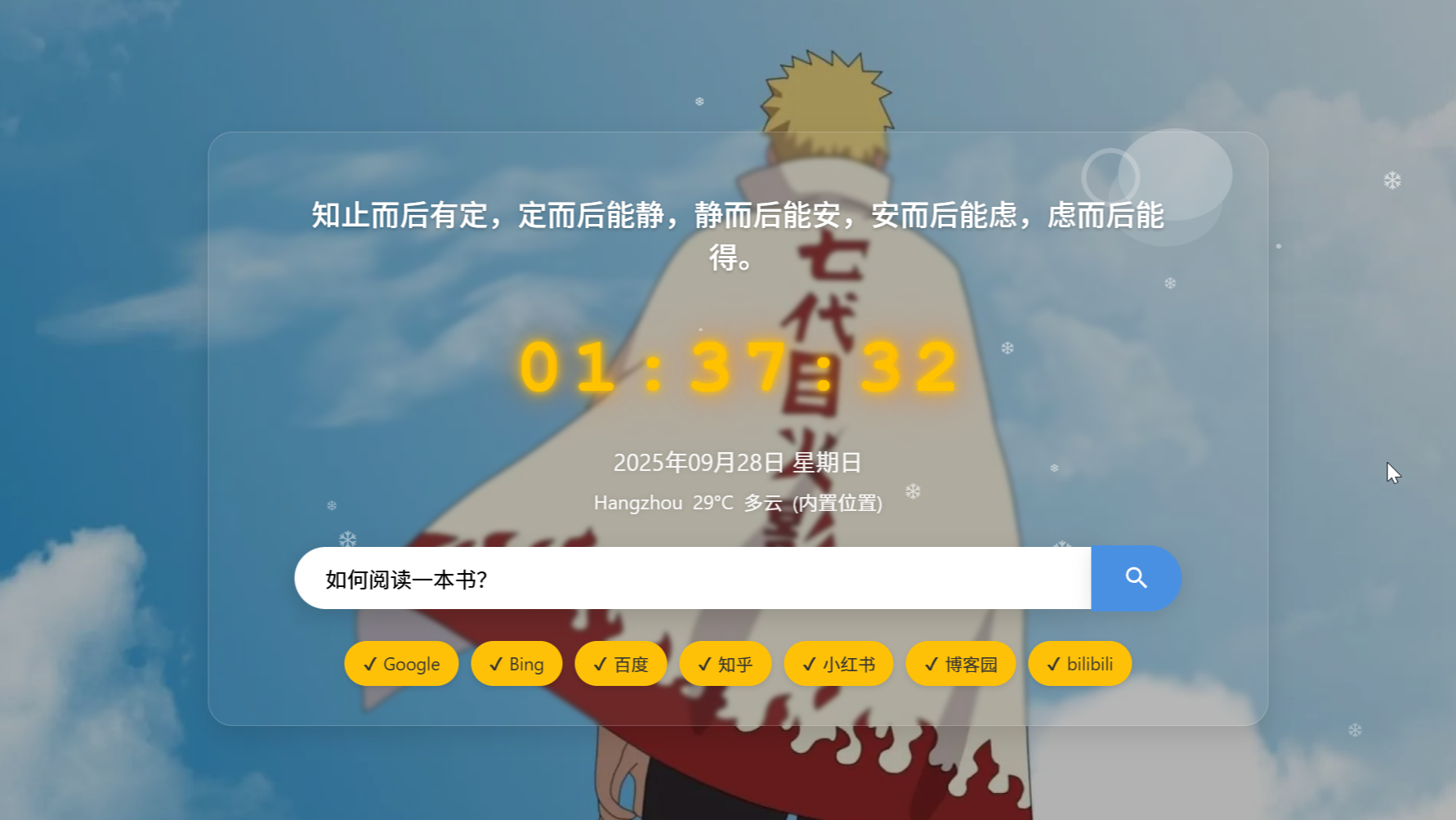 很实用的导航页面,能够并行搜索的小工具,这不仅是一个简单的搜索工具,更是一个功能丰富、高度个性化的浏览器主页。以下是它的核心功能摘要:
这是一个完全独立的、单文件 `HTML` 页面,旨在成为你的个人浏览器起始页,提高搜索效率。
很实用的导航页面,能够并行搜索的小工具,这不仅是一个简单的搜索工具,更是一个功能丰富、高度个性化的浏览器主页。以下是它的核心功能摘要:
这是一个完全独立的、单文件 `HTML` 页面,旨在成为你的个人浏览器起始页,提高搜索效率。
介绍
查询资料的时候突发奇想,为什么不能一次性打开多个平台进行同步搜索呢?于是简单验证了这个想法。
用过很多导航网站,自己也基于sun-panel进行修改,翻出以前大学时期写过的前端三大件(HTML、CSS、JS)相关的笔记,结合GeminiPro以及sun-panel源码进行整合,自用,高效搜索内容。
这不仅是一个简单的搜索工具,更是一个功能丰富、高度个性化的浏览器主页。以下是它的核心功能摘要:
这是一个完全独立的、单文件 HTML 页面,旨在成为你的个人浏览器起始页,提高搜索效率。
一共801行代码,可以自行修改。
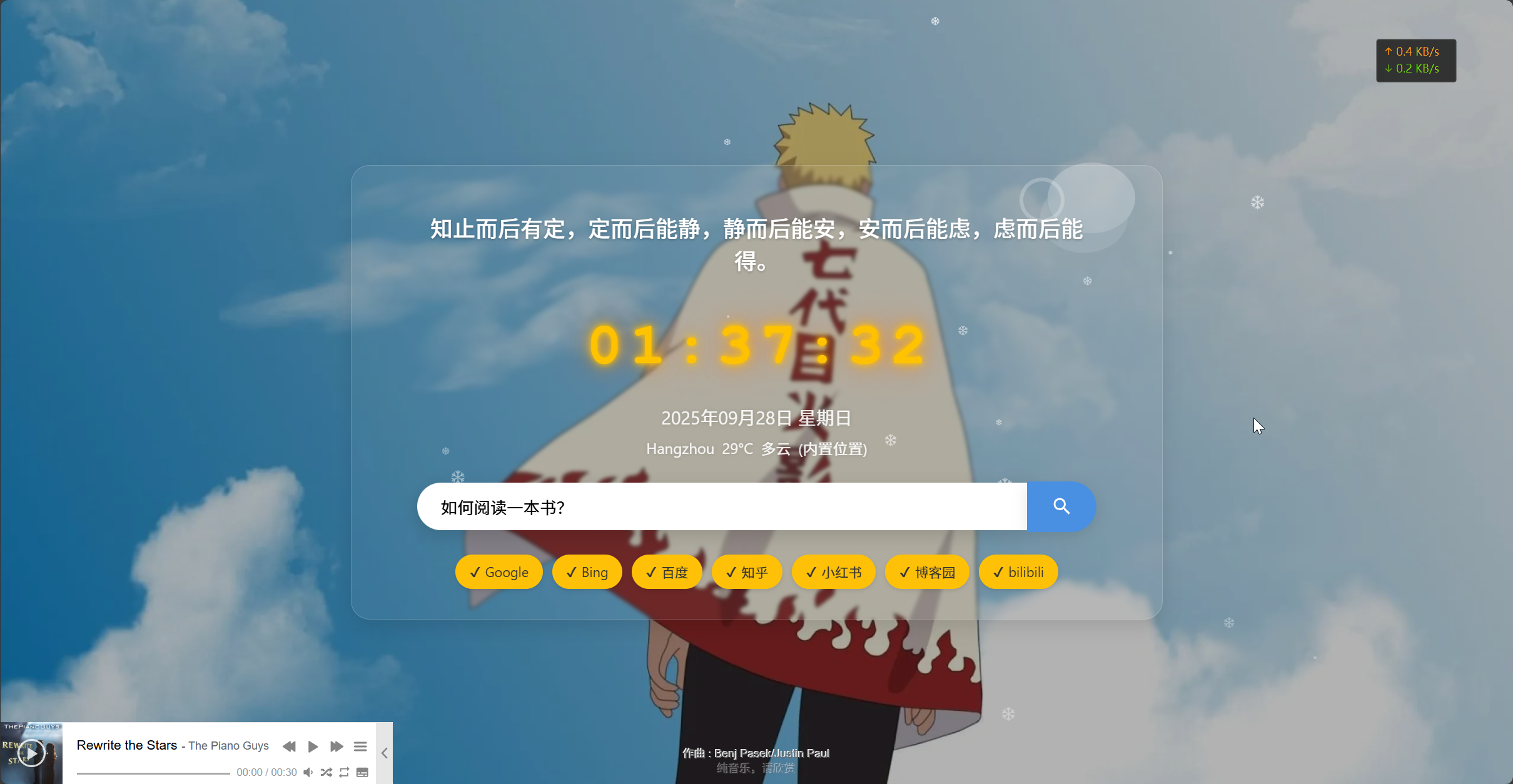
一键多个平台搜索。
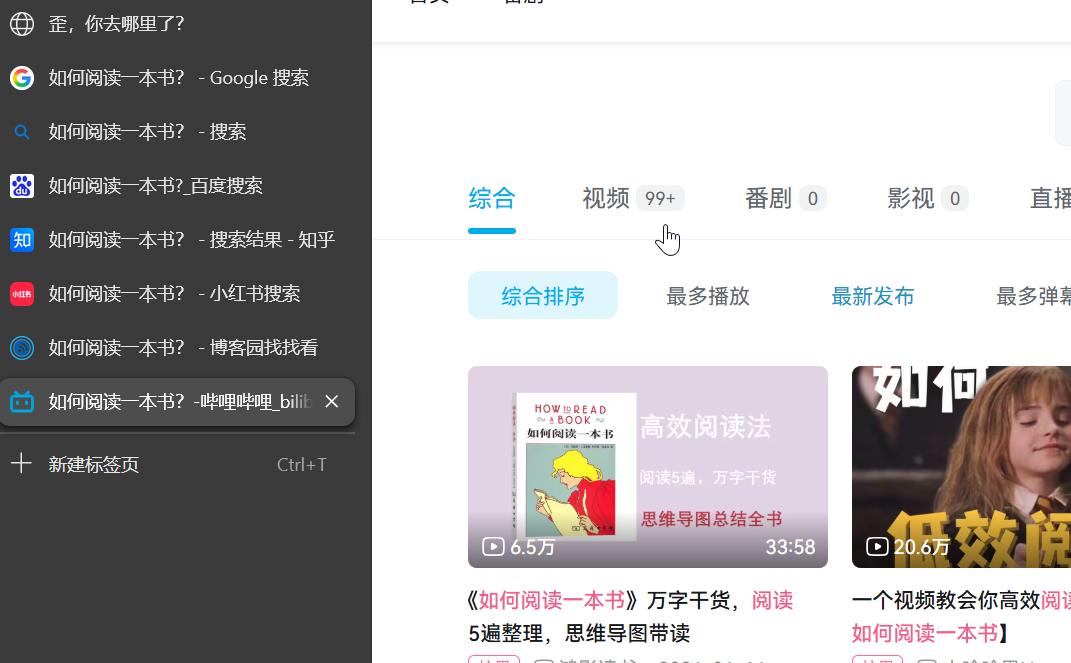
核心功能介绍:一键并行搜索
-
你可以在中心的搜索框内输入任何内容。
-
自由勾选下方的搜索引擎(如Google、百度、bilibili等)。
-
点击搜索或按下回车后,所有被选中的网站将同时在新标签页中打开搜索结果,极大地提升了信息检索效率。
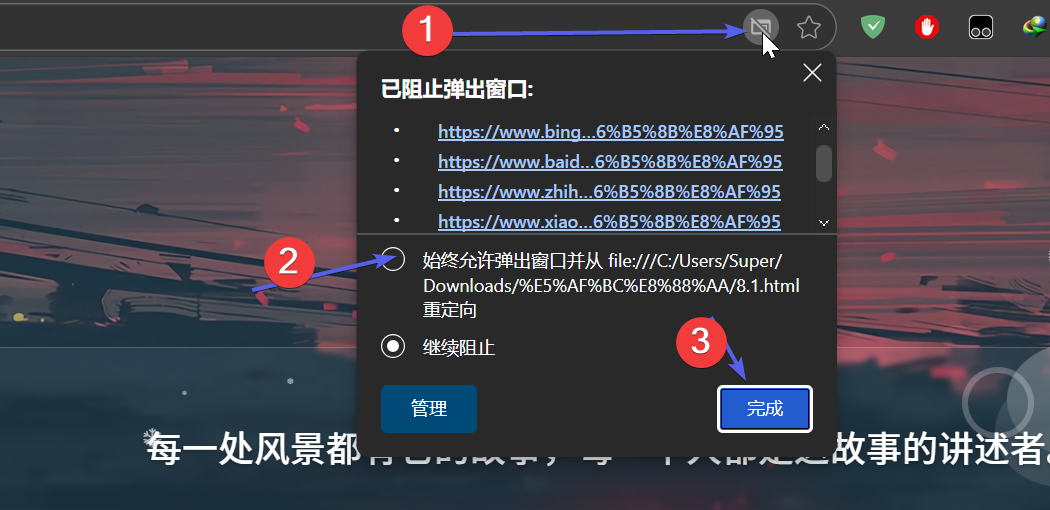
这一部分需要开启多窗口弹出允许,第一次随意搜索内容,然后允许一次即可永久生效:
在下面这部分代码添加你的搜索规则:
         searchEngines: [
            { name: "Google", url: "https://www.google.com/search?q={query}" },
            { name: "Bing", url: "https://www.bing.com/search?q={query}" },
            { name: "百度", url: "https://www.baidu.com/s?wd={query}" },
            {
              name: "知乎",
              url: "https://www.zhihu.com/search?type=content&q={query}",
            },
            {
              name: "小红书",
              url: "https://www.xiaohongshu.com/search_result?keyword={query}",
            },
            { name: "博客园", url: "https://zzk.cnblogs.com/s?w={query}" },
            {
              name: "bilibili",
              url: "https://search.bilibili.com/all?keyword={query}",
            },
          ],
其余介绍
动态与美学设计
- 随机背景与语录: 每次刷新页面,都会从内置的博客的配置中随机加载一张精美的背景图片和一句励志语录,让每一次打开都有新鲜感。
在下面这部分键入你别的服务器或别的网站的壁纸,建议为.webp格式
          // 背景图片URL数组,页面加载时会随机选择一张作为背景
          backgrounds: [
            "https://images.cnblogs.com/cnblogs_com/blogs/786284/galleries/2394419/o_240424165154_wallpaper1.webp",
            "https://img.zcool.cn/community/02kmsydiu76t7q6vwnthal3633.jpg",
            " https://p7.itc.cn/c_fill ,w_2134,h_1200,q_70/images01/20210820/44e1141307c14760aa0c19edc7f0ecef.jpeg",
            " https://p4.itc.cn/c_fill ,w_2134,h_1200,q_70/images01/20210820/16627c41d3234cc6b59c6c24b380bd3a.jpeg",
            "https://s101.lzjoy.com/res/statics/fileupload/202004/9205135e879056527e0.jpg",
            "https://images.cnblogs.com/cnblogs_com/blogs/786284/galleries/2394423/o_240424172911_5.webp",
            "https://images.cnblogs.com/cnblogs_com/blogs/786284/galleries/2394423/o_240424172911_9.webp",
            "https://images.cnblogs.com/cnblogs_com/blogs/786284/galleries/2394423/o_240424172911_1.webp",
            "https://images.cnblogs.com/cnblogs_com/blogs/786284/galleries/2394423/o_240424172911_6.webp",
            "https://images.cnblogs.com/cnblogs_com/blogs/786284/galleries/2394423/o_240424172911_3.webp",
            "https://images.cnblogs.com/cnblogs_com/blogs/786284/galleries/2394423/o_240424172911_2.webp",
            "https://images.cnblogs.com/cnblogs_com/blogs/784364/galleries/2297199/o_230531060835_bg13.webp",
            "https://images.cnblogs.com/cnblogs_com/blogs/784364/galleries/2297199/o_230407095512_fdf.jpg",
            "https://images.cnblogs.com/cnblogs_com/blogs/786284/galleries/2394423/o_240424172912_8.webp",
            "https://images.cnblogs.com/cnblogs_com/blogs/786284/galleries/2394423/o_240424172911_4.webp",
            "https://images.cnblogs.com/cnblogs_com/blogs/786284/galleries/2394423/o_240424172911_7.webp",
          ],
- 辉光管时钟: 页面中央有一个复古风格的辉光管数字时钟,实时显示时间。
- 天气与日期: 自动获取你当前位置的实时天气(若失败则显示杭州天气)并翻译为中文,同时展示公历和星期。
在下面位置填入你的城市信息,有些时候IP定位会失败:
         async getWeather() {
            const HANGZHOU_WEATHER_URL = "https://wttr.in/Hangzhou?format=j1";
            let weatherUrl = "";
            let locationSource = "";
<!-- 只修改“https://wttr.in/你的城市名称,首字母大写?format=j1 -->
-
玻璃拟态风格: 核心内容区域采用了优雅的“气泡透明”设计,具有现代感和层次感。
-
丰富的互动特效
- 动态雪花: 页面背景有持续不断的雪花飘落,营造出宁静的氛围。
- 音乐播放器: 右下角内置了一个音乐播放器,可自动播放你指定的歌单。
- 趣味交互: 当你切换到其他浏览器标签页再切回来时,页面标题会用颜文字和俏皮话欢迎你。同时,点击页面空白处还会有彩色的文字浮现特效。
-
高度可定制性
- 整个项目的所有代码和配置(包括搜索引擎、背景图片、语录等)都清晰地写在这一个HTML文件中,并配有详尽的注释,即使是初学者也能轻松地进行修改,打造完全属于自己的版本。
Docker部署
下载:docker pull pixelpulse01/my-search-page:latest
运行:docker run -d -p 12345:8080 pixelpulse01/my-search-page:latest
使用: http://localhost:12345/
端口8080
代码
小白使用,记事本新建.txt文件, 贴入代码,然后修改后缀为.html
点击查看代码
<!DOCTYPE html>
<html lang="zh-CN">
<head>
<meta charset="UTF-8" />
<meta name="viewport" content="width=device-width, initial-scale=1.0" />
<title>聚合搜索导航V0.8.3</title>
<!-- 引入 APlayer 音乐播放器的 CSS 样式文件 -->
<link
rel="stylesheet"
href="https://cdn.jsdelivr.net/npm/aplayer@1.10.1/dist/APlayer.min.css"
/>
<style>
/* --- 全局样式 --- */
body,
html {
margin: 0; /* 移除默认的外边距 */
padding: 0; /* 移除默认的内边距 */
height: 100%; /* 让根元素和body元素高度占满整个视口 */
font-family: -apple-system, BlinkMacSystemFont, "Segoe UI", Roboto,
"Helvetica Neue", Arial, sans-serif; /* 设置一个优雅的、跨平台的默认字体栈 */
overflow: hidden; /* 隐藏滚动条,因为所有内容都在一屏内 */
background: #f0f2f5; /* 设置一个浅灰色背景作为底色 */
}
/* --- 背景容器 --- */
.background-container {
display: flex; /* 使用 Flexbox 布局 */
justify-content: center; /* 水平居中内容 */
align-items: center; /* 垂直居中内容 */
height: 100%;
width: 100%;
/* 默认的渐变背景,如果JS加载图片失败则显示这个 */
background: linear-gradient(135deg, #87ceeb 0%, #b0e0e6 100%);
color: white; /* 容器内文字默认颜色为白色 */
text-align: center; /* 文字居中对齐 */
background-size: cover; /* 背景图片等比例缩放,填满整个容器 */
background-position: center; /* 背景图片居中显示 */
transition: background-image 0.5s ease-in-out; /* 为背景图片的切换添加平滑的过渡动画 */
}
/* --- 内容主容器 --- */
/* 用户自定义美化: 玻璃拟态/气泡透明效果 */
.main-content {
padding: 2rem; /* 内边距 */
max-width: 800px; /* 最大宽度 */
width: 90%; /* 宽度占父容器的90% */
display: flex;
flex-direction: column; /* 子元素垂直排列 */
align-items: center; /* 子元素水平居中 */
gap: 1.5rem; /* 子元素之间的间距 */
/* 核心样式: 实现玻璃效果 */
background: rgba(
255,
255,
255,
0.05
); /* 半透明的白色背景,营造玻璃质感 */
backdrop-filter: blur(
2px
); /* 对容器背后的元素进行模糊处理,这是毛玻璃效果的关键 */
-webkit-backdrop-filter: blur(2px); /* 兼容 Safari 浏览器 */
border-radius: 20px; /* 圆角 */
box-shadow: 0 8px 20px rgba(0, 0, 0, 0.1); /* 添加一个柔和的阴影,增强立体感 */
border: 1px solid rgba(255, 255, 255, 0.18); /* 添加一个半透明的白色边框,模拟玻璃边缘的高光 */
}
/* --- 欢迎语 --- */
.welcome-message {
font-size: 1.5rem; /* 字体大小 */
font-weight: 500; /* 字体粗细 */
color: white;
text-shadow: 0 1px 3px rgba(0, 0, 0, 0.25); /* 文字阴影,使其在复杂背景下更清晰 */
position: relative; /* 设置为相对定位,为其伪元素提供定位上下文 */
padding: 1rem;
max-width: 90%;
}
/* 使用 :before 和 :after 伪元素为欢迎语添加装饰性的圆圈,增加设计感 */
.welcome-message:before {
position: absolute;
content: "";
width: 93px;
height: 75px;
border-radius: 50%;
z-index: -1;
right: -27px;
top: -35px;
background: #ffffff3b;
box-shadow: -8px 21px 0 #ffffff1a;
}
.welcome-message:after {
position: absolute;
width: 40px;
height: 40px;
display: block;
border: 4px solid #ffffff3b;
content: "";
border-radius: 50%;
top: -19px;
right: 48px;
z-index: -1;
}
/* --- 辉光管时钟样式 --- */
.nixie-clock {
display: flex;
align-items: center;
justify-content: center;
gap: 8px; /* 数字和分隔符之间的间距 */
}
.nixie-char {
font-family: "Courier New", Courier, monospace; /* 使用等宽字体,确保数字宽度一致 */
font-size: 4rem;
font-weight: bold;
color: #ffc300; /* 数字的核心颜色 */
/* 使用多层 text-shadow 模拟辉光管发光的效果 */
text-shadow: 0 0 5px rgba(255, 195, 0, 0.9),
0 0 10px rgba(255, 195, 0, 0.8), 0 0 20px rgba(255, 150, 0, 0.7),
0 0 40px rgba(255, 80, 0, 0.6);
}
/* 时间分隔符的闪烁动画 */
.nixie-separator {
animation: blink 2s infinite steps(1, start);
}
@keyframes blink {
50% {
opacity: 0.6;
}
}
/* --- 日期和天气 --- */
.info-container {
display: flex;
flex-direction: column;
align-items: center;
gap: 0.5rem;
}
.date-display {
font-size: 1.2rem;
opacity: 0.9;
text-shadow: 0 0 5px rgba(0, 0, 0, 0.2);
}
.weather-display {
font-size: 1rem;
opacity: 0.9;
text-shadow: 0 0 5px rgba(0, 0, 0, 0.2);
display: flex;
align-items: center;
gap: 8px;
}
/* --- 搜索表单容器 --- */
.search-container {
display: flex;
justify-content: center;
align-items: center;
width: 100%;
}
.search-input {
width: 100%;
max-width: 600px;
padding: 15px 25px;
font-size: 1.1rem;
border: none;
border-radius: 50px 0 0 50px; /* 左侧圆角 */
outline: none; /* 移除点击时的边框 */
background-color: rgba(255, 255, 255, 0.9);
box-shadow: 0 4px 15px rgba(0, 0, 0, 0.1);
transition: all 0.3s ease; /* 平滑过渡效果 */
}
.search-input:focus {
background-color: white;
box-shadow: 0 6px 20px rgba(0, 0, 0, 0.15);
}
.search-input::placeholder {
color: #999;
}
/* 当用户未选择搜索引擎就搜索时,应用这个动画 */
.search-input.shake {
animation: shake 0.5s ease-in-out;
}
@keyframes shake {
0%,
100% {
transform: translateX(0);
}
20%,
60% {
transform: translateX(-10px);
}
40%,
80% {
transform: translateX(10px);
}
}
.search-button {
display: flex;
align-items: center;
justify-content: center;
padding: 15px 25px;
border: none;
background-color: #4a90e2;
color: white;
border-radius: 0 50px 50px 0; /* 右侧圆角 */
cursor: pointer;
outline: none;
box-shadow: 0 4px 15px rgba(0, 0, 0, 0.1);
transition: background-color 0.3s ease;
}
.search-button:hover {
background-color: #357abd;
} /* 鼠标悬停时改变背景色 */
.search-button svg {
width: 24px;
height: 24px;
}
/* --- 搜索引擎列表 --- */
.engine-list {
display: flex;
flex-wrap: wrap;
justify-content: center;
gap: 10px;
}
.engine-item {
padding: 8px 15px;
border-radius: 20px;
font-size: 0.9rem;
cursor: pointer;
transition: all 0.3s ease;
user-select: none;
display: flex;
align-items: center;
gap: 5px;
}
/* 选中状态的样式 */
.engine-item.selected {
background-color: #ffc107;
color: #333;
box-shadow: 0 2px 5px rgba(0, 0, 0, 0.1);
}
/* 未选中状态的样式 */
.engine-item:not(.selected) {
background-color: rgba(255, 255, 255, 0.8);
color: #555;
}
.engine-item .checkmark {
display: none;
}
.engine-item.selected .checkmark {
display: inline;
}
/* 点击特效文字的消失动画 */
@keyframes text-fade-out {
0% {
transform: translateY(0);
opacity: 1;
}
100% {
transform: translateY(-50px);
opacity: 0;
}
}
</style>
</head>
<body>
<!-- 主背景容器 -->
<div class="background-container">
<!-- 玻璃拟态效果的内容容器 -->
<div class="main-content">
<!-- 欢迎语/励志语录 -->
<div id="welcomeMessage" class="welcome-message"></div>
<!-- 辉光管时钟 -->
<div id="nixieClock" class="nixie-clock"></div>
<!-- 日期和天气信息容器 -->
<div class="info-container">
<div id="dateDisplay" class="date-display"></div>
<div id="weatherDisplay" class="weather-display">加载天气中...</div>
</div>
<!-- 搜索表单 -->
<form id="searchForm" class="search-container">
<input
type="text"
id="searchInput"
class="search-input"
placeholder="输入内容,一键多站搜索..."
autocomplete="off"
/>
<button type="submit" class="search-button" aria-label="搜索">
<svg
xmlns="http://www.w3.org/2000/svg"
viewBox="0 0 24"
fill="currentColor"
>
<path
d="M15.5 14h-.79l-.28-.27A6.471 6.471 0 0 0 16 9.5 6.5 6.5 0 1 0 9.5 16c1.61 0 3.09-.59 4.23-1.57l.27.28v.79l5 4.99L20.49 19l-4.99-5zm-6 0C7.01 14 5 11.99 5 9.5S7.01 5 9.5 5 14 7.01 14 9.5 11.99 14 9.5 14z"
/>
</svg>
</button>
</form>
<!-- 搜索引擎选择列表 -->
<div id="engineList" class="engine-list"></div>
</div>
</div>
<!-- APlayer 播放器容器, MetingJS 会自动渲染这个容器 -->
<!--
id="my-aplayer"
class="aplayer"
data-id="填入你的网易云音乐歌单id"
data-server="指定音乐来源平台为网易云音乐"
data-type="资源类型为播放列表(包含多首歌曲)"
data-fixed="控制播放器是否固定在页面底部(true表示固定)"
data-autoplay="是否自动播放(false表示不自动播放)"
data-order="播放顺序:random表示随机播放"
data-volume="初始音量设置为70%(0~1之间的数值"
data-theme="播放器的主题颜色,使用十六进制色值"
data-preload="音频预加载方式:auto表示自动预加载"
data-listFolded="播放列表默认是否折叠(true表示折叠)"
-->
<div
id="my-aplayer"
class="aplayer"
data-id="6895409634"
data-server="netease"
data-type="playlist"
data-fixed="true"
data-autoplay="false"
data-order="random"
data-volume="0.7"
data-theme="#2EA7E0"
data-preload="auto"
data-listFolded="true"
></div>
<script>
// 使用立即执行函数表达式 (IIFE),创建一个独立的作用域,避免污染全局命名空间
(function () {
"use strict"; // 开启严格模式,有助于编写更安全、更规范的代码
// --- 模块一:全局配置 (Configuration) ---
// 将所有可配置的参数集中存放在一个对象中,方便修改和维护
const config = {
// 励志语录数组,页面加载时会随机选择一条显示
quotes: [
"古人学问无遗力,少壮工夫老始成。纸上得来终觉浅,绝知此事要躬行。",
"知止而后有定,定而后能静,静而后能安,安而后能虑,虑而后能得。",
"物有本末,事有终始。知所先后,则近道矣。",
"我大体上欢喜冷静、沉着、稳重、刚毅,以出世精神做入世事业,尊崇理性和意志,却也不菲薄情感和想象。我的思想就抱着这个中心旋转,我不另找玄学或形而上学的基础",
"念念不忘,必有回响",
"苟有恒,何必三更眠、五更起;最无益,莫过一日曝、十日寒",
"苟能发奋自立,则家塾可读书,即旷野之地,热闹之场,亦可读书,负薪牧豕,皆可读书。苟不能发奋自立,则家塾不宜读书,即清净之乡,神仙之境,皆不能读书。何必择地?何必择时?但自问立志之真不真耳。",
"一日不读书,尘生其中;两日不读书,言语乏味;三日不读书,面目可憎。",
"凡心所向,素履所往,生如逆旅,一苇以航。",
"每一处风景都有它的故事,每一个人都是这故事的讲述者。",
"岁月是一场有去无回的旅行,好的坏的都是风景。",
"星光不问赶路人,时光不负有心人。",
],
// 背景图片URL数组,页面加载时会随机选择一张作为背景
backgrounds: [
"https://images.cnblogs.com/cnblogs_com/blogs/786284/galleries/2394419/o_240424165154_wallpaper1.webp",
"https://img.zcool.cn/community/02kmsydiu76t7q6vwnthal3633.jpg",
" https://p7.itc.cn/c_fill ,w_2134,h_1200,q_70/images01/20210820/44e1141307c14760aa0c19edc7f0ecef.jpeg",
" https://p4.itc.cn/c_fill ,w_2134,h_1200,q_70/images01/20210820/16627c41d3234cc6b59c6c24b380bd3a.jpeg",
"https://s101.lzjoy.com/res/statics/fileupload/202004/9205135e879056527e0.jpg",
"https://images.cnblogs.com/cnblogs_com/blogs/786284/galleries/2394423/o_240424172911_5.webp",
"https://images.cnblogs.com/cnblogs_com/blogs/786284/galleries/2394423/o_240424172911_9.webp",
"https://images.cnblogs.com/cnblogs_com/blogs/786284/galleries/2394423/o_240424172911_1.webp",
"https://images.cnblogs.com/cnblogs_com/blogs/786284/galleries/2394423/o_240424172911_6.webp",
"https://images.cnblogs.com/cnblogs_com/blogs/786284/galleries/2394423/o_240424172911_3.webp",
"https://images.cnblogs.com/cnblogs_com/blogs/786284/galleries/2394423/o_240424172911_2.webp",
"https://images.cnblogs.com/cnblogs_com/blogs/784364/galleries/2297199/o_230531060835_bg13.webp",
"https://images.cnblogs.com/cnblogs_com/blogs/784364/galleries/2297199/o_230407095512_fdf.jpg",
"https://images.cnblogs.com/cnblogs_com/blogs/786284/galleries/2394423/o_240424172912_8.webp",
"https://images.cnblogs.com/cnblogs_com/blogs/786284/galleries/2394423/o_240424172911_4.webp",
"https://images.cnblogs.com/cnblogs_com/blogs/786284/galleries/2394423/o_240424172911_7.webp",
],
// ★搜索引擎配置,可以在这里自由增删改查,在下面这部分代码添加你的搜索规则
searchEngines: [
{ name: "Google", url: "https://www.google.com/search?q={query}" },
{ name: "Bing", url: "https://www.bing.com/search?q={query}" },
{ name: "百度", url: "https://www.baidu.com/s?wd={query}" },
{
name: "知乎",
url: "https://www.zhihu.com/search?type=content&q={query}",
},
{
name: "小红书",
url: "https://www.xiaohongshu.com/search_result?keyword={query}",
},
{ name: "博客园", url: "https://zzk.cnblogs.com/s?w={query}" },
{
name: "bilibili",
url: "https://search.bilibili.com/all?keyword={query}",
},
{
name: "维基百科",
url: "https://zh.wikipedia.org/wiki/{query}",
},
],
// 天气状况英文到中文的翻译映射表
weatherTranslations: {
Sunny: "晴天",
"Partly cloudy": "多云",
Cloudy: "阴天",
Overcast: "阴天",
Mist: "薄雾",
"Patchy rain possible": "可能有零星小雨",
"Patchy snow possible": "可能有零星小雪",
"Patchy sleet possible": "可能有雨夹雪",
"Patchy freezing drizzle possible": "可能有冻毛毛雨",
"Thundery outbreaks possible": "可能打雷",
"Blowing snow": "风雪",
Blizzard: "暴雪",
Fog: "雾",
"Freezing fog": "冻雾",
"Patchy light drizzle": "零星小雨",
"Light drizzle": "小雨",
"Freezing drizzle": "冻毛毛雨",
"Heavy freezing drizzle": "大冻雨",
"Patchy light rain": "零星小雨",
"Light rain": "小雨",
"Moderate rain at times": "有时有中雨",
"Moderate rain": "中雨",
"Heavy rain at times": "有时有大雨",
"Heavy rain": "大雨",
"Light freezing rain": "小冻雨",
"Moderate or heavy freezing rain": "中到大冻雨",
"Light sleet": "雨夹雪",
"Moderate or heavy sleet": "中到大雨夹雪",
"Patchy light snow": "零星小雪",
"Light snow": "小雪",
"Patchy moderate snow": "中雪",
"Moderate snow": "中雪",
"Patchy heavy snow": "大雪",
"Heavy snow": "大雪",
"Ice pellets": "冰粒",
"Light rain shower": "小阵雨",
"Moderate or heavy rain shower": "中到大阵雨",
"Torrential rain shower": "倾盆大雨",
"Light sleet showers": "雨夹雪阵雨",
"Moderate or heavy sleet showers": "中到大雨夹雪阵雨",
"Light snow showers": "小雪阵雨",
"Moderate or heavy snow showers": "中到大雪阵雨",
"Light showers of ice pellets": "冰粒阵雨",
"Moderate or heavy showers of ice pellets": "中到大冰粒阵雨",
"Patchy light rain with thunder": "雷阵雨",
"Moderate or heavy rain with thunder": "雷阵雨",
"Patchy light snow with thunder": "雷阵雪",
"Moderate or heavy snow with thunder": "中到大雷阵雪",
Clear: "晴朗",
},
// 集中管理所有的DOM元素选择器,方便统一修改
selectors: {
backgroundContainer: ".background-container",
welcomeMessage: "#welcomeMessage",
searchForm: "#searchForm",
searchInput: "#searchInput",
dateDisplay: "#dateDisplay",
engineList: "#engineList",
nixieClock: "#nixieClock",
weatherDisplay: "#weatherDisplay",
},
};
// --- 模块二:独立功能函数 (Utility Functions) ---
/**
* @description 创建并控制雪花飘落的特效
*/
function createSnowflakes() {
const flake = document.createElement("div");
flake.innerHTML = "❄";
flake.style.cssText =
"position:absolute;color:#fff;z-index:9999;top:-25px;pointer-events:none;";
const documentHeight = window.innerHeight;
const documentWidth = window.innerWidth;
const creationInterval = 100; // 每100毫秒创建一片新雪花
setInterval(() => {
const startLeft = Math.random() * documentWidth;
const endLeft = Math.random() * documentWidth;
const flakeSize = 3 + 20 * Math.random();
const durationTime = 6000 + 10000 * Math.random();
const startOpacity = 0.7 + 0.3 * Math.random();
const endOpacity = 0.2 + 0.2 * Math.random();
const cloneFlake = flake.cloneNode(true);
cloneFlake.style.cssText += `left: ${startLeft}px; opacity: ${startOpacity}; font-size: ${flakeSize}px; transition: all ${durationTime}ms linear;`;
document.body.appendChild(cloneFlake);
setTimeout(() => {
cloneFlake.style.cssText += `left: ${endLeft}px; top: ${documentHeight}px; opacity: ${endOpacity};`;
setTimeout(() => {
cloneFlake.remove();
}, durationTime);
}, 0);
}, creationInterval);
}
/**
* @description 初始化页面标题的互动效果
*/
function initTitleInteraction() {
const originalTitle = document.title;
let titleTime;
document.addEventListener("visibilitychange", () => {
if (document.hidden) {
document.title = "歪,你去哪里了?";
clearTimeout(titleTime);
} else {
document.title = "(つェ⊂)咦,又回来了!";
titleTime = setTimeout(() => {
document.title = originalTitle;
}, 2000);
}
});
}
/**
* @description 初始化鼠标点击时的文字浮现特效
*/
function initClickEffect() {
const textValues = [
"富强",
"民主",
"文明",
"和谐",
"自由",
"平等",
"公正",
"法治",
"爱国",
"敬业",
"诚信",
"友善",
];
let index = 0;
document.body.addEventListener("click", (e) => {
if (e.target.closest("button, a, .engine-item, .aplayer")) {
return;
}
const x = e.pageX,
y = e.pageY;
const span = document.createElement("span");
span.textContent = textValues[index];
index = (index + 1) % textValues.length;
span.style.cssText = `position: absolute; z-index: 99999; top: ${
y - 20
}px; left: ${x}px; color: #${(
"00000" + ((Math.random() * 0x1000000) << 0).toString(16)
).slice(
-6
)}; font-size: 16px; font-weight: bold; user-select: none; pointer-events: none; animation: text-fade-out 1s forwards;`;
document.body.appendChild(span);
setTimeout(() => {
span.remove();
}, 1000);
});
}
// --- 模块三:主应用对象 (Application Object) ---
const app = {
/**
* @description 应用初始化入口
*/
init() {
this.cacheDOMElements();
this.applyDynamicContent();
this.createNixieClock();
this.renderEngineList();
this.bindEvents();
this.startClock();
this.getWeather();
createSnowflakes();
initTitleInteraction();
initClickEffect();
console.log("导航页已加载。");
},
/**
* @description 缓存需要频繁操作的DOM元素,提高性能
*/
cacheDOMElements() {
const selectors = config.selectors;
this.backgroundContainer = document.querySelector(
selectors.backgroundContainer
);
this.welcomeMessage = document.querySelector(
selectors.welcomeMessage
);
this.searchForm = document.querySelector(selectors.searchForm);
this.searchInput = document.querySelector(selectors.searchInput);
this.dateDisplay = document.querySelector(selectors.dateDisplay);
this.engineList = document.querySelector(selectors.engineList);
this.nixieClock = document.querySelector(selectors.nixieClock);
this.weatherDisplay = document.querySelector(
selectors.weatherDisplay
);
},
/**
* @description 应用动态内容,包括随机背景和随机语录
*/
applyDynamicContent() {
const randomQuote =
config.quotes[Math.floor(Math.random() * config.quotes.length)];
this.welcomeMessage.textContent = randomQuote;
const randomBg =
config.backgrounds[
Math.floor(Math.random() * config.backgrounds.length)
];
this.backgroundContainer.style.backgroundImage = `linear-gradient(rgba(0, 0, 0, 0.3), rgba(0, 0, 0, 0.3)), url('${randomBg}')`;
},
/**
* @description 获取并显示天气信息
* 只修改“https://wttr.in/你的城市名称,首字母大写?format=j1”
*/
async getWeather() {
const HANGZHOU_WEATHER_URL = "https://wttr.in/Hangzhou?format=j1";
let weatherUrl = "";
let locationSource = "";
try {
const controller = new AbortController();
const timeoutId = setTimeout(() => controller.abort(), 5000); // 5秒超时
const geoResponse = await fetch("https://ipapi.co/json/", {
signal: controller.signal,
});
clearTimeout(timeoutId);
if (!geoResponse.ok) throw new Error("Failed to get location");
const geoData = await geoResponse.json();
if (geoData && geoData.city) {
weatherUrl = `https://wttr.in/${encodeURIComponent(
geoData.city
)}?format=j1`;
locationSource = " (定位位置)";
} else {
weatherUrl = HANGZHOU_WEATHER_URL;
locationSource = " (内置位置)";
}
} catch (error) {
console.error("IP定位失败,将使用默认位置。", error);
weatherUrl = HANGZHOU_WEATHER_URL;
locationSource = " (内置位置)";
}
try {
const weatherResponse = await fetch(weatherUrl);
if (!weatherResponse.ok) throw new Error("Failed to get weather");
const weatherData = await weatherResponse.json();
const currentCondition = weatherData.current_condition[0];
const location = weatherData.nearest_area[0].areaName[0].value;
const temp = currentCondition.temp_C;
const descriptionEn = currentCondition.weatherDesc[0].value;
const descriptionCn =
config.weatherTranslations[descriptionEn] || descriptionEn;
this.weatherDisplay.innerHTML = `<span>${location}</span> <span>${temp}°C</span> <span>${descriptionCn}</span><span>${locationSource}</span>`;
} catch (error) {
console.error("天气信息获取失败:", error);
this.weatherDisplay.textContent = "天气信息加载失败";
}
},
/**
* @description 创建辉光管时钟的HTML结构
*/
createNixieClock() {
this.nixieClock.innerHTML = `<span class="nixie-char">0</span><span class="nixie-char">0</span><span class="nixie-char nixie-separator">:</span><span class="nixie-char">0</span><span class="nixie-char">0</span><span class="nixie-char nixie-separator">:</span><span class="nixie-char">0</span><span class="nixie-char">0</span>`;
this.nixieDigits = this.nixieClock.querySelectorAll(
".nixie-char:not(.nixie-separator)"
);
},
/**
* @description 根据配置动态渲染搜索引擎列表,每次打开都会默认选中。
*/
renderEngineList() {
// 1. 在这里定义你希望默认选中的搜索引擎名称
const defaultEngines = ["Google", "Bing", "百度"];
config.searchEngines.forEach((engine, index) => {
const engineItem = document.createElement("div");
// 2. 判断当前引擎的名称是否在你的默认列表中
const isSelected = defaultEngines.includes(engine.name);
// 3. 根据判断结果来决定是否添加 'selected' 类
engineItem.className = isSelected
? "engine-item selected"
: "engine-item";
engineItem.dataset.index = index;
engineItem.innerHTML = `<span class="checkmark">✔</span> ${engine.name}`;
this.engineList.appendChild(engineItem);
});
},
/**
* @description 绑定页面上的所有事件监听器
*/
bindEvents() {
this.searchForm.addEventListener(
"submit",
this.performSearch.bind(this)
);
this.engineList.addEventListener(
"click",
this.toggleEngineSelection.bind(this)
);
},
/**
* @description 处理搜索引擎按钮的点击事件(切换选中/未选中状态)
* @param {Event} event - 点击事件对象
*/
toggleEngineSelection(event) {
const clickedItem = event.target.closest(".engine-item");
if (clickedItem) {
clickedItem.classList.toggle("selected");
}
},
/**
* @description 启动时钟,每秒更新一次
*/
startClock() {
this.updateTime();
setInterval(this.updateTime.bind(this), 1000);
},
/**
* @description 更新时间和日期的显示
*/
updateTime() {
const now = new Date();
const hours = String(now.getHours()).padStart(2, "0");
const minutes = String(now.getMinutes()).padStart(2, "0");
const seconds = String(now.getSeconds()).padStart(2, "0");
const timeString = hours + minutes + seconds;
this.nixieDigits.forEach((digitSpan, index) => {
if (digitSpan.textContent !== timeString[index]) {
digitSpan.textContent = timeString[index];
}
});
if (!this.dateInitialized) {
const year = now.getFullYear();
const month = String(now.getMonth() + 1).padStart(2, "0");
const day = String(now.getDate()).padStart(2, "0");
const week = [
"星期日",
"星期一",
"星期二",
"星期三",
"星期四",
"星期五",
"星期六",
][now.getDay()];
this.dateDisplay.textContent = `${year}年${month}月${day}日 ${week}`;
this.dateInitialized = true;
}
},
/**
* @description 执行搜索操作
* @param {Event} event - 表单提交事件对象
*/
performSearch(event) {
event.preventDefault(); // 阻止表单的默认提交行为
const query = this.searchInput.value.trim();
if (query) {
const encodedQuery = encodeURIComponent(query);
const selectedItems = this.engineList.querySelectorAll(
".engine-item.selected"
);
if (selectedItems.length === 0) {
this.searchInput.classList.add("shake");
this.searchInput.placeholder = "请至少选择一个搜索引擎!";
setTimeout(() => {
this.searchInput.classList.remove("shake");
this.searchInput.placeholder = "输入内容,一键多站搜索...";
}, 500);
return;
}
selectedItems.forEach((item) => {
const engineIndex = item.dataset.index;
const engine = config.searchEngines[engineIndex];
if (engine) {
const searchUrl = engine.url.replace("{query}", encodedQuery);
window.open(searchUrl, "_blank");
}
});
} else {
this.searchInput.placeholder = "请输入有效内容后再搜索!";
this.searchInput.focus();
}
},
};
// --- 模块四:启动器 (Initializer) ---
// 确保在整个HTML文档加载并解析完毕后,再执行我们的JS代码
document.addEventListener("DOMContentLoaded", () => {
app.init();
});
})();
</script>
<!-- 引入 APlayer 和 MetingJS 的库文件, 必须在播放器容器之后引入 -->
<script src="https://cdn.jsdelivr.net/npm/aplayer@1.10.1/dist/APlayer.min.js"></script>
<script src="https://cdn.jsdelivr.net/npm/meting@1.2.0/dist/Meting.min.js"></script>
</body>
</html>
本文来自博客园,作者:舟清颺,转载请注明原文链接:https://www.cnblogs.com/zqingyang/p/19115967

 浙公网安备 33010602011771号