

软件开发与创新——结对编程
AAS
——结对编程实现自动出计算题并改错的小程序
结对编程说明
-
成员:Oto_G(后简称为G)、Canon Curry(后简称为C)
-
G主要负责后端搭建,C主要负责前端搭建
-
开始时间2021.4.21 13:00 完成时间2021.4.24 16:00
-
下面将对结对编程主要编写者进行 斜体 标注
程序架构说明
- 使用前后端分离技术开发
- 数据库使用MySQL
- 后端使用SpringBoot框架开发
- 前端使用Quasar框架开发
代码规范说明
-
数据库
- 数据库内字段对大小写敏感
- 数据库名全大写
- 表名格式:t_<小驼峰>
- 视图格式:v_<小驼峰>
- 字段名格式:小驼峰
-
后端
- 包名前缀:com.aas.*
- 类名:大驼峰
- 变量名、方法名:小驼峰
-
前端
- 视图名:大驼峰
- 变量名、函数名:小驼峰
程序详细解读
后端
SpringBoot
Model(JavaBean) G
-
Question
定义了问题类的成员变量,与数据库表内字段匹配,主要包括ID、问题、正确答案、用户提交的答案
@Data
@NoArgsConstructor
public class Question implements Serializable{

    private Long questionId;

    private Date createTime;

    private Integer firstNumber;

    private String firstOperator;

    private Integer secondNumber;

    private String secondOperator;

    private Integer thirdNumber;

    private Double answer;

    private String stringQuestion;

    private Date submissionTime;

    private String submissionAnswer;

    private Integer isRight;

}
-
CalendarInfo
定义了当日做题信息类,其中主要包括ID、日期、完成数、最后提交时间
package com.aas.model;

import lombok.Data;
import lombok.NoArgsConstructor;

import java.io.Serializable;
import java.sql.Date;

@Data
@NoArgsConstructor
public class CalendarInfo implements Serializable {

    private Long calendarId;

    private Date date;

    private Integer completed;

    private java.util.Date latestSaveTime;

}
-
Page
定义了分页类,其中包括当前页、页面元素数量、总个数、总页数等成员变量
@Data
@NoArgsConstructor
public class Page<T> {
    private Integer currentPage = 1;
    private Integer pageSize = 10;
    private Integer totalNum;
    private Boolean isMore;
    private Integer totalPage;
    private Integer startIndex;
    private List<T> items;

    public Page(Integer currentPage, Integer pageSize, Integer totalNum){
        this.currentPage = currentPage;
        this.pageSize = pageSize;
        this.totalNum = totalNum;
        this.totalPage = (this.totalNum + this.pageSize - 1) / this.pageSize;
        this.startIndex = (this.currentPage - 1) * this.pageSize;
        this.isMore = this.currentPage < this.totalPage;
    }
}
Util
-
NumberUtils G
-
isInt(double)
用来判断一个double类型变量是否为整数,如为整数返回真
-
public class NumberUtils {
    public static boolean isInt(double a)
    {
        double b = a;
        int b1 = (int)a;
        if(b % b1 == 0)
            return true;
        else
            return false;
    }
}
-
QuestionUtils
-
generateQuestion(Date) C
用来生成问题,通过随机数的方式生成三个数字与两个运算符,同时计算正确答案,如果不为整数就再次生成问题
-
answerByQuestion(Question) G
用来给出产生的问题的正确答案
-
translateQuestion(Question) G
用来对question内的字段进行拼接,形成适合阅读的题目格式
-
public class QuestionUtils {
    public static void answerByQuestion(Question question){
        Double ans = 0.0;
        int operatorOne = Integer.parseInt(question.getFirstOperator());
        int operatorTwo = Integer.parseInt(question.getSecondOperator());
        if(operatorOne >= operatorTwo){
            switch (operatorOne){
                case 1:
                    ans = question.getFirstNumber() + question.getSecondNumber() + 0.0;
                    break;
                case 2:
                    ans = question.getFirstNumber() - question.getSecondNumber() + 0.0;
                    break;
                case 3:
                    ans = question.getFirstNumber() * question.getSecondNumber() + 0.0;
                    break;
                case 4:
                    ans = question.getFirstNumber() / Double.valueOf(question.getSecondNumber());
                    break;
            }
            switch (operatorTwo){
                case 1:
                    ans = ans + question.getThirdNumber();
                    break;
                case 2:
                    ans = ans - question.getThirdNumber();
                    break;
                case 3:
                    ans = ans * question.getThirdNumber();
                    break;
                case 4:
                    ans = ans / Double.valueOf(question.getThirdNumber());
                    break;
            }
        }
        else{
            switch (operatorTwo){
                case 1:
                    ans = question.getSecondNumber() + question.getThirdNumber() + 0.0;
                    break;
                case 2:
                    ans = question.getSecondNumber() - question.getThirdNumber() + 0.0;
                    break;
                case 3:
                    ans = question.getSecondNumber() * question.getThirdNumber() + 0.0;
                    break;
                case 4:
                    ans = question.getSecondNumber() / Double.valueOf(question.getThirdNumber());
                    break;
            }
            switch (operatorOne){
                case 1:
                    ans = question.getFirstNumber() + ans;
                    break;
                case 2:
                    ans = question.getFirstNumber() - ans;
                    break;
                case 3:
                    ans = question.getFirstNumber() * ans;
                    break;
                case 4:
                    ans = question.getFirstNumber() / ans;
                    break;
            }
        }
        question.setAnswer(ans);
    }

    public static void translateQuestion(Question question){
        StringBuilder trueQuestion = new StringBuilder();
        trueQuestion.append(question.getFirstNumber()).append(" ");
        switch (Integer.parseInt(question.getFirstOperator())){
            case 1:
                trueQuestion.append("+").append(" ");
                break;
            case 2:
                trueQuestion.append("-").append(" ");
                break;
            case 3:
                trueQuestion.append("*").append(" ");
                break;
            case 4:
                trueQuestion.append("/").append(" ");
                break;
        }
        trueQuestion.append(question.getSecondNumber()).append(" ");
        switch (Integer.parseInt(question.getSecondOperator())){
            case 1:
                trueQuestion.append("+").append(" ");
                break;
            case 2:
                trueQuestion.append("-").append(" ");
                break;
            case 3:
                trueQuestion.append("*").append(" ");
                break;
            case 4:
                trueQuestion.append("/").append(" ");
                break;
        }
        trueQuestion.append(question.getThirdNumber()).append(" ");
        trueQuestion.append("=");
        question.setStringQuestion(trueQuestion.toString());
    }

    public static Question generateQuestion(Date createDate){

        Random random = new Random();

        Question question = new Question();

        question.setCreateTime(createDate);

        for(;;){
            question.setFirstNumber(random.nextInt(100));
            question.setSecondNumber(random.nextInt(100));
            question.setThirdNumber(random.nextInt(100));
            question.setFirstOperator(String.valueOf(random.nextInt(4)+1));
            question.setSecondOperator(String.valueOf(random.nextInt(4)+1));
            if(Integer.parseInt(question.getFirstOperator()) == 4 && question.getSecondNumber() == 0){
                continue;
            }
            if(Integer.parseInt(question.getSecondOperator()) == 4 && question.getThirdNumber() == 0){
                continue;
            }
            answerByQuestion(question);
            if(question.getAnswer() >= 0 && question.getAnswer() <= 100 && NumberUtils.isInt(question.getAnswer())){
                break;
            }
        }

        translateQuestion(question);

        return  question;
    }
}
Repository
-
CalendarInfoRepository C
-
findAllCalendar()
返回数据库内所有日程
-
countCalendar()
返回数据库内日程总数,分页需要调用此方法
-
addCalendar(CalendarInfo)
添加日程进入数据库
-
searchCalendarByDate(Date)
通过日期寻找数据库内日程
-
updateCalendar(CalendarInfo)
更新数据库内日程信息
-
@Component
public interface CalendarInfoRepository {

    public List<CalendarInfo> findAllCalendar();

    public Integer countCalendar();

    public void addCalendar(CalendarInfo calendarInfo);

    public CalendarInfo searchCalendarByDate(Date date);

    public void updateCalendar(CalendarInfo calendarInfo);
}
-
QuestionRepository G
-
addQuestion(Question)
添加问题至数据库
-
countQuestionsBySubmissionDate(Date)
获取用户提交答卷后的答题数
-
countQuestionsByCreateDate(Date)
获取已经生成的题目数
-
searchQuestionByDate(Date)
获取指定日期的所有题目
-
updateSubmissionAnswer(Question)
更新用户回答
-
updateCheckedQuestion(Question)
更新答题是否正确
-
countQuestionsBySubmissionAnswer(Date)
获取用户已答题数
-
searchAnswerByDate(Date)
获取答案和对错情况
-
@Component
public interface QuestionRepository {

    public void addQuestion(Question question);

    public Integer countQuestionsBySubmissionDate(Date date);

    public Integer countQuestionsByCreateDate(Date date);

    public List<Question> searchQuestionByDate(Date date);

    public void updateSubmissionAnswer(Question question);

    public void updateCheckedQuestion(Question question);

    public Integer countQuestionsBySubmissionAnswer(Date date);

    public List<Question> searchAnswerByDate(Date date);
}
Controller
-
QuestionHandler G
-
@GetMapping askQuestion()
通过传入当前页和每页内容数,调用数据库获取对应数量的题目并返回前端
@GetMapping("/ask/{currentPage}/{pageSize}") @Transactional public Page<Question> askQuestion(@PathVariable("currentPage") Integer currentPage,@PathVariable("pageSize") Integer pageSize, HttpServletResponse response){ Date nowDate = new Date(System.currentTimeMillis()); Integer createCount = questionRepository.countQuestionsByCreateDate(nowDate); Integer hasSubmissionCount = questionRepository.countQuestionsBySubmissionDate(nowDate); if(currentPage * pageSize > 300){ response.setStatus(HttpServletResponse.SC_BAD_REQUEST); return null; } if(hasSubmissionCount > 0){ response.setStatus(HttpServletResponse.SC_NO_CONTENT); return null; } if(createCount == 300 || createCount >= currentPage * pageSize){ response.setStatus(HttpServletResponse.SC_OK); } else { response.setStatus(HttpServletResponse.SC_CREATED); int needToCreate = currentPage * pageSize - createCount; for (int i = 0; i < needToCreate; i++) { questionRepository.addQuestion(QuestionUtils.generateQuestion(nowDate)); } } PageHelper.startPage(currentPage, pageSize); List<Question> questionList = questionRepository.searchQuestionByDate(nowDate); for(Question question : questionList){ if(question.getSubmissionAnswer().equals("-1")) question.setSubmissionAnswer(null); } Page<Question> questionPage = new Page<>(currentPage, pageSize, questionRepository.countQuestionsByCreateDate(nowDate)); questionPage.setItems(questionList); return questionPage; }-
@GetMapping showAnswer()
通过传入当前页和每页内容数,调用数据库获取答案并返回前端
@GetMapping("/answer/{currentPage}/{pageSize}") public Page<Question> showAnswer(@PathVariable("currentPage") Integer currentPage,@PathVariable("pageSize") Integer pageSize, HttpServletResponse response){ Date nowDate = new Date(System.currentTimeMillis()); Integer countSubmission = questionRepository.countQuestionsBySubmissionDate(nowDate); if(countSubmission == 0){ response.setStatus(HttpServletResponse.SC_NO_CONTENT); return null; } PageHelper.startPage(currentPage, pageSize); List<Question> questionList = questionRepository.searchAnswerByDate(nowDate); for(Question question : questionList){ if(question.getSubmissionAnswer().equals("-1")) question.setSubmissionAnswer(null); } Page<Question> questionPage = new Page<>(currentPage, pageSize, questionRepository.countQuestionsByCreateDate(nowDate)); questionPage.setItems(questionList); return questionPage; }-
@PostMapping saveSubmissionAnswer()
通过传入json格式用户回答答案,将用户回答答案更新至数据库
@PostMapping("/save") @Transactional public void saveSubmissionAnswer(@RequestBody List<Question> questionList, HttpServletResponse response){ for (Question question : questionList) { if(question.getSubmissionAnswer() == null) question.setSubmissionAnswer("-1"); questionRepository.updateSubmissionAnswer(question); } }-
@GetMapping checkSubmissionAnswer()
对数据库内用户提交答案进行验证对错并更新进数据库
@GetMapping("/check") public void checkSubmissionAnswer(HttpServletResponse response){ Date nowDate = new Date(System.currentTimeMillis()); List<Question> questionList = questionRepository.searchAnswerByDate(nowDate); for(Question question : questionList){ question.setSubmissionTime(nowDate); if(Integer.parseInt(question.getSubmissionAnswer()) == question.getAnswer()){ question.setIsRight(1); } else{ question.setIsRight(0); } questionRepository.updateCheckedQuestion(question); } } -
-
CalendarInfoHandler C
-
@GetMapping originalStart()
如六十天结束,调用改方法向数据库内新增六十天日程
@GetMapping("/original") @Transactional public void originalStart(){ CalendarInfo calendarInfo = new CalendarInfo(); calendarInfo.setCompleted(0); Calendar c = Calendar.getInstance(); Date date; for(int i = 0;i < 60;i++){ c.add(Calendar.DATE,1); date = new Date(c.getTimeInMillis()); if(calendarInfoRepository.searchCalendarByDate(date) == null) { calendarInfo.setDate(date); calendarInfoRepository.addCalendar(calendarInfo); } } }-
@GetMapping askCalendar()
通过传入当前页和每页内容数,调用数据库获取对应数量的日程并返回前端
@GetMapping("/ask/{currentPage}/{pageSize}") @Transactional public Page<CalendarInfo> askCalendar(@PathVariable("currentPage") Integer currentPage,@PathVariable("pageSize") Integer pageSize, HttpServletResponse response){ PageHelper.startPage(currentPage,pageSize); List<CalendarInfo> calendarInfoList = calendarInfoRepository.findAllCalendar(); Page<CalendarInfo> calendarInfoPage = new Page<>(currentPage,pageSize,calendarInfoRepository.countCalendar()); calendarInfoPage.setItems(calendarInfoList); return calendarInfoPage; }-
@GetMapping askNowDate()
返回java.sql.Date格式日期
@GetMapping("/nowDate") @Transactional public Date askNowDate(){ return new Date(System.currentTimeMillis()); }-
GetMapping freshCalendarInfo()
根据用户当前答题数刷新数据库内字段
@GetMapping("/fresh") @Transactional public void freshCalendarInfo(){ Date nowDate = new Date(System.currentTimeMillis()); java.util.Date preciseDate = new java.util.Date(); CalendarInfo calendarInfo = calendarInfoRepository.searchCalendarByDate(nowDate); calendarInfo.setLatestSaveTime(preciseDate); calendarInfo.setCompleted(questionRepository.countQuestionsBySubmissionAnswer(nowDate)); calendarInfoRepository.updateCalendar(calendarInfo); } -
前端
Quasar
quasar.variables.scss G
界面的颜色设置
Vue文件
-
MainLayout.vue C
主要是界面上方框架的设置。

<template>
  <q-layout view="hHh lpR fFf">

    <q-header elevated class="bg-primary text-white">
      <q-toolbar>
        <q-toolbar-title>
          AAS
          <q-badge outline color="white" align="middle" label="Beta" />
        </q-toolbar-title>
      </q-toolbar>
    </q-header>

    <q-page-container>
      <router-view />
    </q-page-container>

  </q-layout>
</template>

<script>
export default {
  data () {
    return {
    }
  }
}
</script>
-
index.vue G
是主界面的设置(日程单界面),用户可以通过这个界面看到自己的做题进度。通过对calendarInfo变量的循环生成日程卡片。此外,开始做题和查看答案两个按钮通过router链接到了question.vue和answer.vue页面。我们还通过设置formatTime函数将数据库中DataTime类型的时间转化成了正常的时间形式。

<template>
  <div>
    <div class="q-pa-md text-h5 ">
      日程单:<q-badge color="primary">v1.0.0</q-badge>
    </div>
    <div class="q-pa-md row items-start q-gutter-md">
      <q-card v-for="calendarInfo in calendarList" :key="calendarInfo.calendarId" class="my-card">
        <q-card-section class="bg-primary text-white">
          <div class="text-h6">{{ calendarInfo.date }}</div>
          <div class="text-subtitle2" style="padding-top: 6px">待完成习题:{{ 300 - calendarInfo.completed }}道</div>
          <div class="text-subtitle2" style="padding-top: 6px">上次保存时间:{{formatTime(calendarInfo.latestSaveTime)}}</div>
        </q-card-section>

        <q-separator />

        <q-card-actions v-if="calendarInfo.date === nowDate" align="right">
          <q-btn flat @click="startQuestion">开始做题</q-btn>
          <q-btn flat @click="startAnswer">查看答案</q-btn>
        </q-card-actions>

        <q-card-actions v-else align="center">
          <q-btn disable flat>暂未开放答题</q-btn>
        </q-card-actions>

      </q-card>
    </div>

    <div class="q-pa-lg flex flex-center">
      <q-pagination
        v-model="current"
        :max="maxPage"
        @input="getWorkInfo"
      >
      </q-pagination>
    </div>
  </div>
</template>

<script>
import axios from "axios";

export default {
  name: 'PageIndex',
  data(){
    return {
      nowDate: null,
      current: 1,
      pageSize: 6,
      maxPage: 0,
      calendarList: null,
    }
  },
  methods:{

    getWorkInfo(currentPage){
      axios.get('http://127.0.0.1:9092/calendar/ask' + '/' + currentPage + '/' + this.pageSize).then((response) => {
        this.calendarList = response.data.items;
        this.current = response.data.currentPage;
        this.maxPage = response.data.totalPage;
      })
    },

    getLocalDate(){
      axios.get("http://127.0.0.1:9092/calendar/nowDate").then((response) => {
        this.nowDate = response.data;
      })
    },

    startQuestion(){
      this.$store.commit('showcase/updateData', true)
      this.$router.push({path: '/question'});
    },

    startAnswer(){
      this.$router.push({path: '/answer'});
    },

    formatTime(originalDate){
      if(originalDate == null){
        return null;
      }
      let date = new Date(originalDate);
      let Y = date.getFullYear() + '-';
      let M = (date.getMonth()+1 < 10 ? '0'+(date.getMonth()+1) : date.getMonth()+1) + '-';
      let D = (date.getDate() < 10 ? '0'+date.getDate() : date.getDate()) + ' ';
      let h = (date.getHours() < 10 ? '0'+date.getHours() : date.getHours()) + ':';
      let m = (date.getMinutes() < 10 ? '0'+date.getMinutes() : date.getMinutes()) + ':';
      let s = (date.getSeconds() < 10 ? '0'+date.getSeconds() : date.getSeconds());

      let strDate = Y+M+D+h+m+s;
      return strDate;
    }

  },
  mounted() {
    if(!this.$store.state.showcase.data){
      alert("您已提交,不能继续答题!")
    }
  },
  created() {
    this.getWorkInfo(1);
    this.getLocalDate();
  }
}
</script>
-
question.vue C
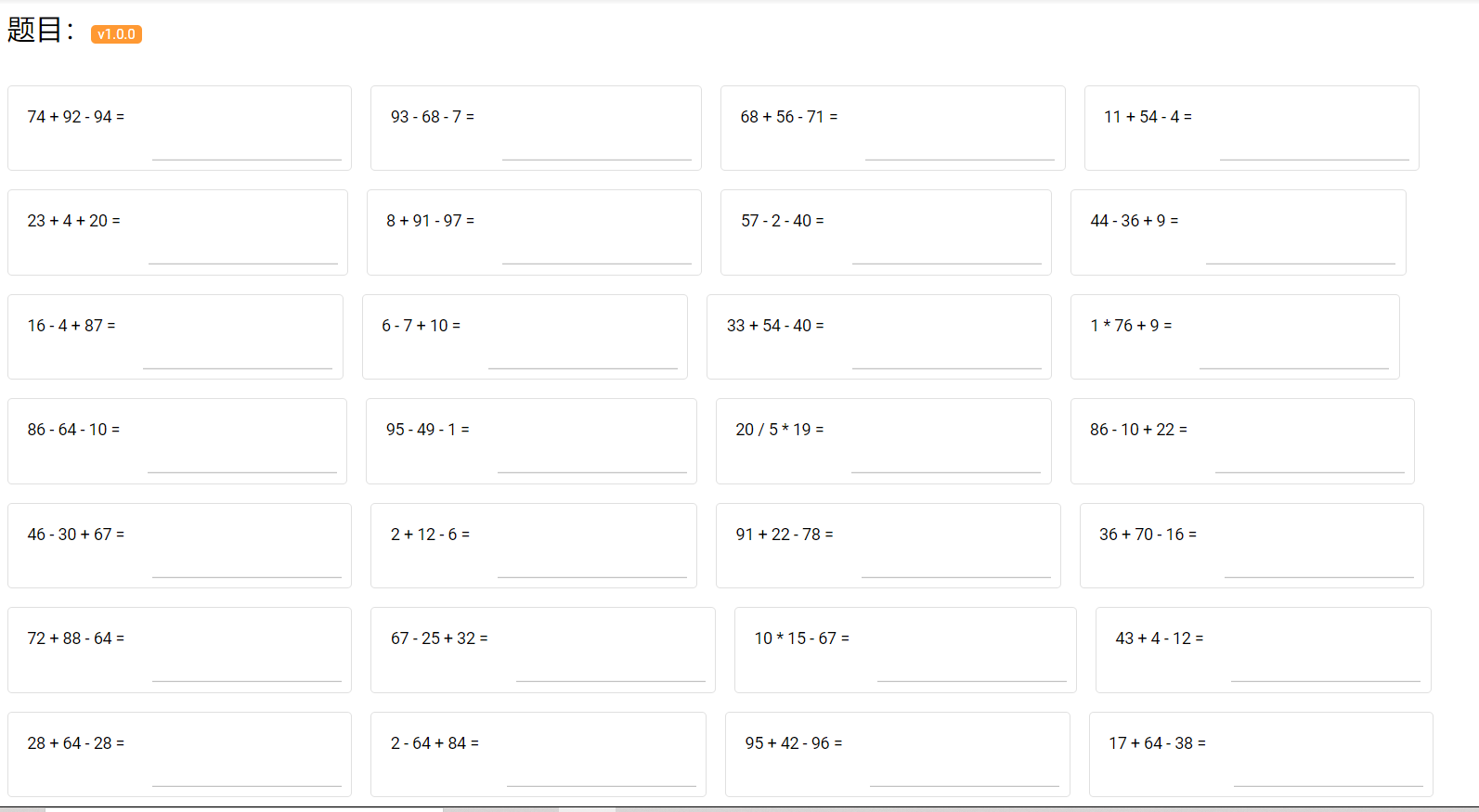
是做题界面的设置,有个小妙思就是我们的题目并不是在点击按钮时就直接生成300道,而是先生成30道,再用户点击后面页码的时候生成下一页的30道,这样可以有效的减少冗余。这里题目的生成和上面index.vue里日程卡一样是通过对question的遍历循环生成的。此外,还设置了悬浮的提交和返回按钮,若用户已提交,再在index.vue点界面击开始答题,则会后端会返回Null,界面通过askQuestion()函数检测到,则跳回index.vue,并提出提示框。
<template>
  <div>
    <q-layout view="hHh lpR fFf">
      <div class="q-pa-md text-h5 ">
        题目:<q-badge color="primary">v1.0.0</q-badge>
      </div>

      <div class="q-pa-md row items-start q-gutter-md">
        <q-card v-for="question in questions" :key="question.questionId" class="my-card" flat bordered>
          <q-card-section horizontal>
            <q-card-section>
              {{ question.stringQuestion }}
            </q-card-section>

            <q-card-actions>
              <q-input v-model="question.submissionAnswer"/>
            </q-card-actions>
          </q-card-section>
        </q-card>

        <div class="q-pa-lg flex flex-center">
          <q-pagination
            v-model="current"
            :max="maxPage"
            @mousedown="saveSubmissionAnswer"
            @input="askQuestion"
          >
          </q-pagination>
        </div>

      </div>

      <div>
        <q-page-sticky position="top-right" :offset="fabPos">
          <q-fab flat color="amber" icon="keyboard_arrow_down" label="提交" direction="down" v-touch-pan.prevent.mouse="moveFab">
            <q-fab-action flat label-position="right" color="primary" @click="saveSubmissionAnswer" icon="mail" label="暂存" />
            <q-fab-action flat label-position="right" color="warning" @click="checkAnswer" icon="alarm" label="提交" />
          </q-fab>
        </q-page-sticky>
        <q-page-sticky position="bottom-right" :offset=[47,20]>
          <q-fab flat color="amber" icon="keyboard_arrow_left" @click="backHome" label="返回">
          </q-fab>
        </q-page-sticky>
      </div>

    </q-layout>
  </div>
</template>

<script>
import axios from "axios";
axios.defaults.headers.post['Content-Type'] = 'application/json';

export default {
  name: 'question',
  data(){
    return {
      problem: 'aas',
      text: null,
      pageSize: 30,
      questions: null,
      current: 1,
      maxPage: 10,
      fab: true,
      fabPos: [ 47, 60 ],
      draggingFab: false,
    }
  },


  methods:{
    askQuestion(currentPage){
      axios.get('http://127.0.0.1:9092/question/ask' + '/' + currentPage + '/' + this.pageSize).then((response) => {
        if(response.status == 204){
          this.$store.commit('showcase/updateData', false)
          this.$router.push({path: '/index'});
        }
        else {
          this.$store.commit('showcase/updateData', true)
          this.questions = response.data.items;
          this.current = response.data.currentPage;
          this.maxPage = 300 / this.pageSize;
        }
      })
    },

    updateCalendarInfo(){
      axios.get('http://127.0.0.1:9092/calendar/fresh').then((response) => {

      })
    },

    moveFab (ev) {
      this.draggingFab = ev.isFirst !== true && ev.isFinal !== true
      this.fabPos = [
        this.fabPos[0] - ev.delta.x,
        this.fabPos[1] + ev.delta.y
      ]
    },

    checkAnswer(){
      this.saveSubmissionAnswer();
      axios.get('http://127.0.0.1:9092/question/check');
      this.updateCalendarInfo();
      this.$router.push({path: '/index'});
    },

    saveSubmissionAnswer() {
      if (this.questions != null) {
        axios.post('http://127.0.0.1:9092/question/save', JSON.stringify(this.questions)).then((response) => {})
      }
      this.updateCalendarInfo();
    },

    backHome() {
      this.$router.push({path: '/index'});
      this.updateCalendarInfo();
    }

  },

  mounted() {
    if(!this.$store.state.showcase.data3){
      alert("您还未做完!")
    }
  },

  created() {
    this.askQuestion(1);
  }
}
</script>
-
answer.vue C
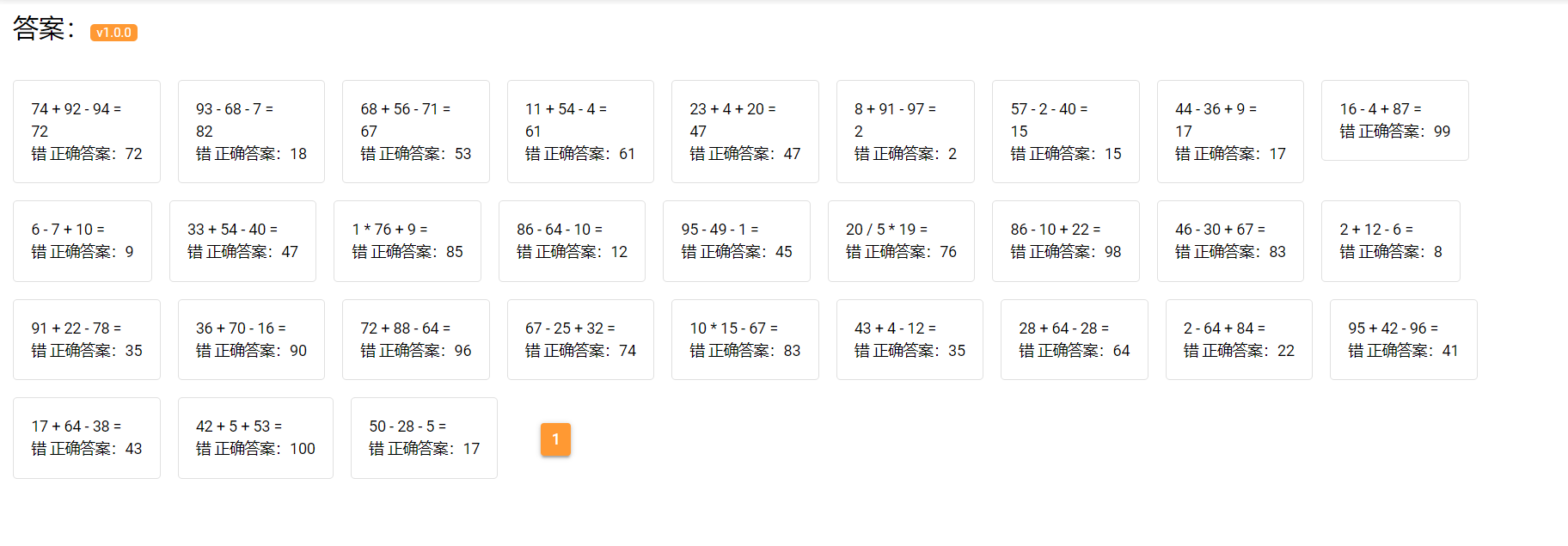
是查看答案界面的设置,和question.vue界面中题目的设置一样,我们设置了用户做了一页就显示了一页的答案,主要是想到有同学会想不做完就看答案,这样就可以起到督促的作用。还有答案的生成也是一样通过循环生成的卡片。然后通过if语句对数据库中isRight变量的检测判断对错。
<template>
  <div>
    <q-layout view="hHh lpR fFf">
      <div class="q-pa-md text-h5 ">
        答案:<q-badge color="primary">v1.0.0</q-badge>
      </div>

      <div class="q-pa-md row items-start q-gutter-md">
        <q-card v-for="question in questions" :key="question.questionId" class="my-card" flat bordered>
          <q-card-section horizontal>
            <q-card-section>
              {{ question.stringQuestion}}
              <div v-if="question.submissionAnswer == null">

              </div>
              <div v-else>
                {{question.submissionAnswer}}
              </div>
              <div v-if="question.isRight == 1">
                对 正确答案:{{question.answer}}
              </div>
              <div v-else>
                错 正确答案:{{question.answer}}
              </div>
            </q-card-section>
          </q-card-section>
        </q-card>

        <div class="q-pa-lg flex flex-center">
          <q-pagination
            v-model="current"
            :max="maxPage"
            @mousedown="saveSubmissionAnswer"
            @input="askQuestion"
          >
          </q-pagination>
        </div>

      </div>

      <div>
        <q-page-sticky position="bottom-right" :offset=[47,20]>
          <q-fab flat color="amber" icon="keyboard_arrow_left" @click="backHome" label="返回">
          </q-fab>
        </q-page-sticky>
      </div>

    </q-layout>
  </div>
</template>

<script>
import axios from "axios";
axios.defaults.headers.post['Content-Type'] = 'application/json';
import { matClear } from '@quasar/extras/material-icons'

export default {
  name: 'question',
  data(){
    return {
      problem: 'aas',
      text: null,
      pageSize: 30,
      questions: null,
      current: 1,
      maxPage: 10,
      fab: true,
      fabPos: [ 47, 60 ],
      draggingFab: false,
    }
  },

  methods:{
    askQuestion(currentPage){
      axios.get('http://127.0.0.1:9092/question/answer' + '/' + currentPage + '/' + this.pageSize).then((response) => {
        if(response.status == 204) {
          this.$router.push({path: '/index'});
        }
        else {
          this.questions = response.data.items;
          this.current = response.data.currentPage;
          this.maxPage = response.data.totalPage;
        }
        })
    },

    onClick(){

    },

    saveSubmissionAnswer() {
      if (this.questions != null) {
        axios.post('http://127.0.0.1:9092/question/save', JSON.stringify(this.questions)).then((response) => {})
      }
    },

    backHome() {
      this.$router.push({path: '/index'});
    }

  },

  mounted() {
  },

  created() {
    this.askQuestion(1);
  }
}
</script>
js文件
-
routes.js G
主要是对vue界面的配置。
const routes = [ { path: '/', component: () => import('layouts/MainLayout.vue'), redirect: 'index', children: [ { path: 'index', component: () => import('pages/Index.vue') }, { path:'question', component: () => import('pages/question.vue') }, { path:'answer', component: () => import('pages/answer.vue') } ] }, // Always leave this as last one, // but you can also remove it { path: '/error', component: () => import('pages/Error404.vue') }, ] export default routes -
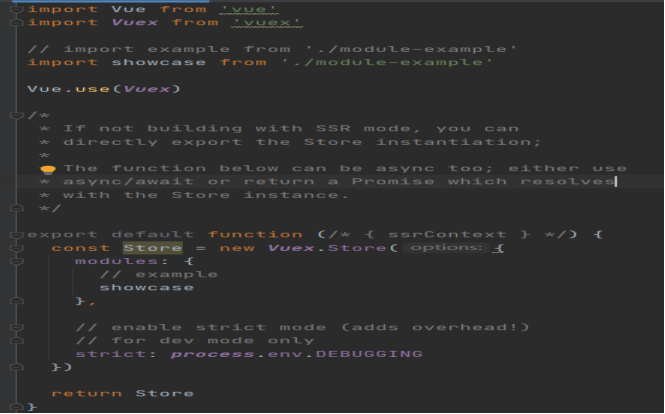
index.js(store/index.js) G
对Vue全局变量的配置。
import Vue from 'vue'
import Vuex from 'vuex'

// import example from './module-example'
import showcase from './module-example'

Vue.use(Vuex)

/*
 * If not building with SSR mode, you can
 * directly export the Store instantiation;
 *
 * The function below can be async too; either use
 * async/await or return a Promise which resolves
 * with the Store instance.
 */

export default function (/* { ssrContext } */) {
  const Store = new Vuex.Store({
    modules: {
      // example
      showcase
    },

    // enable strict mode (adds overhead!)
    // for dev mode only
    strict: process.env.DEBUGGING
  })

  return Store
}
-
VueX G
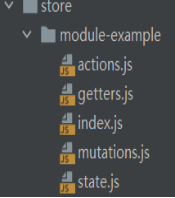
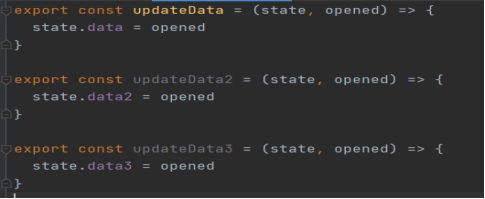
设置了三个全局变量(data,data2,data3),用来记录做题的状态,控制提示框的弹出。
export const updateData = (state, opened) => {
  state.data = opened
}

export const updateData2 = (state, opened) => {
  state.data2 = opened
}

export const updateData3 = (state, opened) => {
  state.data3 = opened
}
遇到的问题与解决
问题主要是出现在前端,也和我们两个人主要学习了后端代码,没有怎么学习前端代码有关。
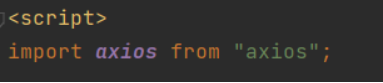
1、json传数组,后端一直收不到数据。
解决方法:修改axios请求头。


2、全局变量VueX的设置
解决方法:我们主要是去网上查阅了quasar框架的中文文档,了解到在quasar中他设置好的框架里就有了编写Vuex全局变量的文件,然后在依据他上面的编写方式修改了我们自己的变量。
小结
G:
这次结对编程的题目十分清晰,有很大的自由发挥空间,我和C通过一起协商,提出了以WEB的形式呈现这个程序,同时在结对编程中,也感受到了其带来的好处,如我在写代码时疏忽输错了变量,或是代码不知如何写时,结对的伙伴能够及时的予以纠错和帮助,提高了开发效率,同时在结对编程中还能互相学习对方的编程思路,提高编程能力,所以我认为这次结对编程是十分成功的!
C:
这次结对编程的题目还是比较简单的。我原先是想用c语言写的,主要是因为c语言写比较简单,也不用怎么编写界面。但G说服了我,了解到用spring boot+quasar前后端框架编程的方式来写的话可以起到练兵的目的,我们也还有一个相似的大创项目。主要来说,这次的结对编程还是比较成功的。

 浙公网安备 33010602011771号