
JavaIO流(二)
2.IO流
I:指input,称为输入流:负责把数据读到内存中去
O:指output ,称为输出流:负责写数据出去
1.IO流的分类
按照流的方向分:
- 输入流
- 输出流
按照流中数据的最小单位分:
-
字节流
-
适合操作所有类型的文件
例如:音频、视频、图片、文本复制、转移等。
-
-
字符流
- 只适合操作纯文本文件
比如:读写TXT、java文件等
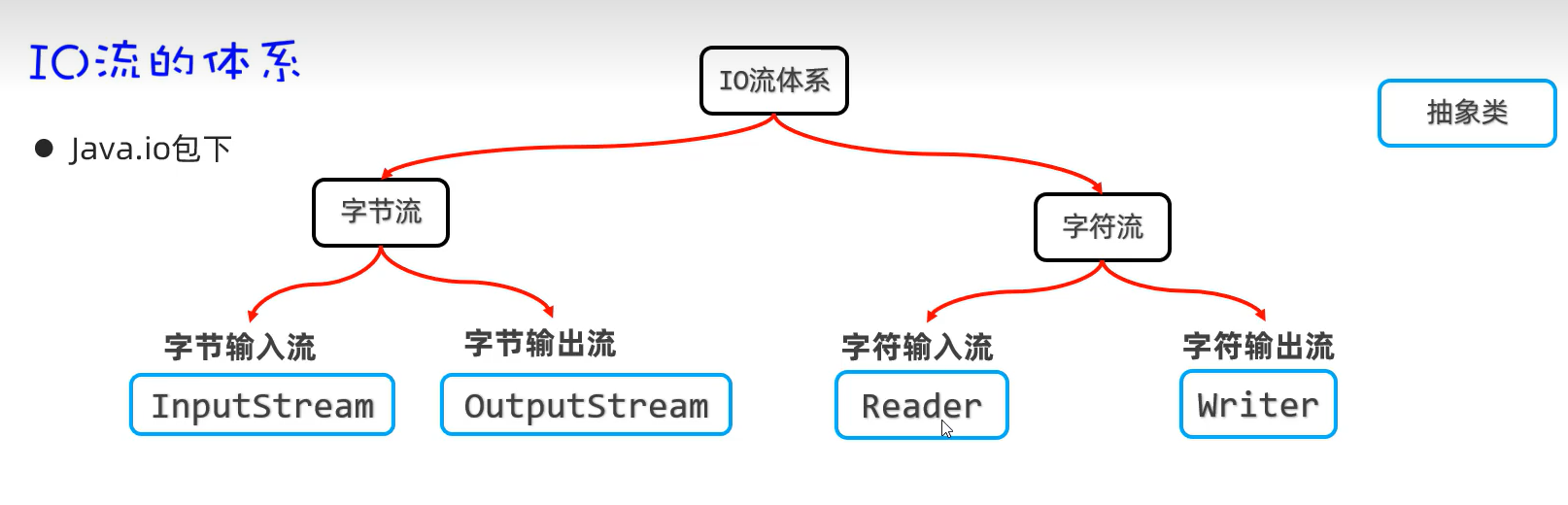
总体分为四大流
- 字节输入流:以内存为基准,来自磁盘文件/网络中的数据以字节的形式读入到内存中去的流。
- 字节输出流:以内存为基准,把内存中的数据以字节写出到磁盘文件或者网络中去的流。
- 字符输入流:以内存为基准,来自磁盘文件/网络中的数据以字符的形式读入到内存中去的流。
- 字符输出流:以内存为基准,把内存中的数据以字符写出到磁盘文件或者网络介质中去的流。
1.字节流
1.文件字节输入流(FileInputStream)
- public int read():每次读取一个字节返回,如果没有数据了,返回-1.
package com.IO.byte_stream;

import java.io.File;
import java.io.FileInputStream;
import java.io.FileNotFoundException;
import java.io.InputStream;

/*
    目标:掌握文件字节输入流,每次读取一个字节
 */
public class FileInputStreamTest01 {
    public static void main(String[] args) throws Exception {
        //1.创建文件字节输入流管道,与源文件接通
        //FileInputStream is = new FileInputStream(new File("basic-grammar\\src\\yehuan01.txt"));
        //简化写法
        InputStream is = new FileInputStream("basic-grammar\\src\\yehuan01.txt");//多态

        //2.开始读取文件的字节数据
        //public int read():每次读取一个字节返回,如果没有数据了,返回-1.
        int b1 = is.read();
        System.out.println((char)b1);

        int b2 = is.read();
        System.out.println((char)b2);

        int b3 = is.read();
        System.out.println(b3);


    }
}
使用循环改造代码:
//3.使用循环改造上述代码
int b;//用于记住读取的字节
while ((b = is.read()) != -1){
    System.out.print((char)b);
}

// 读取数据性能很差
// 读取汉字输出会乱码!!无法避免的!!!
// 流使用完毕之后,必须关闭!释放系统资源!
is.close();
注意事项:
- 读取数据性能很差
- 读取汉字输出会乱码!!无法避免的!!!
- 流使用完毕之后,必须关闭!释放系统资源!(is.close();)
掌握使用FileInputStream每次读取多个字节:
- public int read(byte b[]) throws IOException
- 每次读取多个字节到字节数组中去,返回读取的字节数量,读取完毕会返回-1
package com.IO.byte_stream;

import java.io.FileInputStream;
import java.io.IOException;
import java.io.InputStream;

/*
    目标:掌握使用FileInputStream每次读取多个字节
 */
public class FileInputStreamTest02 {
    public static void main(String[] args) throws Exception {
        //1.创建一个字节输入流对象代表字节输入流管道与源文件接通
        FileInputStream s1 = new FileInputStream("basic-grammar\\src\\yehuan02.txt");

        //2.开始读取文件中的字节数据,每次读取多个字节
        //public int read(byte b[]) throws IOException
        // 每次读取多个字节到字节数组中去,返回读取的字节数量,读取完毕会返回-1
        byte[] buffer  =new byte[3];
        int len = s1.read(buffer);
        String res = new String(buffer);
        System.out.println(res);
        System.out.println("每次读取的字节数量为:"+len);

        int len2 = s1.read(buffer);
        //注意:读取多少,倒出多少。
        String res2 = new String(buffer,0,len2);
        System.out.println(res2);
        System.out.println("每次读取的字节数量为:"+len);

        int len3 = s1.read(buffer);
        System.out.println(len3);//-1

    }
}
循环改造上述代码:
//3.使用循环改造
        byte[] buffer = new byte[3];
        int len;//记录每次读取了多少个字节
        while((len = s1.read(buffer)) != -1 ){
            String str = new String(buffer,0,len);
            System.out.print(str);
        }

        // 性能得到了明显的提升!!
        // 这种方案也不能避免读取汉字输出乱码的问题!!

        s1.close();//关闭流
注意:
- 性能得到了明显的提升!!
- 这种方案也不能避免读取汉字输出乱码的问题!!
文件字节输入流:一次性读取完全部字节
- 方式一:自己定义一个字节数组与被读取的文件大小一样大,然后使用该字节数组,一次读完文件的全部字节
package com.IO.byte_stream;

import java.io.File;
import java.io.FileInputStream;
import java.io.FileNotFoundException;

/*
     目标:掌握使用FileInputStream一次性读取完文件的全部字节
 */
public class FileInputStreamTest03 {
    public static void main(String[] args) throws Exception {
        FileInputStream is = new FileInputStream("basic-grammar\\src\\yehuan03.txt");

        //准备数组
        File file = new File("basic-grammar\\src\\yehuan03.txt");
        long size = file.length();
        byte[] buffer = new byte[(int)size];

        int len = is.read(buffer);
        System.out.println(new String(buffer));

        System.out.println(size);
        System.out.println(len);

    }
}
注意:
- 直接把文件数据全部读取到一个字节数组可以避免乱码
- 如果文件过大,创建的字节数组也会过大,可能会引起内存溢出
- 读写文本内容更适合用字符流
2.文件字节输出流(FileOutputStream)
package com.IO.byte_stream;

import java.io.FileNotFoundException;
import java.io.FileOutputStream;

public class FileOutputStreamTest01 {
    public static void main(String[] args) throws Exception {
        //1.创建一个字节输出流管道与目标文件接通
        // 覆盖管道:覆盖之前的数据
        //FileOutputStream os = new FileOutputStream("basic-grammar/src/yehuan04.txt");

        // 追加数据管道
        FileOutputStream os = new FileOutputStream("basic-grammar/src/yehuan04.txt",true);

        //2.开始写字节数据
        os.write('a');//‘a’也是一个字节
        os.write(97);//97 就是一个字节,代表a

        byte[] bytes = "我爱你中国abc".getBytes();
        os.write(bytes);

        os.write(bytes,0,15);

        //换行符
        os.write("\r\n".getBytes());

        os.close();

    }
}
案例:文件复制(可复制一切文件)
package com.IO.byte_stream;

import java.io.FileInputStream;
import java.io.FileNotFoundException;
import java.io.FileOutputStream;
import java.io.InputStream;

//目标:使用字节流实现文件复制的操作
public class CopyTest01 {
    public static void main(String[] args) throws Exception {
        //需求:复制文件
        //1.创建一个字节输入流管道与源文件接通
        InputStream is = new FileInputStream("basic-grammar\\src\\yehuan04.txt");
        //2.创建一个字节输出流管道与源文件接通
        FileOutputStream os = new FileOutputStream("basic-grammar\\src\\yehuan05.txt");
        //3.创建一个字节数组,负责转移字节数据
        byte[] buffer = new byte[1024];
        int len;
        while ((len = is.read(buffer)) != -1) {
            os.write(buffer,0,len);
        }
        os.close();
        is.close();
        System.out.println("复制完成");

    }

}
释放资源的方式
- try-catch-finally
- finally代码区的特点:无论try中的程序是正常运行了还是出现异常,最后都一定执行finally区,除非JVM终止
- 作用:一般用于在程序执行完成后进行资源的释放操作(专业级做法)
package com.IO.resource;

import java.io.*;

public class Test02 {
    public static void main(String[] args) {
        InputStream is = null;
        OutputStream os = null;
        try {
            System.out.println(10 / 0);
            //需求:复制文件
            //1.创建一个字节输入流管道与源文件接通
            is = new FileInputStream("basic-grammar\\src\\yehuan04.txt");
            //2.创建一个字节输出流管道与源文件接通
            os = new FileOutputStream("basic-grammar\\src\\yehuan05.txt");
            System.out.println(10/0);
            //3.创建一个字节数组,负责转移字节数据
            byte[] buffer = new byte[1024];
            int len;
            while ((len = is.read(buffer)) != -1) {
                os.write(buffer,0,len);
            }
            System.out.println("复制完成");
        } catch (IOException e) {
            throw new RuntimeException(e);
        } finally {
            //释放资源的操作
            try {
                if(os != null) os.close();
            } catch (IOException e) {
                throw new RuntimeException(e);
            }
            try {
                if(is != null) is.close();
            } catch (IOException e) {
                throw new RuntimeException(e);
            }
        }

    }
}
- try-with-resource (该资源使用完毕后,会自动调用其close()方法,完成对资源的释放)
4.字符流
FileReader(文件字符输入流):和字节输入流的用法差不多
- 作用:以内存为基准,来自磁盘文件/网络中的数据以字符的形式读入到内存中去的流。
package com.IO.char_stream;

import java.io.FileNotFoundException;
import java.io.FileReader;
import java.io.Reader;

/*
    目标:掌握文件字符输入流每次读取一个字符
 */
public class FileReaderTest01 {
    public static void main(String[] args) {
        try (
                Reader fr = new FileReader("basic-grammar\\src\\yehuan05.txt");
                ){
            //读取文本文件的内容
//            int c;//记住每次读取的字符编号
//            while ((c = fr.read()) != -1){
//                System.out.print((char)c);
//            }
            //每次读取一个字符的形式,性能肯定是比较差的。

            //每次读取多个字符
            char[] buffer = new char[3];
            int len;//记录每次读取多少个字符
            while ((len = fr.read(buffer)) != -1) {
                System.out.print(new String(buffer, 0, len));
            }
            //性能是比较不错的
        } catch (Exception e) {
            e.printStackTrace();
        }
    }
}
FileWriter(文件字符输出流):和字节输出流的用法差不多
- 作用:以内存为基准,把内存中的数据以字符写出到磁盘文件或者网络介质中去的流。
package com.IO.char_stream;

import java.io.FileWriter;
import java.io.IOException;
import java.io.Writer;

public class FileWriterTest02 {
    public static void main(String[] args) {
        //0.创建一个文件字符输出流管道与目标文件接通。
        try (
                //覆盖管道
                //Writer fw = new FileWriter("basic-grammar\\src\\yehuan06out.txt");
                //追加数据的管道
                Writer fw = new FileWriter("basic-grammar\\src\\yehuan06out.txt",true);
                ){
            //1.public void writer(int c):写一个字符出去
            fw.write(97);
            fw.write('b');
            fw.write('欢');
            fw.write("\r\n");
            //2.public void writer(String c):写一个字符串出去
            fw.write("我爱你中国");
            fw.write("\r\n");

            //3.public void writer(String c,int pos,int len):写字符串的一部分出去
            fw.write("我爱你中国",0,5);
            fw.write("\r\n");

            //4.public void writer(char[] buffer):写一个字符数组出去
            char[] buffer = {'夜','冷','昼','欢'};
            fw.write(buffer);
            fw.write("\r\n");
            //5.public void writer(char[],int pos,int len):写字符数组的一部分出去
            fw.write(buffer,0,2);
            fw.write("\r\n");
        } catch (IOException e) {
            throw new RuntimeException(e);
        }
    }
}
字符输出流的注意事项:
- 字符输出流写出数据后,必须刷新流(fw.flush(),刷新了后面还可以继续使用),或者关闭流(fw.close() 包含了刷新流,关闭了就不能继续使用了),写出去的数据才能生效。
字节流、字符流的使用场景:
- 字节流适合做一切文件数据的拷贝(音视频,文本);字节流不适合读取中文内容输出
- 字符流适合做文本文件的操作(读、写)。
5.缓冲流
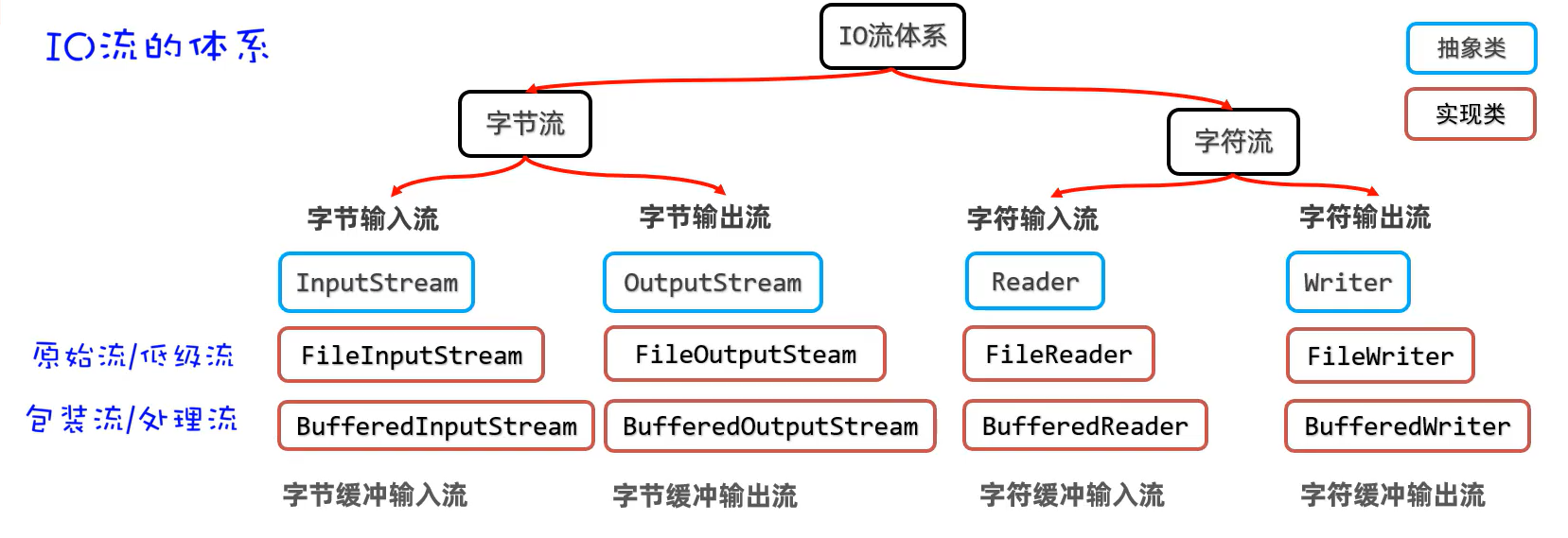
- 作用:对原始流进行包装,以提高原始流读写数据的性能
字节缓冲流
- 作用:提高字节流读写数据的性能
- 原理:字节缓冲输入流(BufferedInputStream)自带了8KB缓冲池;字节缓冲输出流(BufferedOutputStream)也自带了8KB缓冲池。
package com.IO.buffered_stream;

import java.io.*;

public class BufferedInputStreamTest01 {
    public static void main(String[] args) {
        try (
                InputStream is = new FileInputStream("basic-grammar\\src\\yehuan04.txt");
                //1.定义一个字节缓冲输入流包装原始流的字节输入流
                InputStream bis = new BufferedInputStream(is,8192*2);//可以声明缓冲池的大小

                OutputStream os = new FileOutputStream("basic-grammar\\src\\yehuan05bak.txt");
                //2.定义一个字节缓冲输出流包装原始流的字节输出流
                OutputStream bos = new BufferedOutputStream(os,8192*2);
                ){
            byte[] buffer = new byte[1024];
            int len;
            while ((len = bis.read(buffer)) != -1) {
                bos.write(buffer,0,len);
            }
            System.out.println("复制完成");
        } catch (Exception e) {
            e.printStackTrace();
        }
    }
}
字符缓冲流
BufferedReader(字符缓冲输入流)
- 作用:自带8k的字符缓冲池,可以提高字符输入流读取数据的性能
package com.IO.buffered_stream;

import java.io.BufferedReader;
import java.io.FileNotFoundException;
import java.io.FileReader;
import java.io.Reader;

public class BufferedReaderTest02 {
    public static void main(String[] args) {
        try (
                Reader fr = new FileReader("basic-grammar\\src\\yehuan07.txt");
                //创建一个字符缓冲输入流包装原始的字符输入流
                BufferedReader br = new BufferedReader(fr);
                ){
//            char[] buffer = new char[3];
//            int len;
//            while ((len = br.read(buffer)) != -1) {
//                System.out.print(new String(buffer,0,len));
//            }
            //新增功能 readLine() 读取一行数据
//            System.out.println(br.readLine());
//            System.out.println(br.readLine());
//            System.out.println(br.readLine());
//            System.out.println(br.readLine());

            String line;//记录每次读取一行的数据
            while((line = br.readLine()) != null) {
                System.out.println(line);
            }

        } catch (Exception e) {
            throw new RuntimeException(e);
        }
    }
}
BufferedWriter(字符缓冲输出流)
- 作用:自带8k的字符缓冲池,可以提高字符输入流读取数据的性能
package com.IO.buffered_stream;

import java.io.BufferedWriter;
import java.io.FileWriter;
import java.io.IOException;
import java.io.Writer;

public class BufferedWriterTest03 {
    public static void main(String[] args) {
        try (
                Writer fw = new FileWriter("basic-grammar\\src\\yehuan08out.txt", true);
                //创建一个字符缓冲输出流管道包装原始的字符输出流
                BufferedWriter bw = new BufferedWriter(fw);
                ){
            bw.write('a');
            bw.write(97);
            bw.write('夜');
            bw.newLine();//换行

            bw.write("我爱你中国abc");
            bw.newLine();//换行

        } catch (IOException e) {
            throw new RuntimeException(e);
        }
    }
}

 浙公网安备 33010602011771号