
安卓课堂练习
1.计算器
示例
    <LinearLayout
        android:layout_width="match_parent"//全部填充
        android:layout_height="wrap_content"//全部填充
        android:layout_weight="5"//权重
        android:background="#EDEEEE">
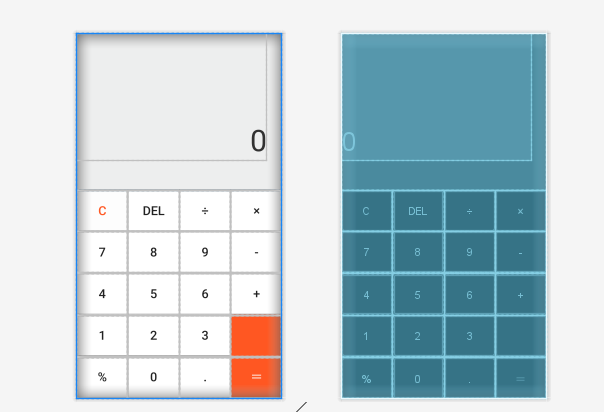
<?xml version="1.0" encoding="utf-8"?>
<LinearLayout xmlns:android="http://schemas.android.com/apk/res/android"
    xmlns:app="http://schemas.android.com/apk/res-auto"
    xmlns:tools="http://schemas.android.com/tools"
    android:layout_width="match_parent"
    android:layout_height="match_parent"
    android:orientation="vertical"
    tools:context=".MainActivity">
    <!--文字显示-->

    <LinearLayout
        android:layout_width="match_parent"
        android:layout_height="wrap_content"
        android:layout_weight="5"
        android:background="#EDEEEE">

        <TextView
            android:layout_width="match_parent"
            android:layout_height="match_parent"
            android:layout_marginRight="30dp"
            android:layout_marginBottom="60dp"
            android:gravity="right|bottom"
            android:text="0"
            android:textColor="#313131"
            android:textSize="60dp" />

    </LinearLayout>

    <TextView
        android:layout_width="match_parent"
        android:layout_height="1dp"
        android:background="#797979" />
    <!--第一行-->
    <LinearLayout
        android:layout_width="match_parent"
        android:layout_height="wrap_content"
        android:layout_weight="1"
        android:orientation="horizontal">

        <Button
            android:layout_width="wrap_content"
            android:layout_height="match_parent"
            android:layout_weight="1"
            android:background="#FDFDFD"
            android:text="C"
            android:textColor="#FF5722"
            android:textSize="25dp" />

        <TextView
            android:layout_width="1dp"
            android:layout_height="match_parent"
            android:background="#797979" />

        <Button
            android:layout_width="wrap_content"
            android:layout_height="match_parent"
            android:layout_weight="1"
            android:background="#FFFFFF"
            android:text="DEL"
            android:textSize="25dp" />

        <TextView
            android:layout_width="1dp"
            android:layout_height="match_parent"
            android:background="#797979" />

        <Button
            android:layout_width="wrap_content"
            android:layout_height="match_parent"
            android:layout_weight="1"
            android:background="#FFFFFF"
            android:text="÷"
            android:textSize="25dp" />

        <TextView
            android:layout_width="1dp"
            android:layout_height="match_parent"
            android:background="#797979" />

        <Button
            android:layout_width="wrap_content"
            android:layout_height="match_parent"
            android:layout_weight="1"
            android:background="#FFFFFF"
            android:text="×"
            android:textSize="25dp" />

    </LinearLayout>
    <!--第一行-->
    <TextView
        android:layout_width="match_parent"
        android:layout_height="1dp"
        android:background="#797979" />

    <!--第二行-->
    <LinearLayout
        android:layout_width="match_parent"
        android:layout_height="wrap_content"
        android:layout_weight="1"
        android:orientation="horizontal">

        <Button
            android:layout_width="wrap_content"
            android:layout_height="match_parent"
            android:layout_weight="1"
            android:background="#FFFFFF"
            android:text="7"
            android:textSize="25dp" />

        <TextView
            android:layout_width="1dp"
            android:layout_height="match_parent"
            android:background="#797979" />

        <Button
            android:layout_width="wrap_content"
            android:layout_height="match_parent"
            android:layout_weight="1"
            android:background="#FFFFFF"
            android:text="8"
            android:textSize="25dp" />

        <TextView
            android:layout_width="1dp"
            android:layout_height="match_parent"
            android:background="#797979" />

        <Button
            android:layout_width="wrap_content"
            android:layout_height="match_parent"
            android:layout_weight="1"
            android:background="#FFFFFF"
            android:text="9"
            android:textSize="25dp" />

        <TextView
            android:layout_width="1dp"
            android:layout_height="match_parent"
            android:background="#797979" />

        <Button
            android:layout_width="wrap_content"
            android:layout_height="match_parent"
            android:layout_weight="1"
            android:background="#FFFFFF"
            android:text="-"
            android:textSize="25dp" />

    </LinearLayout>

    <TextView
        android:layout_width="match_parent"
        android:layout_height="1dp"
        android:background="#797979" />

    <!--第三行-->
    <LinearLayout
        android:layout_width="match_parent"
        android:layout_height="wrap_content"
        android:layout_weight="1"
        android:orientation="horizontal">

        <Button
            android:layout_width="wrap_content"
            android:layout_height="match_parent"
            android:layout_weight="1"
            android:background="#FFFFFF"
            android:text="4"
            android:textSize="25dp" />

        <TextView
            android:layout_width="1dp"
            android:layout_height="match_parent"
            android:background="#797979" />

        <Button
            android:layout_width="wrap_content"
            android:layout_height="match_parent"
            android:layout_weight="1"
            android:background="#FFFFFF"
            android:text="5"
            android:textSize="25dp" />

        <TextView
            android:layout_width="1dp"
            android:layout_height="match_parent"
            android:background="#797979" />

        <Button
            android:layout_width="wrap_content"
            android:layout_height="match_parent"
            android:layout_weight="1"
            android:background="#FFFFFF"
            android:text="6"
            android:textSize="25dp" />

        <TextView
            android:layout_width="1dp"
            android:layout_height="match_parent"
            android:background="#797979" />

        <Button
            android:layout_width="wrap_content"
            android:layout_height="match_parent"
            android:layout_weight="1"
            android:background="#FFFFFF"
            android:text="+"
            android:textSize="25dp" />

    </LinearLayout>

    <TextView
        android:layout_width="match_parent"
        android:layout_height="1dp"
        android:background="#797979" />

    <!--第四行-->
    <LinearLayout
        android:layout_width="match_parent"
        android:layout_height="wrap_content"
        android:layout_weight="1"
        android:orientation="horizontal">

        <Button
            android:layout_width="wrap_content"
            android:layout_height="match_parent"
            android:layout_weight="1"
            android:background="#FFFFFF"
            android:text="1"
            android:textSize="25dp" />

        <TextView
            android:layout_width="1dp"
            android:layout_height="match_parent"
            android:background="#797979" />

        <Button
            android:layout_width="wrap_content"
            android:layout_height="match_parent"
            android:layout_weight="1"
            android:background="#FFFFFF"
            android:text="2"
            android:textSize="25dp" />

        <TextView
            android:layout_width="1dp"
            android:layout_height="match_parent"
            android:background="#797979" />

        <Button
            android:layout_width="wrap_content"
            android:layout_height="match_parent"
            android:layout_weight="1"
            android:background="#FFFFFF"
            android:text="3"
            android:textSize="25dp" />

        <TextView
            android:layout_width="1dp"
            android:layout_height="match_parent"
            android:background="#797979" />

        <Button
            android:layout_width="wrap_content"
            android:layout_height="match_parent"
            android:layout_weight="1"
            android:background="#FF5722"
            android:text=""
            android:textSize="25dp" />

    </LinearLayout>

    <LinearLayout
        android:layout_width="match_parent"
        android:layout_height="1dp"
        android:orientation="horizontal">

        <TextView
            android:layout_width="wrap_content"
            android:layout_height="1dp"
            android:layout_weight="3"
            android:background="#797979" />

        <TextView
            android:layout_width="wrap_content"
            android:layout_height="1dp"
            android:layout_weight="1"
            android:background="#FF5722" />

    </LinearLayout>
    <!--第五行-->
    <LinearLayout
        android:layout_width="match_parent"
        android:layout_height="wrap_content"
        android:layout_weight="1"
        android:orientation="horizontal">

        <Button
            android:layout_width="wrap_content"
            android:layout_height="match_parent"
            android:layout_weight="1"
            android:background="#FFFFFF"
            android:text="%"
            android:textSize="25dp" />

        <TextView
            android:layout_width="1dp"
            android:layout_height="match_parent"
            android:background="#797979" />

        <Button
            android:layout_width="wrap_content"
            android:layout_height="match_parent"
            android:layout_weight="1"
            android:background="#FFFFFF"
            android:text="0"
            android:textSize="25dp" />

        <TextView
            android:layout_width="1dp"
            android:layout_height="match_parent"
            android:background="#797979" />

        <Button
            android:layout_width="wrap_content"
            android:layout_height="match_parent"
            android:layout_weight="1"
            android:background="#FFFFFF"
            android:text="."
            android:textSize="25dp" />

        <TextView
            android:layout_width="1dp"
            android:layout_height="match_parent"
            android:background="#797979" />

        <Button
            android:layout_width="wrap_content"
            android:layout_height="match_parent"
            android:layout_weight="1"
            android:background="#FF5722"
            android:text="="
            android:textColor="#FFFFFF"
            android:textSize="25dp" />

    </LinearLayout>

</LinearLayout>
2.梅花布局

<?xml version="1.0" encoding="utf-8"?>
<RelativeLayout xmlns:android="http://schemas.android.com/apk/res/android"
    android:layout_width="fill_parent"
    android:layout_height="fill_parent">

    <Button
        android:id="@+id/btn_center"
        android:layout_width="wrap_content"
        android:layout_height="wrap_content"
        android:layout_centerInParent="true"
        android:text="中间" />

    <Button
        android:id="@+id/btn_top"
        android:layout_width="wrap_content"
        android:layout_height="wrap_content"
        android:layout_above="@+id/btn_center"
        android:layout_centerHorizontal="true"
        android:text="上边" />

    <Button
        android:id="@+id/btn_bottom"
        android:layout_width="wrap_content"
        android:layout_height="wrap_content"
        android:layout_below="@+id/btn_center"
        android:layout_centerHorizontal="true"
        android:text="下边" />

    <Button
        android:id="@+id/btn_left"
        android:layout_width="wrap_content"
        android:layout_height="wrap_content"
        android:layout_centerVertical="true"
        android:layout_toLeftOf="@+id/btn_center"
        android:text="左边" />

    <Button
        android:id="@+id/btn_right"
        android:layout_width="wrap_content"
        android:layout_height="wrap_content"
        android:layout_centerVertical="true"
        android:layout_toRightOf="@+id/btn_center"
        android:text="右边" />
</RelativeLayout>

 浙公网安备 33010602011771号