
网络编程小结
 网络编程小结
网络编程
一、概述
网络编程是指编写运行在多个设备(计算机)的程序,这些设备都通过网路连接起来.
1.1 网络通信的两个要素:
- 通信双方地址:
-
ip
-
端口号
- 规则:网络通信的协议
-
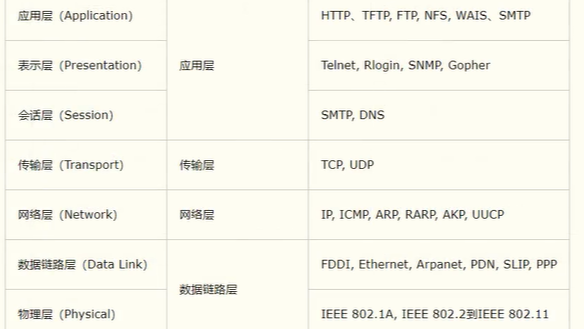
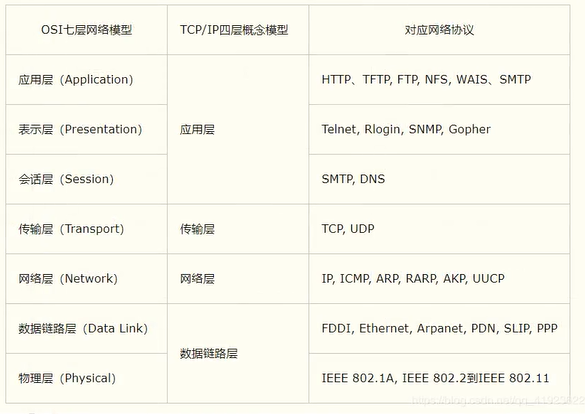
TCP/IP
参考模型:
![]()
1.2 IP
ip地址:inetAddress
-
唯一定位网络上的一台计算机
-
127.0.0.1 == localhost(本机)
-
ip地址的分类
-
ipv4 : 127.0.0.1 4个字节组成, 0-255 42亿个
-
ipv6 : 128位,8个无符号的整数
-
-
公网(互联网)/私网(局域网)
-
域名: www.jd.com
(InetAddress)点击查看代码
InetAddress inetAddress1 = InetAddress.getByName("127.0.0.1");
InetAddress inetAddress2 = InetAddress.getByName("localhost");
InetAddress inetAddress3 = InetAddress.getLocalHost();
InetAddress inetAddress4 = InetAddress.getByName("www.baidu.com");
1.3 port
端口表示计算机上的一个程序的进程:
-
不同的进程有不同的端口号,用来区分软件
-
范围:0 - 65535
-
TCP/UDP : 65535*2 tcp:80 udp:80 ; 同一个协议下,端口号不能冲突
-
端口分类:
-
共有端口:0~1023
-
HTTP:80
-
HTTPS:443
-
FTP:21
-
Telnet:23
-
-
程序注册端口:1024~49151,分配用户或注册程序
-
Tomcat:8080
-
MySQL:3306
-
Oracle:1521
-
-
动态、私有:49152~65535
-
(InetSocketAddress)点击查看代码
public static void main(String[] args) throws UnknownHostException {
        InetSocketAddress address1 = new InetSocketAddress("127.0.0.1", 8080);
        InetSocketAddress address2 = new InetSocketAddress("localhost", 8080);
        InetSocketAddress address3 = new InetSocketAddress(InetAddress.getByName("127.0.0.1"), 8080);
        System.out.println(address1);  // /127.0.0.1:8080
        System.out.println(address2);  // localhost/127.0.0.1:8080
        System.out.println(address3);  // /127.0.0.1:8080
        System.out.println("--------------------------------");
        System.out.println(address1.getPort());  // 8080
        System.out.println(address1.getAddress());  // /127.0.0.1
        System.out.println(address1.getHostName());  // 127.0.0.1
        System.out.println(address1.getHostString()); // 127.0.0.1
        System.out.println(address1.getClass());  //
    }
1.4 通信协议
协议:约定
TCP/IP协议簇:实际上是一组协议
-
TCP:传输控制协议
-
UDP:用户数据报协议
-
IP:网络互联协议
TCP/UDP对比:
-
TCP:打电话
-
连接,稳定
-
三次握手,四次挥手
-
客户端,服务端
-
传输完成,释放连接,效率低
-
-
UDP:发短信
-
无连接,不稳定
-
客户端,服务端,没有明确的界限(发送端,接收端)
-
不管有没有准备好,都可以发送
-
效率高,但可能会丢包
-
缺乏可靠性,可能会出现丢失,错误,重复的包
-
DDOS:洪水攻击!(饱和攻击)
-
1.5 TCP
TCP:(Transmission Control Protocol),传输控制协议
客户端:
-
连接服务器 Socket
-
发送消息
服务端:
-
建立服务的端口: ServerSocket
-
等待用户的连接(监听): accept()
-
接收用户的消息
客户端code:
点击查看代码
package cn.com.longer.test.netWorkProgram.tcp;

import java.io.IOException;
import java.io.OutputStream;
import java.net.InetAddress;
import java.net.Socket;

/**
 * TCP客户端
 */
public class TcpClientDemo01 {
    public static void main(String[] args) {
        Socket socket = null;
        OutputStream os = null;
        try {
            // 1.要知道服务端的地址:IP 端口号
            InetAddress serverIp = InetAddress.getByName("127.0.0.1");
            int port = 9999;
            // 2.创建一个socket连接
            socket = new Socket(serverIp,port);
            // 3.发送消息 IO流
            os = socket.getOutputStream();
            os.write("你哈啊用扽森ewefef三东风四".getBytes());
        } catch (Exception e) {
            e.printStackTrace();
        }finally {
            if (socket != null){
                try {
                    socket.close();
                } catch (IOException e) {
                    e.printStackTrace();
                }
            }
            if (os != null){
                try {
                    os.close();
                } catch (IOException e) {
                    e.printStackTrace();
                }
            }
        }
    }
}
服务端code:
点击查看代码
package cn.com.longer.test.netWorkProgram.tcp;


import java.io.ByteArrayOutputStream;
import java.io.IOException;
import java.io.InputStream;
import java.net.ServerSocket;
import java.net.Socket;

/**
 * TCP服务端
 */
public class TcpServerDemo01 {
    public static void main(String[] args) {
        ServerSocket serverSocket = null;
        Socket socket =null;
        InputStream is =null;
        ByteArrayOutputStream baos = null;
        try {
            // 1.服务端:我要有一个地址
            serverSocket = new ServerSocket(9999);
            // 2.等待客户端连接 监听
            socket = serverSocket.accept();
            // 3.读取客户端的消息
            is = socket.getInputStream();
            // 管道流
            baos = new ByteArrayOutputStream();
            byte[] buffer = new byte[1024];
            int len;
            while ((len = is.read(buffer)) != -1){
                baos.write(buffer, 0, len);
            }
            System.out.println(baos.toString());

            /*
                byte[] bytes = new byte[1024];
                int len;
                while ((len=is.read(buffer)) != -1){
                    String msg = new String(buffer, 0, len);
                    System.out.println(msg);
                }
            */
        } catch (IOException e) {
            e.printStackTrace();
        }finally {
            // 关流
            if (baos != null){
                try {
                    baos.close();
                } catch (IOException e) {
                    e.printStackTrace();
                }
            }
            if (is != null){
                try {
                is.close();
                } catch (IOException e) {
                    e.printStackTrace();
                }
            }
            if (socket != null){
                try {
                    socket.close();
                } catch (IOException e) {
                    e.printStackTrace();
                }
            }
            if (serverSocket != null){
                try {
                    serverSocket.close();
                } catch (IOException e) {
                    e.printStackTrace();
                }
            }
        }
    }
}
1.6 UDP
UDP: (User Datagram Protocol),用户数据报协议
发短信:不用连接,但需要知道对方的地址!
发送方(code):
点击查看代码
package cn.com.longer.test.netWorkProgram.udp;

import java.net.DatagramPacket;
import java.net.DatagramSocket;
import java.net.InetAddress;

/**
 * UDP 发送方
 */
public class UdpClientDemo01 {
    public static void main(String[] args) throws Exception {
        // 1.建立一个socket
        DatagramSocket socket = new DatagramSocket();
        // 2.组件包
        String msg = "UDP 接收方,你好啊!!!";
        InetAddress ip = InetAddress.getByName("127.0.0.1");
        int port = 9090;

        // 数据包 数据的起始长度 要发送给谁
        DatagramPacket datagramPacket = new DatagramPacket(msg.getBytes(), 0, msg.getBytes().length, ip, port);
        // 3.发送包
        socket.send(datagramPacket);
        // 4.关闭流
        socket.close();
    }
}
接收方(code):
点击查看代码
package cn.com.longer.test.netWorkProgram.udp;

import java.net.DatagramPacket;
import java.net.DatagramSocket;

/**
 * UDP 接收方
 */
public class UdpServerDemo01 {
    public static void main(String[] args) throws Exception {
        // 1.创建socket,开放端口
        DatagramSocket socket = new DatagramSocket(9090);
        // 2.接收数据包
        byte[] buffer = new byte[1024];
        DatagramPacket datagramPacket = new DatagramPacket(buffer, 0, buffer.length);

        socket.receive(datagramPacket); // 阻塞式接收

        System.out.println(datagramPacket.getAddress().getHostName());
        System.out.println(datagramPacket.getData().toString());
        System.out.println(new String(datagramPacket.getData(), 0, datagramPacket.getLength()));

        // 3. 关闭流
        socket.close();
    }
}
1.7 URL
统一资源定位符: 定位资源的,定位互联网上的某一个资源!
DNS域名解析(把一个域名解析为IP): www.baidu.com ---> https://220.181.38.149/
协议://IP地址:端口号/项目名/资源
URLDemo:
点击查看代码
public static void main(String[] args) throws Exception {
        URL url = new URL("https://space.bilibili.com/29038862/fans/follow?spm_id_from=333.1007.0.0");
        System.out.println(url.getProtocol());
        System.out.println(url.getHost());
        System.out.println(url.getPort());
        System.out.println(url.getPath());
        System.out.println(url.getFile());
        System.out.println(url.getQuery());
    }
URLDown:
点击查看代码
package cn.com.longer.test.netWorkProgram;

import java.io.FileOutputStream;
import java.io.InputStream;
import java.net.HttpURLConnection;
import java.net.URL;

public class UrlDown {
    public static void main(String[] args) throws Exception {
        // 1.下载地址
        URL url = new URL("https://webfs.tx.kugou.com/202201071810/4d1be68a4efcbd709473a9d7d8f1013c/part/0/960141/G229/M0A/1A/07/xZQEAF9Iv6SAHH0xAEiEHQZqX8E377.mp3");
        // 2.连接到这个资源 HTTP
        HttpURLConnection urlConnection = (HttpURLConnection) url.openConnection();
//        HttpsURLConnection urlConnection = (HttpsURLConnection) url.openConnection();
        InputStream is = urlConnection.getInputStream();
        FileOutputStream fos = new FileOutputStream("loveOneLife.m4a");

        byte[] buffer = new byte[1024];
        int len;
        while ((len=is.read(buffer)) != -1){
            // 写出这个数据
            fos.write(buffer, 0, len);
        }
        fos.close();
        is.close();
        urlConnection.disconnect();
    }
}

 浙公网安备 33010602011771号