
打造极致轻量的私有云:Windows 环境下 WebDAV 服务端深度部署指南
前言
在个人数据管理中,WebDAV 协议凭借其原生跨平台支持、低开销以及能够被大多数文件管理器(如 RaiDrive、nPlayer、小雅等)直接挂载的特性,成为了私有云方案的首选。
本文将介绍如何使用开源的高性能 Go 语言实现版本 hacdias/webdav,并配合一个精心编写的 PowerShell 管理脚本,实现后台静默运行、自动启动以及便捷的密码加密管理。
一、 方案亮点
- 极简部署:无需安装 IIS 或复杂的 Web 服务器,单个
.exe即可运行。 - 安全加密:支持 Bcrypt 强哈希加密算法,确保配置文件的安全性。
- 静默运行:通过脚本实现无窗口后台运行,不占用任务栏。
- 一键自动化:集成自启管理、实时日志监控与配置快速编辑。
二、 核心环境搭建
1. 准备工作
- 前往 GitHub Releases 下载适用于 Windows 的版本。
- 创建一个文件夹(如
C:\WebDAV),将下载的webdav.exe放入其中。
2. 配置文件 (config.json)
在该目录下创建 config.json,建议使用以下配置:
{
  "address": "0.0.0.0",
  "port": 6065,
  "directory": "G:\\文件备份\\WebDAV",
  "permissions": "CRUD",
  "users": [
    {
      "username": "admin",
      "password": "{bcrypt}$2a$10$..."
    }
  ],
  "log": {
    "format": "console",
    "colors": true,
    "outputs": [
      "stdout",
      "webdav.log"
    ]
  }
}
里面的密码可以使用下面的方式生成:
webdav.exe bcrypt 123456
生成的格式类似$2a$10$Y0iRy1prmCuSBvmhPsDKCO1r3fx5cCwPqVw7kmv5VnNKH8QqhDCJq,将上面配置文件的密码替换成更改生成的,记得前面加上{bcrypt}。
如果你有更高需要的功能调整,请参考官方的配置说明。
三、 使用 PowerShell 脚本提升管理效率
由于 webdav.exe 默认在前台运行,关闭窗口服务即停止。为了实现类似 Windows 服务的管理体验,我们使用以下管理脚本。
1. 脚本说明
这是一个基于 PowerShell 开发的 WebDAV 服务管理工具,用于便捷地控制后台 WebDAV 服务的生命周期。主要功能包括:
- 一键启动/停止后台 WebDAV 服务(静默运行)
- 快捷配置 JSON 文件与 Bcrypt 密码生成
- 实时查看服务端访问日志
- 注册/取消 Windows 开机自动启动
查看完整代码
# ==============================================================================
# WebDAV 轻量服务器管理脚本
# ------------------------------------------------------------------------------
# 说明:
#   这是一个基于 PowerShell 开发的 WebDAV 服务管理工具,用于便捷地控制
#   后台 WebDAV 服务的生命周期。主要功能包括:
#   - 一键启动/停止后台 WebDAV 服务(静默运行)
#   - 快捷配置 JSON 文件与 Bcrypt 密码生成
#   - 实时查看服务端访问日志
#   - 注册/取消 Windows 开机自动启动
#
# 作者: zjw
# 版本: 1.0
# 日期: 2026/01/07
# ==============================================================================

# --- 新增:参数解析 (放在最前面,执行完即退出,不影响下方菜单) ---
param (
    [string]$action
)

# 设置编码
[Console]::OutputEncoding = [System.Text.Encoding]::UTF8


function Get-WebDAVExe {
    $exeName = "webdav.exe"
    $foundPath = $null

    # 1. 检查脚本同级目录
    if (Test-Path (Join-Path $PSScriptRoot $exeName)) {
        $foundPath = Join-Path $PSScriptRoot $exeName
    }
    # 2. 检查环境变量 PATH
    else {
        $cmd = Get-Command $exeName -ErrorAction SilentlyContinue
        if ($cmd) { $foundPath = $cmd.Source }
    }

    # 3. 如果没找到,显示错误并停住窗口
    if (-not $foundPath) {
        Write-Host "`n" + ("=" * 60) -ForegroundColor Red
        Write-Host " [错误] 未能找到主程序: $exeName" -ForegroundColor Red
        Write-Host " 原因分析: 程序既不在当前脚本目录下,也没有加入系统 PATH。" -ForegroundColor Yellow
        Write-Host " 解决办法: 请将 webdav.exe 放置在以下路径:" -ForegroundColor Gray
        Write-Host "           $PSScriptRoot" -ForegroundColor White
        Write-Host ("=" * 60) -ForegroundColor Red
        Write-Host "`n 请按任意键退出..." -ForegroundColor Gray
        $null = [System.Console]::ReadKey($true) # 停在这里等待按键
        exit 1
    }

    return $foundPath
}

# 初始化变量
$exe = Get-WebDAVExe
$p = Split-Path -Parent $exe
$configJson = Join-Path $p "config.json"

function Get-Status { return Get-Process "webdav" -ErrorAction SilentlyContinue }

# 封装启动逻辑 (供参数和菜单 1 调用)
function Do-Start {
    $proc = Get-Status
    if (-not $proc) {
        if (Test-Path $configJson) {
            # 保持你验证成功的方案:WorkingDirectory 确保日志在同级
            Start-Process -FilePath $exe -ArgumentList "-c `"$configJson`"" -WorkingDirectory $p -WindowStyle Hidden
            return "[√] 服务器已在后台启动。"
        } else { return "[!] 错误:找不到配置文件 $configJson" }
    } else { return "[!] 服务器已经在运行中。" }
}

# 封装停止逻辑 (供参数和菜单 2 调用)
function Do-Stop {
    if (Get-Status) {
        Stop-Process -Name "webdav" -Force
        return "[√] 服务器已停止。"
    } else { return "[!] 服务器未运行。" }
}

# --- 以下内容完全保持你原本的菜单逻辑不动 ---

# 获取监听端口
function Get-WebDAVPorts {
    param($W_PID)
    if (-not $W_PID) { return "未监听" }
    try {
        $connections = Get-NetTCPConnection -OwningProcess $W_PID -State Listen -ErrorAction SilentlyContinue
        if ($connections) {
            $ports = $connections | Select-Object -ExpandProperty LocalPort | Select-Object -Unique
            return $ports -join ", "
        }
    } catch {}
    # 备选方案:netstat
    $netstat = netstat -ano | Select-String "LISTENING" | Select-String "\s+$W_PID$"
    if ($netstat) {
        $foundPorts = @()
        foreach ($line in $netstat) {
            $parts = $line.ToString().Trim() -split '\s+'
            $port = ($parts[1] -split ':')[-1]
            $foundPorts += $port
        }
        return ($foundPorts | Select-Object -Unique) -join ", "
    }
    return "查询中..."
}

# 开机自启状态检查
function Get-AutoStartStatus {
    $regPath = "HKCU:\Software\Microsoft\Windows\CurrentVersion\Run"
    $runName = "WebDAVAutoStart"
    $val = Get-ItemProperty -Path $regPath -Name $runName -ErrorAction SilentlyContinue
    return $val -ne $null
}

# 带打断功能的等待函数
function Wait-OrBreak {
    param([int]$Seconds)
    Write-Host ""
    $startPos = [Console]::CursorLeft
    $topPos = [Console]::CursorTop
    if ($Seconds -eq 0) {
        Write-Host " [ 按任意键返回... ] " -ForegroundColor Gray -NoNewline
        while ([System.Console]::KeyAvailable) { $null = [System.Console]::ReadKey($true) }
        $null = [System.Console]::ReadKey($true)
        return
    }
    for ($i = $Seconds; $i -gt 0; $i--) {
        [Console]::SetCursorPosition($startPos, $topPos)
        Write-Host " [ $i s 后自动返回,或按任意键返回... ]    " -ForegroundColor Gray -NoNewline
        for ($j = 0; $j -lt 10; $j++) {
            if ([System.Console]::KeyAvailable) {
                $null = [System.Console]::ReadKey($true)
                return
            }
            Start-Sleep -Milliseconds 100
        }
    }
}

# --- 参数触发判断 ---
if ($action) {
    if ($action -eq "start") { Write-Host (Do-Start) -ForegroundColor Green }
    elseif ($action -eq "stop") { Write-Host (Do-Stop) -ForegroundColor Yellow }
    exit # 直接退出,不进入下方的 while 循环
}

while ($true) {
    $proc = Get-Status
    $ports = Get-WebDAVPorts -W_PID $proc.Id
    $isAutoStart = Get-AutoStartStatus
    Clear-Host
    # --- 状态面板 ---
    Write-Host "`n                     WebDAV 轻量服务器管理 " -ForegroundColor Cyan
    Write-Host " ==============================================================================" -ForegroundColor DarkGray
    Write-Host -NoNewline "  程序路径 : "
    Write-Host " $exe" -ForegroundColor Gray
    Write-Host -NoNewline "  开机自启 : "
    if ($isAutoStart) {
        Write-Host " ▶ 已开启" -ForegroundColor Green
    } else {
        Write-Host " ■ 未开启" -ForegroundColor DarkGray
    }
    Write-Host -NoNewline "  当前状态 : "
    if ($proc) {
        Write-Host " ▶ 运行中" -ForegroundColor Green -NoNewline
        Write-Host " (端口: $ports)" -ForegroundColor Yellow
    } else {
        Write-Host " ■ 已停止" -ForegroundColor Red
    }
    Write-Host " ==============================================================================`n" -ForegroundColor DarkGray

    # --- 菜单 ---
    Write-Host "                   [1] 启动服务器" -ForegroundColor Green
    Write-Host "                   [2] 停止服务器" -ForegroundColor Red
    Write-Host "                   [3] 编辑 JSON 配置"
    Write-Host "                   [4] 生成 Bcrypt 加密密码" -ForegroundColor Yellow
    Write-Host "                   [5] 查看实时日志`n"
    Write-Host "                   [8] 设置开机自启" -ForegroundColor Cyan
    Write-Host "                   [9] 取消开机自启`n"
    Write-Host "                   [0] 退出程序`n" -ForegroundColor DarkGray
    Write-Host " ------------------------------------------------------------------------------" -ForegroundColor DarkGray
    Write-Host " 请按对应按键执行操作..." -ForegroundColor Gray

    if ([System.Console]::KeyAvailable) { $null = [System.Console]::ReadKey($true) }
    $key = [Console]::ReadKey($true)
    $opt = $key.KeyChar

    switch ($opt) {
        "1" {
            Write-Host (Do-Start) -ForegroundColor Green
            Start-Sleep -Seconds 1
        }
        "2" {
            Write-Host (Do-Stop) -ForegroundColor Yellow
            Start-Sleep -Seconds 1
        }
        "3" {
            if (Test-Path $configJson) { Invoke-Item $configJson }
            else { Write-Host " [!] 配置文件不存在。" -ForegroundColor Red; Start-Sleep -Seconds 1 }
        }
        "4" {
            Write-Host "`n 请输入明文密码并回车 (输入时不可见):" -ForegroundColor Cyan
            $plain = Read-Host -AsSecureString
            $plainText = [System.Runtime.InteropServices.Marshal]::PtrToStringAuto([System.Runtime.InteropServices.Marshal]::SecureStringToBSTR($plain))
            if ($plainText) {
                Write-Host " 生成的加密串为 (记得手动在前面加上 {bcrypt} ):" -ForegroundColor Green
                & $exe bcrypt $plainText
            }
            Wait-OrBreak 0
        }
        "5" {
            $logPath = Join-Path $p "webdav.log"
            if (Test-Path $logPath) {
                Clear-Host
                Write-Host "`n --- 正在查看实时日志 (按任意键停止查看并返回菜单) ---" -ForegroundColor Magenta
                [Console]::TreatControlCAsInput = $true
                try {
                    $stream = [System.IO.File]::Open($logPath, [System.IO.FileMode]::Open, [System.IO.FileAccess]::Read, [System.IO.FileShare]::ReadWrite)
                    $reader = New-Object System.IO.StreamReader($stream)
                    if ($stream.Length -gt 1000) { $stream.Seek(-1000, [System.IO.SeekOrigin]::End) | Out-Null }
                    while ($true) {
                        if ([Console]::KeyAvailable) { $null = [Console]::ReadKey($true); break }
                        $line = $reader.ReadLine()
                        if ($line -ne $null) { Write-Host $line }
                        else { Start-Sleep -Milliseconds 200 }
                    }
                }
                finally {
                    $reader.Close(); $stream.Close()
                    [Console]::TreatControlCAsInput = $false
                    Write-Host "`n [√] 已停止日志监控。" -ForegroundColor Cyan
                    Start-Sleep -Milliseconds 800
                }
            } else { Write-Host "`n [!] 未找到日志文件:webdav.log" -ForegroundColor Yellow; Wait-OrBreak 0 }
        }
        "8" {
            # 这里会在开机进入桌面的时候调用并伴随着短暂的打开powershell窗口,有能力的可以使用vbs脚本或转成windows服务
            $runCmd = "powershell.exe -ExecutionPolicy Bypass -NoProfile -WindowStyle Hidden -Command `"Start-Process '$exe' -ArgumentList '-c `'$configJson`'' -WorkingDirectory '$p' -WindowStyle Hidden`""
            try {
                Set-ItemProperty -Path "HKCU:\Software\Microsoft\Windows\CurrentVersion\Run" -Name "WebDAVAutoStart" -Value $runCmd
                Write-Host " [√] 自启设置成功!" -ForegroundColor Green
            } catch { Write-Host " [!] 设置失败。" -ForegroundColor Red }
            Start-Sleep -Seconds 2
        }
        "9" {
            Remove-ItemProperty -Path "HKCU:\Software\Microsoft\Windows\CurrentVersion\Run" -Name "WebDAVAutoStart" -ErrorAction SilentlyContinue
            Write-Host " [√] 已取消开机自启。" -ForegroundColor Yellow
            Start-Sleep -Seconds 2
        }
        "0" { exit }
        default { continue }
    }
}
2. 使用说明
-
将脚本保存到文本文件中,编码设置成
UTF8 BOM,名字改成webdav.ps1。你也可以在webdav运行脚本.zip直接下载他们。 -
你可以将这个
ps1文件放在webdav.exe的同级目录下,如果你把webdav.exe添加到了系统PATH中,那该ps1文件可以放在任何你需要的位置,脚本会自动寻找PATH中webdav.exe的位置。 -
默认情况下你双击该
ps1文件无法直接运行。如果你没有关联ps1的默认打开方式为powershell,可以参考《Windows实现双击ps1脚本直接运行 》这篇文章进行设置。
如果没有关联ps1的默认打开方式也没关系,可以再添加一个bat脚本来运行webdav.ps1。使用bat脚本来运行的一个好处是我们可以调整窗口的大小,坏处是又多了一个文件。
@echo off & chcp 65001 >nul & setlocal
%~1 start "" conhost "%~f0" "::" & exit
mode con cols=80 lines=40
title WebDAV 轻量服务器管理
powershell -ExecutionPolicy Bypass -File "%~dp0webdav.ps1"
exit /b
将此脚本设置成UTF8编码保存为webdav.bat,放在webdav.ps1同级目录下,双击运行即可。
3. 运行展示
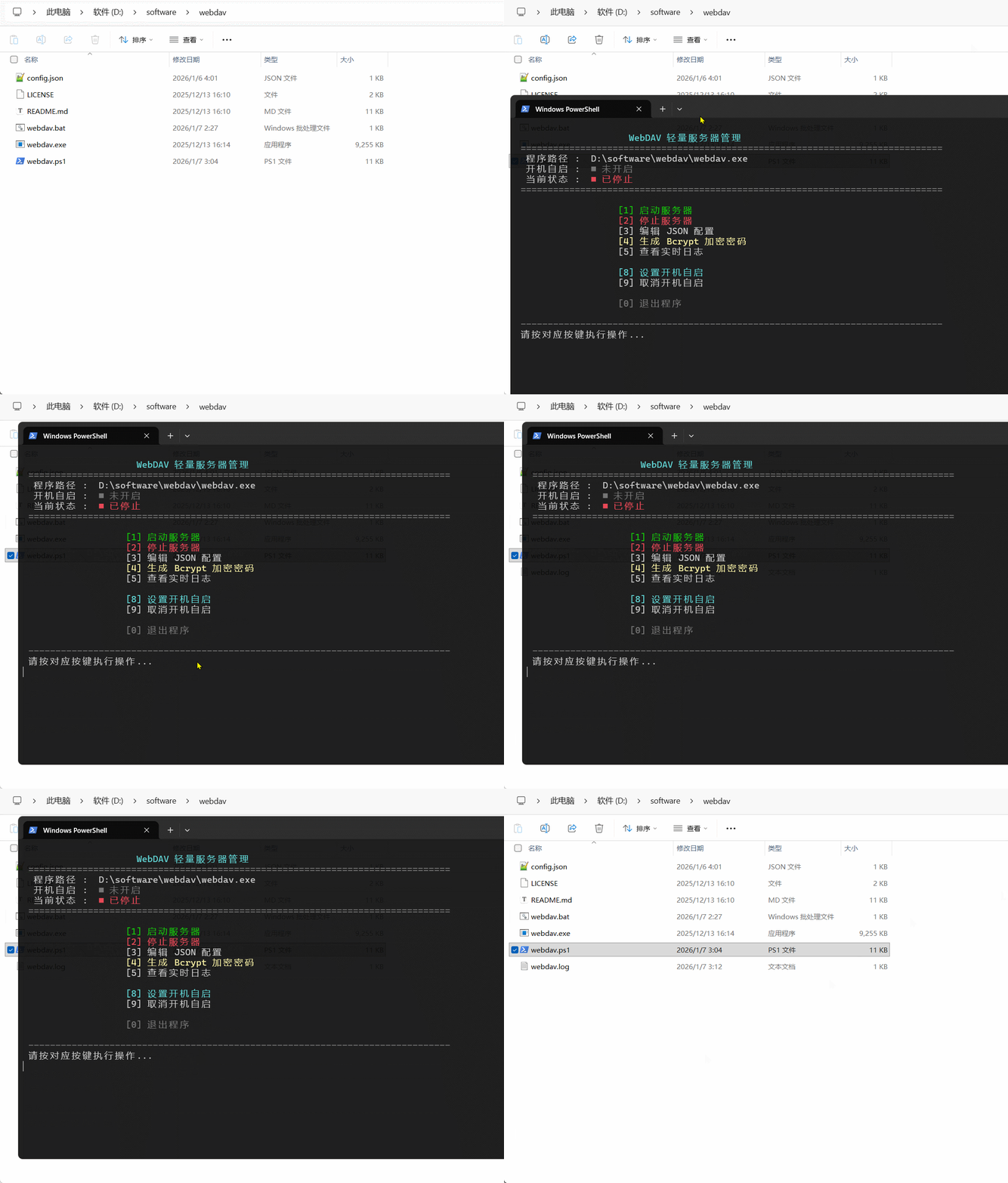
四、 详细配置流程
1. 生成安全密码
WebDAV 的安全性核心在于密码。hacdias/webdav 不建议在配置文件中使用明文。
- 运行管理脚本,选择选项 [4] 生成 Bcrypt 加密密码。
- 输入你的明文密码,脚本将返回类似
$2a$10$...的字符串。 - 将此字符串填入
config.json的password字段,前面加上{bcrypt}组成{bcrypt}$2a$10$...的格式,如果不加{bcrypt}代表使用的是明文密码。
2. 后台启动与验证
- 选择 [1] 启动服务器。
- 脚本会调用
Start-Process -WindowStyle Hidden确保程序在后台潜伏。 - 观察状态栏,若显示
运行中 (端口: 6065),说明服务已就绪。
五、 进阶:实时监控与自动化
实时日志 (Logging)
通过脚本选项 [5],我们可以直接读取 webdav.log。这对于排查连接失败、权限拒绝(403)或认证失败(401)至关重要。
开机自启
选择选项 [8] 后,脚本会自动向 HKCU:\Software\Microsoft\Windows\CurrentVersion\Run 写入指令。此指令在用户登录系统后自动唤醒 WebDAV 服务,并保持后台隐藏状态。
六、 总结
通过 hacdias/webdav 与自定义 PowerShell 脚本的组合,我们不仅获得了一个功能完整的 WebDAV 服务端,还拥有一套专业的管理套件。这种方案既保留了绿色程序的灵活性,又具备了接近系统服务的稳定性。

 浙公网安备 33010602011771号