Pgpool-II + PostgreSQL 一主两备源码编译环境搭建
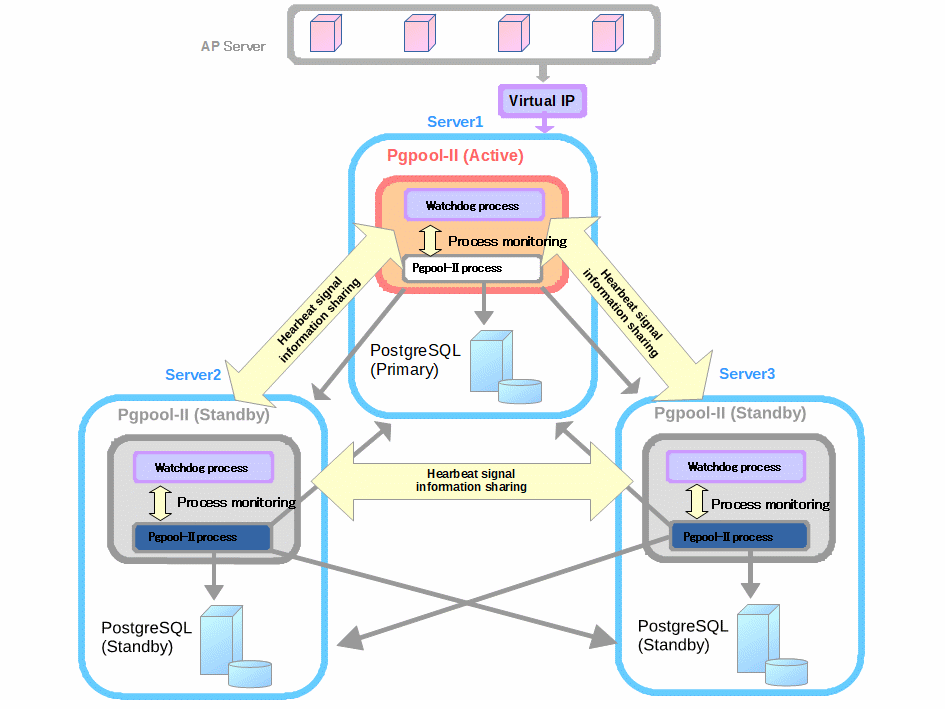
| 主机 | IP | 虚拟IP |
|---|---|---|
| server1 | 192.168.222.141 | 192.168.222.200 |
| server2 | 192.168.222.142 | |
| server3 | 192.168.222.143 |
| Item | Value | Detail |
|---|---|---|
| PostgreSQL 版本 | 10.10 | |
| 安装路径 | /opt/PG-10.10 | |
| 端口 | 5432 | |
| $PGDATA | /opt/PG-10.10/data | |
| Archive mode | on | /opt/PG-10.10/archivedir |
| 开机自启 | Disable | |
| Pgpool-II Version | 4.0.6 | |
| 安装路径 | /opt/pgpool-406 | |
| 端口 | 9999 | Pgpool 连接端口 |
| 端口 | 9898 | PCP 端口 |
| 端口 | 9000 | watchdog 端口 |
| 端口 | 9694 | Watchdog 心跳 |
| 主配置文件 | /opt/pgpool-406/etc/pgpool.conf | |
| Pgpool 启动用户 | root | 可以实现非root运行 |
| 运行模式 | streaming replication mode | |
| Watchdog | on | |
| 开机自启 | Disable |
一、所有节点配置
三节点关闭防火墙(或打开需要使用的端口):
    systemctl stop firewalld.service
    systemctl disable firewalld.service

三节点创建用户:
    adduser postgres && passwd postgres
1、编译安装数据库与pgpool
# pg
./configure --prefix=/opt/PG-10.10 --enable-debug
make && make install && cd contrib && make && make install && cd ..

# pgpool
export PATH=/opt/PG-10.10/bin:$PATH
./configure --prefix=/opt/pgpool-406
make && make install
cd pgpool-II-4.0.6/src/sql/pgpool-recovery
make && make install
# /etc/profile 文件配置全局环境变量
export PATH=/opt/pgpool-406/bin:/opt/PG-10.10/bin:$PATH

# root 用户执行使其生效
source /etc/profile
2、三节点互信(各个节点都要执行一遍)
# root
ssh-keygen -t rsa
ssh-copy-id -i  .ssh/id_rsa.pub root@192.168.222.141
ssh-copy-id -i  .ssh/id_rsa.pub root@192.168.222.142
ssh-copy-id -i  .ssh/id_rsa.pub root@192.168.222.143
ssh-copy-id -i  .ssh/id_rsa.pub postgres@192.168.222.141
ssh-copy-id -i  .ssh/id_rsa.pub postgres@192.168.222.142
ssh-copy-id -i  .ssh/id_rsa.pub postgres@192.168.222.143

# postgres
ssh-keygen -t rsa
ssh-copy-id -i  .ssh/id_rsa.pub postgres@192.168.222.141
ssh-copy-id -i  .ssh/id_rsa.pub postgres@192.168.222.142
ssh-copy-id -i  .ssh/id_rsa.pub postgres@192.168.222.143
2、用户主目录创建密码文件,实现免密访问
# postgres 用户
su - postgres
echo "192.168.222.141:5432:replication:repl:123456" >> ~/.pgpass
echo "192.168.222.142:5432:replication:repl:123456" >> ~/.pgpass
echo "192.168.222.143:5432:replication:repl:123456" >> ~/.pgpass
chmod 600 ~/.pgpass

scp /home/postgres/.pgpass postgres@192.168.222.142:/home/postgres/
scp /home/postgres/.pgpass postgres@192.168.222.143:/home/postgres/

# --------------------------------------------------------------
# root 用户
echo 'localhost:9898:pgpool:pgpool' > ~/.pcppass
chmod 600 ~/.pcppass

scp /root/.pcppass root@192.168.222.142:/root/
scp /root/.pcppass root@192.168.222.143:/root/
3、创建相关目录
# root
chmod 777 /opt/PG-10.10/
mkdir /opt/pgpool-406/log/ && touch /opt/pgpool-406/log/pgpool.log

ssh root@192.168.222.142 "chmod 777 /opt/PG-10.10/ && mkdir /opt/pgpool-406/log/ && touch /opt/pgpool-406/log/pgpool.log"
ssh root@192.168.222.143 "chmod 777 /opt/PG-10.10/ && mkdir /opt/pgpool-406/log/ && touch /opt/pgpool-406/log/pgpool.log"

# postgres
su - postgres
mkdir /opt/PG-10.10/archivedir
ssh postgres@192.168.222.142 "mkdir /opt/PG-10.10/archivedir"
ssh postgres@192.168.222.143 "mkdir /opt/PG-10.10/archivedir"
二、PRIMARY 主节点配置
1、数据库配置
初始化
su - postgres
/opt/PG-10.10/bin/initdb /opt/PG-10.10/data
vim /opt/PG-10.10/data/postgresql.conf
listen_addresses = '*'
archive_mode = on
archive_command = 'cp "%p" "/opt/PG-10.10/archivedir"'
max_wal_senders = 10
max_replication_slots = 10
wal_level = replica
启动数据库
su - postgres
/opt/PG-10.10/bin/pg_ctl -D /opt/PG-10.10/data start
主库修改 postgres 的密码、创建流复制用户 repl
ALTER USER postgres WITH PASSWORD '123456';
CREATE ROLE pgpool WITH PASSWORD '123456' LOGIN;
CREATE ROLE repl WITH PASSWORD '123456' REPLICATION LOGIN;
创建测试表 tb_pgpool
CREATE TABLE tb_pgpool (id serial,age bigint,insertTime timestamp default now());
insert into tb_pgpool (age) values (1);
/opt/PG-10.10/data/pg_hba.conf
echo "host    all             all             192.168.222.0/24            trust" >> /opt/PG-10.10/data/pg_hba.conf
echo "host    replication     all             192.168.222.0/24            trust" >> /opt/PG-10.10/data/pg_hba.conf
启动主库
pg_ctl -D /opt/PG-10.10/data restart

#可以查询主备库情况
psql -U postgres -c 'select * from pg_is_in_recovery();'
2、pgpool配置
cp /opt/pgpool-406/etc/pgpool.conf.sample-stream /opt/pgpool-406/etc/pgpool.conf
listen_addresses = '*'

sr_check_user = 'pgpool'
sr_check_password = ''

health_check_period = 5
health_check_timeout = 30
health_check_user = 'pgpool'
health_check_password = ''
health_check_max_retries = 3

backend_hostname0 = '192.168.222.141'
backend_port0 = 5432
backend_weight0 = 1
backend_data_directory0 = '/opt/PG-10.10/data'
backend_flag0 = 'ALLOW_TO_FAILOVER'

backend_hostname1 = '192.168.222.142'
backend_port1 = 5432
backend_weight1 = 1
backend_data_directory1 = '/opt/PG-10.10/data'
backend_flag1 = 'ALLOW_TO_FAILOVER'

backend_hostname2 = '192.168.222.143'
backend_port2 = 5432
backend_weight2 = 1
backend_data_directory2 = '/opt/PG-10.10/data'
backend_flag2 = 'ALLOW_TO_FAILOVER'

failover_command = '/opt/pgpool-406/etc/failover.sh %d %h %p %D %m %H %M %P %r %R'
follow_master_command = '/opt/pgpool-406/etc/follow_master.sh %d %h %p %D %m %M %H %P %r %R'

recovery_user = 'postgres'
recovery_password = ''
recovery_1st_stage_command = 'recovery_1st_stage'

enable_pool_hba = on

use_watchdog = on
delegate_IP = '192.168.222.200'

if_up_cmd = 'ip addr add $_IP_$/24 dev ens33 label ens33:0'
if_down_cmd = 'ip addr del $_IP_$/24 dev ens33'
arping_cmd = 'arping -U $_IP_$ -w 1 -I ens33'

if_cmd_path = '/sbin'
arping_path = '/usr/sbin'

wd_hostname = '192.168.222.141'
wd_port = 9000

other_pgpool_hostname0 = '192.168.222.142'
other_pgpool_port0 = 9999
other_wd_port0 = 9000
other_pgpool_hostname1 = '192.168.222.143'
other_pgpool_port1 = 9999
other_wd_port1 = 9000

heartbeat_destination0 = '192.168.222.142'
heartbeat_destination_port0 = 9694
heartbeat_device0 = ''
heartbeat_destination1 = '192.168.222.143'
heartbeat_destination_port1 = 9694
heartbeat_device1 = ''

log_destination = 'stderr,syslog'
syslog_facility = 'LOCAL1'

pid_file_name = '/opt/pgpool-406/pgpool.pid'
memqcache_oiddir = '/opt/pgpool-406/log/pgpool/oiddir'
创建脚本(详见附录)
# root
vim /opt/pgpool-406/etc/failover.sh
vim /opt/pgpool-406/etc/follow_master.sh
chmod +x /opt/pgpool-406/etc/{failover.sh,follow_master.sh}
scp /opt/pgpool-406/etc/failover.sh /opt/pgpool-406/etc/follow_master.sh root@192.168.222.142:/opt/pgpool-406/etc/
scp /opt/pgpool-406/etc/failover.sh /opt/pgpool-406/etc/follow_master.sh root@192.168.222.143:/opt/pgpool-406/etc/

# postgres
su - postgres
vim /opt/PG-10.10/data/recovery_1st_stage
vim /opt/PG-10.10/data/pgpool_remote_start
chmod +x /opt/PG-10.10/data/{recovery_1st_stage,pgpool_remote_start}
PRIMARY 主节点创建扩展
psql template1 -c "CREATE EXTENSION pgpool_recovery"
/opt/pgpool-406/etc/pool_hba.conf
(cp /opt/pgpool-406/etc/pool_hba.conf.sample /opt/pgpool-406/etc/pool_hba.conf)
host    all         pgpool           0.0.0.0/0          md5
host    all         postgres         0.0.0.0/0          md5
/opt/pgpool-406/etc/pool_passwd
# root
pg_md5 -p -m -u postgres
pg_md5 -p -m -u pgpool
cat /opt/pgpool-406/etc/pool_passwd
/opt/pgpool-406/etc/pcp.conf
(cp /opt/pgpool-406/etc/pcp.conf.sample /opt/pgpool-406/etc/pcp.conf)
pg_md5 123456 # 生成加密文本

echo "postgres:e10adc3949ba59abbe56e057f20f883e" >> /opt/pgpool-406/etc/pcp.conf
echo "pgpool:e10adc3949ba59abbe56e057f20f883e" >> /opt/pgpool-406/etc/pcp.conf
各配置文件发送到备节点
cd /opt/pgpool-406/etc/
scp pcp.conf pgpool.conf pool_passwd pool_hba.conf root@192.168.222.142:/opt/pgpool-406/etc/
scp pcp.conf pgpool.conf pool_passwd pool_hba.conf root@192.168.222.143:/opt/pgpool-406/etc/
三、备节点配置
1、standby01配置pgpool-Ⅱ
在主节点发送过来的配置文件基础上,修改 pgpool.conf 部分参数,如下
wd_hostname = '192.168.222.142' #本机
wd_port = 9000

other_pgpool_hostname0 = '192.168.222.141' # 节点1
other_pgpool_port0 = 9999
other_wd_port0 = 9000
other_pgpool_hostname1 = '192.168.222.143' # 节点3
other_pgpool_port1 = 9999
other_wd_port1 = 9000

heartbeat_destination0 = '192.168.222.141' # 节点1
heartbeat_destination_port0 = 9694
heartbeat_device0 = ''
heartbeat_destination1 = '192.168.222.143' # 节点3
heartbeat_destination_port1 = 9694
heartbeat_device1 = ''
2、standby02配置pgpool-Ⅱ
在主节点发送过来的配置文件基础上,修改 pgpool.conf 部分参数,如下
wd_hostname = '192.168.222.143' #本机
wd_port = 9000

other_pgpool_hostname0 = '192.168.222.141' # 节点1
other_pgpool_port0 = 9999
other_wd_port0 = 9000
other_pgpool_hostname1 = '192.168.222.142' # 节点2
other_pgpool_port1 = 9999
other_wd_port1 = 9000

heartbeat_destination0 = '192.168.222.141' # 节点1
heartbeat_destination_port0 = 9694
heartbeat_device0 = ''
heartbeat_destination1 = '192.168.222.142' # 节点2
heartbeat_destination_port1 = 9694
heartbeat_device1 = ''
四、使用
1、启动、关闭
启动:
    1、先启动数据库服务
    2、启动pgpool服务:
    	/opt/pgpool-406/bin/pgpool -n -d
    3、先主后从

关闭:
    1、启关闭pgpool服务:
    	/opt/pgpool-406/bin/pgpool stop
    2、关闭数据库服务
    3、先从后主
2、设置备件点
pcp_recovery_node -h 192.168.222.200 -p 9898 -U pgpool -n 1
pcp_recovery_node -h 192.168.222.200 -p 9898 -U pgpool -n 2
3、查看节点
psql -h 192.168.222.200 -p 9999 -U pgpool postgres -c "show pool_nodes"
4、查看 watchdog
pcp_watchdog_info -h 192.168.222.200 -p 9898 -U pgpool
5、故障转移测试
pg_ctl -D /opt/PG-10.10/data -m immediate stop # 主节点关闭数据库,模拟故障

psql -h 192.168.222.200 -p 9999 -U pgpool postgres -c "show pool_nodes" # 查看状态
6、节点恢复
pcp_recovery_node -h 192.168.222.200 -p 9898 -U pgpool -n 0
附件:
1、/opt/pgpool-406/etc/pgpool.conf 完整文件
# ----------------------------
# pgPool-II configuration file
# ----------------------------
#
# This file consists of lines of the form:
#
#   name = value
#
# Whitespace may be used.  Comments are introduced with "#" anywhere on a line.
# The complete list of parameter names and allowed values can be found in the
# pgPool-II documentation.
#
# This file is read on server startup and when the server receives a SIGHUP
# signal.  If you edit the file on a running system, you have to SIGHUP the
# server for the changes to take effect, or use "pgpool reload".  Some
# parameters, which are marked below, require a server shutdown and restart to
# take effect.
#


#------------------------------------------------------------------------------
# CONNECTIONS
#------------------------------------------------------------------------------

# - pgpool Connection Settings -

listen_addresses = '*'
                                   # Host name or IP address to listen on:
                                   # '*' for all, '' for no TCP/IP connections
                                   # (change requires restart)
port = 9999
                                   # Port number
                                   # (change requires restart)
socket_dir = '/tmp'
                                   # Unix domain socket path
                                   # The Debian package defaults to
                                   # /var/run/postgresql
                                   # (change requires restart)


# - pgpool Communication Manager Connection Settings -

pcp_listen_addresses = '*'
                                   # Host name or IP address for pcp process to listen on:
                                   # '*' for all, '' for no TCP/IP connections
                                   # (change requires restart)
pcp_port = 9898
                                   # Port number for pcp
                                   # (change requires restart)
pcp_socket_dir = '/tmp'
                                   # Unix domain socket path for pcp
                                   # The Debian package defaults to
                                   # /var/run/postgresql
                                   # (change requires restart)
listen_backlog_multiplier = 2
                                   # Set the backlog parameter of listen(2) to
                                   # num_init_children * listen_backlog_multiplier.
                                   # (change requires restart)
serialize_accept = off
                                   # whether to serialize accept() call to avoid thundering herd problem
                                   # (change requires restart)

# - Backend Connection Settings -

backend_hostname0 = '192.168.222.141'
                                   # Host name or IP address to connect to for backend 0
backend_port0 = 5432
                                   # Port number for backend 0
backend_weight0 = 1
                                   # Weight for backend 0 (only in load balancing mode)
backend_data_directory0 = '/opt/PG-10.10/data'
                                   # Data directory for backend 0
backend_flag0 = 'ALLOW_TO_FAILOVER'
                                   # Controls various backend behavior
                                   # ALLOW_TO_FAILOVER, DISALLOW_TO_FAILOVER
                                   # or ALWAYS_MASTER
backend_hostname1 = '192.168.222.142'
backend_port1 = 5432
backend_weight1 = 1
backend_data_directory1 = '/opt/PG-10.10/data'
backend_flag1 = 'ALLOW_TO_FAILOVER'

backend_hostname2 = '192.168.222.143'
backend_port2 = 5432
backend_weight2 = 1
backend_data_directory2 = '/opt/PG-10.10/data'
backend_flag2 = 'ALLOW_TO_FAILOVER'

# - Authentication -

enable_pool_hba = on
                                   # Use pool_hba.conf for client authentication
pool_passwd = 'pool_passwd'
                                   # File name of pool_passwd for md5 authentication.
                                   # "" disables pool_passwd.
                                   # (change requires restart)
authentication_timeout = 60
                                   # Delay in seconds to complete client authentication
                                   # 0 means no timeout.

allow_clear_text_frontend_auth = off
                                   # Allow Pgpool-II to use clear text password authentication
                                   # with clients, when pool_passwd does not
                                   # contain the user password

# - SSL Connections -

ssl = off
                                   # Enable SSL support
                                   # (change requires restart)
#ssl_key = './server.key'
                                   # Path to the SSL private key file
                                   # (change requires restart)
#ssl_cert = './server.cert'
                                   # Path to the SSL public certificate file
                                   # (change requires restart)
#ssl_ca_cert = ''
                                   # Path to a single PEM format file
                                   # containing CA root certificate(s)
                                   # (change requires restart)
#ssl_ca_cert_dir = ''
                                   # Directory containing CA root certificate(s)
                                   # (change requires restart)

ssl_ciphers = 'HIGH:MEDIUM:+3DES:!aNULL'
                                   # Allowed SSL ciphers
                                   # (change requires restart)
ssl_prefer_server_ciphers = off
                                   # Use server's SSL cipher preferences,
                                   # rather than the client's
                                   # (change requires restart)
#------------------------------------------------------------------------------
# POOLS
#------------------------------------------------------------------------------

# - Concurrent session and pool size -

num_init_children = 32
                                   # Number of concurrent sessions allowed
                                   # (change requires restart)
max_pool = 4
                                   # Number of connection pool caches per connection
                                   # (change requires restart)

# - Life time -

child_life_time = 300
                                   # Pool exits after being idle for this many seconds
child_max_connections = 0
                                   # Pool exits after receiving that many connections
                                   # 0 means no exit
connection_life_time = 0
                                   # Connection to backend closes after being idle for this many seconds
                                   # 0 means no close
client_idle_limit = 0
                                   # Client is disconnected after being idle for that many seconds
                                   # (even inside an explicit transactions!)
                                   # 0 means no disconnection


#------------------------------------------------------------------------------
# LOGS
#------------------------------------------------------------------------------

# - Where to log -

log_destination = 'stderr,syslog'
                                   # Where to log
                                   # Valid values are combinations of stderr,
                                   # and syslog. Default to stderr.

# - What to log -

log_line_prefix = '%t: pid %p: '   # printf-style string to output at beginning of each log line.

log_connections = off
                                   # Log connections
log_hostname = off
                                   # Hostname will be shown in ps status
                                   # and in logs if connections are logged
log_statement = off
                                   # Log all statements
log_per_node_statement = off
                                   # Log all statements
                                   # with node and backend informations
log_client_messages = off
                                   # Log any client messages
log_standby_delay = 'if_over_threshold'
                                   # Log standby delay
                                   # Valid values are combinations of always,
                                   # if_over_threshold, none

# - Syslog specific -

syslog_facility = 'LOCAL1'
                                   # Syslog local facility. Default to LOCAL0
syslog_ident = 'pgpool'
                                   # Syslog program identification string
                                   # Default to 'pgpool'

# - Debug -

#log_error_verbosity = default          # terse, default, or verbose messages

#client_min_messages = notice           # values in order of decreasing detail:
                                        #   debug5
                                        #   debug4
                                        #   debug3
                                        #   debug2
                                        #   debug1
                                        #   log
                                        #   notice
                                        #   warning
                                        #   error

#log_min_messages = warning             # values in order of decreasing detail:
                                        #   debug5
                                        #   debug4
                                        #   debug3
                                        #   debug2
                                        #   debug1
                                        #   info
                                        #   notice
                                        #   warning