

1.为什么会出现跨域
是因为浏览器的同源策略限制。同源策略是一个重要的安全策略,它用于限制一个origin的文档或者它加载的脚本如何能与另一个源的资源进行交互。它能帮助阻隔恶意文档,减少可能被攻击的媒介。所谓同源(即指在同一个域)就是两个页面具有相同的协议(protocol),主机(host)和端口号(port)。可以说Web是构建在同源策略基础之上的,浏览器只是针对同源策略的一种实现。同源策略会阻止一个域的javascript脚本和另外一个域的内容进行交互。
2.什么是跨域
当两个url的协议、域名、端口号有一个不同则为跨域。下表给出了与 URL http://store.company.com/dir/page.html 的源进行对比的示例
| URL | 结果 | 原因 |
|---|---|---|
http://store.company.com/dir2/other.html |
同源 | 只有路径不同 |
http://store.company.com/dir/inner/another.html |
同源 | 只有路径不同 |
https://store.company.com/secure.html |
失败 | 协议不同 |
http://store.company.com:81/dir/etc.html |
失败 | 端口不同 ( http:// 默认端口是80) |
http://news.company.com/dir/other.html |
失败 | 主机不同 |
同源政策主要限制了三个方向:
(1)第一个当前域下的js脚本不能访问域下的cookie、localStorage和index DB。
(2)第二个是当前域下的js脚本不能操作访问其他域下的DOM。
(3)第三个是当前域下的ajax无法发送跨域请求。
3.常见的解决跨域的方法
(1)JSONP (JSON with Padding)
在网页中有一些标签本省具备跨域能力,如:img、林肯、iframe、script。可利用script标签的src属性来实现跨域,通过将前端方法作为参数传递到服务器端,然后由服务器端注入参数之后再返回,实现服务器端向客户端通信。由于使用script标签的src属性,因此只支持get方法。
简单jsonp实现:
<script>
    const input = document.querySelector('input');
    const p = document.querySelector('p');
    function handle(data){
        input.style.border = "solid 1px #f00";
        p.innerHTML = data.msg;
    }
    input.onblur = function(){  //onblur失去焦点
        let username = this.value; //获取输入值
        //向服务端发送请求,检测用户名是否存在
        const script = document.createElement('script'); //创建script标签
        script.src = 'http://127.0.0.1:8000/check-username'; //设置标签src属性
        document.body.appendChild(script);  //将script插入到文档中
    };
</script>
jQuery实现:
<button>点击发送 jsonp 请求</button>
    <div id="result">
</div>
<script>
    $('button').eq(0).click(function(){
        $.get('http://127.0.0.1:8000/jquery-jsonp-server?callback=?', function(data){
            $('#result').html(`
                名称:${data.name}</br>
                校区:${data.city}
            `)
        },'json');
    })
</script>
(2)CORS (跨域资源共享)
普通跨域请求:只需服务端设置 Access-Control-Allow-Origin 即可,前端无须设置,若要带 cookie 请求:前后端都需要设置。前端设置withCredentials为true,后端设置Access-Control-Allow-Credentials为true,同时Access-Control-Allow-Origin不能设置为
<button>发送请求</button>
    <div id="result"></div>
    <script>
        const btn = document.querySelector('button');
        btn.onclick = function(){
            //1. 创建对象
            const x = new XMLHttpRequest;
            //2. 初始化设置
            x.open('GET','http://127.0.0.1:8000/cros-server');
            //3. 发送
            x.send();
            //4. 绑定事件
            x.onreadystatechange = function(){
                if(x.readyState==4){
                    if(x.status>=200 && x.status<300){
                        console.log(x.response);
                    }
                }
            }
        }
    </script>
const express = require('express');
const app = express();
app.all('/cros-server',(request,response)=>{
   response.setHeader("Access-Control-Allow-Origin","http://127.0.0.1:5500");
    response.send('hello cros');
});
(3)window.postMessage
现代浏览器中多窗口通信使用 HTML5 规范的 targetWindow.postMessage(data, origin);其中 data 是需要发送的对象,origin 是目标窗口的 origin。window.addEventListener('message', handler, false);handler 的 event.data 是 postMessage 发送来的数据,event.origin 是发送窗口的 origin,event.source 是发送消息的窗口引用。
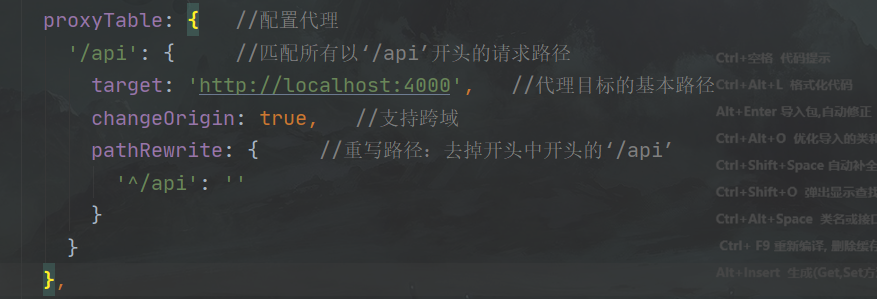
(4)服务器代理
内部服务器代理请求跨域 url,然后返回数据。(在config文件夹中的index.js中设置)

 浙公网安备 33010602011771号