

大二下学期学习进度(十五)
编程时长:18h
代码行数:1200行
发表博客篇数:4篇
所学知识点:
1.通过PHP大项目学会了PHP项目中session的使用,其使用前必须先声明 session_start();,然后可以用 $_SESSION['name'] = $name;来对session进行初始化赋值,此时的session为全局变量,在任何一个PHP页面都可以取出来用,但用之前都需要加session_start();,感觉PHP中的用法比JAVA中简单多了。
<!DOCTYPE html>
<html lang="en">
<head>
    <meta charset="UTF-8">
    <title>登录</title>
	<link rel="stylesheet" href="css/commons.css">
	<style>a {text-decoration: none}
	a:hover {
	color:orange;
	}
	a{color:blue;}
	input:focus{
	background-color:#F0FFFF;
	border: 1px solid blue;
	}
	</style>
</head>
<body background="image/pic4.jpg" style=" background-repeat:no-repeat ;
background-size:100% 100%;
background-attachment: fixed;" >
<!--头条框-->
<div class="pg-head-top">
    <div class="pg-main">
	 <div style="text-align:center">

		<div style="float:left;">
		<span name="s2">图书商城</span>
		<span name="s2">问题反馈</span>
		<span name="s2">联系我们</span>
		</div>
		</div>
    </div>
</div>
<!--购物车-->
       <div class="pg-shopping-car">
            <div style="text-align:center;">
                <a href="">购物车</a>
            </div>
        </div>
<div><h1 style="color:#9999ff"><a href="" style="text-decoration:none;color:#9999ff;"><br/>   Book Mall</a></h1></div>
<br/><br/><br/>
<div class="denglu">
<center>
<form style="font-size:20px;" action="login.php" method="post">
<br/>
 <h2 style="color:#9999ff">登陆</h2>
        <table class=gridtable>
            <tr>
                <input type="text" name="nm" placeholder="用户名:"  value="" style="height:40px;width:300px;display:inline-block;border: 2px solid #ccc;"><br/><br/>
            </tr>
            <tr>
                <input type="password" name="password" placeholder="密码:"  name="userRePwd" id="userRePwd" size="20"  value="" style="height:40px;width:300px;display:inline-block;border: 2px solid #ccc;"><br/><br/>
            </tr>
            <tr>
                <button type="submit" style="height:40px;width:300px; background-color:#ccddff">登    录</button>
            </tr>
        </table>
<p style="font-size:10px;color:blue;">

<a href="zhuceyemian.html">
立即注册
</a>
</p>
</form>
</center>
</div>
</body>
<?php
//数据库连接
include_once("c.php");
session_start();
header("Content-type:text/html;charset=utf-8");
mysqli_set_charset($connID,"UTF8");
//从登录页接受来的数据
$nm=$_POST['nm'];
$password=$_POST['password'];
$sql="select * from login where nm='$nm' AND password='$password';";
$result=mysqli_query($connID,$sql);
$attr = mysqli_fetch_row($result);
$row=mysqli_num_rows($result);
if(!$row){
    echo "<script>alert('密码错误!');location='dengluyemian.html'</script>";
}
else{
    $_SESSION['nm'] = $nm;
    if($attr[2]=="普通用户"){
        echo "<script>alert('普通用户登陆成功,欢迎您');location='index.html'</script>";

    }else{
        echo "<script>alert('管理员登陆成功');location='manager.php'</script>";
    }

};
<?php
session_start();
include_once("c.php");
header("Content-type:text/html;charset=utf-8");
$nm=$_POST['nm'];
$numb=$_POST['numb'];
$price=$_POST['price'];
$people=$_POST['people'];
$tel=$_POST['tel'];
$address=$_POST['address'];
mysqli_set_charset($connID,"UTF8");
$result=mysqli_query($connID,"insert into buyinfo (nm,numb,price,people,tel,address,username) values('".$nm."','".$numb."','".$price."','".$people."','".$tel."','".$address."', '".$_SESSION['nm']."')");
if($result)
{
    echo "<script type='text/javascript'>alert('订单存储成功!');parent.location.href='index.html';</script>";
}
else
{
    echo "<script type='text/javascript'>alert('存储失败!');parent.location.href='insertinfo.php';</script>";
}
?>
运行截图:

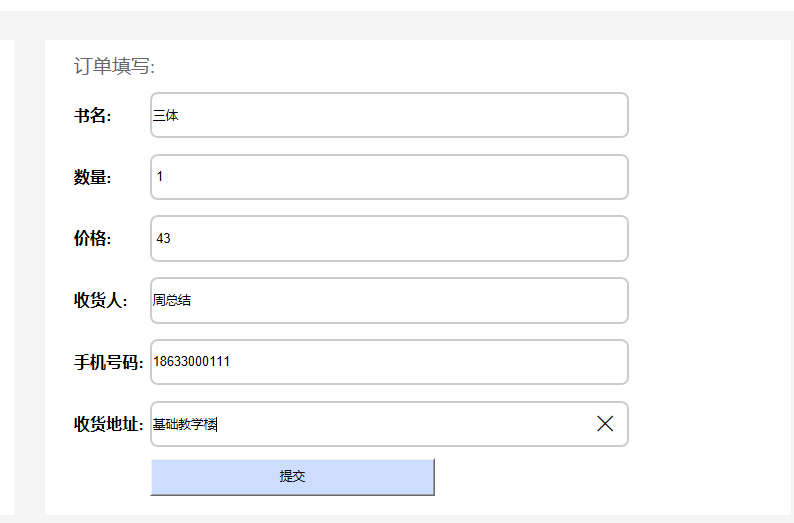


会保存登陆的用户名为购买人的姓名。
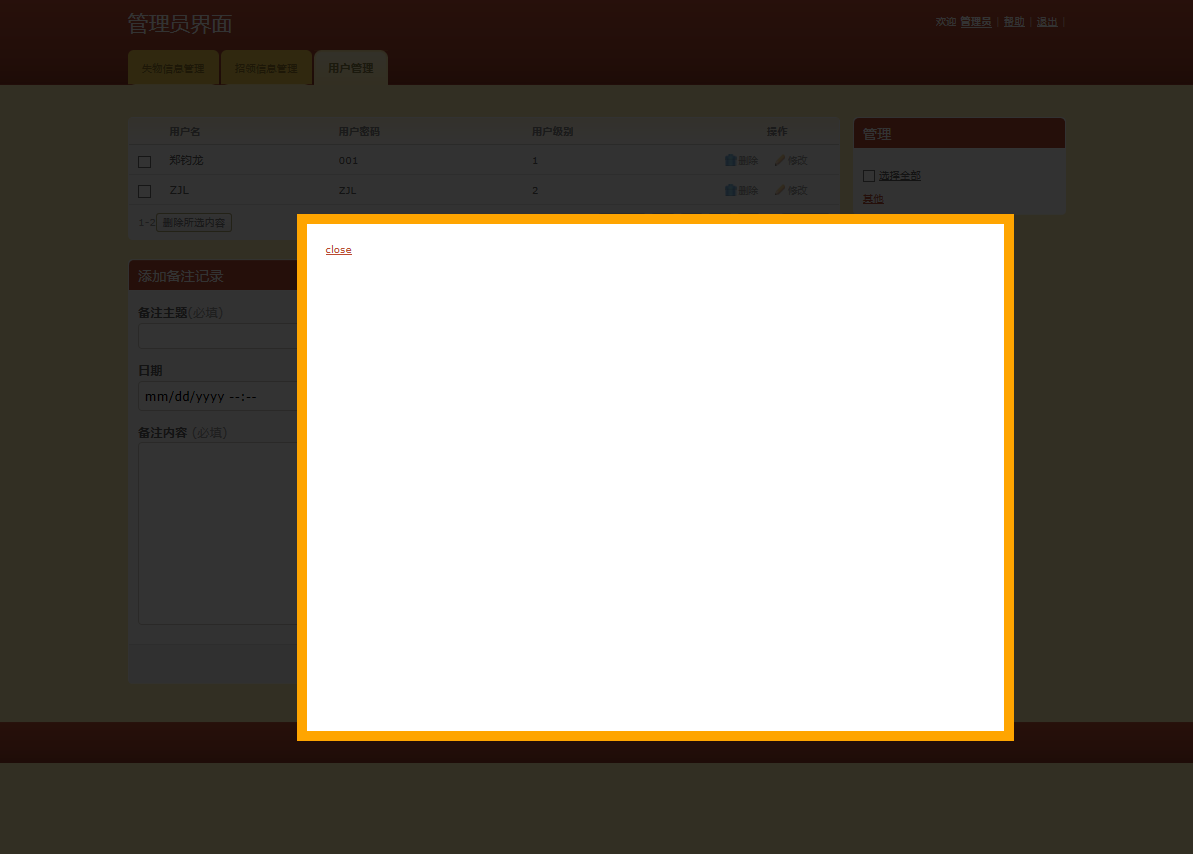
2.根据JavaScript语言来给超链接设置一个跳转悬浮窗口,这里利用点击超链接中跳转到一个JavaScript函数中,onclick = " document.getElementById('light').style.display='block';document.getElementById('fade').style.display='block'"跳转到一个新的div<div id="light" class="white_content">显示新的内容,同时将原来部分变暗
<a href = "#?name=<%=rs.getString("userName") %>" onclick = " document.getElementById('light').style.display='block';document.getElementById('fade').style.display='block'" class="ico edit">修改</a></td>


<div id="light" class="white_content">


 <a href = "javascript:void(0)" onclick = "document.getElementById('light').style.display='none';document.getElementById('fade').style.display='none'">close</a></div>
		                    <div id="fade" class="black_overlay"></div>
							</tr>


 浙公网安备 33010602011771号