Nginx+PHP 动态实时生成不同尺寸图片
原来图片服务器采用Windows .net架构,鉴于需求需要生成各种尺寸图片。
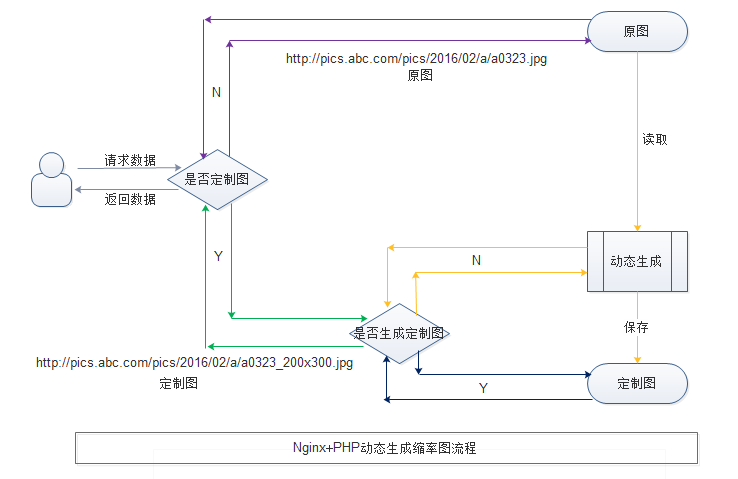
流程说明:
用户从Nginx请求对应的图片,判断是否存在_200x300的对应参数,如果没有就直接请求到对应目录的原图,否则继续判断是否在本地已经生成了对应的缓存图片,如果存在返回已经生成过的定制尺寸图片,否则请求PHP动态生成。
Nginx部分配置:
    server {
        listen       80;
        server_name  pics.abc.com;
        location / {
            root   /var/www/html;
            index  index.html index.htm index.php;
        error_page   500 502 503 504  /50x.html;
        location = /50x.html {
            root   html;
        }

        location ~ \_(\d+)x(\d+)\.(jpg|png|gif|jpeg|bmp)$ {  //判断是否定制图
                try_files $uri /temp/$uri /get.php;    //判断是否已生成过定制图否则转交给/get.php
                expires      30d;
        }

        location ~ \.php$ {
            fastcgi_pass   127.0.0.1:9000;
            fastcgi_index  index.php;
            fastcgi_param  SCRIPT_FILENAME  $document_root$fastcgi_script_name;
            include        fastcgi_params;
        }

        location ~ .*\.(gif|jpg|jpeg|png|bmp)$
        {
                expires      30d;
        }

        }
    }
在/var/www/html我们以只读方式挂载Windows的目录,修改/etc/fstab,添加
\\192.168.2.3\f$\pics.abc.com\pics /var/www/html/pics/ cifs ro,username=user,password=pass 1 2
然后重启netfs服务,另外执行下面命令,安装依赖的包
yum -y install samba-client cifs-utils
service netfs restart
chkconfig netfs on
生成的缩率图会放到网站目录的temp目录下,如请求的http://pics.abc.com/pics/201604/29/abc_200x300.jpg
则生成的图片放在temp/pics/201604/29/abc_200x300.jpg目录下
PHP脚本:
function thumb($src, $width, $height, $filename, $mode = ‘scale‘, $quality = ‘100‘) {
try {
        $imageValue = getimagesize($src);
        $sourceWidth = $imageValue[0]; //原图宽
        $sourceHeight = $imageValue[1]; //原图高
        $thumbWidth = $width; //缩略图宽
        $thumbHeight = $height; //缩略图高
        $_x = 0;
        $_y = 0;
        $w = $sourceWidth;
        $h = $sourceHeight;
        if ($mode == ‘scale‘) {
                if ($sourceWidth <= $thumbWidth && $sourceHeight <= $thumbHeight) {
                        $_x = floor(($thumbWidth - $sourceWidth) / 2);
                        $_y = floor(($thumbHeight - $sourceHeight) / 2);
                        $thumbWidth = $sourceWidth;
                        $thumbHeight = $sourceHeight;
                } else {
                        if ($thumbHeight * $sourceWidth > $thumbWidth * $sourceHeight) {
                                $thumbHeight = floor($sourceHeight * $width / $sourceWidth);
                                $_y = floor(($height - $thumbHeight) / 2);
                        } else {
                                $thumbWidth = floor($sourceWidth * $height / $sourceHeight);
                                $_x = floor(($width - $thumbWidth) / 2);
                        }
                }
        } else if ($mode == ‘crop‘) {
                if ($sourceHeight < $thumbHeight) { //如果原图尺寸小于当前尺寸
                $thumbWidth = floor($thumbWidth * $sourceHeight / $thumbHeight);
                $thumbHeight = $sourceHeight;
                }
                if ($sourceWidth < $thumbWidth) {
                        $thumbHeight = floor($thumbHeight * $sourceWidth / $thumbWidth);
                        $thumbWidth = $sourceWidth;
                }

                $s1 = $sourceWidth / $sourceHeight; //原图比例
                $s2 = $width / $height; //新图比例
                if ($s1 == $s2) {
                } else if ($s1 > $s2) { //全高度
                        $y = 0;
                        $ax = floor($sourceWidth * ($thumbHeight / $sourceHeight));
                        $x = ($ax - $thumbWidth) / 2;
                        $w = $thumbWidth / ($thumbHeight / $sourceHeight);

                } else { //全宽度
                        $x = 0;
                        $ay = floor($sourceHeight * ($thumbWidth / $sourceWidth)); //模拟原图比例高度
                        $y = ($ay - $thumbHeight) / 2;
                        $h = $thumbHeight / ($thumbWidth / $sourceWidth);
                }

        }
        switch ($imageValue[2]) {
                case 2: $source = imagecreatefromjpeg($src);
                        break;
                case 1: $source = imagecreatefromgif($src);
                        break;
                case 3: $source = imagecreatefrompng($src);
                        break;
                case 6: $source = imagecreatefromwbmp($src);
                        break;
                default: defulat();
                return;
        }
        header("Content-type: image/jpeg");
        $thumb = imagecreatetruecolor($width, $height);
        imagefill($thumb, 0, 0, imagecolorallocate($thumb, 255, 255, 255));
        imagecopyresampled($thumb, $source, 0, 0, $x, $y, $width, $height, $w, $h);
        imagejpeg($thumb, null, $quality);
        imagejpeg($thumb, $filename, $quality);
        imagedestroy($thumb);
        imagedestroy($source);
} catch (Exception $ex) {
        defulat();
 }
}


function defulat() {
/*
        $default_img = realpath(‘../pictures/nopic.gif‘);
        ob_start();
        header(‘Content-type:image/jpeg‘);
        readfile($default_img);
        ob_flush();
        flush();
*/
echo ‘error‘;
}

function mkDirs($dir){
    if(!is_dir($dir)){
        if(!mkDirs(dirname($dir))){
            return false;
        }
        if(!mkdir($dir,0755)){
            return false;
        }
    }
    return true;
}

$uri=$_SERVER[‘REQUEST_URI‘];
$image=basename($uri);

$temp=‘./temp/‘.dirname($uri).‘/‘;
$imgpath=‘.‘.dirname($uri).‘/‘;

/*
//检查本地是否存在文件,原图
if(file_exists($temp.$image)){
        ob_start();
        header(‘Content-type:image/jpeg‘);
        readfile($temp.$image);
        ob_flush();
        flush();
        exit();
}
*/

//检查生成的图片是否曾经生成过,存在即返回,否则重新生成新图
if(!preg_match(‘/_(\d+)x(\d+)/‘, $image, $wh)){
        ob_start();
        header(‘Content-type:image/jpeg‘);
        readfile($imgpath.$image);
        ob_flush();
        flush();
        exit();
}

$width = $wh[1];
$height = $wh[2];
$source_img=preg_replace(‘/_(\d+)x(\d+)/‘, ‘‘, $image);
//对长宽都超过的图片返回原图
if($width>=2000 || $height>=2000){
	ob_start();
        header(‘Content-type:image/jpeg‘);
        readfile($imgpath.$source_img);
        ob_flush();
        flush();
        exit();
}

//图片处理
$src=$imgpath.$source_img;
$filename=$temp.$image;
mkDirs($temp);
//thumb(realpath($src), $width, $height, $filename, ‘crop‘, ‘85‘);
thumb(realpath($src), $width, $height, $filename, ‘crop‘, ‘100‘);
PHP生成尺寸部分参考<PHP图片自动裁切应付不同尺寸的显示>
淘宝通过URL生成不同尺寸的图片,思路
使用URLRewrite+实时处理+缓存
淘宝的图片就是使用这种方法来处理的。根据原图使用graphmagick去生成缩略图
简要得代码
nginx rewrite:
rewrite ^/upload/(.+)_(\d+)_(\d+)\.(jpg|png|gif) /upload/thumb.php?src=$1&w=$2&h=$3&type=$4;
php:
$src= $_REQUEST["src"];
$width = $_REQUEST["w"];
$height = $_REQUEST["h"];
$type = strtolower($_REQUEST["type"]);
$filename = $src.".".$width."x".$height.".".$type;
if(!file_exists($filename))
{
$im = new Imagick();
$im- > readImage($src);
if($im- > getImageWidth() > =$im- > getImageHeight())
{
$im- > cropThumbnailImage( $width, $height );
}else
{
$im- > cropImage($im- > getImageWidth(),$im- > getImageWidth(),0,0);
$im- > cropThumbnailImage($width,$height);
}
$im- > writeImage($filename);
$im- > destroy();
}
switch($type)
{
case "jpg":$contenttype = "jpeg";break;
case "jpeg":$contenttype = "jpeg";break;
case "png":$contenttype = "png";break;
case "gif":$contenttype = "gif";break;
}
header("Content-type:image/".$contenttype);
readfile($filename);

 浙公网安备 33010602011771号