

进程间如何进行通信[IPC](一)使用管道(1)
进程间通信IPC(一)管道(1)
不同进程(一般指用户进程)之间的资源是独立的,在一个进程中无法直接访问另一个进程中的资源(比如读时共享,写时拷贝)
通信目的:数据传输,通知事件的发生,资源共享(涉及同步和互斥),进程控制
同步:(直接制约关系)为了完成某个任务而创建的多个进程,在某些位置上协调它们的工作次序而等待,传递信息所产生的制约关系,制约源自于它们的相互合作
异步:多道程序环境允许多个程序并发执行,当时进程的执行一般不是一贯到底的,它以不可预知的速度向前推进,这就是进程的异步性
互斥:间接制约关系,当一个进程进入临界区使用临界资源时,另一个进程必须等待,当占用临界区资源的进程退出临界区后,另一个进程才被允许去访问此临界资源
通信方法(一)管道
无名(匿名)管道
管道是内核内存中的一个缓冲区
管道在很多方面都很像文件:不带任何结构的字节序列
1.读取数据:
(1)管道读取默认阻塞,进程从管道中读取数据时,进程被挂起直到数据被写进管道
(2)管道的读取结束标志:当所有的写者关闭了管道的写数据端时,试图从管道读取数据的调用返回0,意味着文件的结束
(3)因为管道是一个队列,所以多个读者可能会造成麻烦
2.写入数据:
(1)写入数据阻塞到管道有空间去容纳新的数据
(2)写入必须保证一个最小的块大小,POSIX规定内核不会拆分小于512字节的块,Linux保证管道中可以存在4096字节连续缓存
(3)如果所有读者都已经将管道读端关闭,则对管道的写入会失败
单个进程内部通信可以使用管道,多个进程之间通信也可以使用管道
但是管道只能在有关联的进程之间通信(如父子进程)
fork调用后,两个管道文件描述符都是打开的,一对管道文件描述符只能保持父子进程单方向通信
因为管道中的数据读出后才能再写入,所以父子进程必须分别关闭fd[0]或fd[1]
从管道中读取数据是一次性操作,读完管道内的数据就会被丢弃
   #include <unistd.h>
   int pipe(int pipefd[2]);
   //pipefd[1]为写,pipefd[0]为读
//成功返回0,失败返回-1

//查看管道缓冲大小命令:
ulimit -a
//查看管道缓冲大小函数
    long fpathconf(int fd, int name);

//使用strace命令可以查看进程之间的管道通信
Unix/Linux中的命令的IO重定向输入输出有些就用到了管道,且无法随机访问数据
管道的底层数据结构是一个循环队列
例如:who|sort |:管道
将who的输出输入到sort进行排序后输出
如果想要双向通信,则需要使用两个管道
socket提供了一个创建全双工管道的系统调用:
       #include <sys/types.h>          /* See NOTES */
       #include <sys/socket.h>

       int socketpair(int domain, int type, int proto‐
       col, int sv[2]);
这个调用squid服务器程序有使用
#include<stdio.h>
#include<unistd.h>
#include<stdlib.h>
#include<string.h>
int main()
{
    int pipefd[2];
    int ret = pipe(pipefd);
    if(ret==-1){
        perror("pipe");
        exit(0);
    }
    pid_t pid =fork();
    if(pid>0){
        //父进程写数据
        char *buf = "hello,world";
        write(pipefd[1],buf,strlen(buf));
        sleep(1);
    }else if(pid==0){
        //子进程读数据
        char buf[1024];
        int len = read(pipefd[0],buf,sizeof(buf));
        buf[len] = '\0';
        printf("child process received %s\n",buf);
    }
}

//管道的大小
#include<stdio.h>
#include<unistd.h>
#include<stdlib.h>
#include<string.h>
int main()
{
    int pipefd[2];
    int ret = pipe(pipefd);
    if(ret==-1){
        perror("pipe");
        exit(0);
    }
    //获取管道缓冲区大小
    printf("size:%ld\n",fpathconf(pipefd[0],_PC_PIPE_BUF));
    return 0;
}
默认大小4096字节

使用匿名管道实现命令输入输出的重定向,重定向有三种基本方法(在另一篇博客中有写:Unix编程实践教程笔记(四) IO重定向 - ziggystardust - 博客园 (cnblogs.com))
//实现ps aux |
#include<stdio.h>
#include<unistd.h>
#include<stdlib.h>
#include<string.h>
#include<wait.h>
int main()
{
    int fd[2];
    int ret = pipe(fd);
    if(ret==-1){
        perror("pipe");
        exit(0);
    }
    pid_t pid = fork();
    //在子进程中执行ps命令,并且重定向输出到父进程(从标准输出到父进程)
    if(pid>0){
        //父进程接收数据,并打印到标准输出
        char buf[2048] = {0};
        int len;
        while((len = read(fd[0],buf,sizeof(buf)-1))>0){
            printf("%s",buf);
            memset(buf,0,2048);
        }
        wait(NULL);

    }else if(pid==0){
        //子进程
        //可以使用dup2来代替close(1); dup(fd);
        dup2(fd[1],STDOUT_FILENO);//将文件描述符1重定向
        execlp("ps","ps","aux",NULL);
        perror("execlp");
        //使用dup2

    }
    return 0;
}
注意write调用是阻塞的,是有缓冲区的,如果数据过大,则会分包发送,直到发完
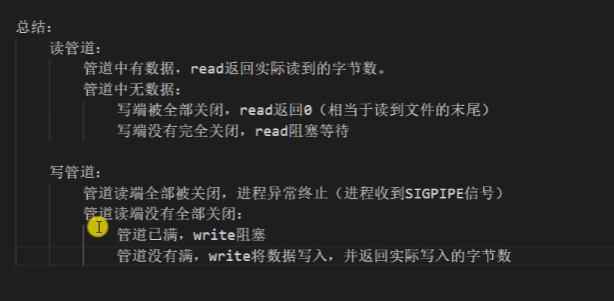
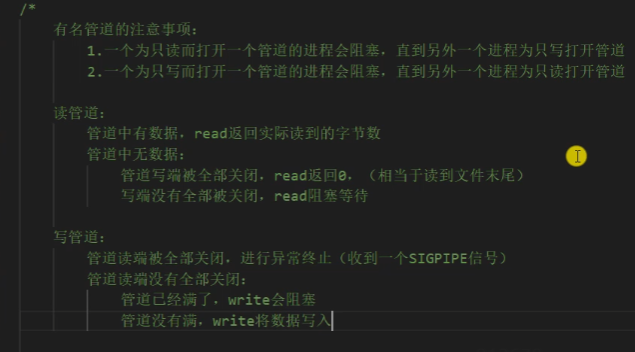
管道的读写特点
这里用了一下视频的截图:
设置管道为非阻塞
即为设置文件描述符非阻塞
fcntl();
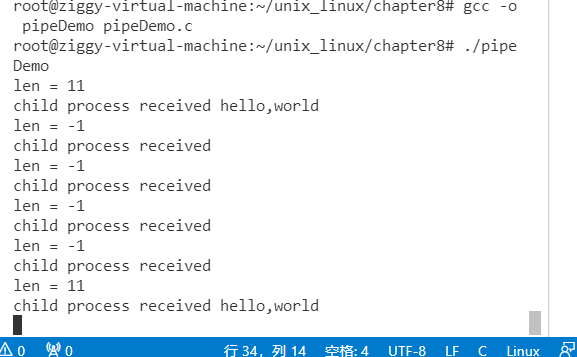
如果管道没有数据,子进程还在read,且设置管道非阻塞:
#include<stdio.h>
#include<unistd.h>
#include<stdlib.h>
#include<string.h>
#include<fcntl.h>
int main()
{
    int pipefd[2];
    int ret = pipe(pipefd);
    if(ret==-1){
        perror("pipe");
        exit(0);
    }
    pid_t pid =fork();
    if(pid>0){
        //父进程写数据
        char *buf = "hello,world";
        while(1){
            write(pipefd[1],buf,strlen(buf));
            sleep(5);
        }
    }else if(pid==0){
        //子进程读数据
        char buf[1024] = {0};
        int flag = fcntl(pipefd[0],F_GETFL);
        flag |= O_NONBLOCK;
        fcntl(pipefd[0],F_SETFL,flag);
        while(1){
            int len = read(pipefd[0],buf,sizeof(buf));
            buf[len] = '\0';
            printf("len = %d\n",len);
            printf("child process received %s\n",buf);
            memset(buf,0,1024);
            sleep(1);
        }
    }
    return 0;
}
特殊管道FIFO (命名管道)
命名管道可以用于无关联的进程之间相互通信
以FIFO的文件形式存于文件系统中,大多数操作和匿名管道是相同的
和匿名管道不同的地方:FIFO在文件系统中作为一个特殊文件存在,FIFO的内容却是放在内存中
FIFO的进程退出后,FIFO文件将继续保存在文件系统中以便以后使用
FIFO有名字,不相关的进程可以打开有名管道进行通信
三种System V IPC也能用于无关联的多个进程之间通信,因为它们都使用一个全局唯一的键值来表示一条信道
#可以使用命令来创建有名管道的实体文件
mkfifo filename
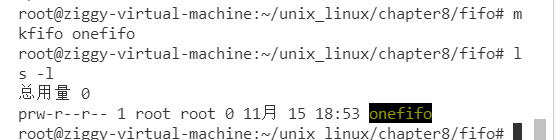
也可以使用函数来创建:
       #include <sys/types.h>
       #include <sys/stat.h>

       int mkfifo(const char *pathname, mode_t mode);
//pathname:管道名称(路径)可以是相对/绝对路径
//mode:文件权限,和open 的文件权限一样(8进制数)
不支持lseek文件定位,严格先进先出
常见的文件I/O操作都可以用于FIFO
#include<stdio.h>
#include<stdlib.h>
#include<sys/stat.h>
#include<sys/types.h>
#include<string.h>
#include<unistd.h>
int main()
{
    //首先判断文件是否已经存在
    if((access("fifo2",F_OK))==-1){
        printf("管道不存在,创建\n");
    }
    else{
        printf("已存在\n");
        exit(1);
    }
    int ret = mkfifo("fifo2",0664);
    if(ret==-1){
        perror("mkfifo");
        exit(0);
    }
    return 0;
}
注意这个管道文件是不保存数据的,数据保存在内存中
//有名管道的读写
//1. write.c
#include<stdio.h>
#include<stdlib.h>
#include<sys/stat.h>
#include<sys/types.h>
#include<string.h>
#include<unistd.h>
#include<fcntl.h>
#define BUFSIZE 1024
int main()
{
    //首先判断文件是否已经存在
    if((access("fifoNew",F_OK))==-1){
        printf("管道不存在,创建\n");
        int ret = mkfifo("fifoNew",0664);
        if(ret==-1){
            perror("mkfifo");
            exit(0);
        }
    }

        int fd = open("fifoNew",O_WRONLY);
        for(int i = 0;i<100;i++){
            char buf[BUFSIZE];
            sprintf(buf,"write NO. %d message\n",i);
            printf("%s",buf);
            write(fd,buf,strlen(buf));
            sleep(1);
        }
        close(fd);

    return 0;
}

//2. read.c

#include<stdio.h>
#include<stdlib.h>
#include<sys/stat.h>
#include<sys/types.h>
#include<string.h>
#include<unistd.h>
#include<fcntl.h>
#define BUFSIZE 1024
int main()
{

    int fd = open("fifoNew",O_RDONLY);
    while (1)
    {
        char buf[BUFSIZE] = {0};
        int len =  read(fd,buf,BUFSIZ-1);
        if(len==0)
        {
            printf("write端断开/没有数据写入\n");
            break;
        }
        printf("recv message:%s\n",buf);
    }
    close(fd);
    return 0;
}
如果读端写端只有一方打开或只有一方在执行操作,那么会阻塞到open调用处
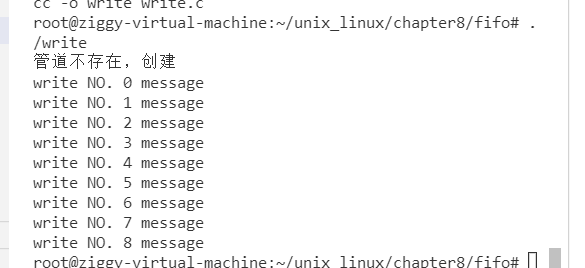
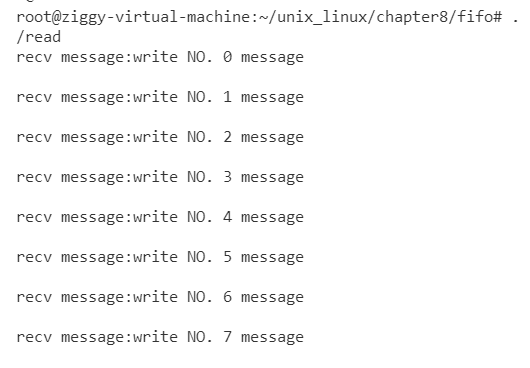
如果先运行读端,写端未写入时,读端也会阻塞到open调用
如果先将读端关闭,写端进程也会被关闭(接收到一个SIGPIPE信号,终止进程)(以上代码的测试结果是这样的)

 浙公网安备 33010602011771号