
Pytest测试框架(二)
Allure下载
https://github.com/allure-framework/allure2/releases
日志管理
- 日志
跟踪软件运行情况,记录执行过程,按不同级别显示
- 日志级别
logging提供了一组便利的函数,用来做简单的日志。它们是debug()、info()、warning()、error()、critical()
默认等级是WARNING,这意味着仅仅这个等级及以上的才会反馈信息,除非logging模块被用来做其他事情
python logging的用法
一般情况下,一些程序的调试过程中我们会让它输出一些信息,特别是一些大型的程序,我们通过这些信息可以了解程序的运行情况,python提供了一个日志模块logging,它可以把我们想要的信息全部保存到一个日志文件中,方便查看。
import logging

logging.debug('This is debug message')
logging.info('This is info message')
logging.warning('This is warning message')
WARNING:root:This is warning message
默认情况下,logging将日志打印到屏幕,日志级别为WARNING;
日志级别大小关系为:CRITICAL > ERROR > WARNING > INFO > DEBUG > NOTSET,当然也可以自己定义日志级别。
在pytest中用logging来代替print
test_logging.py
import time
import logging

logging.basicConfig(level=logging.DEBUG)

def test_1():
    log = logging.getLogger('test_1')
    time.sleep(1)
    log.debug('after 1 sec')
    time.sleep(1)
    log.debug('after 2 sec')
    time.sleep(1)
    log.debug('after 3 sec')
    assert 1, 'should pass'


def test_2():
    log = logging.getLogger('test_2')
    time.sleep(1)
    log.debug('after 1 sec')
    time.sleep(1)
    log.debug('after 2 sec')
    time.sleep(1)
    log.debug('after 3 sec')
    assert 0, 'failing for demo purposes'
E       AssertionError: failing for demo purposes
E       assert 0

test_logging.py:25: AssertionError
---------------------------- Captured stderr call -----------------------------
DEBUG:test_2:after 1 sec
DEBUG:test_2:after 2 sec
DEBUG:test_2:after 3 sec
------------------------------ Captured log call ------------------------------
DEBUG    test_2:test_logging.py:20 after 1 sec
DEBUG    test_2:test_logging.py:22 after 2 sec
DEBUG    test_2:test_logging.py:24 after 3 sec
=========================== short test summary info ===========================
FAILED test_Pytest.py::Test_01_Pytest::test_02_something_quick - AssertionErr...
FAILED test_Pytest.py::Test_01_Pytest::test_03_another - assert 1 == 0
FAILED test_Pytest.py::Test_01_Pytest::test_06_run - assert 10 == 11
FAILED test_logging.py::test_2 - AssertionError: failing for demo purposes
======================== 4 failed, 11 passed in 5.00s =========================

Process finished with exit code 0
pytest用logging和–capture=no实现实时输出log信息
pytest -s --capture=no test_logging.py
import pytest

if __name__ == '__main__':
    pytest.main(['-s','--capture=no','-n','5'])
test_logging.py:25: AssertionError
------------------------------ Captured log call ------------------------------
DEBUG    test_2:test_logging.py:20 after 1 sec
DEBUG    test_2:test_logging.py:22 after 2 sec
DEBUG    test_2:test_logging.py:24 after 3 sec
=========================== short test summary info ===========================
FAILED test_Pytest.py::Test_01_Pytest::test_06_run - assert (5 * 2) == 11
FAILED test_Pytest.py::Test_01_Pytest::test_03_another - assert (3 - 2) == 0
FAILED test_Pytest.py::Test_01_Pytest::test_02_something_quick - AssertionErr...
FAILED test_logging.py::test_2 - AssertionError: failing for demo purposes
======================== 4 failed, 11 passed in 4.94s =========================

Process finished with exit code 0
allure测试报告框架
pytest+allure测试报告
简介
python 主流自动化测试报告插件有三个:HTMLTestRunner、BeautifulReport 和 Allure。HTMLTestRunner是一个比较古老的报告模板,界面也不是很好看。BeautifulReport 界面很简洁,看起来也很直观,是一款比较不错的报告插件。如果你想提升一下你的level,让你的自动化测试报告变得高大上,那么请选择 Allure 。
Allure 是一款轻量级的开源自动化测试报告生成框架。它支持绝大部分测试框架,比如 TestNG、Junit 、pytest、unittest 等。本文主要介绍 pytest 框架结合 Allure 生成 格式统一、美观的 测试报告。
pip install allure-pytest
下载安装allure
https://github.com/allure-framework/allure2/releases
下载后可以解压到硬盘,并设置环境变量

环境变量配置
path下加上 绝对路径 C:\allure-2.13.1\bin

cmd进入bin目录,运行:allure

则安装成功
注:以上方法可行,本人不建议用以上方法
推荐方法:
把allure文件夹放在项目目录下

用代码获取allure.bat的绝对路径,来运行生成html报告
#!/usr/bin/env python
# coding=utf-8
import pytest
import allure
import os

file = os.path.abspath(__file__)    # 1、获取当前文件路径
path = file.split('run_all_case')[0]   # 2、获取共同路径部分
allurepath = path + 'allure-2.13.1/bin/allure.bat'  # 3、拼凑成需上传附件的绝对路径


if __name__ =="__main__":
    # 执行pytest单元测试,生成 Allure 报告需要的数据存在 /temp 目录
    pytest.main(['--alluredir', './temp'])
    # # 执行命令 allure generate ./temp -o ./report --clean ,生成测试报告
    os.system('%s generate ./temp -o ./report --clean' %allurepath)


定制报告
- Feature: 标注主要功能模块
- Story: 标注Features功能模块下的分支功能
- Severity: 标注测试用例的重要级别
- Step: 标注测试用例的重要步骤
- Issue和TestCase: 标注Issue、Case,可加入URL
feature定制
# test_Pytest.py文件
# coding=utf-8

import pytest
import allure

class Test_01_Pytest():

    @pytest.mark.run(order=6)
    @allure.feature('test_Pytest')
    def test_01_send_http(self):
        print("----start----")
        print('test_01_send_http方法执行')
        pass  # perform some website test for your app

    @pytest.mark.run(order=5)
    @allure.feature('test_Pytest')
    def test_02_something_quick(self):
        print("test_02_something_quick方法执行")
        assert 'o' in 'live' # 报错

    @pytest.mark.run(order=4)
    @allure.feature('test_Pytest')
    def test_03_another(self):
        print("test_03_another方法执行")
        assert 3-2==0  # 报错

    @pytest.mark.run(order=3)
    @allure.feature('test_Pytest')
    def test_04_run(self):
        print("test_04_run方法执行")

    @pytest.mark.run(order=2)
    @allure.feature('test_Pytest')
    def test_05_run(self):
        print("test_05_run方法执行")

    @pytest.mark.run(order=1)
    @allure.feature('test_Pytest')
    def test_06_run(self):
        print("test_05_run方法执行")
        assert 5*2==11 # 报错


if __name__ == '__main__':
    pytest.main(['-v','--reruns','5','--reruns-delay','1','test_Pytest.py'])

story定制
# test_Pytest.py文件
# coding=utf-8

import pytest
import allure

class Test_01_Pytest():

    @pytest.mark.run(order=6)
    @allure.feature('test_Pytest')
    @allure.story("CSCN 4437 test_01_send_http")
    def test_01_send_http(self):
        print("----start----")
        print('test_01_send_http方法执行')
        pass  # perform some website test for your app

    @pytest.mark.run(order=5)
    @allure.feature('test_Pytest')
    @allure.story("CSCN 4439 test_02_something_quick")
    def test_02_something_quick(self):
        print("test_02_something_quick方法执行")
        assert 'o' in 'live' # 报错

    @pytest.mark.run(order=4)
    @allure.feature('test_Pytest')
    @allure.story("CSCN 4702 test_03_another")
    def test_03_another(self):
        print("test_03_another方法执行")
        assert 3-2==0  # 报错

    @pytest.mark.run(order=3)
    @allure.feature('test_Pytest')
    @allure.story("CSCN 4791 test_04_run")
    def test_04_run(self):
        print("test_04_run方法执行")

    @pytest.mark.run(order=2)
    @allure.feature('test_Pytest')
    @allure.story("CSCN 4792 test_05_run")
    def test_05_run(self):
        print("test_05_run方法执行")

    @pytest.mark.run(order=1)
    @allure.feature('test_Pytest')
    @allure.story("CSCN 4755 test_06_run")
    def test_06_run(self):
        print("test_05_run方法执行")
        assert 5*2==11 # 报错


if __name__ == '__main__':
    pytest.main(['-v','--reruns','5','--reruns-delay','1','test_Pytest.py'])
添加story,Report展示见下图

用例标题和用例描述定制详解
# test_Pytest.py文件
# coding=utf-8

import pytest
import allure

class Test_01_Pytest():

    @pytest.mark.run(order=6)
    @allure.feature('test_Pytest')
    @allure.story("CSCN 4437 test_01_send_http")
    # test_01_send_http为用例title
    def test_01_send_http(self):
        '''
        用例描述:这是用例描述,test_01_send_http,描述本人
        '''
        # 注释为用例描述
        print("----start----")
        print('test_01_send_http方法执行')
        pass  # perform some website test for your app

    @pytest.mark.run(order=5)
    @allure.feature('test_Pytest')
    @allure.story("CSCN 4439 test_02_something_quick")
    def test_02_something_quick(self):
        '''
        test_02_something_quick的用例描述
        '''
        print("test_02_something_quick方法执行")
        assert 'o' in 'live' # 报错

    @pytest.mark.run(order=4)
    @allure.feature('test_Pytest')
    @allure.story("CSCN 4702 test_03_another")
    def test_03_another(self):
        '''
        test_03_another 的用例描述
        '''
        print("test_03_another方法执行")
        assert 3-2==0  # 报错

    @pytest.mark.run(order=3)
    @allure.feature('test_Pytest')
    @allure.story("CSCN 4791 test_04_run")
    def test_04_run(self):
        '''
        test_04_run 的用例描述
        '''
        print("test_04_run方法执行")

    @pytest.mark.run(order=2)
    @allure.feature('test_Pytest')
    @allure.story("CSCN 4792 test_05_run")
    def test_05_run(self):
        '''
        test_05_run 的用例描述
        '''
        print("test_05_run方法执行")

    @pytest.mark.run(order=1)
    @allure.feature('test_Pytest')
    @allure.story("CSCN 4755 test_06_run")
    def test_06_run(self):
        '''
        test_06_run 的用例描述
        '''
        print("test_05_run方法执行")
        assert 5*2==11 # 报错


if __name__ == '__main__':
    pytest.main(['-v','--reruns','5','--reruns-delay','1','test_Pytest.py'])

Severity定制详解
Allure中对严重级别的定义:
- Blocker级别:中断缺陷(客户端程序无响应,无法执行下一步操作)
- Critical级别 :临界缺陷( 功能点缺失)
- Normal级别 :普通缺陷(数值计算错误)
- Minor级别 :次要缺陷(界面错误与UI需求不符)
- Trivial级别 :轻微缺陷(必输项无提示,或者提示不规范)
# test_Pytest.py文件
# coding=utf-8

import pytest
import allure

class Test_01_Pytest():

    @pytest.mark.run(order=6)
    @allure.feature('test_Pytest')
    @allure.story("CSCN 4437 test_01_send_http")
    @allure.severity(allure.severity_level.BLOCKER) # blocker、critical、normal、minor、trivial
    # test_01_send_http为用例title
    def test_01_send_http(self):
        '''
        用例描述:这是用例描述,test_01_send_http,描述本人
        '''
        # 注释为用例描述
        print("----start----")
        print('test_01_send_http方法执行')
        pass  # perform some website test for your app

    @pytest.mark.run(order=5)
    @allure.feature('test_Pytest')
    @allure.story("CSCN 4439 test_02_something_quick")
    @allure.severity(allure.severity_level.CRITICAL)
    def test_02_something_quick(self):
        '''
        test_02_something_quick的用例描述
        '''
        print("test_02_something_quick方法执行")
        assert 'o' in 'live' # 报错

    @pytest.mark.run(order=4)
    @allure.feature('test_Pytest')
    @allure.story("CSCN 4702 test_03_another")
    @allure.severity(allure.severity_level.NORMAL)
    def test_03_another(self):
        '''
        test_03_another 的用例描述
        '''
        print("test_03_another方法执行")
        assert 3-2==0  # 报错

    @pytest.mark.run(order=3)
    @allure.feature('test_Pytest')
    @allure.story("CSCN 4791 test_04_run")
    @allure.severity(allure.severity_level.MINOR)
    def test_04_run(self):
        '''
        test_04_run 的用例描述
        '''
        print("test_04_run方法执行")

    @pytest.mark.run(order=2)
    @allure.feature('test_Pytest')
    @allure.story("CSCN 4792 test_05_run")
    @allure.severity(allure.severity_level.TRIVIAL)
    def test_05_run(self):
        '''
        test_05_run 的用例描述
        '''
        print("test_05_run方法执行")

    @pytest.mark.run(order=1)
    @allure.feature('test_Pytest')
    @allure.story("CSCN 4755 test_06_run")
    @allure.severity(allure.severity_level.BLOCKER)
    def test_06_run(self):
        '''
        test_06_run 的用例描述
        '''
        print("test_05_run方法执行")
        assert 5*2==11 # 报错

if __name__ == '__main__':
    pytest.main(['-v','--reruns','5','--reruns-delay','1','test_Pytest.py'])


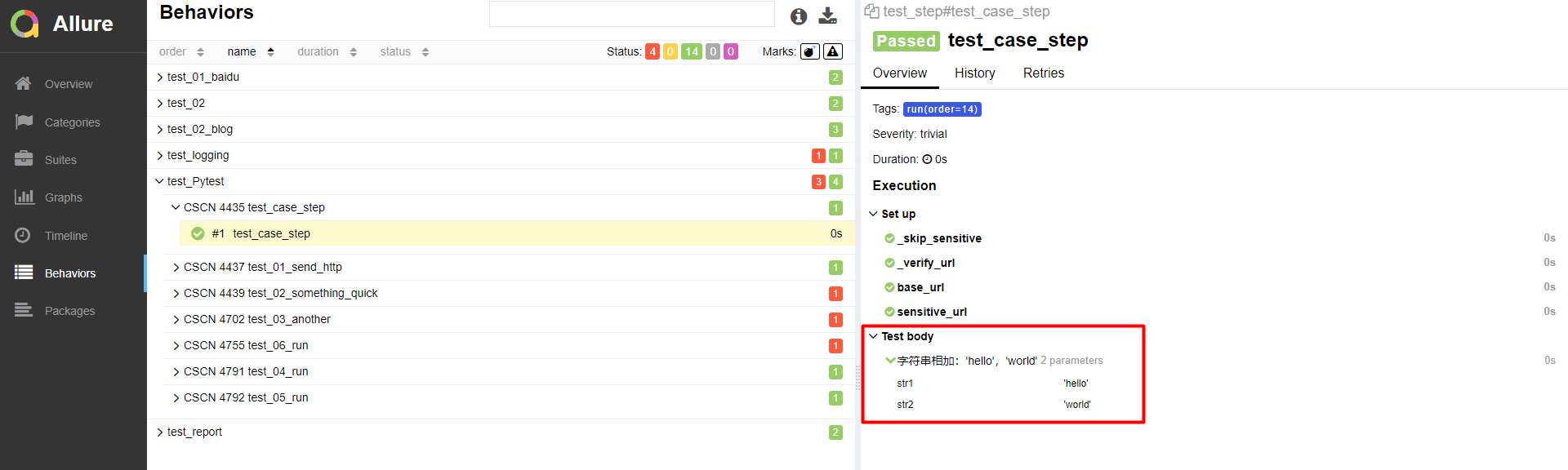
Step定制详解
# -*- coding: utf-8 -*-
import allure
import pytest

@allure.step("字符串相加:{0},{1}")
# 测试步骤,可通过format机制自动获取函数参数
def str_add(str1, str2):
    if not isinstance(str1, str):
        return "%s is not a string" % str1
    if not isinstance(str2, str):
        return "%s is not a string" % str2
    return str1 + str2

@pytest.mark.run(order=14)
@allure.feature('test_Pytest')
@allure.story("CSCN 4435 test_case_step")
@allure.severity(allure.severity_level.TRIVIAL)
def test_case_step():
    str1 = 'hello'
    str2 = 'world'
    assert str_add(str1, str2) == 'helloworld'


if __name__ == '__main__':
    pytest.main(['-s', '-q', '--alluredir', './report/xml'])

Issue和TestCase定制详解
# -*- coding: utf-8 -*-

import allure
import pytest

@allure.step("字符串相加:{0},{1}")
# 测试步骤,可通过format机制自动获取函数参数
def str_add(str1, str2):
    if not isinstance(str1, str):
        return "%s is not a string" % str1
    if not isinstance(str2, str):
        return "%s is not a string" % str2
    return str1 + str2

@pytest.mark.run(order=14)
@allure.feature('test_step')
@allure.story("CSCN 4435 test_case_step")
@allure.severity(allure.severity_level.TRIVIAL)
@allure.issue("https://blog.csdn.net/qq_42610167/article/details/101204066")
@allure.testcase("https://www.cnblogs.com/123blog/p/12499802.html")
def test_case_step():
    str1 = 'hello'
    str2 = 'world'
    assert str_add(str1, str2) == 'helloworld'


if __name__ == '__main__':
    pytest.main(['-s', '-q', '--alluredir', './report/xml'])

attach定制详解
allure.attach(body, name, attachment_type, extension)
作用:allure报告还支持显示许多不同类型的附件,可以补充测试结果;自己想输出啥就输出啥,挺好的
语法: allure.attach(body, name, attachment_type, extension)
参数列表
- body:要显示的内容(附件)
- name:附件名字
- attachment_type:附件类型,是 allure.attachment_type 里面的其中一种
- extension:附件的扩展名(比较少用)

allure.attach.file(source, name, attachment_type, extension)
作用:传送文件
语法: allure.attach.file(source, name, attachment_type, extension)
参数列表
- source:文件路径,相当于传一个文件
试下两种效果:
# -*- coding: utf-8 -*-

import allure
import pytest
import os

file = os.path.abspath(__file__)    # 1、获取当前文件路径
path = file.split('test_step')[0]   # 2、获取共同路径部分
pngpath = path + 'data/porsche.png'  # 3、拼凑成需上传附件的绝对路径

@allure.step("字符串相加:{0},{1}")
# 测试步骤,可通过format机制自动获取函数参数
def str_add(str1, str2):
    if not isinstance(str1, str):
        return "%s is not a string" % str1
    if not isinstance(str2, str):
        return "%s is not a string" % str2
    return str1 + str2

@pytest.mark.run(order=14)
@allure.feature('test_step')
@allure.story("CSCN 4435 test_case_step")
@allure.severity(allure.severity_level.TRIVIAL)
@allure.issue("https://blog.csdn.net/qq_42610167/article/details/101204066")
@allure.testcase("https://www.cnblogs.com/123blog/p/12499802.html")
def test_case_step():
    str1 = 'hello'
    str2 = 'world'
    assert str_add(str1, str2) == 'helloworld'
    # print("jpgpath:",jpgpath)
    # file = open(jpgpath, 'rb').read()
    file = open(pngpath,'rb').read()
    allure.attach(file,'porsche',allure.attachment_type.PNG)
    allure.attach.file(pngpath, 'porsche', allure.attachment_type.PNG)


if __name__ == '__main__':
    pytest.main(['-s', '-q', '--alluredir', './report/xml'])

pytest运行指定用例
import pytest

# 运行指定模块
if __name__ == '__main__':
    pytest.main("-v -s spec_001_modul_test.py")


# 运行批量文件夹(运行当前文件夹包括子文件夹所有用例)
if __name__ == '__main__':
    pytest.main("-v -s ./")


# 运行指定文件夹(subpath1目录下面所有用例)
if __name__ == '__main__':
    pytest.main("-v -s subpath1/")


# 运行指定文件夹(subpath1目录下面所有用例)
if __name__ == '__main__':
    pytest.main("-v -s subpath1/")


# 运行模块中指定用例 (运行模块中test_001_spec用例)
if __name__ == '__main__':
    pytest.main("-v -s spec_001_modul_test.py::test_001_spec")


# 运行class中指定的用例(运行模块中Test_Class类test_003_spec方法)
if __name__ == '__main__':
   pytest.main("-v -s spec_001_modul_test.py::Test_Class::test_003_spec")


# 模糊匹配运行用例(匹配当前目录下面包含)
if __name__ == '__main__':
    #运行spec_001_modul_test模块中用例名称包含spec的用例
    pytest.main("-v -s -k spec spec_001_modul_test.py")
    #运行当前文件夹匹配Test_Class的用例,类文件下面的用例
    pytest.main('-s -v -k Test_Class')
按重要性级别进行一定范围测试
--allure-severities=blocker # critical、normal、minor、trivial、blocker 按照case严重程度来执行用例
#!/usr/bin/env python
# coding=utf-8
import pytest
import allure
import os

file = os.path.abspath(__file__)    # 1、获取当前文件路径
path = file.split('run_all_case')[0]   # 2、获取共同路径部分
allurepath = path + 'allure-2.13.1/bin/allure.bat'  # 3、拼凑成需上传附件的绝对路径


if __name__ =="__main__":
    pytest.main(['--allure-severities=blocker','--alluredir', './temp'])
    os.system('%s generate ./temp -o ./report --clean' %allurepath)

 浙公网安备 33010602011771号