
Pytest测试框架(一)
Pytest框架介绍
Pytest是一个易用、强大、灵活的功能测试框架,并且兼容unittest和nose的测试用例
- 易用: 用例编写简单, 断言方便
- 强大: 全能的mark, 强大的fixtures
- 灵活: 灵活的执行控制及丰富的插件
编写规则
编写pytest测试样例非常简单,只需要按照下面的规则:
- 测试文件以test_开头(以_test结尾也可以)
- 测试类以Test开头,并且不能带有 init 方法
- 测试函数以test_开头
- 断言使用基本的assert即可
安装依赖插件
pip install pytest
pip install pytest-xdist
pip install pytest-assume
pip install pytest-html
pip install pytest-rerunfailures
pip install pytest-selenium
pip install pytest-ordering
pip install pytest-emoji  # 添加表情
pip install pytest-sugar # 添加色彩进度条
pip install allure-pytest  # 添加allure测试报告
框架结构
模块级
(setup_module/teardown_module) 不在类中的函数有用
函数级
(setup_function/teardown_function) 不在类中的函数有用
类级
(setup_class/teardown_class)只在 类中前后运行一次。
方法级
(setup_method/teardown_methond) 运行在类中方法始末
pytest执行方法
执行单个测试模块
pytest test_module.py
执行单个测试用例
pytest -v 路径/文件名(最高级别信息—verbose -q静默模式)

pytest -v -s -q 文件名 (s是带控制台输出结果,也是输出详细)
执行某个目录下的所有测试
pytest test/
用pytest.main()函数来执行
if __name__ == '__main__':
    pytest.main(['-s','-r','test_Pytest.py','test_Pytest.py'])
指定模块指定类运行
pytest test_reg.py::TestClass::test_method
运行名称包含指定表达式的用例
pytest -k "test_a and test_b"
运行指定标签(mark)的用例
pytest -m "apitest and level1"
- 遇到失败后停止:-x/--exitfirst 首次失败后退出(可用于保留出错现场) --maxfails=3 3次失败后退出
- 执行上次失败的用例 --lf/--last-failed
- 先执行上次失败的用例,再执行成功的用例 --ff/--failed-first
- 只收集用例,不执行 --collect-only
- 显示执行最慢的前N条用例:--durations=N
- 并行执行: -n 2 (需安装pytest-xdist)
https://www.jianshu.com/p/b07d897cb10c
https://www.cnblogs.com/davieyang/p/11684554.html
【分布式执行用例】
https://www.cnblogs.com/poloyy/p/12694861.html
断言、跳过及运行
调用pytes.xfail()方法,可以选择传入reason参数表示原因。
# test_Pytest.py文件
# doding=utf-8

import pytest

class Test_Pytest():

    def test_one(self):
        print("----start----")
        pytest.xfail(reason='该功能尚未完成')
        print('test_one方法执行')
        assert 1==1

    def test_two(self):
        print("test_two方法执行")
        assert 'o' in 'love'

    def test_three(self):
        print("test_three方法执行")
        assert 3-2==1

if __name__ == '__main__':
    pytest.main(['-s','-r','test_Pytest.py','test_Pytest.py'])
C:\Python35\python.exe E:/PycharmProjects/pytest_sample/test_Pytest.py
============================= test session starts =============================
platform win32 -- Python 3.5.0, pytest-5.4.2, py-1.8.1, pluggy-0.13.1
sensitiveurl: .*
rootdir: E:\PycharmProjects\pytest_sample
plugins: assume-2.2.1, base-url-1.4.1, forked-1.1.3, html-1.22.1, metadata-1.8.0, rerunfailures-9.0, selenium-1.17.0, variables-1.9.0, xdist-1.32.0
collected 3 items

test_Pytest.py ----start----
xtest_two方法执行
.test_three方法执行
.

=================================== PASSES ====================================
=========================== short test summary info ===========================
PASSED test_Pytest.py::Test_Pytest::test_two
PASSED test_Pytest.py::Test_Pytest::test_three
======================== 2 passed, 1 xfailed in 0.05s =========================

Process finished with exit code 0
pytest.mark.xfail标签
pytest.mark.xfail标签,他的含义是期望测试用例是失败的,但是不会影响测试用例的的执行
@pytest.mark.xfail标签如果测试用例执行失败的则结果是xfail(不会额外显示出错误信息);如果测试用例执行成功的则结果是xpass
# test_Pytest.py文件
# doding=utf-8

import pytest

class Test_Pytest():

    @pytest.mark.xfail
    def test_one(self):
        print("----start----")
        print('test_one方法执行')
        assert 1==2

    def test_two(self):
        print("test_two方法执行")
        assert 'o' in 'love'

    def test_three(self):
        print("test_three方法执行")
        assert 3-2==1

if __name__ == '__main__':
    pytest.main(['-s','test_Pytest.py'])
C:\Python35\python.exe E:/PycharmProjects/pytest_sample/test_Pytest.py
============================= test session starts =============================
platform win32 -- Python 3.5.0, pytest-5.4.2, py-1.8.1, pluggy-0.13.1
sensitiveurl: .*
rootdir: E:\PycharmProjects\pytest_sample
plugins: assume-2.2.1, base-url-1.4.1, forked-1.1.3, html-1.22.1, metadata-1.8.0, rerunfailures-9.0, selenium-1.17.0, variables-1.9.0, xdist-1.32.0
collected 3 items

test_Pytest.py ----start----
test_one方法执行
xtest_two方法执行
.test_three方法执行
.

======================== 2 passed, 1 xfailed in 0.08s =========================

Process finished with exit code 0
自定义标记mark,执行部分用例
标记test_send_http()、test_something_quick为marktest
# test_Pytest.py文件
# doding=utf-8

import pytest

class Test_Pytest():

    @pytest.mark.marktest
    def test_send_http(self):
        print("----start----")
        print('test_send_http方法执行')
        pass  # perform some website test for your app

    @pytest.mark.marktest
    def test_something_quick(self):
        print("test_two方法执行")
        assert 'o' in 'love'

    def test_another(self):
        print("test_three方法执行")
        assert 3-2==1

if __name__ == '__main__':
    pytest.main(['-s','test_Pytest.py','-m=marktest'])
    # 只运行用website标记的测试用例,cmd运行的时候,加个-m参数,指定参数值marktest
C:\Python35\python.exe E:/PycharmProjects/pytest_sample/test_Pytest.py
============================= test session starts =============================
platform win32 -- Python 3.5.0, pytest-5.4.2, py-1.8.1, pluggy-0.13.1
sensitiveurl: .*
rootdir: E:\PycharmProjects\pytest_sample
plugins: assume-2.2.1, base-url-1.4.1, forked-1.1.3, html-1.22.1, metadata-1.8.0, rerunfailures-9.0, selenium-1.17.0, variables-1.9.0, xdist-1.32.0
collected 3 items / 1 deselected / 2 selected

test_Pytest.py ----start----
test_send_http方法执行
.test_two方法执行
.

============================== warnings summary ===============================
test_Pytest.py:8
  E:\PycharmProjects\pytest_sample\test_Pytest.py:8: PytestUnknownMarkWarning: Unknown pytest.mark.marktest - is this a typo?  You can register custom marks to avoid this warning - for details, see https://docs.pytest.org/en/latest/mark.html
    @pytest.mark.marktest

test_Pytest.py:14
  E:\PycharmProjects\pytest_sample\test_Pytest.py:14: PytestUnknownMarkWarning: Unknown pytest.mark.marktest - is this a typo?  You can register custom marks to avoid this warning - for details, see https://docs.pytest.org/en/latest/mark.html
    @pytest.mark.marktest

-- Docs: https://docs.pytest.org/en/latest/warnings.html
================= 2 passed, 1 deselected, 2 warnings in 0.06s =================

Process finished with exit code 0
如果不想执行标记webtest的用例,那就用”not marktest”
if __name__ == '__main__':
    pytest.main(['-s','test_Pytest.py','-m=not marktest'])
    # 只运行用website标记的测试用例,cmd运行的时候,加个-m参数,指定参数值marktest
C:\Python35\python.exe E:/PycharmProjects/pytest_sample/test_Pytest.py
============================= test session starts =============================
platform win32 -- Python 3.5.0, pytest-5.4.2, py-1.8.1, pluggy-0.13.1
sensitiveurl: .*
rootdir: E:\PycharmProjects\pytest_sample
plugins: assume-2.2.1, base-url-1.4.1, forked-1.1.3, html-1.22.1, metadata-1.8.0, rerunfailures-9.0, selenium-1.17.0, variables-1.9.0, xdist-1.32.0
collected 3 items / 2 deselected / 1 selected

test_Pytest.py test_three方法执行
.

============================== warnings summary ===============================
test_Pytest.py:8
  E:\PycharmProjects\pytest_sample\test_Pytest.py:8: PytestUnknownMarkWarning: Unknown pytest.mark.marktest - is this a typo?  You can register custom marks to avoid this warning - for details, see https://docs.pytest.org/en/latest/mark.html
    @pytest.mark.marktest

test_Pytest.py:14
  E:\PycharmProjects\pytest_sample\test_Pytest.py:14: PytestUnknownMarkWarning: Unknown pytest.mark.marktest - is this a typo?  You can register custom marks to avoid this warning - for details, see https://docs.pytest.org/en/latest/mark.html
    @pytest.mark.marktest

-- Docs: https://docs.pytest.org/en/latest/warnings.html
================= 1 passed, 2 deselected, 2 warnings in 0.05s =================

Process finished with exit code 0
文件名类名方法执行部分用例
pytest -v test_server.py::TestClass::test_method # 运行文件下类的方法
pytest -v test_server.py::TestClass            # 运行文件下的类
pytest -v test_server.py::TestClass test_server.py::test_send_http  # 运行多个节点
# test_Pytest.py文件
# doding=utf-8

import pytest

class Test_Pytest():

    def test_send_http(self):
        print("----start----")
        print('test_send_http方法执行')
        pass  # perform some website test for your app

    def test_something_quick(self):
        print("test_two方法执行")
        assert 'o' in 'love'

    def test_another(self):
        print("test_three方法执行")
        assert 3-2==1

if __name__ == '__main__':
    pytest.main(['-v','test_Pytest.py::Test_Pytest::test_another'])
    # 运行test_Pytest.py文件下Test_Pytest类的test_another方法
C:\Python35\python.exe E:/PycharmProjects/pytest_sample/test_Pytest.py
============================= test session starts =============================
platform win32 -- Python 3.5.0, pytest-5.4.2, py-1.8.1, pluggy-0.13.1 -- C:\Python35\python.exe
cachedir: .pytest_cache
metadata: {'Platform': 'Windows-10.0.18363', 'Plugins': {'metadata': '1.8.0', 'selenium': '1.17.0', 'variables': '1.9.0', 'forked': '1.1.3', 'html': '1.22.1', 'assume': '2.2.1', 'rerunfailures': '9.0', 'base-url': '1.4.1', 'xdist': '1.32.0'}, 'Capabilities': {}, 'Packages': {'pluggy': '0.13.1', 'py': '1.8.1', 'pytest': '5.4.2'}, 'JAVA_HOME': 'C:\\Java\\jdk1.8.0_05', 'Driver': None, 'Python': '3.5.0', 'Base URL': ''}
sensitiveurl: .*
rootdir: E:\PycharmProjects\pytest_sample
plugins: assume-2.2.1, base-url-1.4.1, forked-1.1.3, html-1.22.1, metadata-1.8.0, rerunfailures-9.0, selenium-1.17.0, variables-1.9.0, xdist-1.32.0
collecting ... collected 1 item

test_Pytest.py::Test_Pytest::test_another PASSED                         [100%]

============================== 1 passed in 0.05s ==============================

Process finished with exit code 0
[-k] 组合调用调用执行部分用例
可以使用-k命令行选项指定在匹配用例名称的表达式
pytest -v -k http

可以运行所有的测试,根据用例名称排除掉某些用例
pytest -k “not send_http” -v

也可以同时选择匹配 “http” 和“quick”
pytest -k “http or quick” -v
# test_Pytest.py文件
# doding=utf-8

import pytest

class Test_Pytest():

    def test_send_http(self):
        print("----start----")
        print('test_send_http方法执行')
        pass  # perform some website test for your app

    def test_something_quick(self):
        print("test_two方法执行")
        assert 'o' in 'love'

    def test_another(self):
        print("test_three方法执行")
        assert 3-2==1

if __name__ == '__main__':
    pytest.main(['-v','-k=http']) # 运行 匹配到包含'http'的用例
    pytest.main(['-k=not http','-v'])  # 运行 所有用例 除了包含'http'以外的用例
    pytest.main(['-k=http or quick','-v'])  # 运行 匹配多个条件的用例
C:\Python35\python.exe E:/PycharmProjects/pytest_sample/test_Pytest.py
============================= test session starts =============================
platform win32 -- Python 3.5.0, pytest-5.4.2, py-1.8.1, pluggy-0.13.1 -- C:\Python35\python.exe
cachedir: .pytest_cache
metadata: {'Platform': 'Windows-10.0.18363', 'Plugins': {'xdist': '1.32.0', 'forked': '1.1.3', 'rerunfailures': '9.0', 'variables': '1.9.0', 'base-url': '1.4.1', 'html': '1.22.1', 'assume': '2.2.1', 'metadata': '1.8.0', 'selenium': '1.17.0'}, 'Driver': None, 'Capabilities': {}, 'Python': '3.5.0', 'Packages': {'pluggy': '0.13.1', 'pytest': '5.4.2', 'py': '1.8.1'}, 'JAVA_HOME': 'C:\\Java\\jdk1.8.0_05', 'Base URL': ''}
sensitiveurl: .*
rootdir: E:\PycharmProjects\pytest_sample
plugins: assume-2.2.1, base-url-1.4.1, forked-1.1.3, html-1.22.1, metadata-1.8.0, rerunfailures-9.0, selenium-1.17.0, variables-1.9.0, xdist-1.32.0
collecting ... collected 3 items / 1 deselected / 2 selected

test_Pytest.py::Test_Pytest::test_send_http PASSED                       [ 50%]
test_Pytest.py::Test_Pytest::test_something_quick PASSED                 [100%]

======================= 2 passed, 1 deselected in 0.06s =======================

Process finished with exit code 0
fixture
pytest 提供的 fixture 实现 unittest 中 setup/teardown 功能,可以在每次执行case之前初始化数据。不同点是,fixture 可以只在执行某几个特定 case 前运行,只需要在运行 case 前调用即可。比 setup/teardown 使用起来更灵活。
通俗的讲: fixture = 前置+后置
而方便的是:如果很多用例都有同样的前置和后置,那么我就只实现一个,然后需要的用例就去调用就好了。
- 机制:与测试用例同级,或者是测试用例的父级,创建一个conftest.py文件
- conftest.py文件里:放所有的前置和后置。不需要用例.py文件主动引入conftest文件
- 定义一个函数:包含前置和后置操作
- 把函数声明为fixture:在函数前面加上 @pytest.fixture(作用级别=默认为function)
- fixture的定义:
如果有返回值,那么写在yield后面 (field的作用就相当于return)
在测试用例当中,调用有返回值得fixture函数时,函数名称就是代表返回值
在测试用例当中,函数名称作为用例的参数即可
fixture scope 作用范围
先看下 fixture 函数的定义:
def fixture(scope="function", params=None, autouse=False, ids=None, name=None):
    """
    :arg scope:    可选四组参数:function(默认)、calss、module、package/session
    :arg params:   一个可选的参数列表,它将导致多个参数调用fixture函数和所有测试使用它。
    :arg autouse:  如果为True,则fixture func将为所有测试激活可以看到它。如果为False(默认值),则需要显式激活fixture。
    :arg ids:      每个参数对应的字符串id列表,因此它们是测试id的一部分。如果没有提供id,它们将从参数中自动生成。
    :arg name:     fixture的名称。 这默认为装饰函数的名称。 如果fixture在定义它的同一模块中使用,夹具的功能名称将被请求夹具的功能arg遮蔽; 解决这个问题的一种方法是将装饰函数命名 “fixture_ <fixturename>”然后使用”@ pytest.fixture(name ='<fixturename>')”。
  """
重点说下 scope 四组参数的意义:
-
function:每个方法(函数)都会执行一次。
-
class:每个类都会执行一次。类中有多个方法调用,只在第一个方法调用时执行。
-
module:一个 .py 文件执行一次。一个.py 文件可能包含多个类和方法。
-
package/session:多个文件调用一次,可以跨 .py 文件。
第三方插件
调整测试用例的执行顺序
未考虑按自然顺序执行时,或想变更执行顺序,比如增加 数据的用例要先执行,再执行删除的用例。测试用例默认是按名 称顺序执行的。
pip install pytest-ordering
在测试方法上面 加 装饰器
@pytest.mark.last —最后一个执行
@pytest.mark.run(order=1)—第几个执行
pytest默认按字母顺序去执行的
# test_Pytest.py文件
# coding=utf-8

import pytest

class Test_01_Pytest():

    @pytest.mark.run(order=10)
    def test_01_send_http(self):
        print("----start----")
        print('test_01_send_http方法执行')
        pass  # perform some website test for your app

    @pytest.mark.run(order=9)
    def test_02_something_quick(self):
        print("test_02_something_quick方法执行")
        assert 'o' in 'love'

    @pytest.mark.run(order=8)
    def test_03_another(self):
        print("test_03_another方法执行")
        assert 3-2==1

    @pytest.mark.run(order=7)
    def test_04_run(self):
        print("test_04_run方法执行")

    @pytest.mark.run(order=6)
    def test_05_run(self):
        print("test_05_run方法执行")

class Test_03_Pytest():

    @pytest.mark.run(order=5)
    def test_01_BB(self):
        print("----start----")
        print('test_01_BB方法执行')
        pass  # perform some website test for your app

    @pytest.mark.run(order=4)
    def test_02_BB(self):
        print("test_02_BB方法执行")
        assert 'o' in 'love'

    @pytest.mark.run(order=3)
    def test_03_BB(self):
        print("test_03_BB方法执行")
        assert 3-2==1

    @pytest.mark.run(order=2)
    def test_04_BB(self):
        print("test_04_BB方法执行")

    @pytest.mark.run(order=1)
    def test_05_BB(self):
        print("test_05_BB方法执行")

if __name__ == '__main__':
    pytest.main(['-v'])
C:\Python35\python.exe E:/PycharmProjects/pytest_sample/test_Pytest.py
============================= test session starts =============================
platform win32 -- Python 3.5.0, pytest-5.4.2, py-1.8.1, pluggy-0.13.1 -- C:\Python35\python.exe
cachedir: .pytest_cache
metadata: {'Driver': None, 'Python': '3.5.0', 'Plugins': {'base-url': '1.4.1', 'rerunfailures': '9.0', 'html': '1.22.1', 'forked': '1.1.3', 'xdist': '1.32.0', 'variables': '1.9.0', 'assume': '2.2.1', 'selenium': '1.17.0', 'metadata': '1.8.0', 'ordering': '0.6'}, 'Packages': {'py': '1.8.1', 'pytest': '5.4.2', 'pluggy': '0.13.1'}, 'Capabilities': {}, 'Platform': 'Windows-10.0.18363', 'JAVA_HOME': 'C:\\Java\\jdk1.8.0_05', 'Base URL': ''}
sensitiveurl: .*
rootdir: E:\PycharmProjects\pytest_sample
plugins: assume-2.2.1, base-url-1.4.1, forked-1.1.3, html-1.22.1, metadata-1.8.0, ordering-0.6, rerunfailures-9.0, selenium-1.17.0, variables-1.9.0, xdist-1.32.0
collecting ... collected 10 items

test_Pytest.py::Test_03_Pytest::test_05_BB PASSED                        [ 10%]
test_Pytest.py::Test_03_Pytest::test_04_BB PASSED                        [ 20%]
test_Pytest.py::Test_03_Pytest::test_03_BB PASSED                        [ 30%]
test_Pytest.py::Test_03_Pytest::test_02_BB PASSED                        [ 40%]
test_Pytest.py::Test_03_Pytest::test_01_BB PASSED                        [ 50%]
test_Pytest.py::Test_01_Pytest::test_05_run PASSED                       [ 60%]
test_Pytest.py::Test_01_Pytest::test_04_run PASSED                       [ 70%]
test_Pytest.py::Test_01_Pytest::test_03_another PASSED                   [ 80%]
test_Pytest.py::Test_01_Pytest::test_02_something_quick PASSED           [ 90%]
test_Pytest.py::Test_01_Pytest::test_01_send_http PASSED                 [100%]

============================= 10 passed in 0.06s ==============================

Process finished with exit code 0
执行用例遇到错误停止
正常全部执行完成后才能停止,如果遇到错误时停止测试:-x
也可以当用例错误个数n达到指定量时,停止测试:--maxfail=n
pytest -x -v -s 文件名 -x是遇到错误就停止
pytest -x -v -s 文件名 --maxfail=2 -maxfail=2是遇到两个错误就停止
# test_Pytest.py文件
# coding=utf-8

import pytest

class Test_01_Pytest():

    @pytest.mark.run(order=5)
    def test_01_send_http(self):
        print("----start----")
        print('test_01_send_http方法执行')
        pass  # perform some website test for your app

    @pytest.mark.run(order=4)
    def test_02_something_quick(self):
        print("test_02_something_quick方法执行")
        assert 'o' in 'live' # 报错

    @pytest.mark.run(order=3)
    def test_03_another(self):
        print("test_03_another方法执行")
        assert 3-2==1

    @pytest.mark.run(order=2)
    def test_04_run(self):
        print("test_04_run方法执行")

    @pytest.mark.run(order=1)
    def test_05_run(self):
        print("test_05_run方法执行")


if __name__ == '__main__':
    pytest.main(['-x','-v','test_Pytest.py'])
C:\Python35\python.exe E:/PycharmProjects/pytest_sample/test_Pytest.py
============================= test session starts =============================
collecting ... collected 5 items

test_Pytest.py::Test_01_Pytest::test_05_run PASSED                       [ 20%]
test_Pytest.py::Test_01_Pytest::test_04_run PASSED                       [ 40%]
test_Pytest.py::Test_01_Pytest::test_03_another PASSED                   [ 60%]
test_Pytest.py::Test_01_Pytest::test_02_something_quick FAILED           [ 80%]

================================== FAILURES ===================================
___________________ Test_01_Pytest.test_02_something_quick ____________________

self = <test_Pytest.Test_01_Pytest object at 0x0000022635E462B0>

    @pytest.mark.run(order=4)
    def test_02_something_quick(self):
        print("test_02_something_quick方法执行")
>       assert 'o' in 'live'
E       AssertionError: assert 'o' in 'live'

test_Pytest.py:17: AssertionError
---------------------------- Captured stdout call -----------------------------
test_02_something_quick方法执行
=========================== short test summary info ===========================
FAILED test_Pytest.py::Test_01_Pytest::test_02_something_quick - AssertionErr...
!!!!!!!!!!!!!!!!!!!!!!!!!! stopping after 1 failures !!!!!!!!!!!!!!!!!!!!!!!!!!
========================= 1 failed, 3 passed in 0.08s =========================

Process finished with exit code 0
# test_Pytest.py文件
# coding=utf-8

import pytest

class Test_01_Pytest():

    @pytest.mark.run(order=6)
    def test_01_send_http(self):
        print("----start----")
        print('test_01_send_http方法执行')
        pass  # perform some website test for your app

    @pytest.mark.run(order=5)
    def test_02_something_quick(self):
        print("test_02_something_quick方法执行")
        assert 'o' in 'live' # 报错

    @pytest.mark.run(order=4)
    def test_03_another(self):
        print("test_03_another方法执行")
        assert 3-2==0  # 报错

    @pytest.mark.run(order=3)
    def test_04_run(self):
        print("test_04_run方法执行")

    @pytest.mark.run(order=2)
    def test_05_run(self):
        print("test_05_run方法执行")

    @pytest.mark.run(order=1)
    def test_06_run(self):
        print("test_05_run方法执行")
        assert 5*2==11 # 报错


if __name__ == '__main__':
    pytest.main(['-x','-v','test_Pytest.py','--maxfail=3'])
C:\Python35\python.exe E:/PycharmProjects/pytest_sample/test_Pytest.py
============================= test session starts =============================
test_Pytest.py::Test_01_Pytest::test_06_run FAILED                       [ 16%]
test_Pytest.py::Test_01_Pytest::test_05_run PASSED                       [ 33%]
test_Pytest.py::Test_01_Pytest::test_04_run PASSED                       [ 50%]
test_Pytest.py::Test_01_Pytest::test_03_another FAILED                   [ 66%]
test_Pytest.py::Test_01_Pytest::test_02_something_quick FAILED           [ 83%]

================================== FAILURES ===================================
_________________________ Test_01_Pytest.test_06_run __________________________

self = <test_Pytest.Test_01_Pytest object at 0x000001CAC49C3208>

    @pytest.mark.run(order=1)
    def test_06_run(self):
        print("test_05_run方法执行")
>       assert 5*2==11 # 报错
E       assert 10 == 11
E         +10
E         -11

test_Pytest.py:35: AssertionError
---------------------------- Captured stdout call -----------------------------
test_05_run方法执行
_______________________ Test_01_Pytest.test_03_another ________________________

self = <test_Pytest.Test_01_Pytest object at 0x000001CAC49B6668>

    @pytest.mark.run(order=4)
    def test_03_another(self):
        print("test_03_another方法执行")
>       assert 3-2==0  # 报错
E       assert 1 == 0
E         +1
E         -0

test_Pytest.py:22: AssertionError
---------------------------- Captured stdout call -----------------------------
test_03_another方法执行
___________________ Test_01_Pytest.test_02_something_quick ____________________

self = <test_Pytest.Test_01_Pytest object at 0x000001CAC49D5D30>

    @pytest.mark.run(order=5)
    def test_02_something_quick(self):
        print("test_02_something_quick方法执行")
>       assert 'o' in 'live' # 报错
E       AssertionError: assert 'o' in 'live'

test_Pytest.py:17: AssertionError
---------------------------- Captured stdout call -----------------------------
test_02_something_quick方法执行
=========================== short test summary info ===========================
FAILED test_Pytest.py::Test_01_Pytest::test_06_run - assert 10 == 11
FAILED test_Pytest.py::Test_01_Pytest::test_03_another - assert 1 == 0
FAILED test_Pytest.py::Test_01_Pytest::test_02_something_quick - AssertionErr...
!!!!!!!!!!!!!!!!!!!!!!!!!! stopping after 3 failures !!!!!!!!!!!!!!!!!!!!!!!!!!
========================= 3 failed, 2 passed in 0.09s =========================

Process finished with exit code 0
执行用例失败后重新运行
测试失败后要重新运行n次,要在重新运行之间添加延迟时间,间隔n秒再运行
pip install pytest-rerunfailures
pytest --reruns 3 -v 文件名
pytest -v --reruns 5 --reruns-delay 1 # 每次等1秒 重试5次
if __name__ == '__main__':
    pytest.main(['--reruns','3','-v','test_Pytest.py'])
test_Pytest.py::Test_01_Pytest::test_06_run RERUN                        [ 16%]
test_Pytest.py::Test_01_Pytest::test_06_run RERUN                        [ 16%]
test_Pytest.py::Test_01_Pytest::test_06_run RERUN                        [ 16%]
test_Pytest.py::Test_01_Pytest::test_06_run FAILED                       [ 16%]
test_Pytest.py::Test_01_Pytest::test_05_run PASSED                       [ 33%]
test_Pytest.py::Test_01_Pytest::test_04_run PASSED                       [ 50%]
test_Pytest.py::Test_01_Pytest::test_03_another RERUN                    [ 66%]
test_Pytest.py::Test_01_Pytest::test_03_another RERUN                    [ 66%]
test_Pytest.py::Test_01_Pytest::test_03_another RERUN                    [ 66%]
test_Pytest.py::Test_01_Pytest::test_03_another FAILED                   [ 66%]
test_Pytest.py::Test_01_Pytest::test_02_something_quick RERUN            [ 83%]
test_Pytest.py::Test_01_Pytest::test_02_something_quick RERUN            [ 83%]
test_Pytest.py::Test_01_Pytest::test_02_something_quick RERUN            [ 83%]
test_Pytest.py::Test_01_Pytest::test_02_something_quick FAILED           [ 83%]
test_Pytest.py::Test_01_Pytest::test_01_send_http PASSED                 [100%]
多线程并行与分布式执行
前提条件:用例之间都是独立的,没有先后顺序,随机都能执行,可重复运行不影响其他用例
pip install pytest-xdist
多个CPU并行执行用例,直接加 -n 3 是并行数量:pytest -n 3
在多个终端下一起执行
# test_Pytest.py文件
# coding=utf-8

import pytest

class Test_01_Pytest():

    @pytest.mark.run(order=6)
    def test_01_send_http(self):
        print("----start----")
        print('test_01_send_http方法执行')
        pass  # perform some website test for your app

    @pytest.mark.run(order=5)
    def test_02_something_quick(self):
        print("test_02_something_quick方法执行")
        assert 'o' in 'live' # 报错

    @pytest.mark.run(order=4)
    def test_03_another(self):
        print("test_03_another方法执行")
        assert 3-2==0  # 报错

    @pytest.mark.run(order=3)
    def test_04_run(self):
        print("test_04_run方法执行")

    @pytest.mark.run(order=2)
    def test_05_run(self):
        print("test_05_run方法执行")

    @pytest.mark.run(order=1)
    def test_06_run(self):
        print("test_05_run方法执行")
        assert 5*2==11 # 报错


if __name__ == '__main__':
    pytest.main(['-v','--reruns','5','--reruns-delay','1','test_Pytest.py'])

# test_02_blog.py文件
# coding=utf-8

import pytest
import time

@pytest.mark.run(order=9)
def test_03(start, open_blog):
    print("测试用例test_03")
    time.sleep(1)
    assert start == "yoyo"

@pytest.mark.run(order=8)
def test_04(start, open_blog):
    print("测试用例test_04")
    time.sleep(1)
    assert start == "yoyo"

@pytest.mark.run(order=7)
def test_05(start, open_blog):
    '''跨模块调用baidu模块下的conftest'''
    print("测试用例test_05,跨模块调用baidu")
    time.sleep(1)
    assert start == "yoyo"

# test_02.py文件
# coding=utf-8

import pytest
import time


@pytest.mark.run(order=11)
def test_06(start,open_baidu):
    print("测试用例test_01")
    time.sleep(1)
    assert start == "yoyo"

@pytest.mark.run(order=10)
def test_07(start,open_baidu):
    print("测试用例test_02")
    time.sleep(1)
    assert start == "yoyo"

if __name__ == "__main__":
    pytest.main(["-s", "test_2.py"])

# test_01_baidu.py文件
# coding=utf-8

import pytest
import time

@pytest.mark.run(order=13)
def test_01(start,open_baidu):
    print("测试用例test_01")
    time.sleep(1)
    assert start == "yoyo"

@pytest.mark.run(order=12)
def test_02(start,open_baidu):
    print("测试用例test_02")
    time.sleep(1)
    assert start == "yoyo"

if __name__ == "__main__":
    pytest.main(["-s", "test_1_baidu.py"])
在项目的目录下创建文件run_all_case.py
import pytest

if __name__ == '__main__':
    pytest.main(['--reruns','3','-v','-n','5'])
C:\Python35\python.exe E:/PycharmProjects/pytest_sample/run_all_case.py
============================= test session starts =============================
platform win32 -- Python 3.5.0, pytest-5.4.2, py-1.8.1, pluggy-0.13.1 -- C:\Python35\python.exe
cachedir: .pytest_cache
metadata: {'Driver': None, 'Packages': {'pytest': '5.4.2', 'pluggy': '0.13.1', 'py': '1.8.1'}, 'JAVA_HOME': 'C:\\Java\\jdk1.8.0_05', 'Capabilities': {}, 'Base URL': '', 'Python': '3.5.0', 'Plugins': {'selenium': '1.17.0', 'ordering': '0.6', 'forked': '1.1.3', 'metadata': '1.8.0', 'assume': '2.2.1', 'xdist': '1.32.0', 'html': '1.22.1', 'rerunfailures': '9.0', 'variables': '1.9.0', 'base-url': '1.4.1'}, 'Platform': 'Windows-10.0.18363'}
sensitiveurl: .*
rootdir: E:\PycharmProjects\pytest_sample
plugins: assume-2.2.1, base-url-1.4.1, forked-1.1.3, html-1.22.1, metadata-1.8.0, ordering-0.6, rerunfailures-9.0, selenium-1.17.0, variables-1.9.0, xdist-1.32.0
gw0 I / gw1 I / gw2 I / gw3 I / gw4 I
[gw0] win32 Python 3.5.0 cwd: E:\PycharmProjects\pytest_sample
[gw1] win32 Python 3.5.0 cwd: E:\PycharmProjects\pytest_sample
[gw2] win32 Python 3.5.0 cwd: E:\PycharmProjects\pytest_sample
[gw3] win32 Python 3.5.0 cwd: E:\PycharmProjects\pytest_sample
[gw4] win32 Python 3.5.0 cwd: E:\PycharmProjects\pytest_sample
[gw0] Python 3.5.0 (v3.5.0:374f501f4567, Sep 13 2015, 02:27:37) [MSC v.1900 64 bit (AMD64)]
[gw1] Python 3.5.0 (v3.5.0:374f501f4567, Sep 13 2015, 02:27:37) [MSC v.1900 64 bit (AMD64)]
[gw2] Python 3.5.0 (v3.5.0:374f501f4567, Sep 13 2015, 02:27:37) [MSC v.1900 64 bit (AMD64)]
[gw3] Python 3.5.0 (v3.5.0:374f501f4567, Sep 13 2015, 02:27:37) [MSC v.1900 64 bit (AMD64)]
[gw4] Python 3.5.0 (v3.5.0:374f501f4567, Sep 13 2015, 02:27:37) [MSC v.1900 64 bit (AMD64)]
gw0 [13] / gw1 [13] / gw2 [13] / gw3 [13] / gw4 [13]

scheduling tests via LoadScheduling

test_Pytest.py::Test_01_Pytest::test_05_run
test_Pytest.py::Test_01_Pytest::test_06_run
test_Pytest.py::Test_01_Pytest::test_03_another
test_Pytest.py::Test_01_Pytest::test_02_something_quick
test_Pytest.py::Test_01_Pytest::test_04_run
[gw1] [  7%] PASSED test_Pytest.py::Test_01_Pytest::test_04_run
[gw2] [ 15%] PASSED test_Pytest.py::Test_01_Pytest::test_05_run
test_02_blog.py::test_04
test_02_blog.py::test_05
[gw0] [ 23%] RERUN test_Pytest.py::Test_01_Pytest::test_06_run
test_Pytest.py::Test_01_Pytest::test_06_run
[gw0] [ 23%] RERUN test_Pytest.py::Test_01_Pytest::test_06_run
test_Pytest.py::Test_01_Pytest::test_06_run
[gw4] [ 30%] RERUN test_Pytest.py::Test_01_Pytest::test_03_another
[gw3] [ 38%] RERUN test_Pytest.py::Test_01_Pytest::test_02_something_quick
test_Pytest.py::Test_01_Pytest::test_02_something_quick
test_Pytest.py::Test_01_Pytest::test_03_another
[gw4] [ 38%] RERUN test_Pytest.py::Test_01_Pytest::test_03_another
test_Pytest.py::Test_01_Pytest::test_03_another
[gw0] [ 38%] RERUN test_Pytest.py::Test_01_Pytest::test_06_run
test_Pytest.py::Test_01_Pytest::test_06_run
[gw3] [ 38%] RERUN test_Pytest.py::Test_01_Pytest::test_02_something_quick
test_Pytest.py::Test_01_Pytest::test_02_something_quick
[gw4] [ 38%] RERUN test_Pytest.py::Test_01_Pytest::test_03_another
test_Pytest.py::Test_01_Pytest::test_03_another
[gw0] [ 38%] FAILED test_Pytest.py::Test_01_Pytest::test_06_run
[gw3] [ 38%] RERUN test_Pytest.py::Test_01_Pytest::test_02_something_quick
test_Pytest.py::Test_01_Pytest::test_01_send_http
test_Pytest.py::Test_01_Pytest::test_02_something_quick
[gw4] [ 38%] FAILED test_Pytest.py::Test_01_Pytest::test_03_another
[gw0] [ 46%] PASSED test_Pytest.py::Test_01_Pytest::test_01_send_http
test_02_blog.py::test_03
test_01_baidu.py::test_01
[gw3] [ 46%] FAILED test_Pytest.py::Test_01_Pytest::test_02_something_quick
test_02.py::test_07
[gw1] [ 53%] PASSED test_02_blog.py::test_04
[gw2] [ 61%] PASSED test_02_blog.py::test_05
test_02.py::test_06
test_01_baidu.py::test_02
[gw4] [ 69%] PASSED test_02_blog.py::test_03
[gw0] [ 76%] PASSED test_01_baidu.py::test_01
[gw3] [ 84%] PASSED test_02.py::test_07
[gw1] [ 92%] PASSED test_02.py::test_06
[gw2] [100%] PASSED test_01_baidu.py::test_02

================================== FAILURES ===================================
_________________________ Test_01_Pytest.test_06_run __________________________
[gw0] win32 -- Python 3.5.0 C:\Python35\python.exe

self = <test_Pytest.Test_01_Pytest object at 0x000002B6BC8E6358>

    @pytest.mark.run(order=1)
    def test_06_run(self):
        print("test_05_run方法执行")
>       assert 5*2==11 # 报错
E       assert 10 == 11
E         +10
E         -11

test_Pytest.py:35: AssertionError
---------------------------- Captured stdout call -----------------------------
test_05_run方法执行
---------------------------- Captured stdout call -----------------------------
test_05_run方法执行
---------------------------- Captured stdout call -----------------------------
test_05_run方法执行
---------------------------- Captured stdout call -----------------------------
test_05_run方法执行
_______________________ Test_01_Pytest.test_03_another ________________________
[gw4] win32 -- Python 3.5.0 C:\Python35\python.exe

self = <test_Pytest.Test_01_Pytest object at 0x00000245E40D2F60>

    @pytest.mark.run(order=4)
    def test_03_another(self):
        print("test_03_another方法执行")
>       assert 3-2==0  # 报错
E       assert 1 == 0
E         +1
E         -0

test_Pytest.py:22: AssertionError
---------------------------- Captured stdout call -----------------------------
test_03_another方法执行
---------------------------- Captured stdout call -----------------------------
test_03_another方法执行
---------------------------- Captured stdout call -----------------------------
test_03_another方法执行
---------------------------- Captured stdout call -----------------------------
test_03_another方法执行
___________________ Test_01_Pytest.test_02_something_quick ____________________
[gw3] win32 -- Python 3.5.0 C:\Python35\python.exe

self = <test_Pytest.Test_01_Pytest object at 0x00000191238D7F60>

    @pytest.mark.run(order=5)
    def test_02_something_quick(self):
        print("test_02_something_quick方法执行")
>       assert 'o' in 'live' # 报错
E       AssertionError: assert 'o' in 'live'

test_Pytest.py:17: AssertionError
---------------------------- Captured stdout call -----------------------------
test_02_something_quick方法执行
---------------------------- Captured stdout call -----------------------------
test_02_something_quick方法执行
---------------------------- Captured stdout call -----------------------------
test_02_something_quick方法执行
---------------------------- Captured stdout call -----------------------------
test_02_something_quick方法执行
=========================== short test summary info ===========================
FAILED test_Pytest.py::Test_01_Pytest::test_06_run - assert 10 == 11
FAILED test_Pytest.py::Test_01_Pytest::test_03_another - assert 1 == 0
FAILED test_Pytest.py::Test_01_Pytest::test_02_something_quick - AssertionErr...
==================== 3 failed, 10 passed, 9 rerun in 2.91s ====================

Process finished with exit code 0
其他插件
pytest --timeout=0.5 -x test_**.py # 为测试设置时间限制
pytest --emoji -v # 测试结果显示表情
import pytest

if __name__ == '__main__':
    pytest.main(['--emoji','-v','-n','5'])
---------------------------- Captured stdout call -----------------------------
test_05_run方法执行
=========================== short test summary info ===========================
FAILED 😰  test_Pytest.py::Test_01_Pytest::test_02_something_quick - Assertio...
FAILED 😰  test_Pytest.py::Test_01_Pytest::test_03_another - assert 1 == 0
FAILED 😰  test_Pytest.py::Test_01_Pytest::test_06_run - assert 10 == 11
======================== 3 failed, 10 passed in 2.92s =========================
pytest-html生成报告
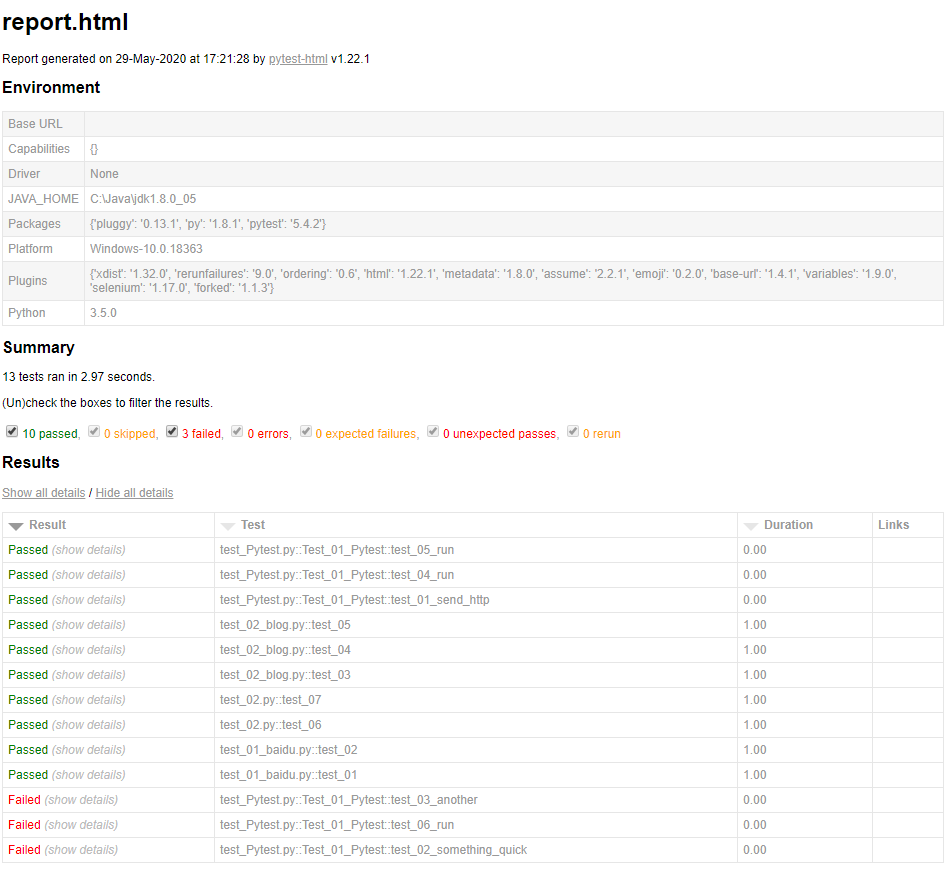
pytest-HTML是一个插件,pytest用于生成测试结果的HTML报告。兼容Python 2.7,3.6
pip install pytest-html
生成报告命令
pytest --html=report.html --self-contained-html # 把css样式合并到html里
import pytest

if __name__ == '__main__':
    pytest.main(['-v','-n','5','--html=./report/report.html','--self-contained-html'])

 浙公网安备 33010602011771号