

UpdatePanel嵌套
UpdatePanel主要是防止页面的刷新,但是项目中有时候可能要根据不同的事件更新不同的地方。
这时候UpdatePanel嵌套可以很好的解决这个问题。
在事例中主要是用时间来记录每个UpdatePanel的刷新。
页面预览:
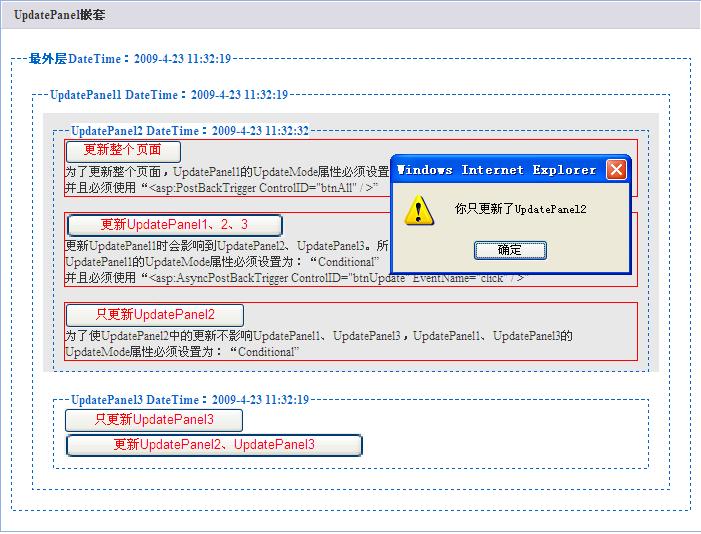
前台代码:

 Code
Code1
<% @ Page Language="C#" AutoEventWireup="true" CodeFile="UpdatePanelTest.aspx.cs" Inherits="UpdatePanelTest" %>
2

3
<!DOCTYPE html PUBLIC "-//W3C//DTD XHTML 1.0 Transitional//EN" "http://www.w3.org/TR/xhtml1/DTD/xhtml1-transitional.dtd">4
5
<html xmlns="http://www.w3.org/1999/xhtml">6
<head runat="server">7
<title>UpdatePanel嵌套</title>8
<style type="text/css">9
 body
body10

 {}{
{}{11
Font-size: 9pt;12
Color: #333333;13
Scrollbar-face-color: #EEEEEE;14
Scrollbar-shadow-color: #CCCCCC;15
Scrollbar-3dlight-color: #CCCCCC;16
Scrollbar-darkshadow-color: #CCCCCC;17
Scrollbar-arrow-color: #999999;18
 }
} 19
h120
{}{21
margin: 0; 22
padding: 0; 23
font-size: 1em;24
}25
.styleDiv26
{}{27
width: 700px;28
height: 100%; 29
border:1px solid #92B0DD;30
background-color: #FFFFFf;31
margin: 1em 10em 1em !important; 32
padding: 0px; 33
margin-bottom: 10px;34
padding-bottom:10px;35
}36
.styleDiv h137
{}{38
39
line-height: 26px; border: 1px solid; 40
background: #DDDCE4; 41
background-repeat: repeat-x; 42
background-position: 0 0; 43
border-color: #FBFBF9 #FBFBF9 #CCCCD4 #FBFBF9; 44
padding-left: 1em; 45
margin-bottom: 1em; 46
}47
48
fieldset {}{49
padding:10px;50
margin:10px;51
color:#333; 52
border:#06c dashed 1px;53
} 54
legend {}{55
color:#06c;56
font-weight:800; 57
background:#fff;58
} 59
 </style>
60
</head>61
<body>62
<form id="form1" runat="server">63
<asp:ScriptManager ID="ScriptManager1" runat="server">64
</asp:ScriptManager>65
<div>66
<asp:Label ID="Label1" runat="server" Height="300px" Text="Label的作用是为了显示局部更新时,并没有影响到定位"></asp:Label>67
<div class="styleDiv">68
<h1>UpdatePanel嵌套</h1>69
<div>70
<fieldset>71
<legend>最外层DateTime:<%= DateTime.Now %></legend>72
<div>73
<asp:UpdatePanel ID="UpdatePanel1" runat="server" UpdateMode="Conditional">74
<ContentTemplate>75
<fieldset>76
<legend>UpdatePanel1 DateTime:<%= DateTime.Now %></legend>77
<div style="background-color:#E8E8E8">78
<asp:UpdatePanel ID="UpdatePanel2" runat="server" UpdateMode="Conditional">79
<ContentTemplate>80
<fieldset>81
<legend>UpdatePanel2 DateTime:<%= DateTime.Now %></legend>82
<div>83
<div style="border:1px red solid;">84
<asp:Button ID="btnAll" runat="server" Text="更新整个页面" onclick="btnAll_Click" />85
<div>为了更新整个页面,UpdatePanel1的UpdateMode属性必须设置为:“Conditional”<br />86
并且必须使用“<asp:PostBackTrigger ControlID="btnAll" / >”87
</div>88
</div><br />89
<div style="border:1px red solid;">90
<asp:Button ID="btnUpdate" runat="server" Text="更新UpdatePanel1、2、3" onclick="btnUpdate_Click" /> 91
<div>更新UpdatePanel1时会影响到UpdatePanel2、UpdatePanel3。所以UpdatePanel1更新时,它里面的都会更新。<br />92
UpdatePanel1的UpdateMode属性必须设置为:“Conditional”<br />93
并且必须使用“<asp:AsyncPostBackTrigger ControlID="btnUpdate" EventName="click" / >”94
</div>95
</div>96
<br />97
<div style="border:1px red solid;">98
<asp:Button ID="btnSubmit" runat="server" Text="只更新UpdatePanel2" onclick="btnSubmit_Click" /> 99
<div>为了使UpdatePanel2中的更新不影响UpdatePanel1、UpdatePanel3,UpdatePanel1、UpdatePanel3的UpdateMode属性必须设置为:“Conditional”</div>100
</div>101
</div>102
</fieldset> 103
</ContentTemplate>104
<Triggers>105
<asp:AsyncPostBackTrigger ControlID="btnUp" EventName="click" />106
</Triggers> 107
</asp:UpdatePanel>108
</div>109
<div>110
<asp:UpdatePanel ID="UpdatePanel3" runat="server" UpdateMode="Conditional">111
<ContentTemplate>112
<fieldset>113
<legend>UpdatePanel3 DateTime:<%= DateTime.Now %></legend>114
<div>115
<asp:Button ID="btnUpdate3" runat="server" Text="只更新UpdatePanel3" /> 116
</div>117
<div>118
<asp:Button ID="btnUp" runat="server" Text="更新UpdatePanel2、UpdatePanel3" />119
</div>120
</fieldset>121
</ContentTemplate>122
</asp:UpdatePanel>123
</div> 124
</fieldset> 125
</ContentTemplate> 126
<Triggers>127
<asp:AsyncPostBackTrigger ControlID="btnUpdate" EventName="click" />128
<asp:PostBackTrigger ControlID="btnAll" />129
</Triggers> 130
</asp:UpdatePanel> 131
</div> 132
</fieldset> 133
</div>134
</div>135
</div>136
</form>137
</body>138
</html>139
后台CS:
Code1
using System;2
using System.Collections;3
using System.Configuration;4
using System.Data;5
using System.Linq;6
using System.Web;7
using System.Web.Security;8
using System.Web.UI;9
using System.Web.UI.HtmlControls;10
using System.Web.UI.WebControls;11
using System.Web.UI.WebControls.WebParts;12
using System.Xml.Linq;13
14
public partial class UpdatePanelTest : System.Web.UI.Page15
{16
protected void Page_Load(object sender, EventArgs e)17
{18
19
}20
protected void btnSubmit_Click(object sender, EventArgs e)21
{22
ScriptManager.RegisterClientScriptBlock(Page, this.GetType(), "alert", " alert('你只更新了UpdatePanel2');", true);23
}24
protected void btnUpdate_Click(object sender, EventArgs e)25
{26
ScriptManager.RegisterClientScriptBlock(Page, this.GetType(), "alert", " alert('你更新了UpdatePanel1、UpdatePanel2、UpdatePanel3');", true);27
}28
protected void btnAll_Click(object sender, EventArgs e)29
{30
ScriptManager.RegisterClientScriptBlock(Page, this.GetType(), "alert", " alert('你更新了整个页面');", true);31
}32
}33

 浙公网安备 33010602011771号